
How to Sidechain in FL Studio: 3 Methods Compared
A clear guide to sidechain methods in FL Studio: routing, Fruity Limiter, volume automation, and controller-style modulation.
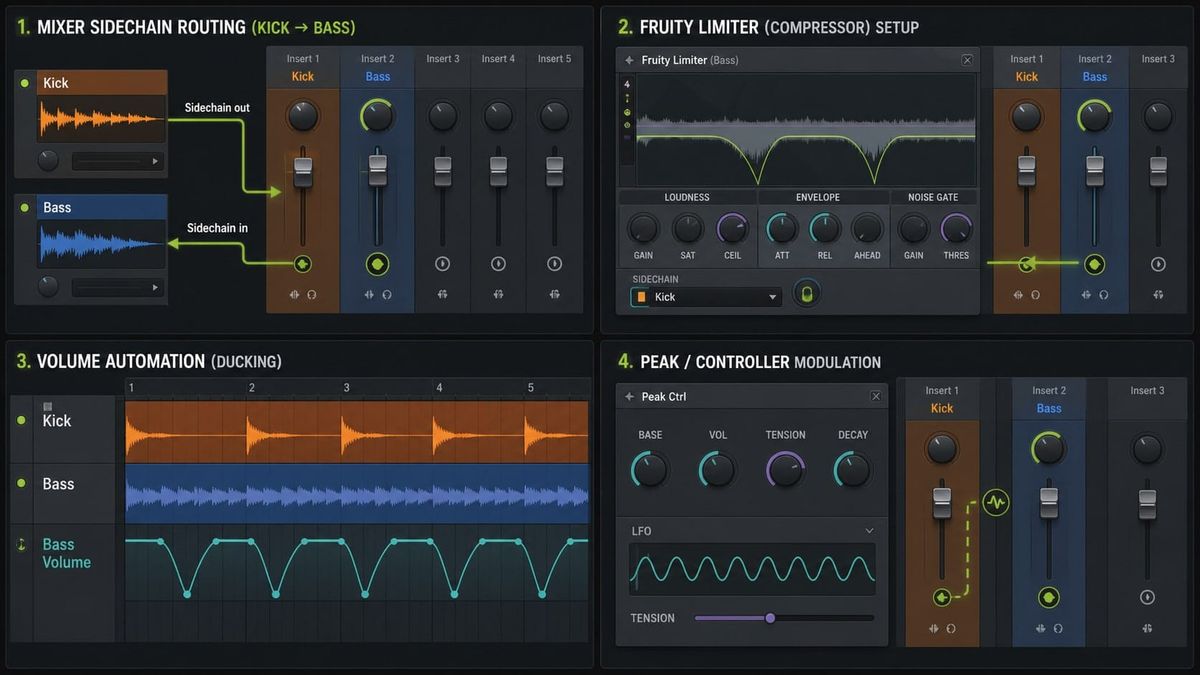
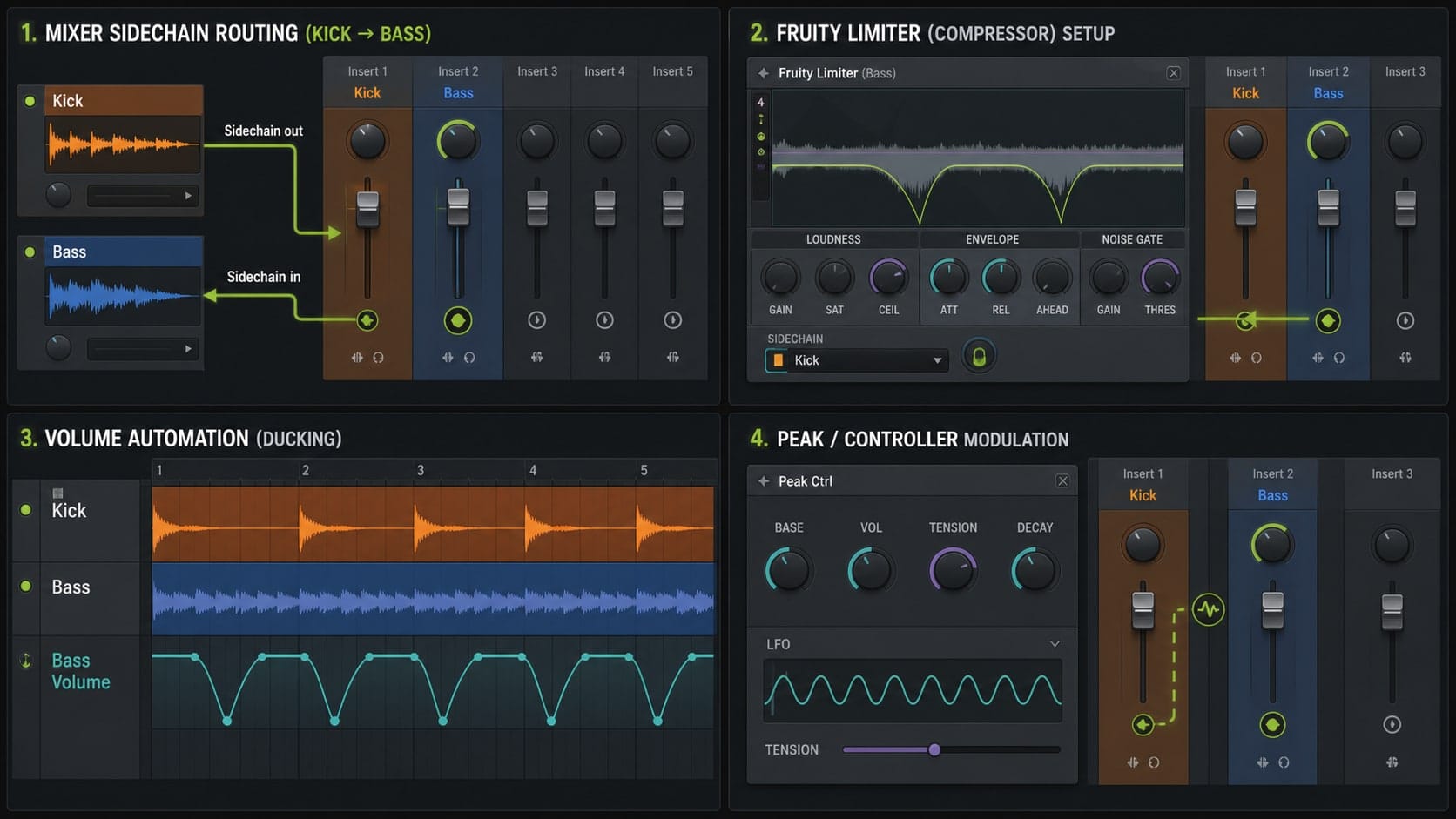
You drop Fruity Limiter on the bass, switch to COMP, pull the threshold down to -30 dB, hit play, and... nothing moves. The bass keeps droning. The kick keeps hitting. The compressor's gain reduction meter sits flat. You raise the ratio. You drop the threshold further. Still nothing. You start blaming the sample. You google for an hour. The fix is one line: you never told Fruity Limiter what to listen to. Sidechain in FL Studio is a two-step thing — route a source into the plugin, then tell the plugin to use it. Skip either step and you get silence. Here's how the three native methods actually work, and when to reach for each.
Step 0: Route the Kick to the Bass as a Sidechain Source
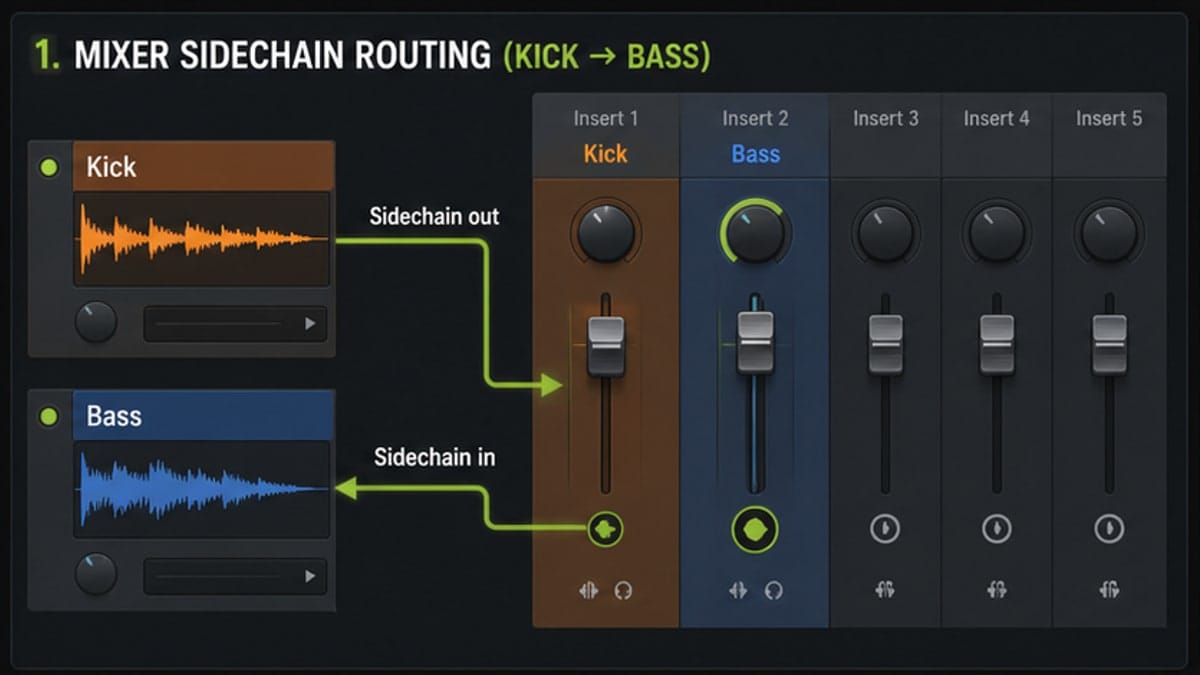
Every sidechain method in FL Studio starts the same way: tell the mixer that one track sends audio to another track as a sidechain. Without this routing, no plugin will hear the kick.
Put your kick on a mixer insert — say insert 1. Put your bass on insert 3. Click insert 1 to select it, then look at the mixer routing arrows along the bottom of the master row. Right-click the arrow that points from insert 1 to insert 3 and choose Mixer → Right-click routing arrow → Sidechain to this track only. The arrow now shows a small numbered tag — that number is the sidechain bus index. If this is your first sidechain on insert 3, it will be 1. The second source you route in becomes 2, and so on.
One thing that catches people: "Sidechain to this track only" means the kick audio is sent to insert 3 as a sidechain feed and is NOT mixed into insert 3's audio output. If you just want a normal send plus sidechain, use "Sidechain to this track" instead. Most of the time you want the "only" version — the kick already plays through master, you just need the bass plugin to hear it.
That's it for the routing. The kick is now available to any plugin on insert 3 that has a sidechain input. Now you pick a method.
Method 1: Fruity Limiter (the Daily Driver)
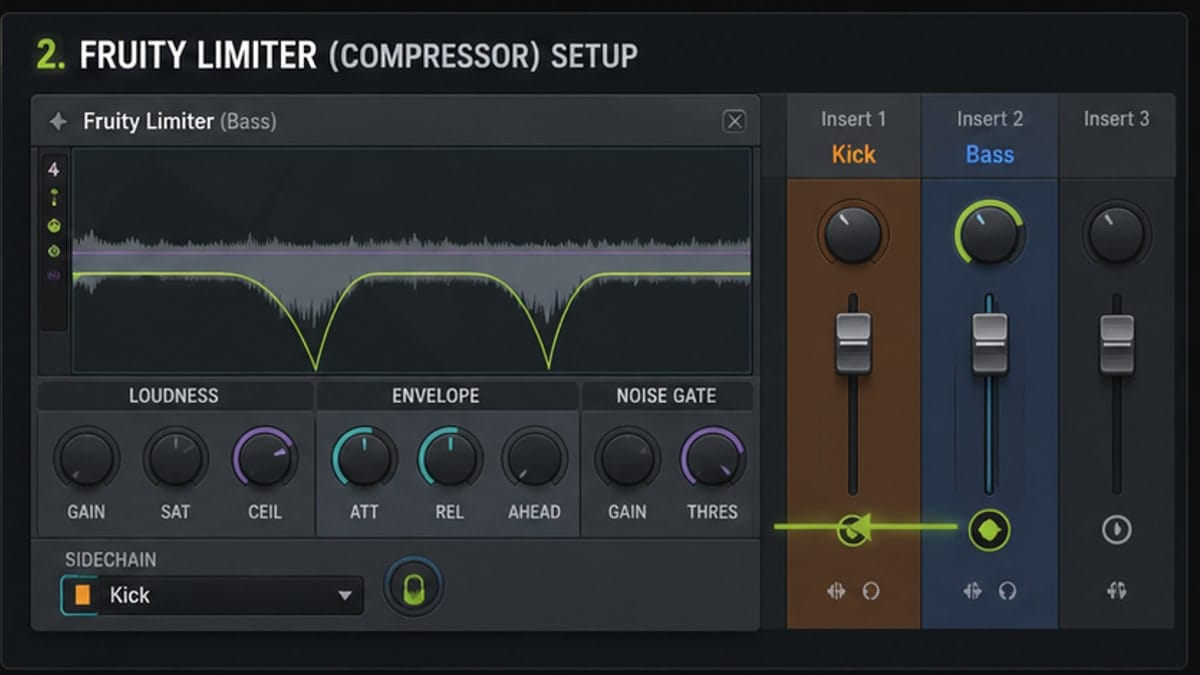
Fruity Limiter is the one everyone uses, and it ships with every FL Studio edition including the free trial. It does five things in one plugin — limit, compress, gate, expand, and saturate — but for sidechain you only care about the COMP tab.
Drop Fruity Limiter on insert 3 (the bass). Click the COMP tab at the top. By default the compressor is bypassed even when the limiter section is doing work — make sure COMP shows enabled (the section lights up, not greyed out). Now the key step: right-click the SIDECHAIN knob in the COMP section and pick Fruity Limiter → COMP tab → Right-click "Sidechain" → Sidechain source: 1, 2, 3.... Pick 1 (the bus index you saw on the routing arrow). The compressor is now listening to the kick instead of the bass itself.
Starter settings that get you 90% of the way there for a 4/4 house or techno track at 124 BPM:
- Threshold: -18 dB — low enough that the kick triggers reduction every hit.
- Ratio: 4:1 — firm but musical. Push to 8:1 for harder pumping, 2:1 for subtle glue.
- Attack: 1 ms — fast enough to catch the kick transient. Going slower defeats the point.
- Release: 80–150 ms — tempo dependent. At 124 BPM, a 16th note is about 121 ms; aim near that so the bass recovers in time for the next hit but isn't fully back before the kick lands.
- Knee: soft — smoother transition into gain reduction.
Watch the gain reduction meter. You want to see it slam down 4–8 dB on each kick and then climb back. If the meter never moves, the sidechain source isn't set. If it moves but the bass doesn't audibly duck, the threshold is too high or the bass is too quiet relative to threshold.
If you're at 174 BPM (DnB), your release wants to be ~95 ms — short enough to recover, long enough to breathe. At 140 BPM (trap), try ~120 ms. The math: 60000 / BPM / 4 = release in ms for a 16th. Use that as a starting point, then trust your ears.
Method 2: Maximus (Surgical, Multi-Band Pumping)
Maximus is the multiband compressor / limiter that ships with FL Studio Producer edition and above (not Fruity edition). It splits incoming audio into LOW, MID, and HIGH bands, and each band has its own compressor with its own sidechain input. That's the trick: you can sidechain only the LOW band, ducking the sub when the kick hits, while leaving the mids and highs untouched. The high harmonics keep ringing, you keep all your top-end energy and movement, and only the part of the bass that's actually fighting the kick gets out of the way.
Drop Maximus on the bass channel. Click the LOW tab. Right-click the SIDECHAIN input selector in the band's lower-right and pick the kick's sidechain index — same routing as before, you don't need to set it up again, the mixer routing is plugin-agnostic.
Starter settings on the LOW band:
- Threshold: -20 dB.
- Ratio: Inf:1 — full duck on the sub. Sounds extreme, sounds great on a sub bass that doesn't need to be heard during the kick.
- Attack: 1 ms.
- Release: same tempo math as Fruity Limiter — 100–150 ms range for 124 BPM.
Leave MID and HIGH bands' sidechain inputs at NONE. They pass through unprocessed. Set the band crossovers in the spectrum view at the top — usually LOW/MID around 150 Hz works for splitting sub from low-mids on a bass. Drag the split points with the mouse.
Why pick Maximus over Fruity Limiter? When your bass is a layered patch with sub plus mid-range plus growl harmonics, full-band sidechain compression will dull the top end every time the kick hits. You lose the bite. Maximus lets the bite survive untouched while the sub gets out of the way. It's also sample-accurate, so the timing is tighter than full-band methods. Cost: more CPU, and the multiband split adds latency in some configurations. Worth it on a feature bass; overkill on a background pad.
Method 3: Peak + Formula Controller (the Real EDM Pump)
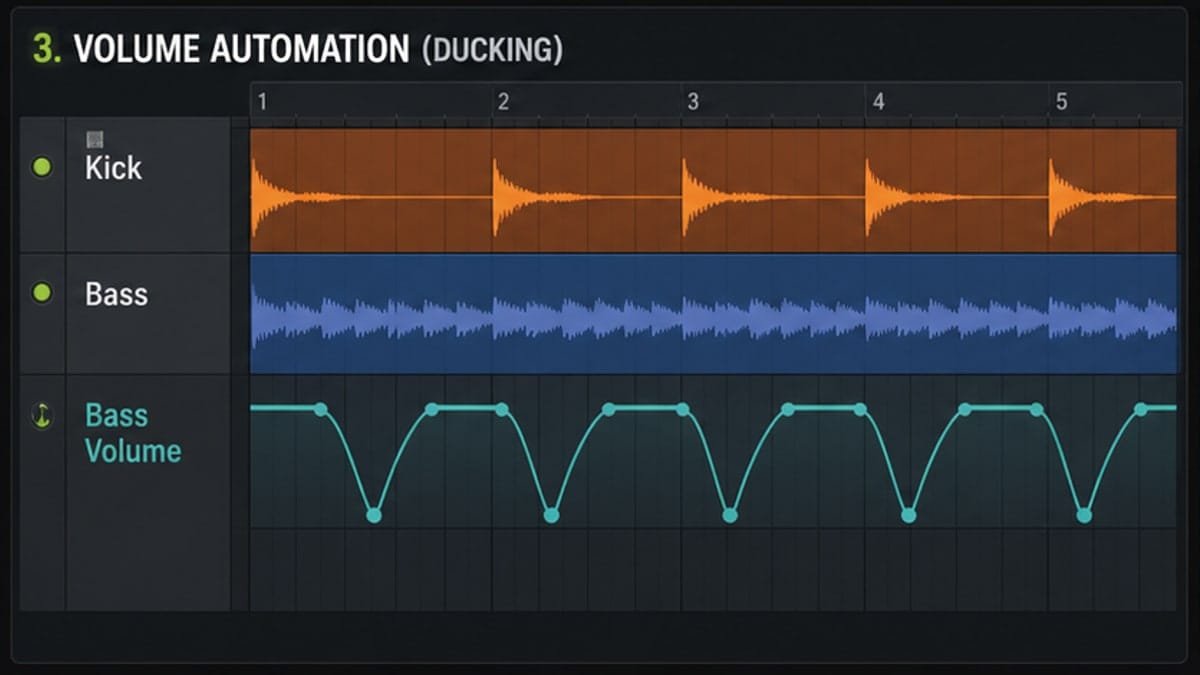
This is the method behind the textbook EDM pump — the one where the bass volume visibly drops on the kick and rises back in a perfect, identical curve every single bar. It's not compression. It's volume automation driven by the kick's amplitude envelope. No compressor artifacts, no attack/release smear from gain reduction circuits, no dependence on threshold and ratio. Just: kick goes up, bass volume goes down, in lock-step.
Peak Controller and Formula Controller both ship with every FL Studio edition, including Fruity. Here's the chain.
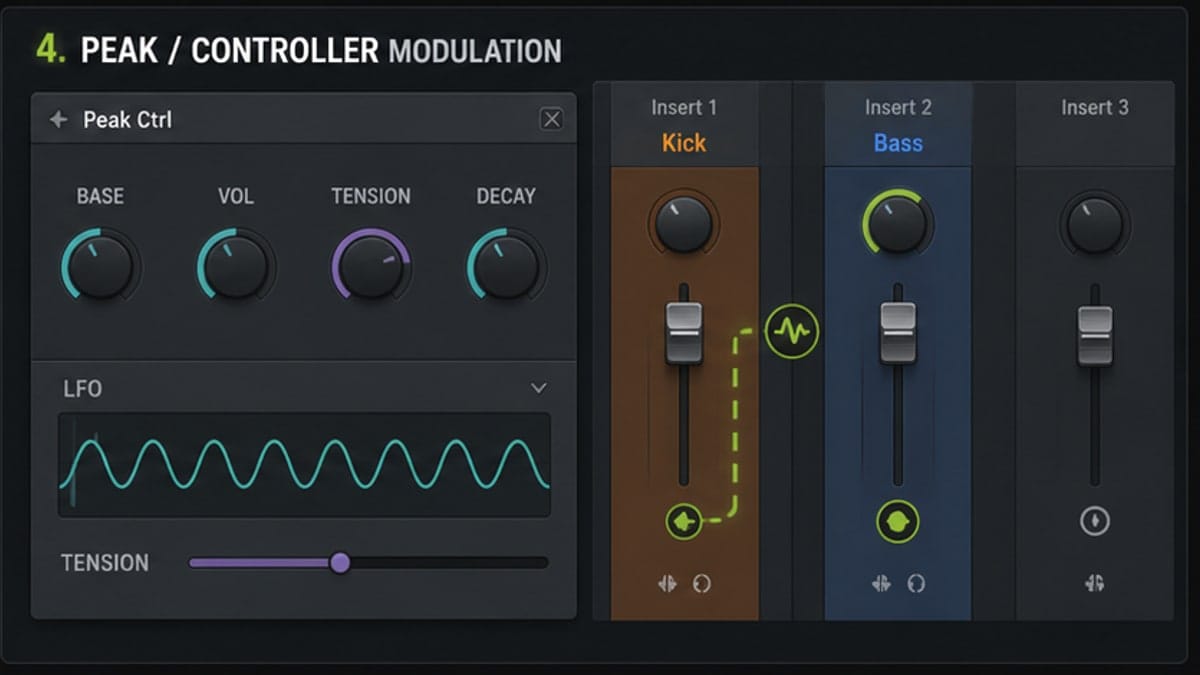
Add a Peak Controller to the kick mixer channel (Effects slot on insert 1). Open it. The settings that matter:
- Base: 0% — minimum output value when there's no kick signal.
- Peak: 100% — maximum output value at full kick amplitude.
- Smoothing: ~3 ms — tiny smoothing so the controller signal doesn't jitter on transient noise.
- Tension: leave at 0 to start, then bend the response curve later if you want a snappier or smoother shape.
Now link the Peak Controller's output to the bass channel's volume. Right-click the bass mixer channel's volume fader, choose Right-click any knob → Link to controller → Peak/Formula Controller, and in the dialog pick the Peak Controller. Set the mapping range so that controller 0% = full bass volume and controller 100% = silent (or however far down you want it ducked). The mapping dropdown has "inverted" — that's what flips it so the kick's energy reduces volume instead of increasing it.
For more control, insert a Formula Controller between the Peak Controller and the volume fader. The Formula Controller lets you write a math expression — for example 1 - input(0) * 0.7 limits the duck depth to 70%, or apply curves to the response. Most users won't need this; the basic Peak Controller → inverted volume link covers 95% of cases.
Why pick this over the two compressor methods? Because it's not compressing. There's no gain reduction circuit doing work on the bass signal — the bass is just being turned down and up. No transient smear, no harmonic distortion, no character imprint from the compressor. The pump is perfectly periodic and perfectly clean. The cost: it sounds mechanical. For a four-on-the-floor club track that's exactly what you want. For anything with a swung or shuffled kick pattern, the rigid lock-step starts to feel less musical than a compressor's natural response.
When to Use Each Method
The three methods overlap a lot, but each has a clear lane.
| Method | CPU cost | Character | Multi-band | Availability | Best for |
|---|---|---|---|---|---|
| Fruity Limiter | Low | Musical, slight compressor color | No | All editions incl. free trial | Daily-driver sidechain on bass, pads, leads |
| Maximus | Medium | Surgical, sample-accurate | Yes (LOW/MID/HIGH) | Producer and up | Layered bass where only sub should duck |
| Peak + Formula Controller | Very low | Clean, mechanical, no compression | No (but per-knob) | All editions | EDM pump on synths, basses, full buses |
A working rule of thumb: start with Fruity Limiter. It's the fastest to set up and sounds good on almost everything. If your bass has top-end content you don't want to lose, switch to Maximus on the LOW band only. If you want that obvious pumping movement on a pad, lead, or background bus, skip compression and use Peak + Formula Controller. You can also stack — use Fruity Limiter for the actual kick/bass duck, then add a Peak Controller link on a reverb send to pump the ambience.
The common gotchas, in order of how often they trip people up:
- Forgot to set the sidechain source on the plugin. Mixer routing alone does nothing — the plugin needs to be told to listen. Right-click SIDECHAIN, pick the index.
- Used "Sidechain to this track" when you meant "only". The non-"only" version mixes the kick into the bass output. You'll hear the kick double up.
- Attack too slow. A 10 ms attack on a 0.5 ms kick transient lets the whole transient through before any reduction. Set attack to 1 ms unless you want some kick bleed.
- Release too short. Bass recovers fully before the next kick hits → no audible pump. Match release to roughly a 16th or 8th note depending on tempo.
- Threshold too high. If gain reduction meter never moves, threshold is above the loudest kick peak coming through the sidechain bus. Drop it 6 dB at a time until you see movement.
Sources and reference pages
Image-Line Mixer routing manual, Image-Line Fruity Limiter manual, Image-Line Fruity Peak Controller manual.
FAQ
What is sidechain in FL Studio?
Sidechain is a control signal or automation movement that makes one sound affect another, often ducking bass or pads when the kick hits.
What is the easiest sidechain method in FL Studio?
For beginners, volume automation is easiest to see. Mixer routing plus Fruity Limiter is the more classic compression-based method.
Does sidechain have to use Fruity Limiter?
No. You can sidechain with Fruity Limiter, automation clips, controller modulation, or third-party plugins.
Why is my sidechain not working?
Check that the source is routed as a sidechain signal to the target, not only sent as audible audio. Then check the plugin input or automation target.