FL Studio
An FL Studio license is a personal license registered to your Image-Line account. You can install and unlock it on Windows and Mac computers you use yourself, including a work machine, provided you are the only user and others cannot use it while you are absent. You can’t share, gift, sell or transfer it. Image-Line’s refund policy excludes licenses once activated on any computer.
I’d run the free FL Studio trial for as long as you need before paying, because Image-Line restricts refunds after activation and downloading a registration file can also affect withdrawal rights. The trial doesn’t expire. After you buy, everything runs through that one account: new computers, upgrades, ID checks and lost emails.
What you own when you buy FL Studio
Image-Line’s Terms of Use grant a personal, limited, non-exclusive, non-transferable, non-rentable, worldwide and revocable license, to a single person who uses the software personally on one or more computers or workstations. The same document says it plainly: the software is licensed, not sold. You buy the right to use FL Studio, not a copy you can pass on later.
That right covers three things:
- Your edition, updated for free. Under Lifetime Free Updates, your FL Studio edition and the plugins included at the time of purchase are updated free for the life of the product. New instruments are a different story: Image-Line sometimes develops new synthesizers, effects or tools and adds them to specific editions only.
- Only your edition’s features. Your key unlocks the features and plugins of the edition you bought (Fruity, Producer, Signature Bundle or All Plugins Edition) plus any plugins you bought separately.
- FL Cloud on the same terms. Any FL Cloud access or subscription you add follows the same single-user rule as FL Studio itself.
Two ways of buying change the picture. With Rent-to-Own, you hold a temporary, month-to-month license while the payment plan runs, and the Terms of Use say it may be suspended or terminated if the plan is cancelled, paused or otherwise interrupted. After 12 payments, the monthly license is automatically converted to a perpetual license with Lifetime Free Updates. Some payment plans might only be available in certain regions.
Educational licenses are narrower still. They are only available as the Signature Bundle Edition, and commercial use is not permitted. The discounted single-user academic license is only sold through third-party resellers and distributors, while schools buy multi-seat licenses in batches of 5 seats for school-owned computers, not student-owned ones. If a student price tempts you, the FL Studio discounts guide covers the reseller check, and the FL Studio editions comparison shows what each tier includes.
How many computers can one FL Studio license use?
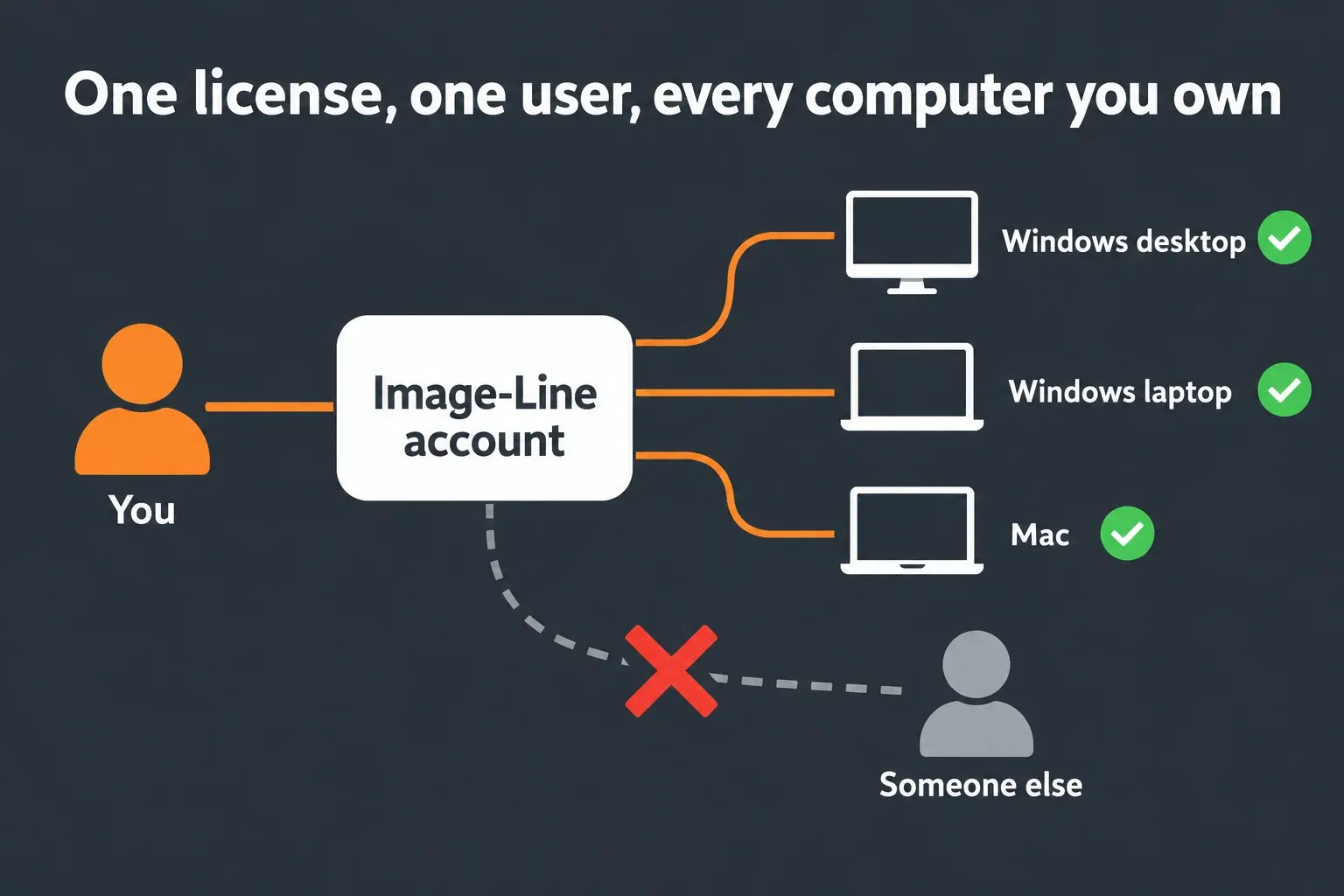
You can use one license across multiple computers and operating systems. Image-Line’s answer on multiple computers covers Windows and macOS; its personal-use conditions include computers at home and work. You must be the only user, and the software must not be available for others to use while you are absent. Install FL Studio for your personal account rather than ‘All users’ on a shared computer.
Taking turns doesn’t count as one user. The Terms of Use ban any use of a personal license by multiple people, even non-simultaneous use, and add that this is not a concurrent use license. A sibling who opens FL Studio on the family PC while you’re at school needs a license of their own, or the trial. Companies, organizations and schools need a multiple license version.
Moving FL Studio to a new computer
There is nothing to transfer, because the license lives in your account. Install FL Studio on the new machine and unlock it with your account, as shown further down. Before you sell or give away the old computer, take the license off it:
- In FL Studio, open Help > Unlock FL Studio.
- Choose Log out... in the panel and click Yes to confirm. This removes your license and signs that computer out of your Image-Line account, and FL Studio returns to trial mode.
- If FL Studio won’t start, use the manual license removal methods. Back up your projects, presets and settings before manual cleanup, especially before handing the computer to someone else. On Windows, Image-Line provides a REMOVE_FLStudio_License.reg file that clears the registration keys. On macOS, follow the support page’s Library paths: copy the two Image-Line folders to a backup you will keep, then remove them from Library/Application Support and your user Library/Preferences. Do not delete Documents/Image-Line, which is the usual user-data location. Empty the Trash only after checking the backup.
If you no longer control the device, such as a stolen laptop or a computer at a job you left, create a support ticket and Image-Line’s staff will disable the license there. I’d log out every time FL Studio has been unlocked on a computer that isn’t yours, like a studio machine you borrowed for one session.
Sharing, gifting and reselling a license
None of them are allowed. Image-Line’s answer on license sharing says FL Studio is a single-user license for you, and only you, to use on any computer you own, and that when Image-Line detects a license used by more than one person, it will revoke it and deactivate the account. The Terms of Use go further: you may not resell, lend, gift, transfer, or otherwise provide any Image-Line license, registration key, unlock key, unlock code or account.
Image-Line ties the rule to its no-transfer policy and Lifetime Free Updates. You get the free updates; in return, you don’t sell or share your license or access to your account. The risk lands on the owner. If your registration key turns up on any website, the Terms of Use say it will be blocked and rendered unusable without any reimbursement. FL Cloud is no different: an FL Cloud account can’t be transferred, sold or shared either.
Collaboration doesn’t need a shared license. Image-Line’s approved collaboration workflow keeps the other person on the trial:
- The collaborator starts a project in the FL Studio trial, saves it as .flp or .zip and sends it to you.
- You open it, work on it if you like, save it again and send it back.
- The collaborator opens that saved copy and keeps working and saving until they close the project for that session, then sends it back to you.
This works because the trial can open a project last saved by a licensed user, and you can reopen the collaborator’s trial projects as long as they only used products you own. Teachers can run the same loop with students. The guide to what the FL Studio trial can do covers the reopening rules in detail.
Cheap keys and second-hand licenses
I wouldn’t buy one. A second-hand key is either a license someone is transferring, which the Terms of Use forbid, or a license that was never theirs to sell. Either way, the license that a stranger hands you can be revoked when Image-Line sees more than one person using it, and a leaked key is blocked without reimbursement. Image-Line says it has seen cases of a license ending up on the internet within weeks, with tens of thousands of attempted installations after it shut the account down.
Legitimate retail codes do exist. A boxed copy or an authorized electronic retailer gives you a 20-digit code in the format XX0XX-000XX-X000X-000X0. That code doesn’t unlock FL Studio by itself. It adds the products you bought to your Image-Line account, and you then unlock FL Studio from that account. If a store’s price looks too good, make sure it is an authorized Image-Line reseller before paying; the discounts guide shows how to trace a seller’s authorization through Image-Line, and the DAW cost comparison shows what a legitimate license costs over the years.
Can you get a refund on FL Studio?
Contact Image-Line before activating the software if you want to request a refund. Its refund answer limits refunds to software that has not been activated on any computer or device. The refund policy also says that downloading the registration file gives up the right of withdrawal under Article 16m of the EU Consumer Rights Directive. Don’t assume that an unused license has an unconditional refund window.
| Situation | What happens |
|---|---|
| Bought, not yet unlocked on any computer or device | Ask Image-Line support to review the refund request before activation; downloading the registration file can also affect withdrawal rights |
| Unlocked on any computer, even once | Image-Line’s policy excludes a refund; the license stays registered to you |
| Wrong edition, already unlocked | Image-Line’s activated-license policy applies; consider an edition upgrade instead |
| FL Cloud monthly payment | A refund is considered if you ask within 5 days of the payment |
| FL Cloud yearly payment | A refund is considered if you ask within 14 days of the payment |
| FL Cloud cancelled | Future payments stop; the service doesn’t end at once and no refund is triggered |
When an FL Cloud subscription ends, you revert to the Free Tier plugins. Previously subscribed plugins can still be unlocked a limited number of times to rescue projects, so finish or render anything that depends on them first.
If you bought Fruity Edition and then found you need more, upgrade to a bigger edition rather than buying FL Studio twice; the editions guide shows what each tier adds. My advice is to treat the trial as your real refund window: Image-Line provides non-expiring trial versions precisely so you can test before you buy.
How to unlock FL Studio with your license
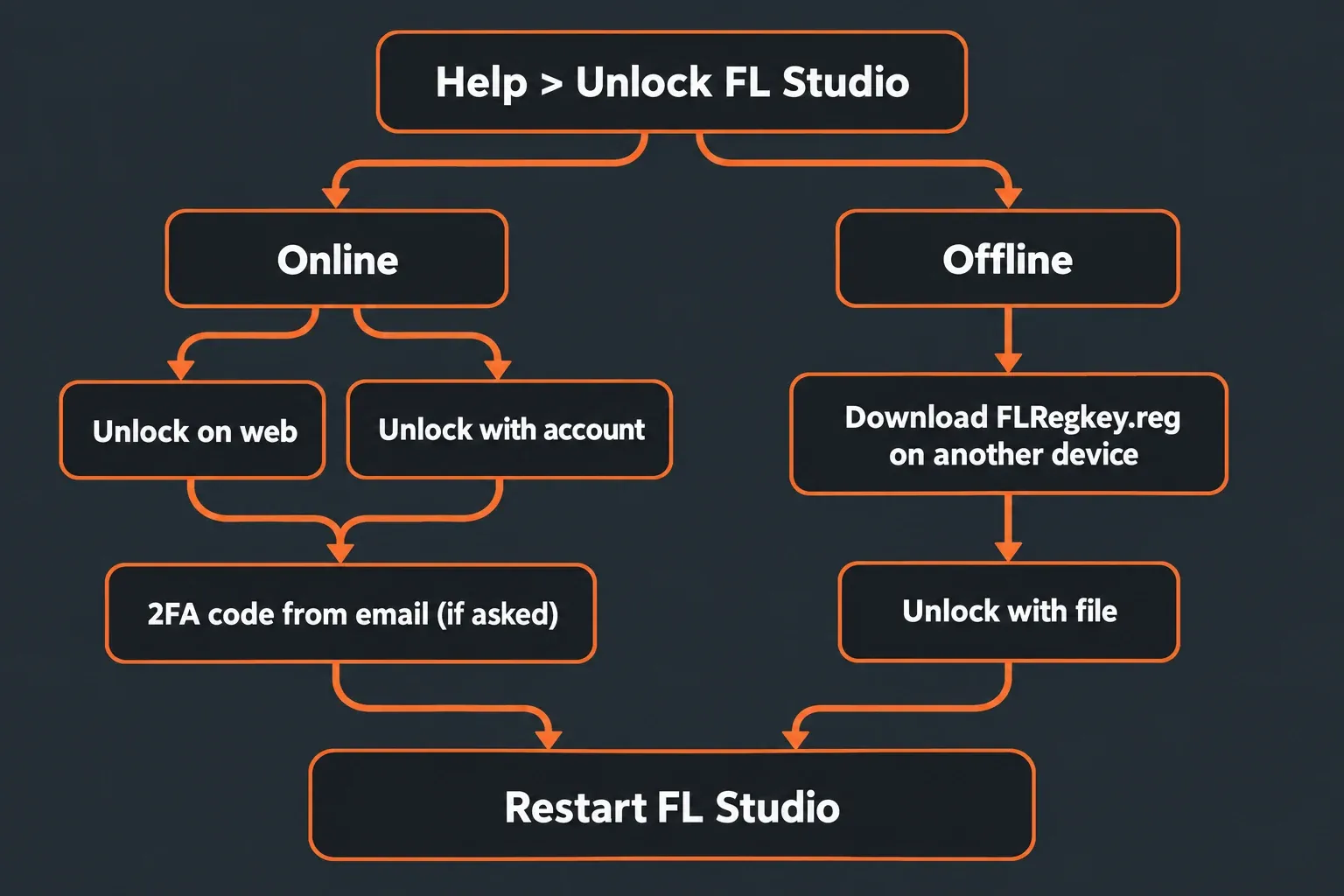
You unlock FL Studio inside the program by signing in to your Image-Line account. Open Help > Unlock FL Studio and pick one of the routes in the Help menu section of the manual:
- Unlock on web. Make sure Agree to terms is selected and click Sign in and unlock. Your default browser opens for the sign-in, then sends you back to FL Studio.
- Unlock with account. Enter your Image-Line account login inside FL Studio, agree to the terms and click the Unlock button. This needs internet access and also unlocks any other plugins you own.
- Unlock with file. For an offline computer running FL Studio 20.9 or later, open Help > Unlock FL Studio > Unlock with file and choose Save validation file on that computer first. On a connected device, sign in to your Image-Line account, open Unlock products and choose Download Offline Unlock File for FL Studio 20.9 or Later. Upload the validation file and download the generated FLRegkey.Reg file. Copy it back to the offline computer, choose Unlock with file > Load license file and restart FL Studio. The key works only on the computer that generated the validation file; Image-Line lists a separate route for versions 9–20.8 in its offline-unlock instructions.
On a new installation or an FL Studio update you may be asked for a 2FA code sent to your email. FL Studio must restart to apply your license. Once it is unlocked, the Unlock button shows Renew instead; Image-Line uses that to signal you should renew the license after updating FL Studio, buying a higher edition or adding products.
I’d use Unlock on web first on any connected computer, since your password goes into Image-Line’s website rather than into FL Studio, and keep Unlock with file for the offline machine. For the full installation and activation walkthrough and the usual errors, follow the FL Studio installation guide; the installer itself is on the FL Studio download page.
Age and ID verification
The Terms of Use require you to be 16 years or older to accept them. If you haven’t reached the legal age of majority, a parent or legal guardian accepts the terms on your behalf, and the terms grant no rights until that happens. Image-Line’s educational license page also names a parent purchasing on behalf of a child as an eligible buyer of the academic license.
ID checks come up in specific cases. Image-Line reserves the right to require valid government-issued identification to verify account ownership, in cases of account recovery, license ratification or suspected unauthorized access, and it will not grant access to any account unless the requester can be positively identified as the rightful owner. The refund policy also asks you to be sure your personal identification details are accurate. Register under your real name and keep the account details current from day one. I’d treat that as non-negotiable, because an ownership check leans on your ID and order details.
Email verification is the other check, and it can stall unlocking. One user on the Image-Line forum reported that without the verification email, even the website’s manual unlocking method returned restricted access. If your codes don’t arrive, Image-Line’s 2FA email answer suggests these steps:
- Whitelist emails from image-line.com.
- In Gmail, check the Promotions folder as well as the inbox.
- On @shaw.ca and other less common email providers, 2FA emails may get blocked. Change your default email address in the account and try the verification again.
Lost access, a new email or deleting the account
If you can still sign in, changing the account email is self-service. On your Image-Line Account page, go to the Personal data tab and enter the new address under Email. You’ll receive a confirmation email at the new address, and if that address already belongs to another Image-Line account, you’ll be told.
If you’ve lost the old mailbox, use Image-Line’s lost-access form and select Lost access to my Image-Line account. The form doesn’t require access to your lost email. Image-Line asks for as much of the following as you can provide:
- your full name and a photo of your ID, such as a driver’s license, passport or student card;
- the order ID or a copy of the order email, and the last 4 digits of the card used for the purchase;
- your full street address and the date of purchase, or an approximate date;
- the first FL Studio edition you bought, and the 20-digit product redemption code for box and third-party retailer purchases.
Don’t delete the account to start over. Deleting an Image-Line account is permanent: all licenses and registration codes on it are deactivated and become unusable, your Lifetime Free Updates end, and deletion doesn’t let you resell or transfer the license either. If you do go ahead, cancel any active subscription first.
Quick answers
Is an FL Studio license lifetime? A fully paid license stays registered to you permanently and comes with Lifetime Free Updates for your edition. A Rent-to-Own license becomes perpetual after the 12th payment.
Can I use one license on Windows and Mac? Yes. Both platforms are covered as long as you are the only user.
Can two people share one license on the same computer? No. Even taking turns breaks the single-user rule.
Do I need the internet to unlock FL Studio? Not on the studio computer. In FL Studio 20.9 or later, save its validation file through Help > Unlock FL Studio > Unlock with file first. Upload that file in your Image-Line account on a connected device, download the generated FLRegkey.Reg and load it on the original computer through Unlock with file > Load license file. Restart FL Studio to finish.
Can I get my money back after unlocking? Image-Line’s policy makes activated licenses non-refundable. Before activation, contact support; do not assume a refund is guaranteed, because downloading the registration file also affects withdrawal rights.
My verdict
The FL Studio license is generous in the one way that matters to a solo producer: personal use across multiple computers and both operating systems, and free updates for your edition. It is strict about everything else, and Image-Line enforces it by revoking licenses and closing accounts. I’d buy it once, from Image-Line or an authorized reseller, in your own name on your own account, and protect that account’s email like the license itself. Log out of borrowed machines, keep collaborators on the trial, and leave second-hand keys alone.