FL Studio
FL Studio is free to try, not free to own. The desktop program is a one-time purchase that starts at $99 and includes Lifetime Free Updates. But Image-Line’s official trial is free, never expires and runs every instrument, effect and feature, with full-quality WAV and MP3 export and no audio watermark. The one limit: a project you save in the trial won’t reopen until you buy an edition.
I’d start every new producer on that trial rather than on a cheaper DAW or a “free full version” from a random download site. It’s the same installer you keep after buying, so every hour you spend learning the Channel Rack and Piano roll carries straight over. The skill to build is finishing and exporting in one sitting, and below I’ll show how, plus the two other free routes worth knowing: FL Studio Web in the browser and the free FL Cloud tier.
What the free trial includes
The official FL Studio download page describes the trial as “the full version of the software” and says the only difference from a purchased license is that it “can’t reopen saved projects.” Image-Line’s support answer on which edition matches the trial adds that it shows every feature and plugin that installs with FL Studio and “is closest to FL Studio All Plugins Edition”, the top tier.
In practice, the trial gives you five things:
- No time limit. Image-Line’s trial FAQ says the trial “is time-unlimited - test it for as long as you like.” Nothing counts down and nothing switches off after a month.
- Full-quality export. The edition feature page in the manual confirms you can render to WAV, MP3, OGG or MIDI before you even save a trial project, and the download page promises no audio watermarks. Our guide to exporting a song covers the settings.
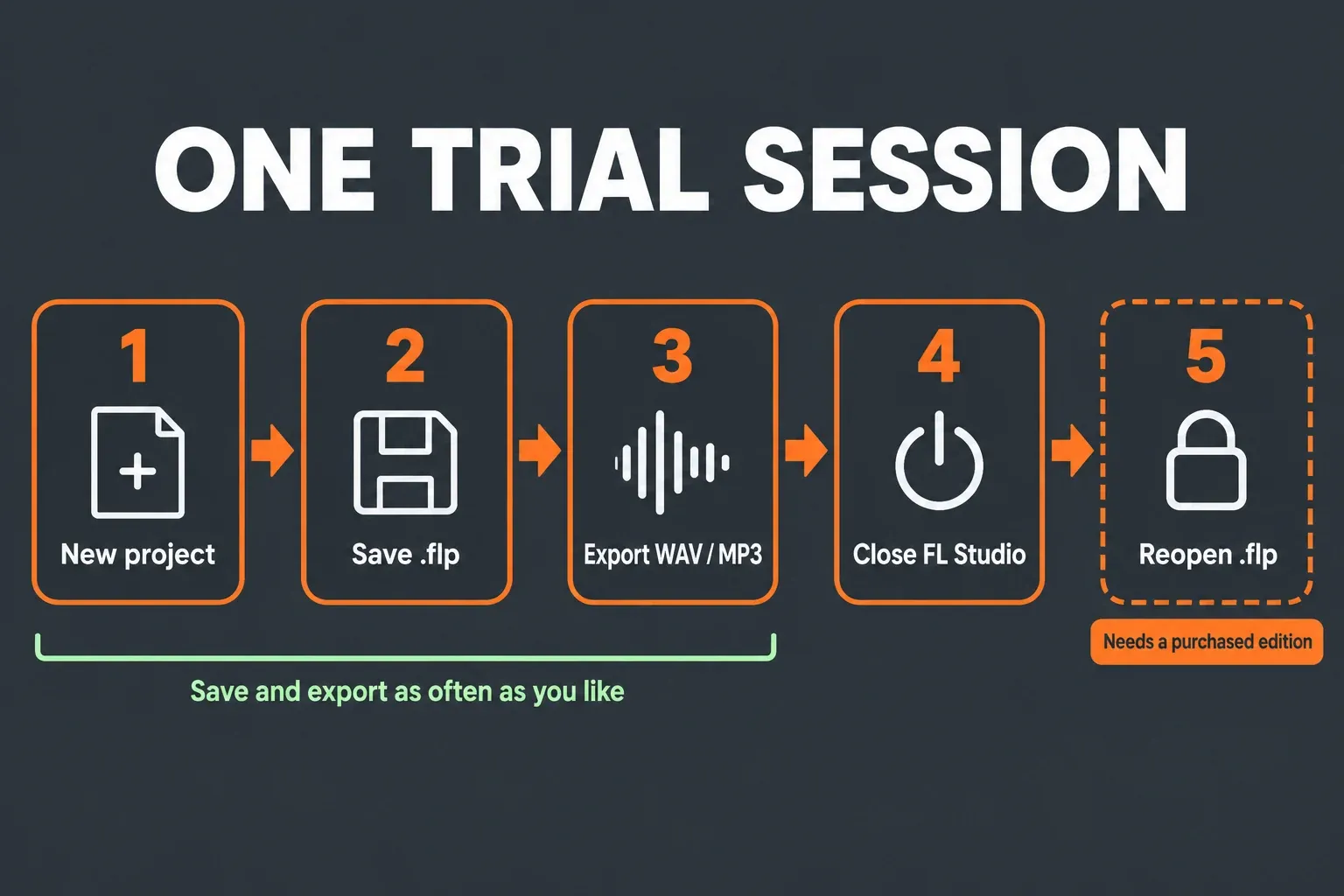
- Saving for later. Ctrl+S (Cmd+S on a Mac) works as usual. The .flp file just stays locked until you own a license, and then it opens normally.
- Any edition on trial. You can pick Fruity, Producer or All Plugins at the Welcome window, so you can work inside the exact tier you plan to buy.
- One installer. Once you buy, you register the same installation “without downloading anything else,” so nothing you set up in the trial is thrown away.
It works the same on both platforms. The download page says the trial “works the same on Mac as on Windows: full features, no time limit,” and one license later covers both. The current Windows build needs Windows 10, 11 or newer and doesn’t run on ARM processors, and the Mac build needs macOS 10.15.7 or newer. Both ask for 4 GB of RAM and 4 GB of free disk space; our FL Studio system requirements breakdown explains what real projects need beyond that floor, and the install walkthrough covers setup on each system.
The one catch: saved projects don’t reopen
Here’s how the limit plays out. You open FL Studio, build a beat, save it and export it. While that project stays open, you can save it as many times as you like. Once you close FL Studio or open a new project, the session is over, and that .flp won’t load again in trial mode. Image-Line’s wording is blunt: “You cannot re-open saved projects until you purchase FL Studio.”
That shapes how you should work on the trial:
- Plan each track for one sitting. A beat, a loop idea or a short song sketch fits. A full mix you’ll revisit over a week doesn’t.
- Save often anyway. Those files become your back catalogue the day you buy, so every idea is worth keeping.
- Export before you close. Render the full mix, plus separate tracks if you may rework the song. Our stem export guide shows how to bounce every Mixer track at once.
- Start the next session from audio. Drag yesterday’s rendered drums or chords into a fresh project and build on top of them.
You may see older advice about a 21-day trial that does reopen projects. Image-Line says it has “occasionally” offered a Time-Limited Trial, “typically 21 days”, that allows saving and loading, but “This is not the standard trial.” If an old time-limited trial gets in the way of the normal one, the same support page tells you to “Remove all licenses and FL Studio settings” and reinstall. Image-Line also states that “You will never be charged or subscribed to anything when a Time Limited FL Studio Trial expires.”
Trial the edition you plan to buy
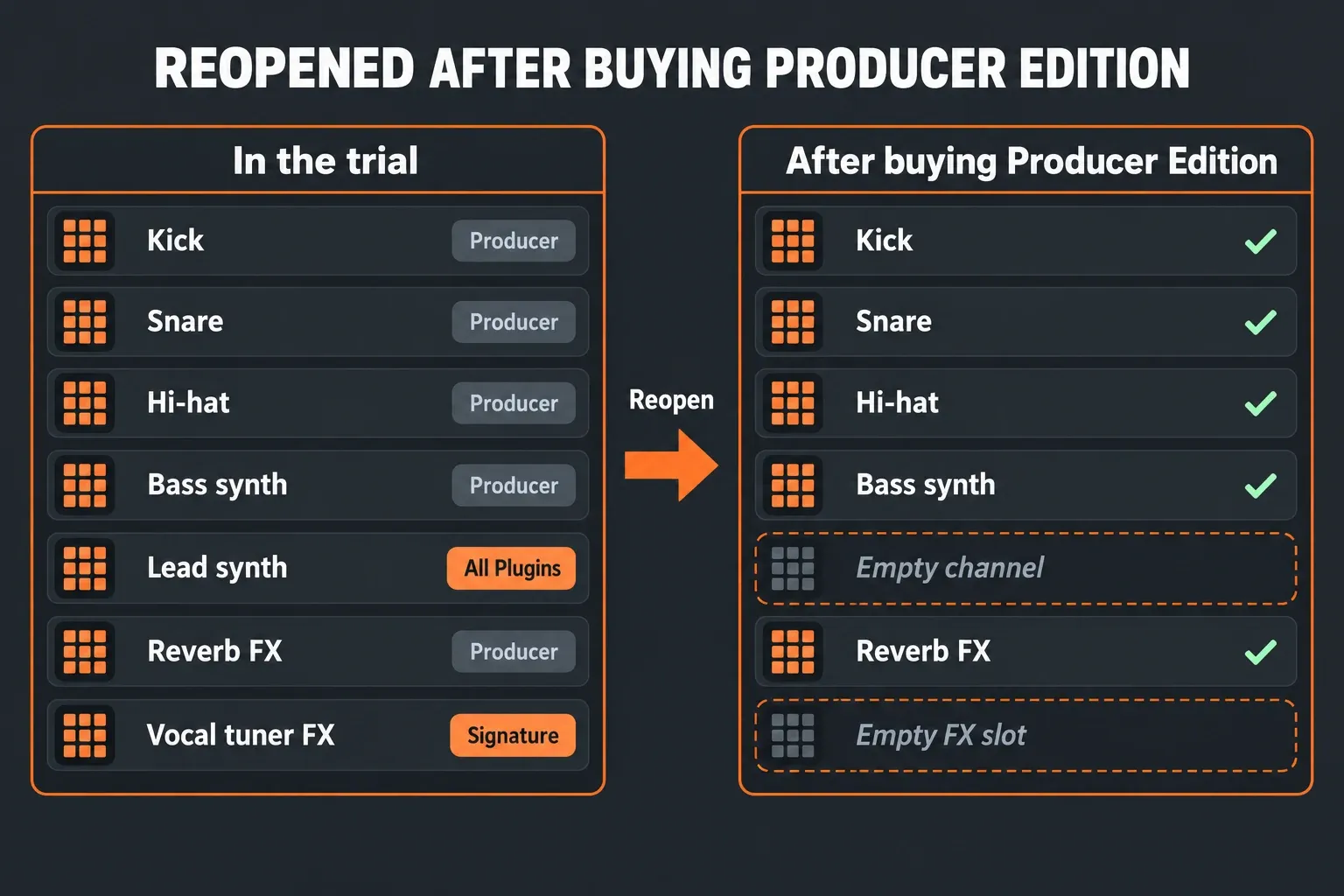
This is the part most “is it free” answers skip, and it decides whether your trial projects open cleanly later. Because the trial behaves like All Plugins Edition, it’s easy to build songs around instruments and effects that your eventual edition doesn’t include. The FL Studio manual warns that “any trial plugins will be replaced with empty Channels/FX Slots the next time the project is opened.” The rest of the project still loads; only those plugins go missing.
Three habits prevent that:
- Choose the edition at startup. The standard trial normally asks which edition to try. If you missed the prompt, Image-Line says to “check the Help > About pop-up where the Edition is listed.”
- Check a plugin before you rely on it. Click its interface and press F1. Image-Line says the help page that opens will mention if it is included in your edition.
- Match the trial to your workflow. The manual says Fruity Edition is for producers who “don’t need more than 8 Audio Clips or audio recording.” If you plan to record vocals or guitar, run the trial as Producer Edition.
I’d set the trial to Producer Edition for most beginners. It’s the tier that adds audio recording, Edison and full Playlist functionality, and it keeps you from falling for a plugin you’d only get in a pricier tier. Our FL Studio edition and price guide lays out what each of the four tiers adds and costs.
Working with someone who owns FL Studio
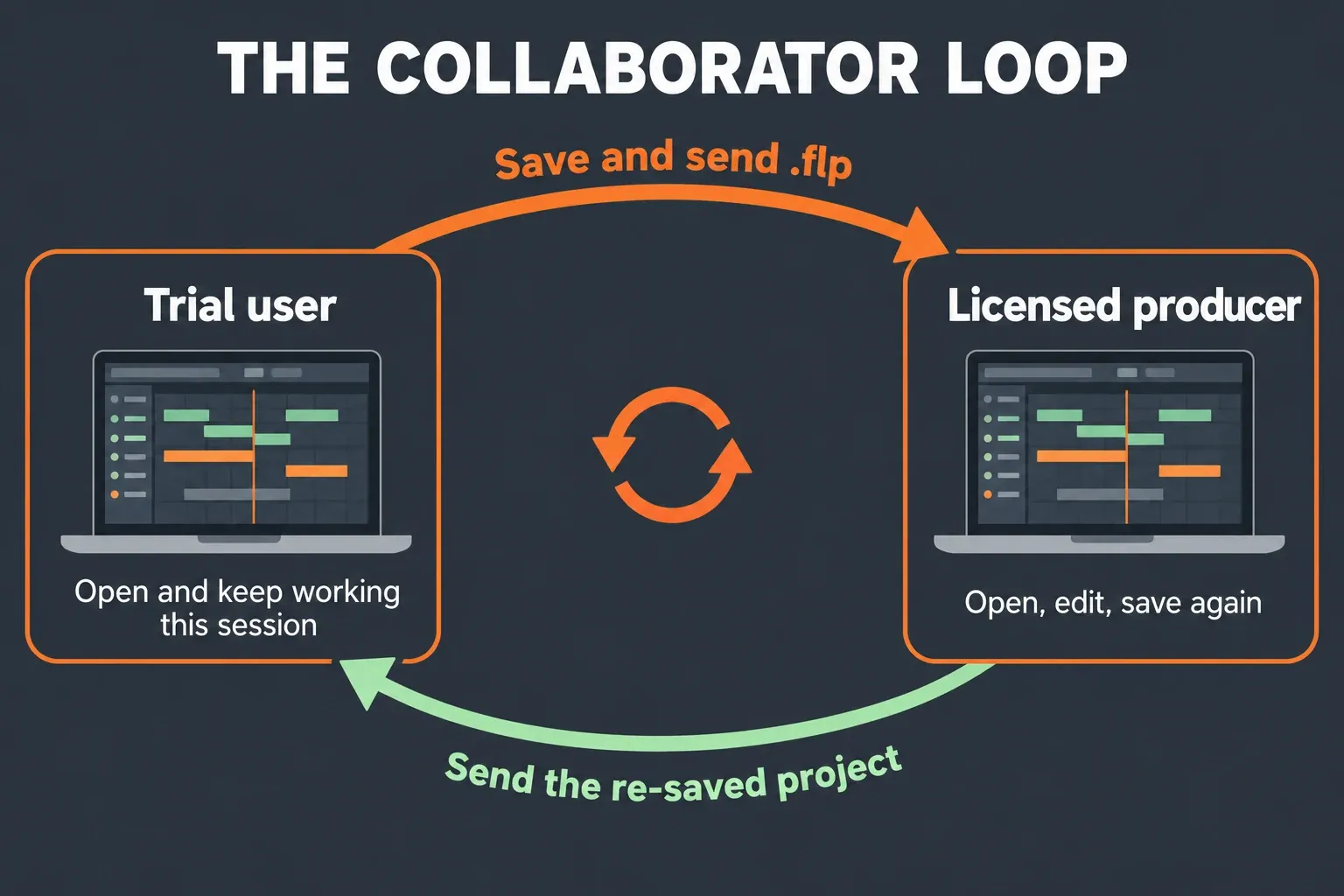
There’s a legitimate way around the reopen limit if a friend, teacher or co-producer has a license. Image-Line’s guide to collaborating or teaching with the trial says “There is no need to share your license to collaborate with others or teach a student,” and license sharing is prohibited anyway. The loop works like this:
- You start a project in the trial, save it as an .flp or .zip and send it to the licensed producer.
- They open it, work on it or not, save it and send it back.
- You can now open that re-saved file and keep editing and saving until you close the session.
- Send it back, they save it again, and the cycle repeats.
The condition is in the fine print: you can reopen the returned project “provided they do not use any products you don’t own”. In other words, the licensed producer shouldn’t add plugins or other paid content you don’t have. Image-Line suggests the same loop for teachers, who can open students’ homework projects, check them and save them again.
FL Studio Web, Mobile and FL Cloud: what’s free
“FL Studio” now covers more than the desktop program, and each version has a different price answer:
| Option | Cost | What you get | Catch |
|---|---|---|---|
| Desktop trial | Free, no time limit | The full Windows or Mac program with every plugin | Saved projects reopen only after you buy |
| FL Studio Web | Free during the beta for eligible users | A simplified browser studio with the Channel Rack and FL Cloud sounds | Desktop projects can’t be opened in it; FL Cloud Sounds comes with a 7-day free trial |
| FL Studio Mobile | Paid app, $14.99 on Google Play, plus in-app purchases | A phone, tablet and Chromebook DAW | Sold separately from the desktop license |
| FL Cloud Free | Included with every desktop edition | Curated sounds, a few third-party plugins, AI mastering on one preset, 500 MB of backup storage | It’s a service tier, not an FL Studio license |
FL Studio Web is the closest thing to a truly free FL Studio: “No download, no setup,” and “During the beta, FL Studio Web is free to use for eligible users.” It runs in a browser tab, and you can carry a Web project into the desktop program on PC or Mac, but it’s “not possible to open desktop projects inside FL Studio Web” yet. I’d treat it as a sketchpad and a way to learn patterns, not as a replacement for the trial. Our FL Studio Web guide covers browsers, limits and the move to desktop.
Mobile is a different story: it’s a paid app. The Google Play listing shows “$14.99 Buy” with “In-app purchases”, and describes it as working “on your phone, tablet, or Chromebook, with Lifetime Free Updates.” Buying the desktop program doesn’t include it: Image-Line’s FL Studio overview calls Mobile “a separate app with its own purchase,” though its instruments and effects come free inside the desktop program through FL Studio Mobile Rack. If you’re weighing the two, our FL Studio Mobile vs Desktop comparison sorts out which fits, and the Chromebook guide covers the Android route.
The FL Cloud tier is the part that confuses people most. Image-Line’s FL Cloud vs license explainer says every FL Studio purchase, in every edition, includes FL Cloud Free User Mode: a curated sound library, “A selection of 3rd party plugins” and “AI-powered Mastering with the ‘Default’ Genre preset”. The FL Cloud plans page lists 500 MB of backup storage for that free tier, which our FL Cloud project backup guide puts to use.
An FL Cloud subscription isn’t a license
An FL Cloud subscription is not a cheaper way to own FL Studio. The manual is explicit: “FL Cloud subscriptions don’t provide an FL Studio license,” so a subscription can’t take FL Studio out of trial mode. Subscribing gets you sounds, plugins and storage, but a trial install keeps its reopen limit.
Watch the FL Cloud free trial for the same reason. The FL Cloud page offers a “30-Day free trial”, and the FL Cloud FAQ spells out what happens next: “If you don’t cancel before the free trial ends, your paid FL Cloud plan will start automatically and your card will be charged.” I’d put a calendar reminder a few days before the end date the moment you start one.
What paying gets you, and cheaper ways in
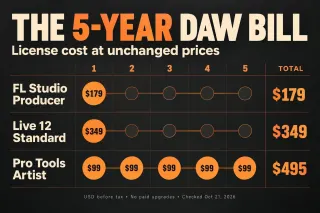
Image-Line’s homepage lists FL Studio from $99, and the free updates matter more than the sticker: Image-Line says “FL Studio has never charged for an update,” so a one-time purchase keeps getting new versions. The Lifetime Free Updates page adds one honest caveat. Asked whether everything added in future is free, it answers “Not everything”: new synths or effects sometimes go into specific editions.
If the upfront price is the blocker, there are three legitimate routes:
- Rent to Own Plus. The FL Studio pricing page says “After 12 payments, FL Studio is yours forever, with Lifetime Free Updates. FL Cloud continues until cancelled.” It also notes “Some payment plans might only be available in certain regions.” Image-Line’s Rent to Own explainer says that after cancellation FL Studio “reverts to Trial mode”, and that RTO “costs slightly more than purchasing a license outright”.
- An academic license. Students and teachers at recognized schools can get a discounted single-user license, but “Educational licenses are only available as our Signature Bundle Edition,” and the academic license page adds that “Commercial use is not permitted with our educational licenses”. You buy it only through Image-Line’s third-party resellers and distributors.
- A sale or an upgrade path. Our FL Studio discounts guide tracks confirmed Image-Line sales, student offers and edition upgrades.
RTO suits you if you’re certain you’ll keep producing and want the full program now. If you’re still deciding whether FL Studio fits, the trial costs nothing and the upgrade path stays open.
Why I’d skip “free full version” downloads
Plenty of sites offer a “free full version” of FL Studio or an APK. They’re cracks, and they add nothing useful: the official trial already is the full program. Image-Line’s download page says “There’s no need for cracks, torrents, or APK versions. Those often carry malware, won’t get updates,” and they won’t connect to an Image-Line account for Lifetime Free Updates. It also warns that “we reserve the right to restrict or block accounts that use cracked versions of FL Studio.” The trial leaves you with clean projects that open the day you buy. A cracked copy gives you no license to register and no updates to collect.
Quick answers
Does the FL Studio trial expire?
No. The standard trial has no time limit. Only the occasional special 21-day trial ends, and it never charges you when it does.
Is FL Studio free on Mac?
On the same terms as Windows: the Mac trial is free with full features and no time limit, and one purchased license covers both platforms.
Do trial exports have a watermark?
No. Image-Line says trial exports have no audio watermarks, and you can render WAV or MP3 at full quality.
Will my trial projects open after I buy?
Yes, as long as your edition includes the plugins they use. Plugins from a higher edition stay in trial mode and load as empty slots, while the rest of the project opens normally.
What if I just want a DAW that’s free forever?
Then FL Studio isn’t the answer, and that’s fine. Our list of free FL Studio alternatives compares DAWs that cost nothing to keep.
My verdict: is the free trial enough?
For learning, the trial is enough, and I’d stay on it until the reopen limit starts costing you work. If you make beats in one sitting, export for battles or demos, or collaborate with a licensed producer, you can go a long way without paying. The moment you want to revisit a mix over several days, buy an edition: every project you saved in the trial opens again, and the updates stay free after that.
When you’re ready, start with the FL Studio download hub for the official installer, then use our edition comparison to choose the tier. For most people who want to record and finish full songs, I’d go with Producer Edition.