FL Studio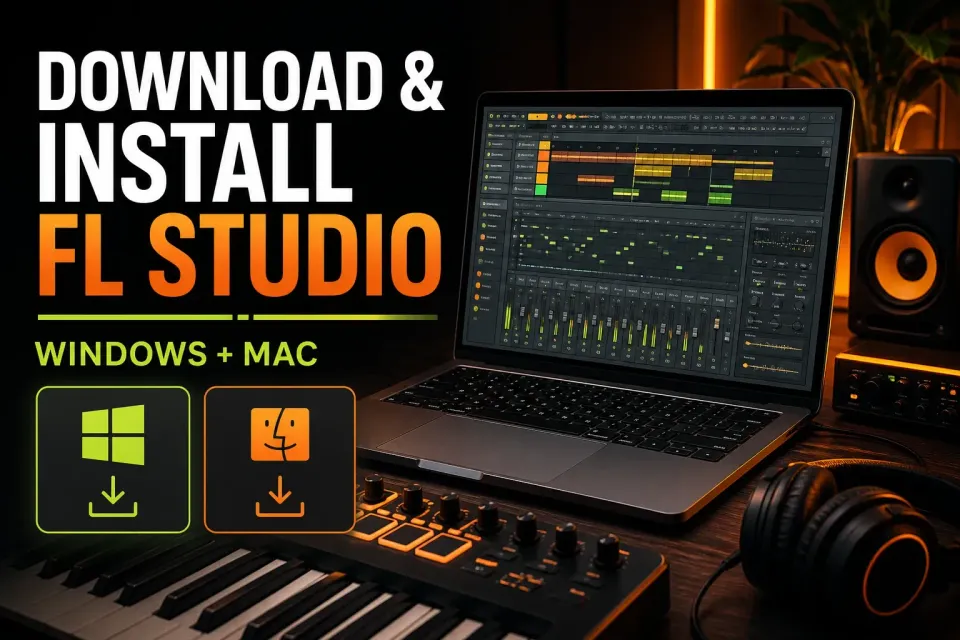
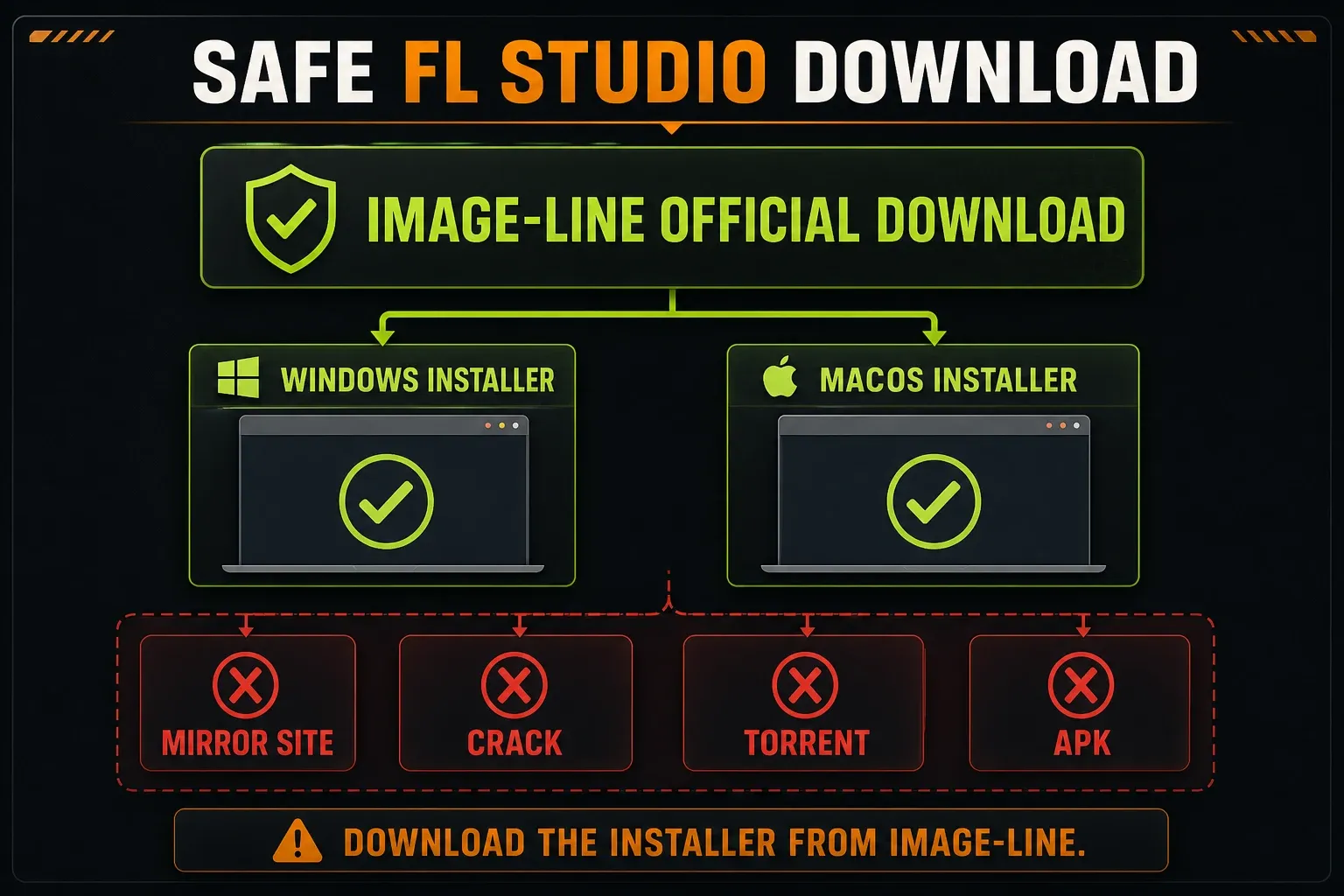
Download FL Studio from Image-Line and nowhere else. Pick Windows or macOS on the official FL Studio download page, run that installer, and your Image-Line account decides which edition unlocks. There is no separate Producer, Signature, or All Plugins installer to hunt for.
Below is the whole route from start to finish: checking compatibility, installing on either desktop platform, unlocking a paid license, keeping projects safe during an update, and a first launch that proves everything actually works.
Download FL Studio without taking a shortcut through the wrong site
Search for “FL Studio free download” and you get mirrors, repackaged installers, torrents, and pages dressed up with fake download buttons. None of them beats the official source. A DAW scans plugins, reads your project folders, and talks to your audio devices, so handing that level of access to a modified installer to save one click is a bad trade.
Go to Image-Line, choose your operating system, and glance at the version and file size printed next to the button. Got the file from somewhere else? Delete that copy and download it again from the vendor. On Windows, the security prompt should name Image-Line as the publisher. On Mac, if macOS reports the disk image or the app as damaged, stop right there and fetch a fresh copy rather than forcing a damaged download to run.
Check the current requirements before downloading
Image-Line ships new builds faster than any static guide can keep up with, so treat the version number and installer size on the official download card as the current source of truth. The requirements that rarely change are summarized below:
| Windows | macOS | |
|---|---|---|
| Operating system | Windows 10 or 11 | macOS 10.15.7 or newer |
| Processor | Intel or AMD | Intel or Apple Silicon |
| Minimum memory | 4 GB RAM | 4 GB RAM |
| Free disk space | 4 GB minimum | 4 GB minimum |
If the live download card shows a different build or different requirements from this dated snapshot, trust the card. And read the four gigabytes of free space as the bare installation minimum. Projects, recordings, samples, backups, and third-party instruments will soon need far more room than that.
The current Windows download card lists Intel and AMD and marks ARM as not supported. Image-Line’s broader requirements page adds a nuance: FL Studio can run on Windows ARM, but Image-Line does not test or optimize it, and its support team cannot help with ARM-specific problems. That makes ARM a try-at-your-own-risk path, and I would not build a workstation around it. On macOS, Image-Line supports both Intel and Apple Silicon, though a case-sensitive file system is off the table.
The trial and every paid edition use the same installer
Don’t be thrown if the download page calls the file a trial installer when you already own FL Studio. Image-Line's installation guidance confirms that the trial installer is also the full installer. Once it is installed, your account license unlocks the edition and native plugins you own.
Knowing that spares you two common detours: hunting for a “Producer Edition download” and installing every Image-Line native plugin one by one. There is one main desktop installer. Still deciding what to buy? The FL Studio editions comparison covers that choice in detail. Keep in mind that the normal trial can make and export music, but it cannot reopen saved projects after FL Studio closes.
Downloading two trials to pick a DAW? Read the Ableton versus FL Studio workflow comparison before you let installation speed decide. After FL Studio opens, a keyboard that is powered but silent is a separate setup problem: work through the MIDI detection checklist before reinstalling the application.
Before you install or update
For a first installation, close any other audio software and check that you can write to the normal Applications or Program Files location. For an update, take one minute to protect the work you cannot re-create:
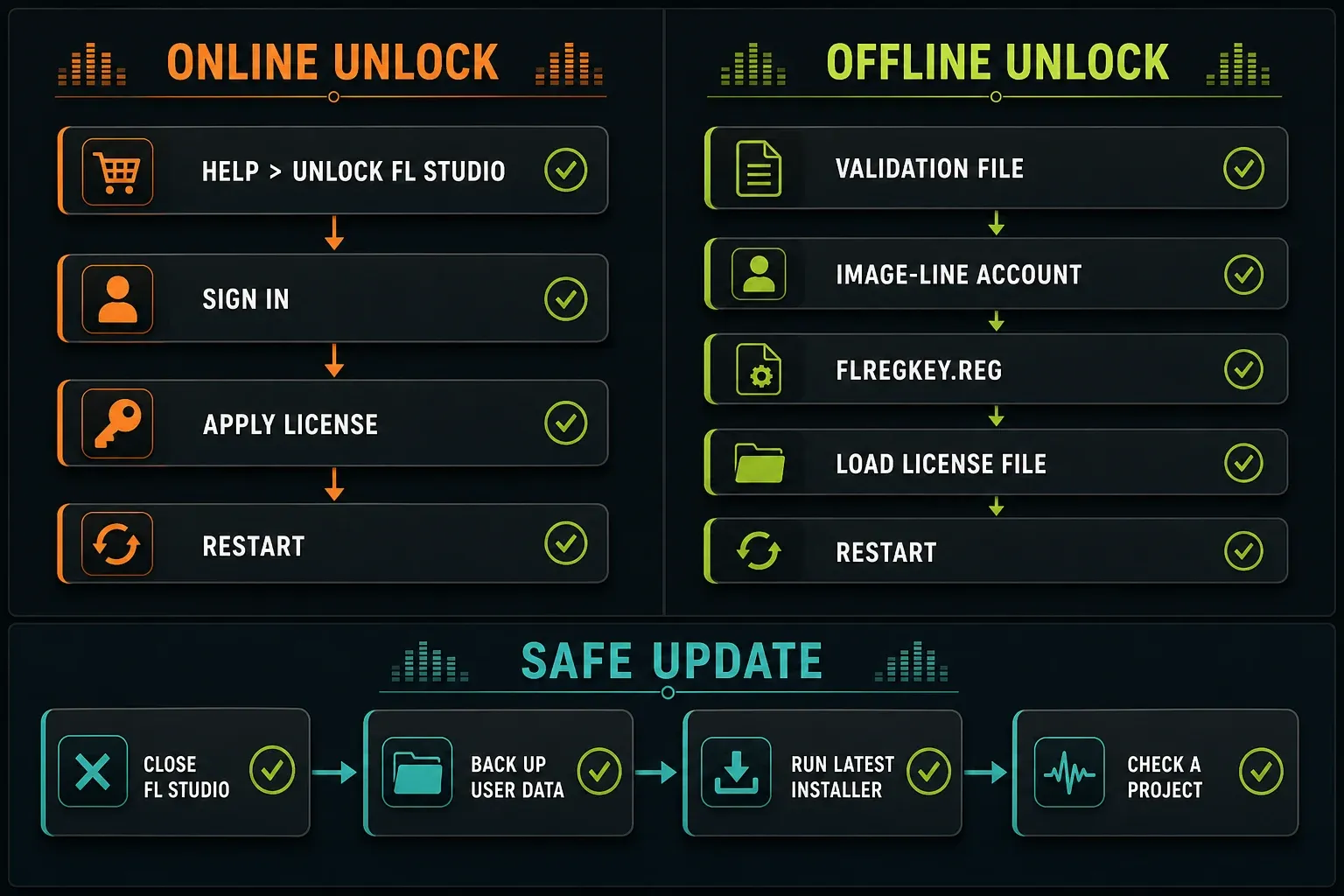
- Close FL Studio.
- Back up your user data folder. In FL Studio 20 and later, the default is under
Documents/Image-Line/FL Studioon both Windows and macOS. - Note any custom Browser extra search folders and third-party plugin locations.
- On a Mac, move any personal project, preset, or sample stored inside
FL Studio.app/Contentsinto the user-data folder before updating. The app bundle is replaced.
A normal update is designed to keep your projects and settings intact. The backup is what turns a nasty surprise into a mistake you can undo.
How to install FL Studio on Windows
- On the official download page, choose Windows and let the installer finish downloading.
- Close FL Studio if an older version is running. Open the downloaded
.exefile. - When Windows asks whether the app may make changes, verify the publisher before continuing. If the publisher or filename looks wrong, cancel and download again from Image-Line.
- Read each installer screen and leave the normal FL Studio components selected. Stick with the default locations unless you already run a deliberate multi-version or shared-studio setup.
- Finish the installation and launch FL Studio from the Start menu or the shortcut you chose to create.
- If you own a license, unlock it after the first launch. If not, the same installation opens in trial mode.
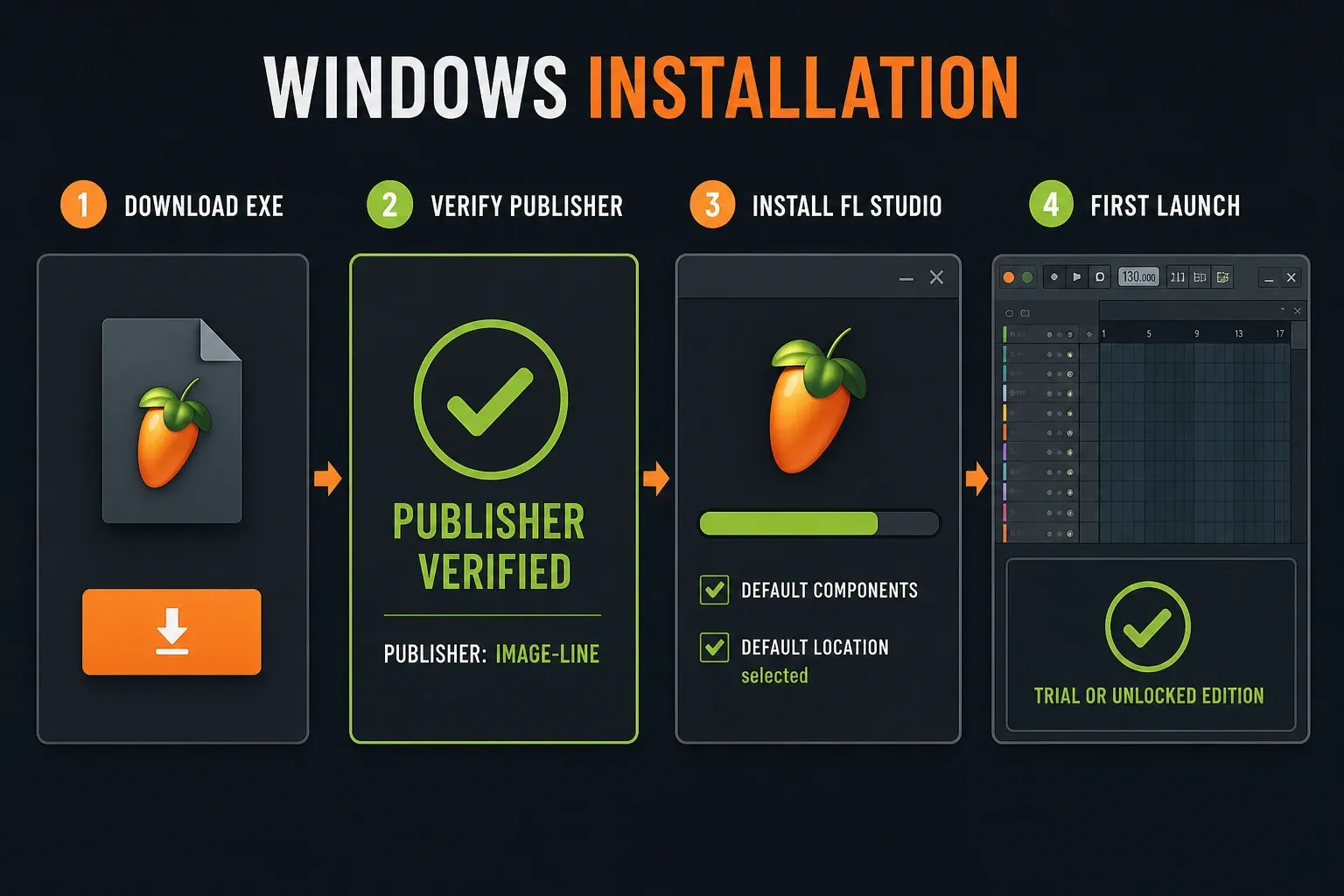
Keep projects and sample libraries out of the FL Studio program folder. Program files can be replaced at any time; your songs cannot. Store working data in the user-data folder or in another folder you actually back up.
How to install FL Studio on macOS
- Choose macOS on the official download page and wait for the
.dmgto finish. - Open the disk image and drag FL Studio into your Applications folder. The current Mac download is a
.dmgdisk image, not a.pkginstaller, so there are no macOS Installer screens to click through. - Install into the normal Applications location. Do not hide projects or samples inside the FL Studio app bundle.
- Launch FL Studio from Applications. Apple Silicon and Intel Macs use the native macOS release; Rosetta is not required for FL Studio itself.
- Unlock your license, or continue in trial mode.
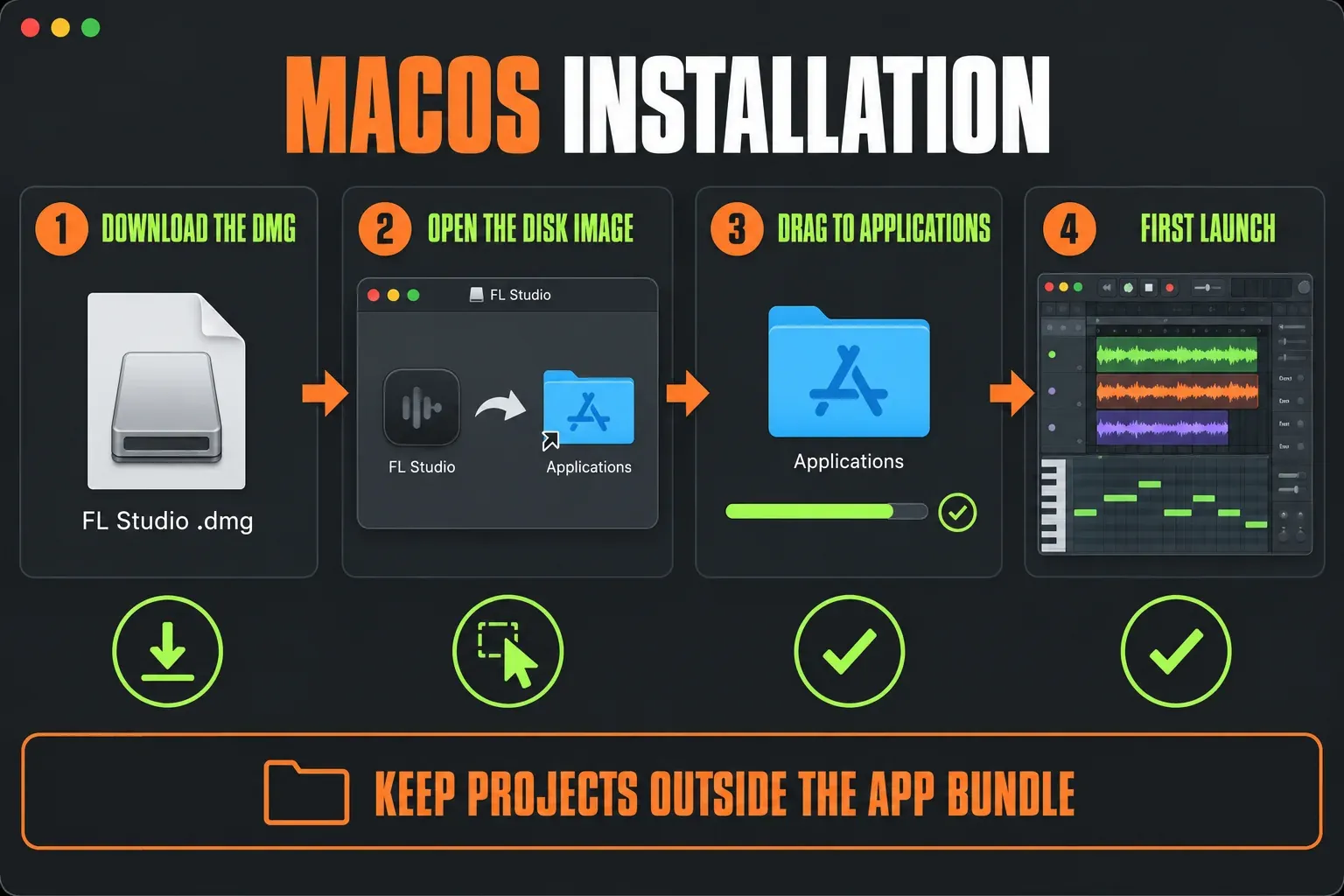
If macOS says the disk image or the app is damaged, don’t wave the warning away. Check that your macOS version meets the current requirement, delete the download, and get a fresh copy from Image-Line. Image-Line notes that the app is signed and notarized. If Gatekeeper still blocks the first launch of a fresh official copy, follow Apple’s app-specific Privacy & Security procedure, which ends with Open Anyway under System Settings → Privacy & Security, and leave system-wide protection switched on.
Unlock FL Studio after purchasing
Before anything else, confirm that the FL Studio license shows up in the Image-Line account you plan to use. A direct Image-Line purchase is already attached to that account. A boxed copy or reseller code has to be redeemed once before it can unlock the application.
The current Image-Line unlock procedure is the same on Windows and macOS:
- Open FL Studio.
- Choose Help → Unlock FL Studio → Sign in and unlock.
- Complete the Image-Line account sign-in in the browser or unlock panel.
- Enter the emailed six-digit code if two-factor authentication is enabled.
- Let FL Studio apply the license, then restart the application.
After the restart, open Help again and check which account and edition it shows. FL Cloud is a separate service: an FL Cloud subscription on its own does not unlock an FL Studio desktop edition.
Unlock an offline computer
Offline activation takes more than copying a generic registration key from another computer. For FL Studio 20.9 and later, go to Help → Unlock FL Studio → Unlock with file on the offline machine and save its validation file. Upload that file through your Image-Line account on any internet-connected device, download the generated FLRegkey.Reg, carry it back, and load it through Unlock with file. The generated key is tied to the machine that created the validation file.
Restart FL Studio after the registration succeeds. Keep license files out of email threads and public cloud links; they belong to your account and should stay private.
Make the first launch useful
An application window that opens does not prove the installation works. Play a stock sound, watch the Master meter move, save a small test FLP, and export a few seconds of audio. On the trial, remember that you can export but cannot reopen that saved FLP once the program closes.
If sound is delayed, silent, or going to the wrong device, open the FL Studio audio settings guide before you reinstall the DAW. Once playback behaves, the first-song FL Studio tutorial walks you from Channel Rack to Playlist, Mixer, and export.
How to update FL Studio without losing projects
Image-Line’s current installation and update procedure separates two cases. Within the same major version, such as FL Studio 2026.1 to 2026.4, the default Upgrade option installs over the existing FL Studio 26 folder. A new major release, such as 2025.2 to 2026.1, creates a separate installation folder and leaves the previous major version in place. Neither routine path requires an uninstall first. Close FL Studio, make the backup described above, run the new installer, and unlock again if prompted.
After the update, open a throwaway project before you touch a client session or a song you cannot replace. Check your audio device, Browser folders, favorite plugins, one third-party instrument, and a short export. Projects saved in a newer FL Studio release will not open in older releases, so duplicate an important client FLP before saving if there is any chance you will go back. If a project still refuses to load, use the FL Studio project-opening recovery guide rather than reinstalling blindly. Your FL Studio user data should survive, but a third-party plugin can still bring its own architecture, authorization, or compatibility problem.
The official update and migration manual also covers parallel versions, old FL Studio 11/12 data, new-computer migration, and a clean uninstall. Those cover repair and migration cases. A routine update does not need a clean install.
Common installation and unlock problems
| What you see | Check first |
|---|---|
| The installer came from a mirror or has an unexpected publisher | Cancel it and download a fresh copy directly from Image-Line |
| Windows or macOS is too old | Compare the live download-card requirement with the installed OS before troubleshooting the DAW |
| macOS says the app or disk image is damaged | Delete the file and redownload; do not bypass a corruption warning |
| FL Studio still opens as Trial after purchase | Confirm the license is in the signed-in Image-Line account, unlock, then restart |
| The browser does not open during unlock | Use the account option in the unlock panel or follow the official offline-validation method |
| Projects or samples look missing after an update | Check the user-data folder and previous Browser extra search paths before reinstalling anything |
| A third-party plugin is missing | Confirm its own installer and plugin search path; this is separate from reinstalling FL Studio |
| FL Studio opens but there is no sound | Follow the FL Studio no-sound checklist before reinstalling the application |
Frequently asked questions
Can I download FL Studio for free?
Yes. Image-Line offers the full desktop installer as a free trial that never expires. You can make and export music with it, but the normal trial cannot reopen saved projects after FL Studio closes. A paid license unlocks the edition attached to your account.
Which FL Studio edition should I download?
Download the same official installer for Fruity, Producer, Signature, or All Plugins Edition. Your Image-Line account license decides which features and native plugins unlock.
Can one license install FL Studio on Windows and Mac?
Yes. Image-Line permits the license owner to use the same license on Windows and macOS computers they control, provided the license is not shared with other users.
Do I need to uninstall FL Studio before an update?
No. A same-major update installs into the existing major-version folder, while a new major release creates a separate folder and leaves the previous major version installed. Back up the user-data folder first. Save the clean uninstall for repairs; a routine update step does not need it.
Will updating FL Studio delete my projects?
Current FL Studio user data is stored outside the program folder, so a normal update is designed to preserve it. Back up Documents/Image-Line/FL Studio anyway. On macOS, move any personal files out of the FL Studio app bundle because an update replaces that bundle.
Does FL Studio run on Apple Silicon?
Yes. The current native macOS version supports both Apple Silicon and Intel Macs. Third-party plugins still need compatible macOS builds and may have different architecture requirements.
Can I install desktop FL Studio on a Chromebook or phone?
The desktop installer in this guide supports Windows and macOS only. FL Studio Mobile is a separate product, and unsupported Chromebook/Linux workarounds do not give you a supported desktop installation.