FL Studio
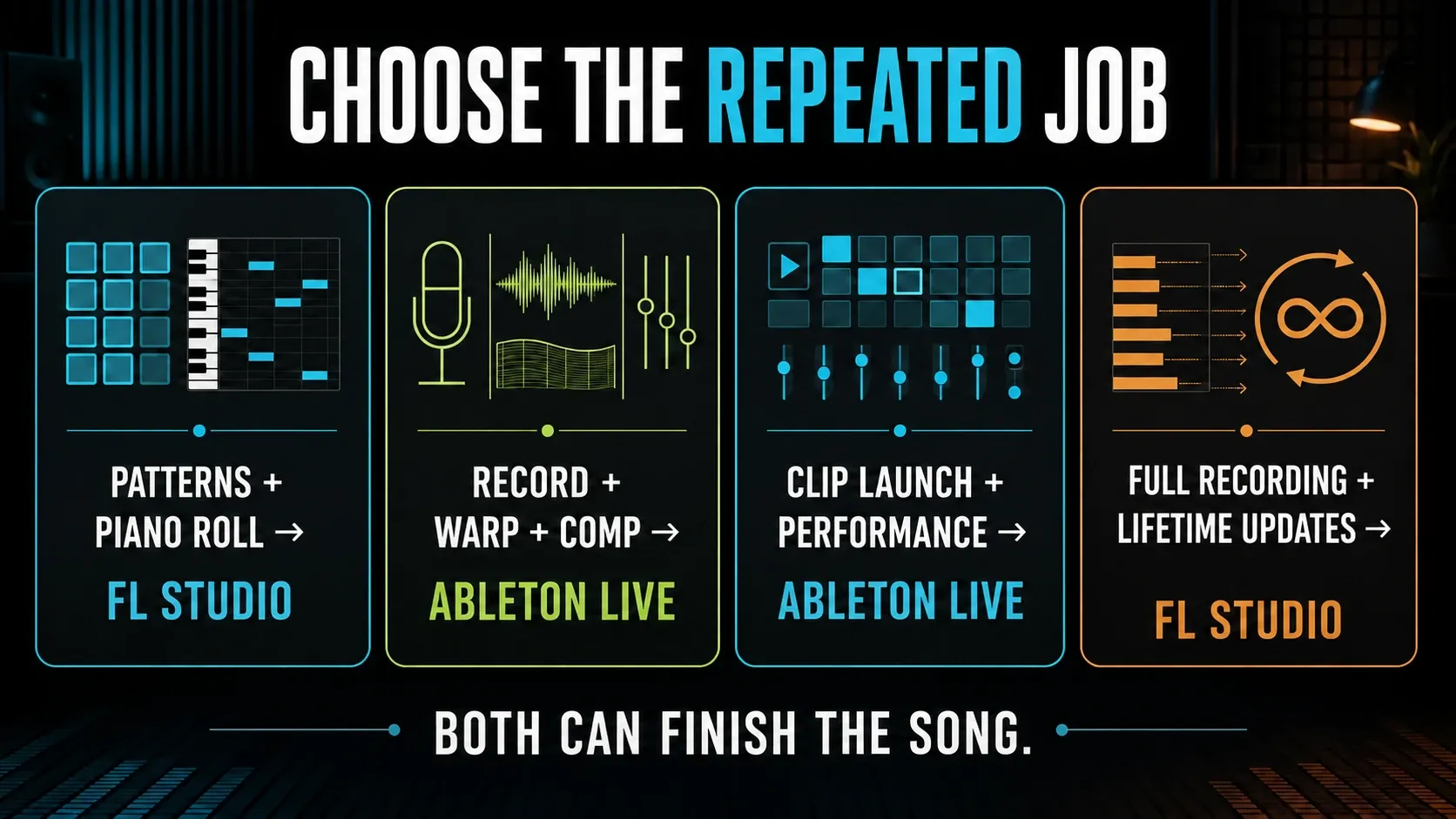
Choose FL Studio if your best ideas start as drum patterns, Piano Roll notes and small musical blocks you arrange later. Choose Ableton Live if you’d rather keep audio clips, tracks, devices and live improvisation inside one connected working model. Both can record, mix and finish professional music. The better DAW is the one whose normal path matches the work you keep repeating.
Compare the edition you’d actually use. At US list prices checked on September 12, 2026, FL Studio Producer is $179 and Live 12 Standard is $349. Both give you a full recording workflow; FL includes future updates to the purchased edition, while Live Standard lifts Intro’s 16-track limit. Their $99 entry editions aren’t equivalent. Sales, local tax and upgrade eligibility can all change what you pay at checkout.
This is an independent editorial comparison of documented workflows. It isn’t a timed benchmark, and neither developer endorsed it. The exercises below are tests you can run on your own projects.
Ableton vs FL Studio: the quick decision
| If your repeated work is… | Start with | Why | Test before paying |
|---|---|---|---|
| Programming drums and drawing detailed MIDI | FL Studio | Channel Rack, patterns and Piano Roll put note construction first | Build one 8-bar beat without a tutorial |
| Recording, comping and reshaping audio | Ableton Live | Audio clips, tracks and devices remain close to the arrangement | Record three takes, comp one line and warp one loop |
| Launching clips or performing an arrangement | Ableton Live | Session View is a core composition and performance model | Launch scenes, improvise and record the result into Arrangement |
| Buying once and keeping future core updates | FL Studio | Every paid edition includes Lifetime Free Updates to that edition | Confirm the plugins you need are actually included |
| One-window device chains and hardware-led sessions | Ableton Live | Track, device and clip relationships stay visually connected | Map a controller and finish one automation pass |
| Flexible pattern placement and deep modular routing | FL Studio | Playlist, Mixer and Patcher allow deliberately loose connections | Name every route and explain the signal path |
Treat these as starting points, not genre laws. Hip-hop, EDM, pop, techno, ambient and recorded music have all been finished in both. “My favorite producer uses it” only helps if you also want that person’s working method, collaboration format or performance setup.
The real difference is the project’s mental model
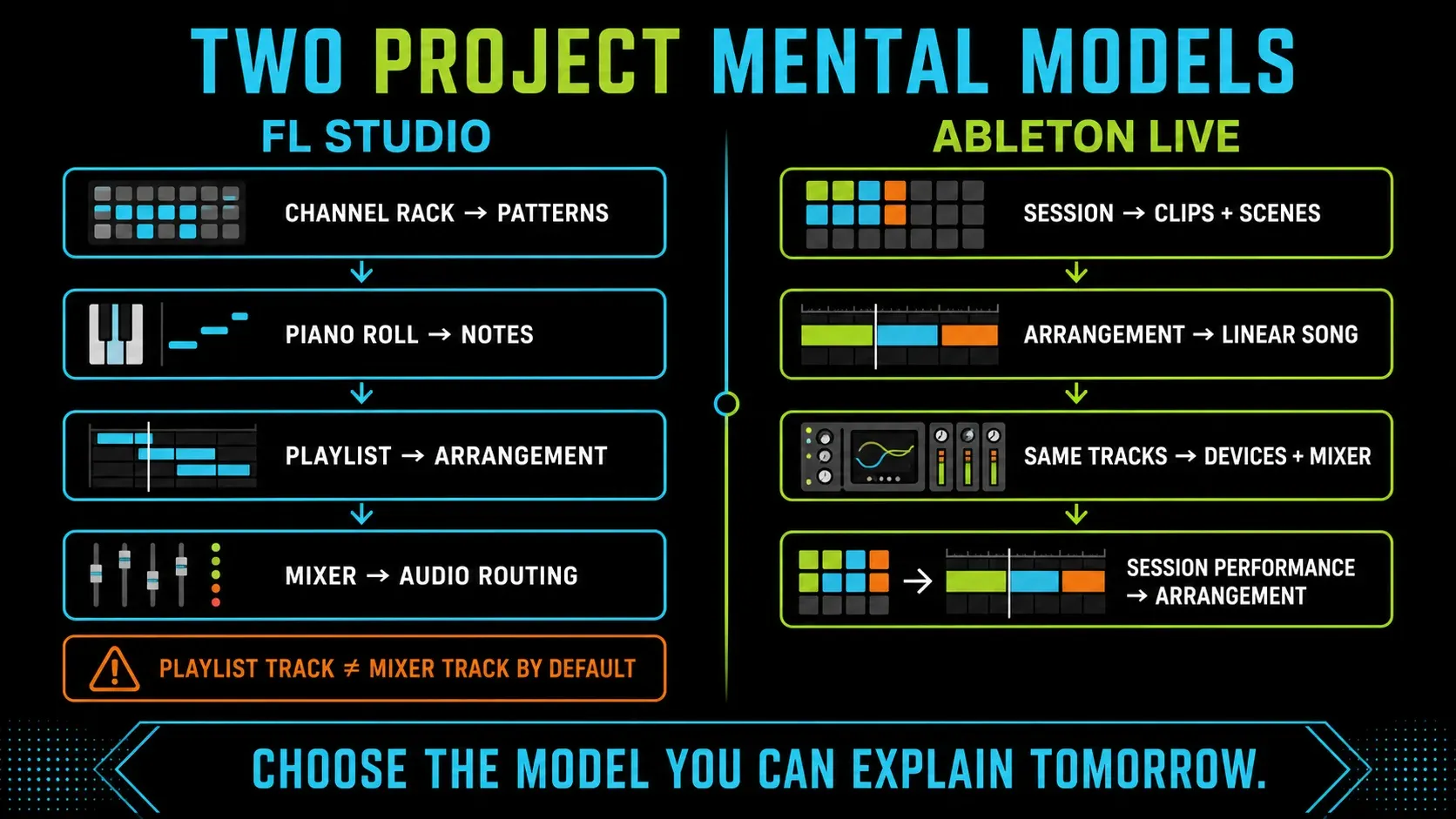
FL Studio begins with separate working areas. The Channel Rack holds instruments and pattern data. The Piano Roll edits notes. The Playlist arranges Pattern, Audio and Automation Clips. The Mixer receives audio from channels and handles effects and routing. Image-Line’s Playlist manual makes one easily missed point explicit: Playlist tracks are not bound to Mixer tracks by default.
That separation lets one pattern trigger several instruments and lets routing differ from the arrangement. It can also confuse a beginner: a clip sits on “Track 4,” but its sound lands on Mixer Insert 17. FL’s optional Track Mode links an Instrument Channel, Playlist track and Mixer track, and dropping an instrument onto a Playlist track header creates that link. Try it before you decide FL can’t offer connected tracks. The first-song FL Studio tutorial explains the route underneath.
Ableton Live connects two views through the same tracks. The Session View launches clips and scenes without committing to a fixed song order. The Arrangement View places clips on a linear timeline. Both views use the track’s devices, mixer and routing. You can improvise in Session and record that performance into Arrangement.
That connection saves some bookkeeping, but it also asks you to accept Live’s track-and-device logic. If you love detached windows, freely overlapped Playlist clips or routing that ignores arrangement rows, Live may feel clean but restrictive. If you want the selected clip, instrument and effect chain visible in one context, FL Studio may feel flexible but scattered.
Beat making: patterns versus track-connected clips
FL Studio earned its beat-making reputation honestly. The Channel Rack gives kick, snare and hat patterns an instant grid. The Piano Roll makes velocity, note length, slides, chords and fine timing easy to see. Pattern Clips then let the same musical block show up wherever the arrangement needs it. For MIDI-first hip-hop, trap or electronic music, that path can feel fast long before you learn much routing.
Ableton isn’t slow at beats either. Drum Rack puts samples and chains behind a 16-pad layout, MIDI clips carry the notes, and the clip loop gives you a repeating region straight away. Arrangement can then duplicate and edit that material in a line. Session scenes make it natural to audition verse, build and drop combinations before you’ve copied out a finished timeline.
The difference shows up when the beat changes. FL Pattern Clips reuse pattern data: edit the pattern and its other instances follow, while Make unique gives a variation its own pattern. In Live, you duplicate a MIDI clip and edit that copy; don’t expect it to behave like a linked FL pattern instance. In either program, changing the instrument or its effects is a separate decision from changing the notes.
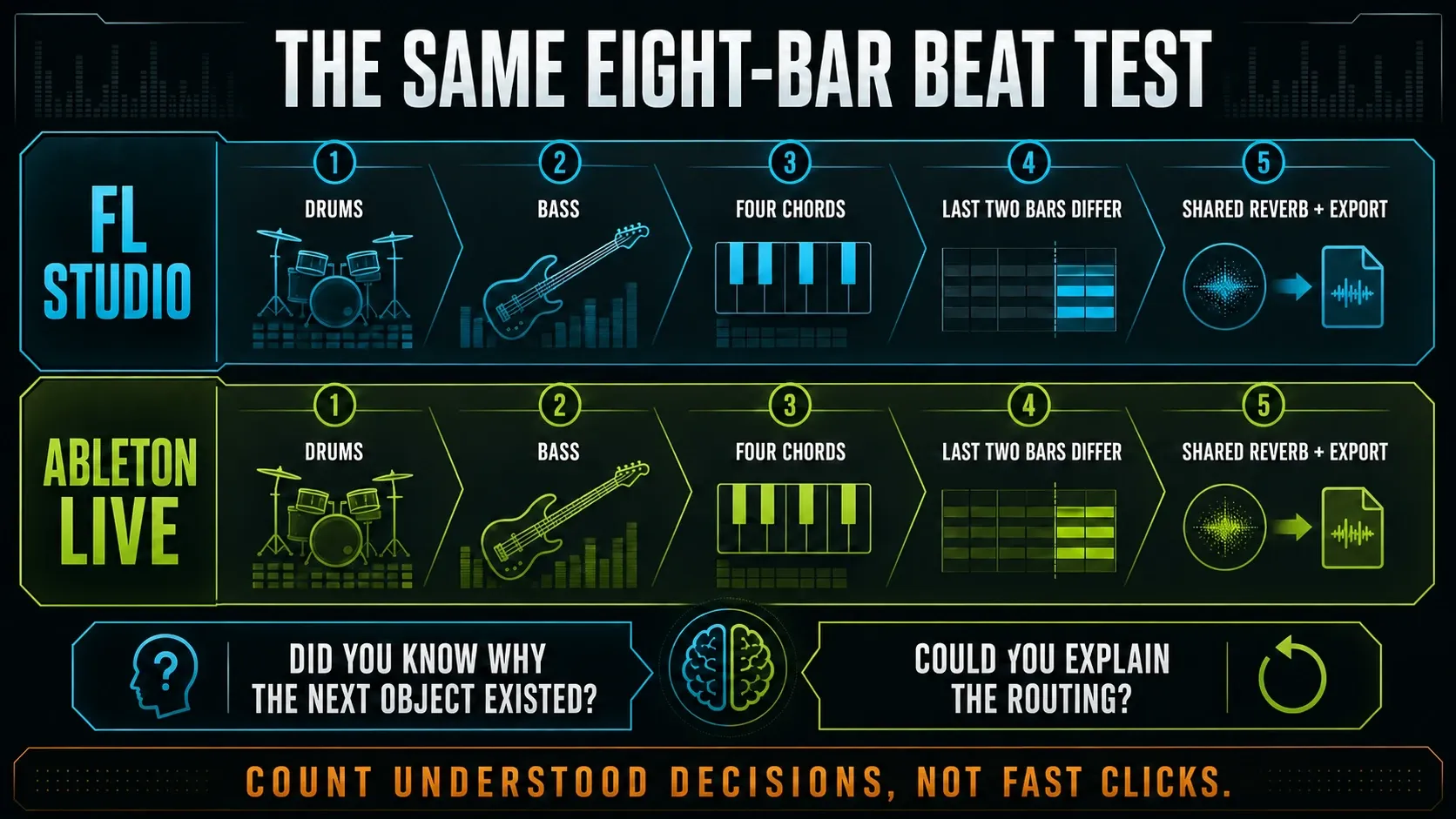
Run the same test in both trials: load one kick, snare and hat, build eight bars, add bass and a four-chord part, make the last two bars different, route a shared reverb and export. Don’t just count clicks. Count how often you understood why the next object existed.
Recording vocals and instruments: both work, but entry tiers differ
Both DAWs can record vocals, guitars, hardware synths and other audio. The important FL Studio qualification is edition. Image-Line’s current edition documentation says Fruity Edition does not include direct audio recording and restricts the Audio Clip workflow. Producer Edition and higher supply the full Playlist and recording path. That is why FL Producer, not Fruity, is the fair everyday comparison with a recording-focused Live setup.
Live 12 Intro includes the core Session/Arrangement workflow, non-destructive audio editing, Capture MIDI and comping, but caps a project at 16 audio/MIDI tracks. Ableton’s current Intro feature page is more useful than old forum posts that treat Intro as a demo. Sixteen tracks can finish a disciplined song. They can also turn into a ceiling fast once you’re comping vocals, layering drums and printing alternate versions.
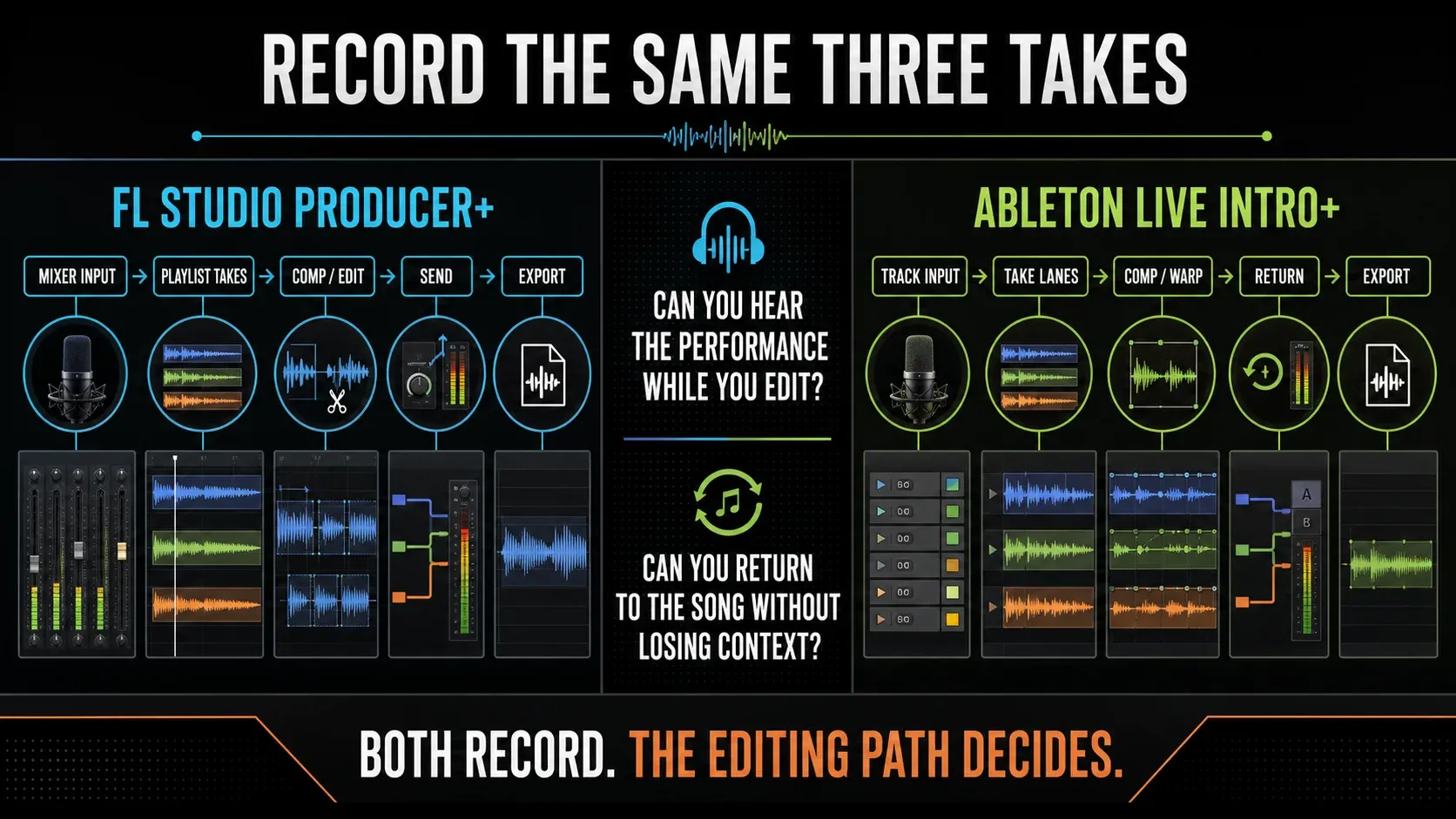
Live keeps takes, clips, warping and devices in the track model. FL can record into Audio Tracks linked to Mixer inputs, then edit the resulting Playlist clips. Edison and Newtime are included with Producer and higher; Newtone requires Signature Bundle or higher, or a separate license. Follow the FL audio-recording setup to compare a working input path, not an unconfigured microphone.
If you sing or play guitar, record the same three takes in both trials. Build one comp, clean one breath, align one phrase, add a send and export stems. The DAW that keeps the performance audible while you edit tells you more than any generic “best DAW for vocals” list. If you stay with FL, the vocal mixing workflow covers the full processing chain.
MIDI and the Piano Roll: preference matters more than reputation
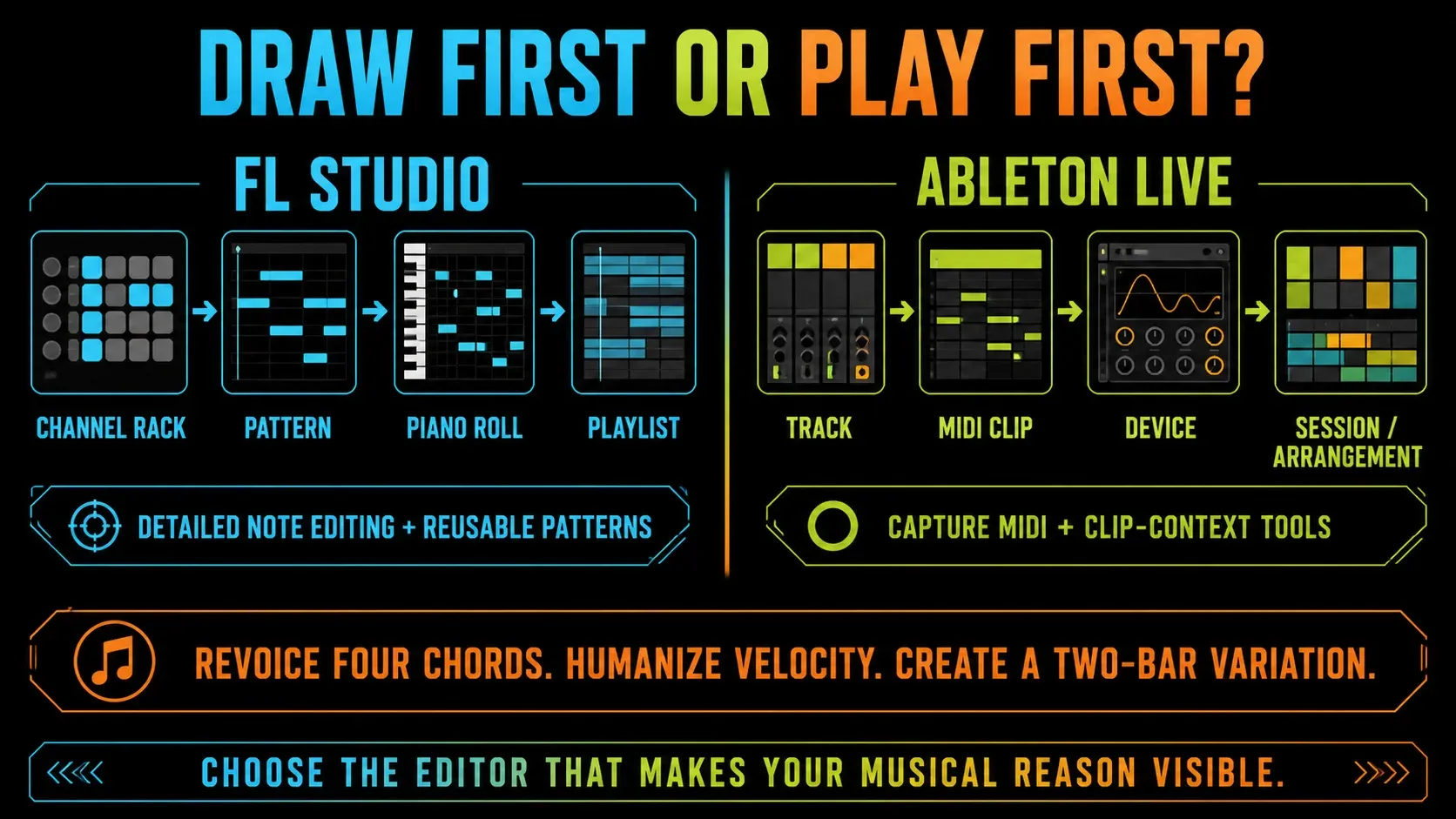
FL Studio’s Piano Roll is the reason plenty of producers never finish this comparison. Editing notes feels like playing a main instrument, not fiddling with a side panel. Patterns keep an idea reusable, the Channel Rack keeps sources in view, and the detailed note properties invite deliberate programming. If you compose by drawing drums, chords and automation before you record any audio, that preference is real.
Live’s MIDI clips sit on the track carrying the instrument and effects. Keys and Scales, MPE and note probability are available in Intro too. The edition comparison places tools such as Arpeggiate, Strum and the Stacks generator in Standard and Suite; do not confuse these MIDI Tools with the separate Arpeggiator MIDI effect. Capture MIDI retrieves notes played on a track that was armed or had monitoring enabled.
Don’t boil this down to “FL has the better Piano Roll” or “Live 12 finally caught up.” Take a four-chord progression and make three edits: change the voicing, humanize velocity without losing the intent, and build a two-bar variation. Then record a melody without pressing record first. Whichever editor makes your musical reasoning visible wins your test.
FL has a forgotten-take rescue too: Tools > Dump score log to selected pattern retrieves recently played controller or typing-keyboard notes. Its rolling log holds up to 30 minutes and clears when FL restarts. Use an empty pattern for the comparison so recovered notes do not get mixed into existing work.
Audio warping, resampling and arrangement
Ableton Live was designed around elastic audio and clip-based performance. Warp markers tie an audio clip to project time, Simpler and Drum Rack keep sample manipulation inside devices, and resampling can print a changing track or the master back to audio. There’s nothing mystical about the sound. The advantage is the short distance between hearing a timing problem, touching the clip and getting back to Arrangement.
Both now offer native stem separation, but at different paid tiers: FL’s separator is included with Producer and higher; Ableton’s requires Live 12 Suite, from version 12.3. Separation estimates parts from mixed audio. It is not the same as exporting tracks from your own session, and this comparison does not claim that either produces cleaner results on every song.
FL Studio can stretch Audio Clips, detect tempo, slice loops and resample through Edison. Producer and higher also include Slicex and Newtime. The FL time-stretching guide separates stretching from pitch-changing resampling; use it when the comparison depends on preserving a loop’s pitch.
Use that difference as a test: warp the same unstable loop, replace one drum everywhere, reverse one phrase and print a processed section in both DAWs. What you end up with matters more than a switching story from someone working on different projects.
Live performance: Ableton has the clearer default
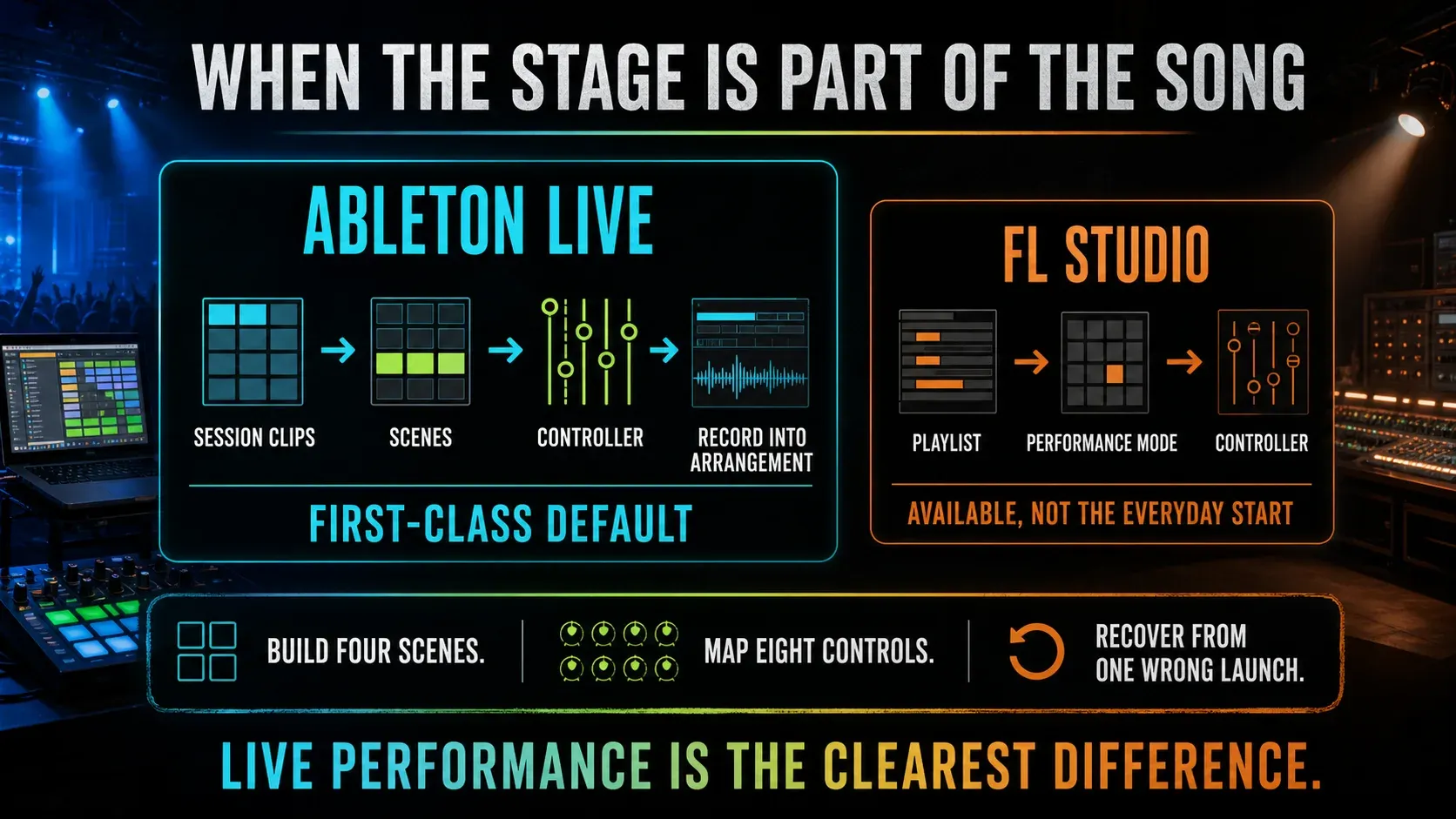
This is the clearest difference of all. Ableton’s own product description calls Live software for creation and performance. Session View launches individual clips and whole scenes in any order, keeps musical time running and can record the performance into Arrangement. Controller mapping, follow actions and clip launch behavior belong to the normal environment; they aren’t bolted on afterward.
FL’s Performance Mode can launch clips and scenes and record triggered clips back into the Playlist. It is not limited to a static backing track. Live still deserves a first trial if Session View’s clip grid is how you want to compose and perform, but this is a preference about the working environment, not an exclusive Live capability. Prepare FL Performance Mode in a separate project copy because its preparation macro changes the layout.
If “live” means recording a guitar in your bedroom, this section shouldn’t decide the purchase. If it means improvising song sections, launching stems, switching effect states and letting the set react to a room, try Session View first. Build four scenes, map eight controls, recover from one wrong launch and record the performance into Arrangement.
Mixer routing, automation and modular systems
FL Studio’s Mixer is separate from the Playlist. Instruments route to Mixer inserts, inserts route to buses and sends, and Playlist rows can stay visually independent. Once this clicks, routing is extremely flexible. Until it does, you can mute the wrong thing or automate a control without knowing which signal path owns it. The FL Studio Mixer guide exists because this mental model has a real learning cost, and there’s no point hiding that.
Live puts a track’s mixer controls and device chain inside that track. Racks combine devices and Macros, routing and return tracks stay close to the signal source, and Arrangement automation belongs to the track/device parameter. That usually makes signal ownership easier to see, though a deep Live Set can still get complicated.
FL’s Patcher workflow can turn multiple instruments, effects, event routes and Control Surface parameters into one reusable system. Live’s Instrument and Audio Effect Racks offer parallel chains and Macros; Suite adds Max for Live for custom devices and deeper extension. Do not compare the logos. Build one parallel distortion rack, expose four useful controls, automate one and explain the resulting signal path.
Automation feels different too. FL Studio often turns a parameter into a dedicated Automation Clip you can drop anywhere in the Playlist. Live shows track/device automation in Arrangement and clip envelopes where a clip calls for them. The FL Studio automation guide covers the detailed methods; here the only question is which ownership model you’ll still be able to explain tomorrow.
Stock instruments, effects and third-party plugins
Pick stock tools by the sounds and jobs you need; a device-count contest won’t tell you much. Live Intro includes Drum Rack, Simpler and the core audio effects. Standard adds tools such as EQ Eight and Audio to MIDI, and Suite includes Max for Live plus instruments such as Operator and Wavetable. Look up the named device in Ableton’s edition table, because the shop summary and the detailed table don’t always show matching totals.
FL Studio spreads native tools across four editions. Fruity and Producer cover the core workflow; Signature and All Plugins add more Image-Line instruments and effects. The site’s stock-plugin learning order shows why ten well-understood native tools are more useful than an expensive complete list.
Both support third-party plugins, but collaboration still depends on matching formats, versions and licenses. An FLP cannot open as a Live Set, or vice versa. Export aligned audio stems, send MIDI and note the tempo and sample rate. Render sounds the recipient cannot reconstruct; freezing alone does not create a universally portable file. A shared free plugin helps only if both computers can run the required format and build.
Price in 2026: compare usable tiers, not matching stickers
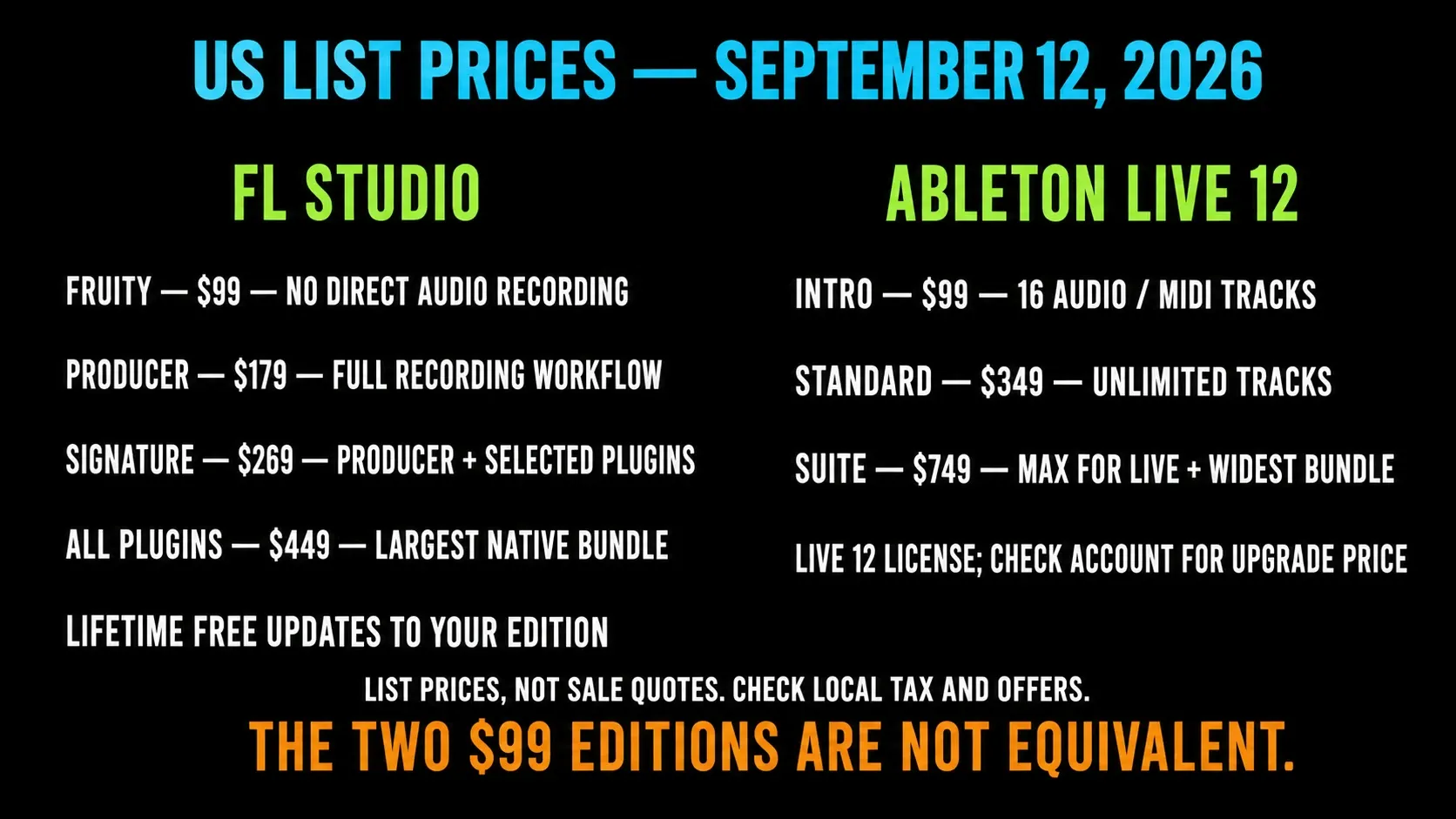
These are US list prices checked on September 12, 2026, not guaranteed checkout quotes. The official Image-Line shop also displayed a discounted All Plugins offer in its US search listing during this check. Confirm live offers, region, tax and any account-specific upgrade before paying; do not assume that the largest edition always costs its full list price.
| Product | US list price | Practical boundary | Update model |
|---|---|---|---|
| FL Studio Fruity Edition | $99 | No direct audio recording; restricted Audio Clip workflow | Lifetime Free Updates to the edition |
| FL Studio Producer Edition | $179 | Full Playlist and audio recording workflow | Lifetime Free Updates to the edition |
| FL Studio Signature Bundle | $269 | Producer plus selected premium Image-Line plugins | Lifetime Free Updates to included products/edition |
| FL Studio All Plugins Edition | $449 | Largest current native Image-Line bundle | Lifetime Free Updates with documented edition exceptions |
| Ableton Live 12 Intro | $99 | 16 audio/MIDI tracks; core recording, comping and Session/Arrangement workflow | Live 12 license; no lifetime-version promise |
| Ableton Live 12 Standard | $349 | Unlimited tracks, expanded devices and 38+ GB advertised sounds | Live 12 license; account shows eligible upgrade pricing |
| Ableton Live 12 Suite | $749 | Widest Live bundle, Max for Live, stem separation and 71+ GB advertised sounds | Buy once or current $31.21/month rent-to-own |
Compare the Image-Line shop and Ableton Live shop with the same region selected. FL’s Lifetime Free Updates apply to your purchased edition, not every future optional plugin, higher edition or paid FL Cloud service. Ableton charges for major-version upgrades; a Live 12 license is not an annual renewal obligation.
If you need recording, compare Producer’s $179 list price with Intro’s $99 price and 16-track ceiling, then Standard’s $349 tier. Fruity can suit pattern-led work but has no direct audio recording and permits only eight Audio Clips. Use the FL Studio editions guide for the detailed FL-only purchasing decision.
Monthly payments need a separate comparison. Live Suite’s rent-to-own plan leads to ownership after 24 payments; the US new-license offer was $31.21 per month at this check. FL’s Rent-to-Own Plus costs more overall than buying outright. The pricing page describes 12 payments to own FL Studio, while the bundled FL Cloud service continues until cancelled. Compare the total and ongoing services, not just the monthly number.
Trials, computers and performance claims
The standard FL Studio trial has no time limit: you can save and export, but cannot reopen saved FLPs until you purchase a suitable license. Check the plugins used as well as the edition. Live’s Suite trial runs for 30 days with saving and export enabled; after expiry, it can open Sets but cannot save or export them.
Protect the FL test before saving or closing: render any trial-only plugin sound you need to keep, and preserve the original project separately. If a project later opens with unlicensed-plugin placeholders, do not overwrite that original. Export your mix and stems while they still play correctly. In Live, check the edition you intend to buy too: Suite trial devices are not automatically included in Intro or Standard.
Both have Windows and macOS versions, but an older computer still needs checking. Live 12 lists 8 GB RAM, about 8 GB for the Mac base installation, and about 5.7 GB on Windows with 8 GB free recommended. Optional sound content needs much more space. FL’s installer page lists at least 4 GB RAM and 4 GB free disk. These are installation minimums, not promises about plugin counts or low-latency performance.
Ignore universal CPU-winner claims. Open the same third-party synth, use the same audio file, choose the same sample rate and buffer, then add identical processing while you watch the real-time meter. Keep monitoring quiet and stop at the first dropout instead of pushing the system into sustained glitches. The FL Studio audio-settings guide can stabilize one side of that test, but it can’t make two audio engines, plugin wrappers and projects mathematically identical.
Who should choose FL Studio?
- You hear ideas as drum patterns, Piano Roll notes and repeatable musical blocks.
- You want a low-cost full recording tier and value Lifetime Free Updates.
- You enjoy flexible Playlist placement, separate Mixer routing and modular Patcher systems.
- You already finish work quickly in FL and the attraction to Live is mostly interface novelty.
- Your collaborators exchange stems/MIDI or already share an FL Studio setup.
Don’t choose FL Studio because someone calls it the hip-hop DAW. Choose it because the Channel Rack, Piano Roll and Playlist path helps you turn a beat into an arrangement without losing the musical idea.
Who should choose Ableton Live?
- You improvise with clips and want that performance to become the arrangement.
- You repeatedly record, comp, warp, resample and rearrange audio.
- You prefer tracks, devices and mixer ownership to remain visibly connected.
- You perform with scenes, controllers, stems or effect-state changes.
- Your collaborators and shared studios already use Live Sets, Packs or Max for Live devices.
Don’t choose Live because someone calls it the professional electronic-music DAW. Choose it because Session and Arrangement match the way you already move from improvisation to a finished timeline.
Should an FL Studio user switch to Ableton?
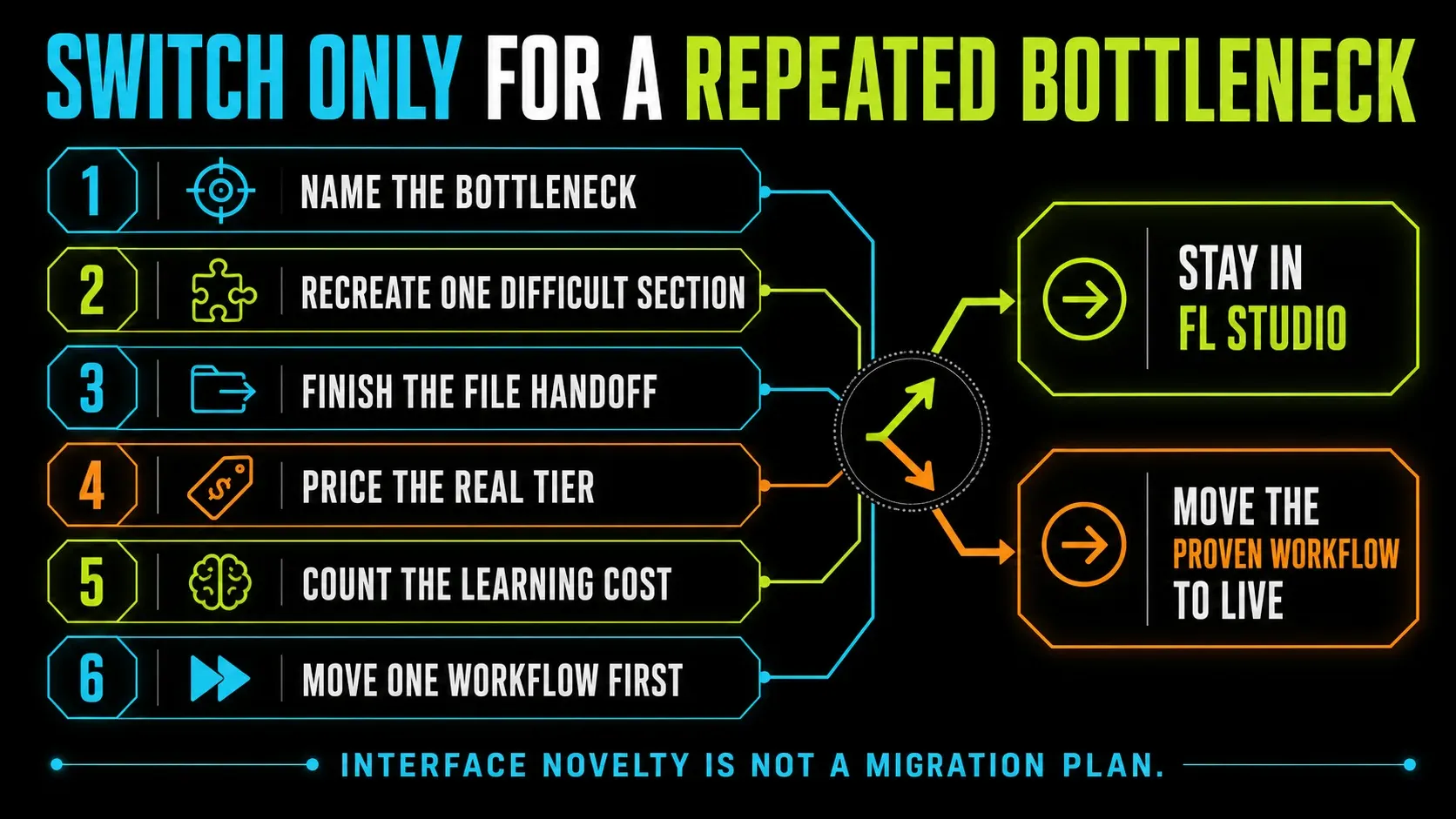
Switch only for a repeated bottleneck you can reproduce. “Live looks cleaner” isn’t reason enough to rebuild templates, shortcuts, plugin folders, presets and muscle memory. “I comp vocals every week and lose the arrangement while jumping between windows” is specific enough to test.
Working in both still makes sense when each DAW owns a repeatable stage: Live can handle performance or audio reshaping while FL keeps composition and pattern reuse. That split is a workflow choice. It isn’t a verdict for every file.
- Name the bottleneck. “Audio edits take too long” is testable; “FL feels old” is not.
- Recreate one difficult section in Live. Use the same files, tempo, target and plugin limits.
- Finish the handoff. Export stems, reopen the set and send it to the person who would receive it.
- Price the real tier. Include the edition, missing devices, upgrade path and any controller you actually need.
- Count learning cost. Rebuild only the templates and shortcuts essential to your weekly work.
- Move one workflow first. You can resample, perform or edit audio in Live while FL remains the main composition DAW.
Using both is fine when the boundary is clear. Bounce a melody or performance to WAV, move stems and MIDI, and keep the native project that owns the next edit. Two DAWs only become wasteful when neither one owns the final decision.
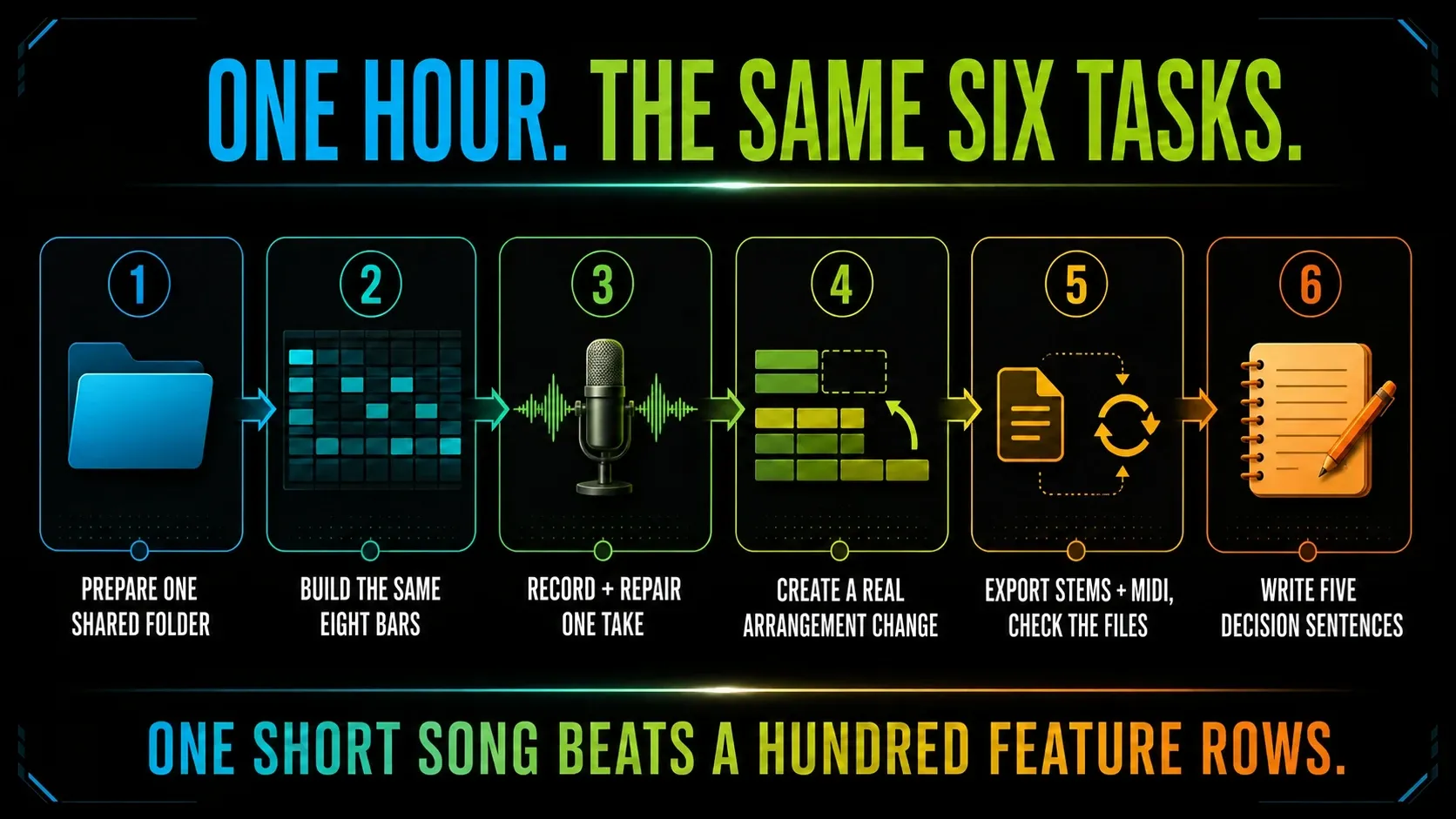
Run this one-hour trial test before choosing
- Prepare one shared folder. Add three drum one-shots, one loop, one vocal phrase and one MIDI chord progression.
- Build the same eight bars. Program drums, bass and chords without watching a start-to-finish tutorial.
- Record and repair one take. Comp or trim the phrase, align one problem and add a shared space effect.
- Create a real arrangement change. Make a verse/drop variation, automate one parameter and replace one drum everywhere it should change.
- Print and move the work. Export a stereo mix, aligned audio stems and MIDI, then check the files. Reopen the native project only if your license allows it.
- Write five sentences. Record what felt clear, what broke, what you looked up, what the usable tier costs and which DAW you want to open tomorrow.
In FL’s standard trial, complete the audio exports before closing; do not make reopening the FLP a required test. Render trial-plugin audio before saving if needed, and never overwrite a project that reopens with missing trial-plugin data. In Live, finish saving and export before the 30-day trial expires. The hour is a suggested exercise, not a promise that setup and every export will take exactly sixty minutes.
Frequently asked questions
Is Ableton better than FL Studio?
There’s no universal winner. Ableton Live is the stronger default for Session View clip launching, a connected track/device workflow and live performance. FL Studio is the stronger default for pattern building, detailed Piano Roll work, flexible routing and long-term update value. Test the task you repeat that matters most to you.
Is FL Studio or Ableton better for beginners?
If you’re a beginner who wants to draw drum patterns and notes, FL’s Channel Rack and Piano Roll make a sensible first trial. If you’d rather see tracks with their devices visibly connected, start with Live, but try FL’s Track Mode before ruling it out. Neither is automatically easier for everyone. Compare the same eight-bar song and the questions you had to look up along the way.
Which is better for beat making, Ableton or FL Studio?
FL Studio is an excellent first choice when beat making means step sequencing, Piano Roll editing and arranging reusable patterns. Ableton is an excellent choice when beats grow from audio clips, Drum Rack, resampling or live scene combinations. Genre alone does not decide it.
Which is better for recording vocals?
Ableton Live keeps recording, comping, clips and devices close to the same track. FL Studio Producer Edition and above can record and edit vocals fully, but the workflow crosses the Mixer, Playlist and sometimes dedicated editors. Record and comp the same three takes before choosing.
Is Ableton more CPU efficient than FL Studio?
There is no reliable universal answer. CPU load changes with the audio driver, buffer, sample rate, plugin format, oversampling, device chain, routing and computer. Compare one controlled project on your hardware and listen for real-time failure instead of trusting a cross-version benchmark.
Can FL Studio projects open in Ableton Live?
No. FLP and Ableton Live Set files are different native formats. Move a project with consolidated WAV stems, MIDI, tempo and sample-rate notes. Print any third-party or native device the other producer cannot install or reconstruct.
Which DAW is cheaper in 2026?
At US list prices checked on September 12, 2026, FL Producer provides full audio recording for $179, compared with $349 for Live Standard. Live Intro costs $99 and records audio but allows 16 audio/MIDI tracks. FL includes future updates to the purchased edition. Promotions, tax, required devices and upgrade eligibility can change which purchase costs less.
Can I install Ableton or FL Studio on both Windows and Mac?
Yes. Both support Windows and macOS. Ableton licenses one user on two owned computers. Image-Line allows the single owner to use the FL Studio license across owned Windows and Mac machines. Check each current system-requirements page before assuming an older computer is supported.
The useful verdict
Choose FL Studio when reusable patterns, detailed Piano Roll edits and its update policy suit the songs you make. Choose Live when Session View, connected track devices and audio reshaping are central to your process. Neither choice rules out recording, beat making or performance in the other program.
If you still can’t decide, make the same short song in both trials and keep the exports. Write down which routing decisions made sense to you and which tasks you had to look up again and again. Use the Compare & Buy route to pick an edition only once you know which workflow you want to keep.