FL Studio
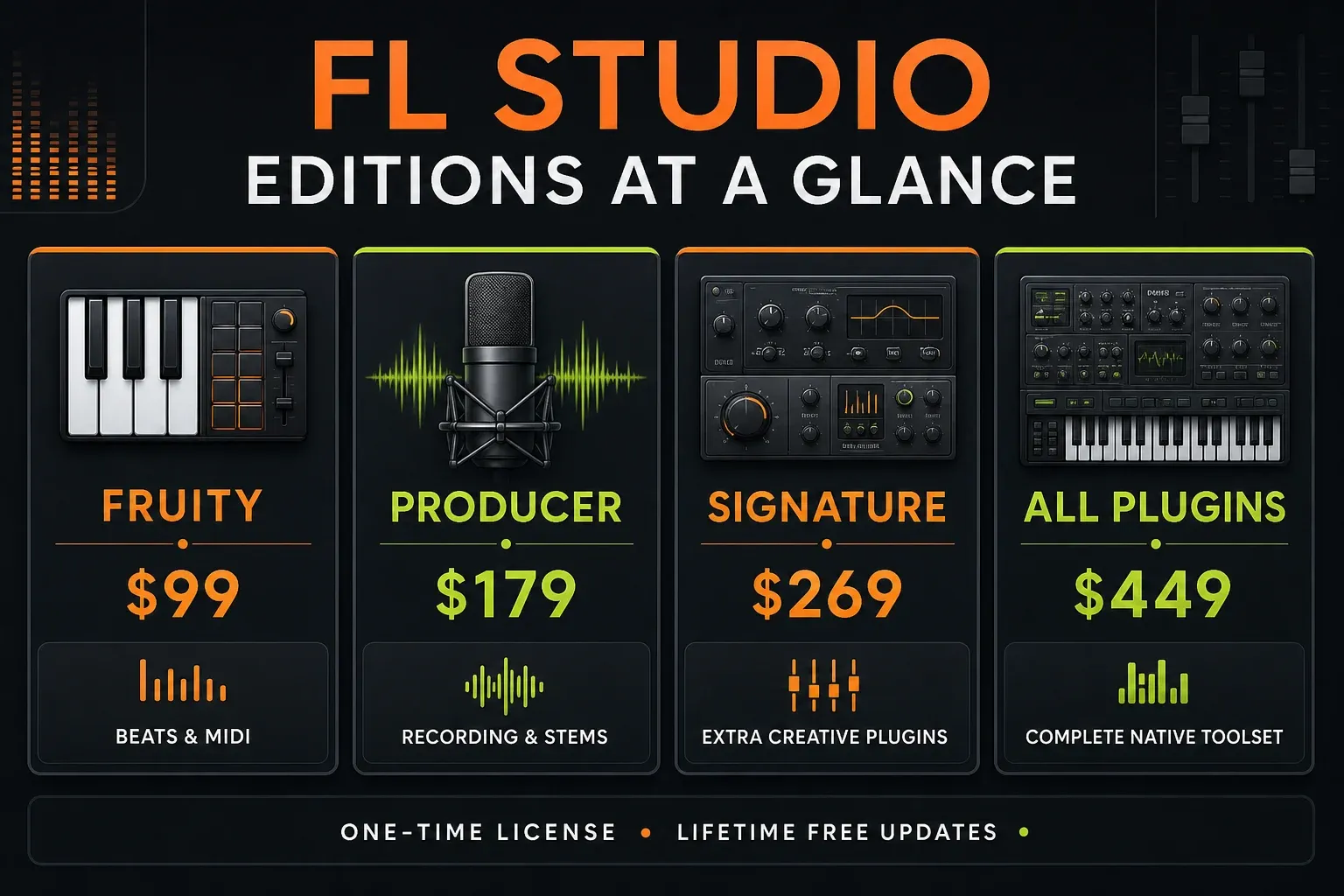
FL Studio's regular US list prices run from $99 to $449 as a one-time purchase. Fruity Edition costs $99, Producer Edition $179, Signature Bundle $269 and All Plugins Edition $449, and every paid edition includes Lifetime Free Updates. There's also a time-unlimited trial, but it cannot reopen saved projects.
If you want to make complete songs, Producer Edition is the sensible starting point. It records vocals and instruments, lets you use audio clips without limits and separates stems. Fruity Edition is cheaper, but the missing recording tools start to hurt fast once you work with microphones, guitars or long audio takes.
The regular list prices and features below were checked against Image-Line's current FL Studio pricing and edition comparison. Regional pricing, tax, promotions and reseller deals can all change what you pay at checkout.
FL Studio prices at a glance
| Edition | Regular US list price | Best for | Main limit or reason to upgrade |
|---|---|---|---|
| Fruity Edition | $99 | MIDI, beat sketches, and pattern-based production | No audio recording; up to eight Audio Clips in the Playlist |
| Producer Edition | $179 | Complete songs, vocals, instruments, sampling, and mixing | Fewer premium native plugins than higher bundles |
| Signature Bundle | $269 | Producers who specifically want Image-Line's extra creative and vocal tools | Not every native plugin is included |
| All Plugins Edition | $449 | Sound designers and heavy users who want the complete native collection | Highest upfront cost |
These are perpetual desktop licenses, so there's nothing to renew each year. In some regions Image-Line also offers Rent-to-Own Plus, a payment option separate from the normal one-time prices. After 12 successful monthly payments the FL Studio license is yours, while the bundled FL Cloud service continues until you cancel it.
Is FL Studio free?
FL Studio isn't free forever as a licensed product, but the official trial is unusually generous. Image-Line says the standard trial has no time limit and no audio watermark. You can use the installed instruments and effects, record audio, save projects and export finished audio.
The catch is easy to miss: the normal trial cannot reopen a saved project. You can save an FLP file, but you have to buy an edition before you can load that project again. Image-Line's current trial documentation also lets you try different edition modes from the Welcome window.
That makes the trial great for testing your computer, audio interface, MIDI keyboard and basic workflow, and risky for a project that stretches over several days. If you close FL Studio before exporting, the saved session stays locked until you buy a license.
Only download the trial from Image-Line's official FL Studio download page. Crack and torrent sites aren't a free edition; they bring security and update risks and sit outside legitimate licensing.
What each FL Studio edition actually gives you
Fruity Edition: $99
Fruity Edition is the cheapest paid license. It includes the core FL Studio workflow: Piano Roll, Channel Rack, Mixer, automation, built-in instruments and effects, third-party plugin support and Lifetime Free Updates.
The limit is audio. Fruity Edition doesn't include direct audio recording and caps you at eight Audio Clips in the Playlist, a limit Producer removes. Fruity can still turn out finished electronic tracks when the work stays mostly in MIDI, patterns, one-shots and instruments. It's a poor fit for singers, guitarists, podcasters or producers who edit long recordings regularly.
Only buy Fruity if you're comfortable with that line. Starting cheap won't ruin you, because Image-Line lets you upgrade later, but the limit can trip up a new producer right when they try to record their first vocal.
Producer Edition: $179
Producer Edition is the best default buy for most beginners and working producers. It adds audio recording and the full audio-clip workflow, and the current edition comparison includes stem separation from Producer upward.
This is where FL Studio becomes the complete production environment most buyers have in mind: record a microphone or guitar, arrange takes, edit audio, build songs, mix, export and reopen the project later. You can use third-party plugins too, so you're not pushed into a pricier bundle just to add a particular synth or effect.
If you can stretch to the extra $80 over Fruity, Producer usually saves you an early upgrade and leaves more money for gear that directly changes your recordings, like an interface, microphone, headphones or room treatment.
Signature Bundle: $269
Signature is Producer Edition plus a chosen set of Image-Line plugins, and the extra $90 only pays off when those tools fit work you already do. Image-Line's current edition comparison lists tools such as Gross Beat, NewTone, Pitcher and Harmless in Signature. Harmor isn't in Signature; it comes with All Plugins Edition.
Don't buy Signature because the name sounds more professional. Producer and Signature share the same core DAW, and your exported audio sounds no worse from Producer. The higher price gets you more bundled tools, and the mix engine stays the same.
All Plugins Edition: $449
All Plugins Edition combines the full FL Studio feature set with Image-Line's native instrument and effect collection as it stands when you buy. It's the paid edition that comes closest to the broad plugin access you see in trial mode.
Whether it's worth it depends on how much you want that native collection. A producer who already owns third-party synths and effects may get little out of spending another $270 over Producer. A sound designer who wants to explore Image-Line's whole ecosystem without buying plugins one by one has an easier case for it.
“All Plugins” means Image-Line's bundled native FL Studio collection. It doesn't cover VST or AU licenses, third-party plugins or every FL Cloud product. Lifetime Free Updates covers the products included with your edition, but Image-Line says a brand-new product added later isn't automatically guaranteed. If one named plugin is the reason you're buying, check the live comparison before buying.
Which FL Studio edition should you buy?
Base the choice on the work you'll do in the next six months, not on a studio you might have one day.
- Buy Fruity Edition if you make MIDI-first beats, don't record audio and can't spend more than $99.
- Buy Producer Edition if you want to record vocals or instruments, arrange audio freely, make complete songs, or just steer clear of the main entry-level limits.
- Buy Signature Bundle if you can name the included premium plugins you'll use and they're worth more to you than the $90 step up from Producer.
- Buy All Plugins Edition if you specifically want Image-Line's complete native toolset and would rather make one bigger purchase than pick plugins individually.
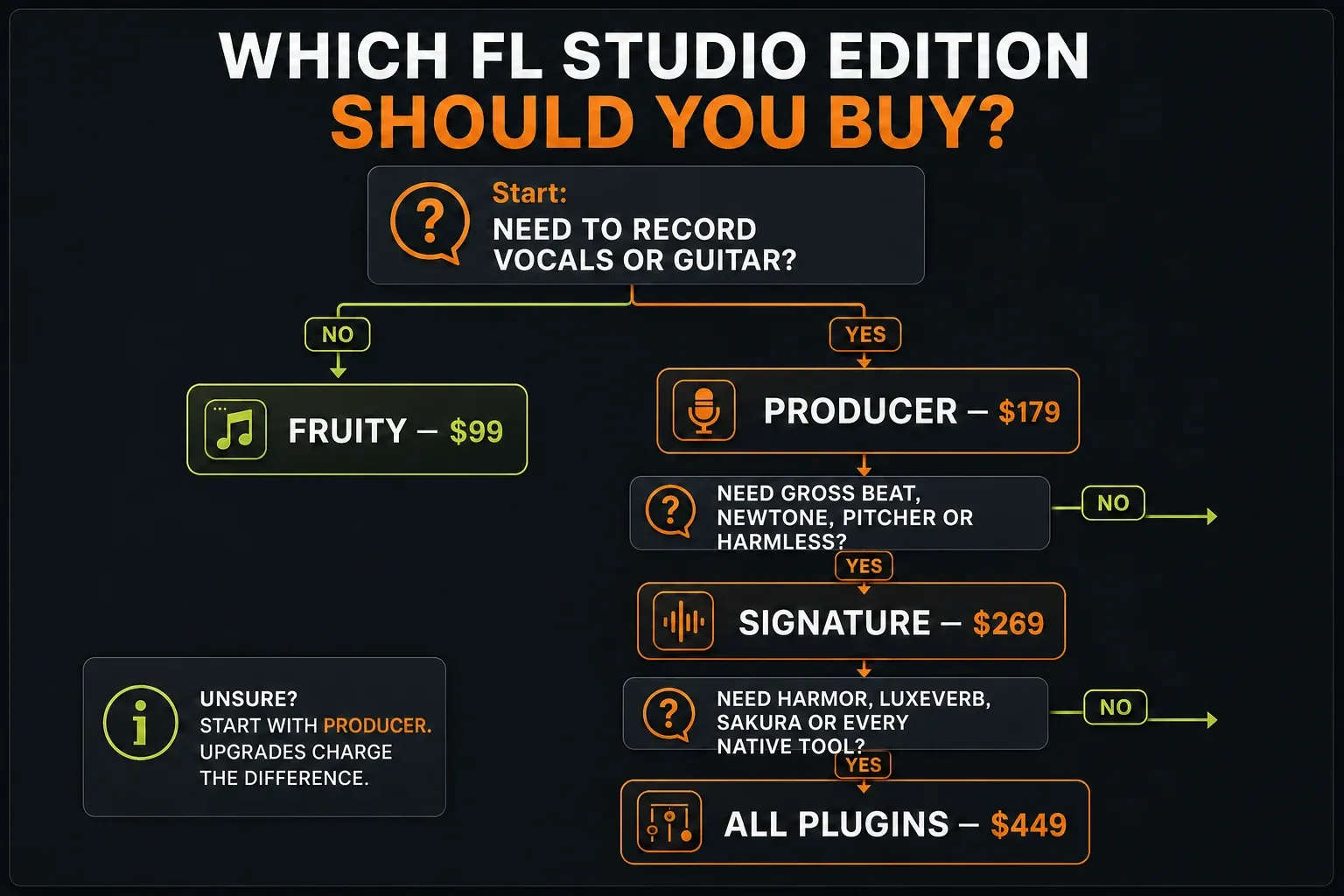
My practical recommendation is Producer Edition. The $179 license covers what most people mean when they say they want FL Studio, without making them pay for a big plugin bundle before they know what they like.
Choosing an edition tells you what FL Studio unlocks, not whether its workflow suits you. If you're still weighing up the DAW itself, compare Ableton and FL Studio by the work you actually do. If stem extraction is what's pulling you toward Producer, read up on the FL Studio stem-separation workflow and its limits before paying for an edition because of one tool. Once you've decided, the first-song tutorial is the quicker path from license to a finished export.
Is FL Studio monthly or a one-time purchase?
The standard FL Studio editions are one-time purchases. Image-Line describes them as perpetual licenses and includes Lifetime Free Updates for the edition you own, so a future FL Studio version won't send you a separate upgrade bill for the same tier.
FL Cloud works differently. It's an optional set of sounds, plugins, mastering and distribution services with free and paid tiers, and you don't need a paid FL Cloud plan to keep using an FL Studio edition you bought. Image-Line's current FL Studio FAQ separates the perpetual desktop license from FL Cloud subscriptions and confirms that one desktop license covers Windows and macOS for its owner. FL Studio Mobile is sold separately.
The newer Rent-to-Own Plus offer can spread FL Studio and FL Cloud over monthly payments in eligible regions. It doesn't turn the normal desktop license into subscription-only software. Image-Line's current Rent-to-Own terms only grant the perpetual software license once all required payments are made, so read the checkout terms carefully and remember that the software you own is separate from the cloud service, which continues until canceled.
Can you upgrade later without buying FL Studio twice?
Yes. Image-Line says an edition upgrade charges you the difference, not the full price of the higher edition. So moving from Fruity to Producer keeps the value of the license you already paid for, subject to the price and tax your account shows at checkout.
That makes Fruity a reasonable budget pick. It still isn't the best choice if you already know you'll record. Buying Producer up front saves you from stopping mid-session to unlock a missing feature.
Projects made in the trial can be reopened once you buy the edition they need. Watch out for plugins, though. If a project uses a native plugin that isn't part of the edition you buy, that plugin can stay in trial mode even after the main FL Studio app is unlocked. Image-Line explains the difference in its trial and edition support note.
Extra costs to budget for
FL Studio may be only one piece of your setup. None of these purchases are required, but they change what you'll really spend:
- Sales tax or VAT, depending on location and checkout method.
- An audio interface and a microphone for recording.
- Wired headphones or studio monitors.
- Optional third-party plugins and sample libraries.
- Optional paid FL Cloud service.
- A bigger SSD if your projects and sample libraries outgrow the computer.
Start with the trial and the gear you already have. If you hear a noticeable delay while playing or recording, work through our FL Studio audio settings guide before assuming a pricier edition will fix it, because license tiers have no effect on audio-driver latency.
The shortest buying answer
If you only want to try FL Studio, download the time-unlimited official trial and export anything important before you close the project. If you want a paid version for full song production, buy Producer Edition for $179. Choose Fruity only for a deliberately MIDI-first workflow, and go above Producer only for specific bundled plugins you already know you need.
Once you've picked a license, use the FL Studio guide library to move from installation and setup to recording, mixing and sound design without buying tools you don't need yet.
Frequently asked questions
How much is FL Studio on PC?
The regular US desktop list prices are $99 for Fruity, $179 for Producer, $269 for Signature and $449 for All Plugins. The same license works for its owner on both Windows and macOS, so there's no separate Mac edition to buy.
How much is FL Studio per month?
The normal FL Studio editions are one-time purchases with no monthly subscription. Rent-to-Own Plus may be available in some regions: after 12 successful monthly payments the FL Studio license is yours, while the bundled FL Cloud service continues until you cancel.
Is FL Studio free forever?
The official trial has no time limit, but it cannot reopen saved projects. A paid edition removes that restriction and includes Lifetime Free Updates for the edition you own.
Is FL Studio Producer Edition worth it?
Producer is the best-value tier for most people, because it includes audio recording, full audio-clip editing, stem separation and the core tools you need to finish songs. Fruity costs less but leaves out recording.
Does FL Studio ever go on sale?
Image-Line and authorized retailers do run promotions, but when sales happen and how big the discounts are isn't guaranteed. Compare the current official checkout price and check the reseller is authorized, instead of planning around an old Black Friday price.
Do I pay for FL Studio updates?
No. Every paid FL Studio edition includes Lifetime Free Updates for that edition. You only pay if you choose to move up to a higher edition or add a separate paid service or product.