FL Studio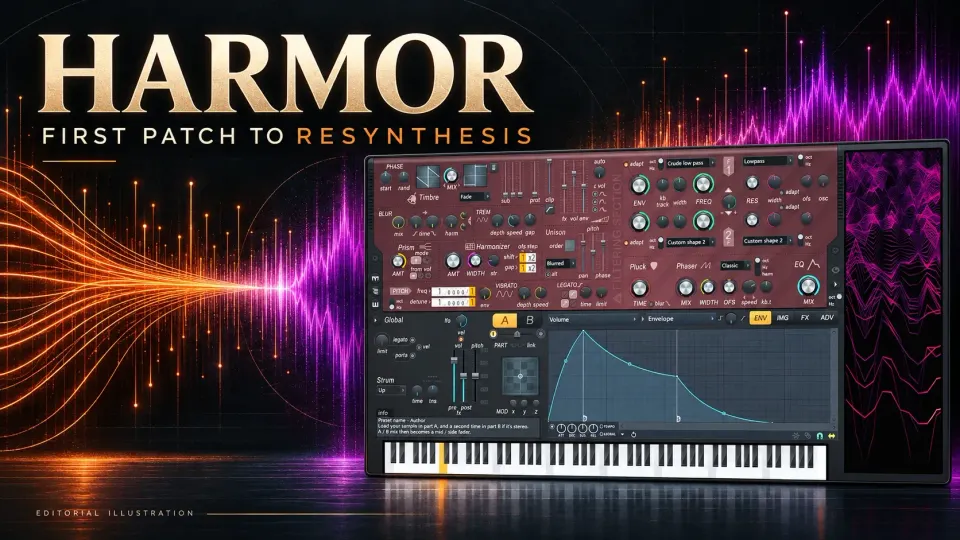
To learn Harmor in FL Studio, build one dry Part A patch before opening the resynthesis tools. Pick a timbre, shape its volume envelope, set the filter, then add one kind of movement. Once that sound works in a short phrase, try unison and effects. That way you hear what each change adds, and you don't have to pick apart a finished preset.
Harmor's additive engine can also turn audio into a playable spectrum. That opens the door to sample-based textures, time scrubbing and image synthesis, and it brings two practical checks with it: whether your Harmor instance is licensed, and whether the project can still find its source audio. Sort out both before you close a session.
What Harmor is—and what it is not
Harmor builds sound from sine-wave components called partials, each with its own frequency, level and phase. The Harmor manual specifies up to 516 partials per note, per unison voice. Its familiar filter controls shape that partial data before the engine produces audio. So even with the filter in play, Harmor never becomes an ordinary recorded-waveform oscillator followed by an analog-modelled filter.
You don't have to draw hundreds of partials. Start with a useful spectrum and change its shape. If oscillator, filter and envelope are still unfamiliar words, begin with the 3xOSC beginner guide and come back to Harmor when you want spectral control or resynthesis. The Sound Design learning routes place this instrument next to the more focused bass and modulation lessons.
Check the license before relying on a patch
Image-Line's current edition comparison lists Harmor in All Plugins Edition and leaves it out of Fruity, Producer and Signature Bundle. A separately owned Harmor license can change what you're entitled to. Seeing the plugin in your installation doesn't mean it's unlocked.
Two different trial restrictions apply here. The FL Studio application trial lets you save projects, but reopening them requires an FL Studio license. On top of that, an unlicensed Harmor instance can be a trial plugin inside a paid edition. Under the current trial-plugin rules, it's replaced by an empty channel when the project reopens, unless you buy and unlock it first. Do not overwrite that reopened project with Harmor missing: doing so loses the stored trial-plugin settings. Keep the original file, and export an audio reference while the sound still plays.
This guide covers Harmor inside desktop FL Studio. Older videos also show the separate VST version. Image-Line has discontinued new VST plugin registrations, though previous owners can still reach their registrations. So a current native Harmor entitlement probably won't get you a newly purchasable standalone VST for another DAW.
Read the interface as five working zones
The two Timbre windows and their MIX control sit at the top left, with the filters at the top right. A/B picks which synthesis part you're editing. The ENV, IMG, FX and ADV tabs switch the lower working panel. The tall visual-feedback display on the right shows partials for the last note you played, so don't treat it as a spectrum editor for a whole chord.
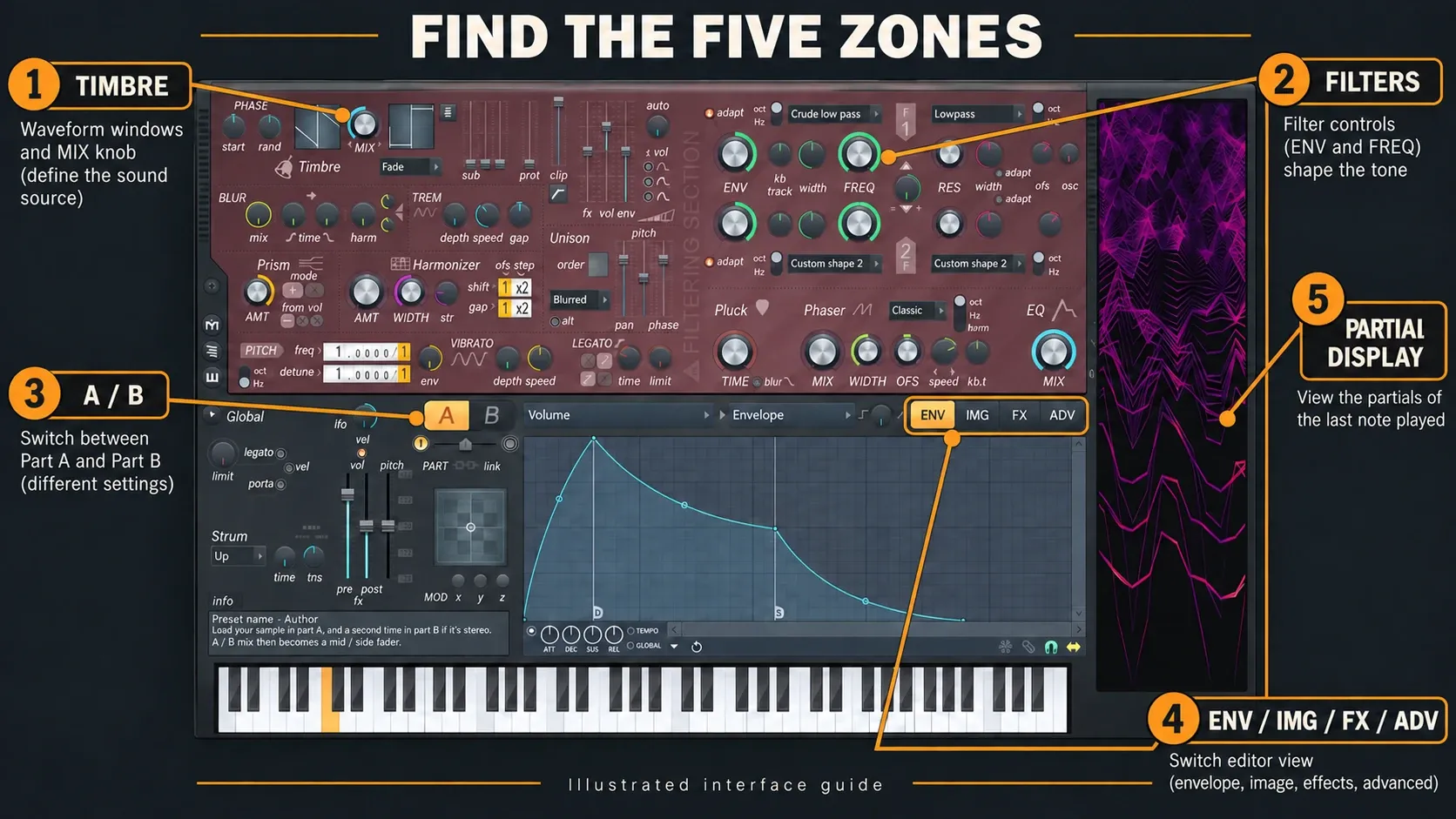
ENV holds modulation targets and the sources that articulate them, so it's much more than one envelope. IMG handles audio and image resynthesis. FX contains the output effects: distortion, chorus, delay, reverb and compression. ADV includes the unit order for each part and the global effect order. Read the sequence in this guide as a learning order, because Harmor's processing order can be changed and its filters can work in series or parallel.
Keep visual feedback open while it helps you understand a change, then close it if the patch is straining the processor. The manual warns that the display itself uses a lot of CPU. A busy spectrum can't tell you whether the part fits the song.
Start from an initialized patch, not a finished demo
Add Harmor as an instrument and pick an initialized/default starting preset. Work on Part A, with Part B inactive and unneeded effects off. Play a short phrase with a low note, a high note and a chord. It's a listening exercise; no single preset or octave suits every bass, lead or pad.
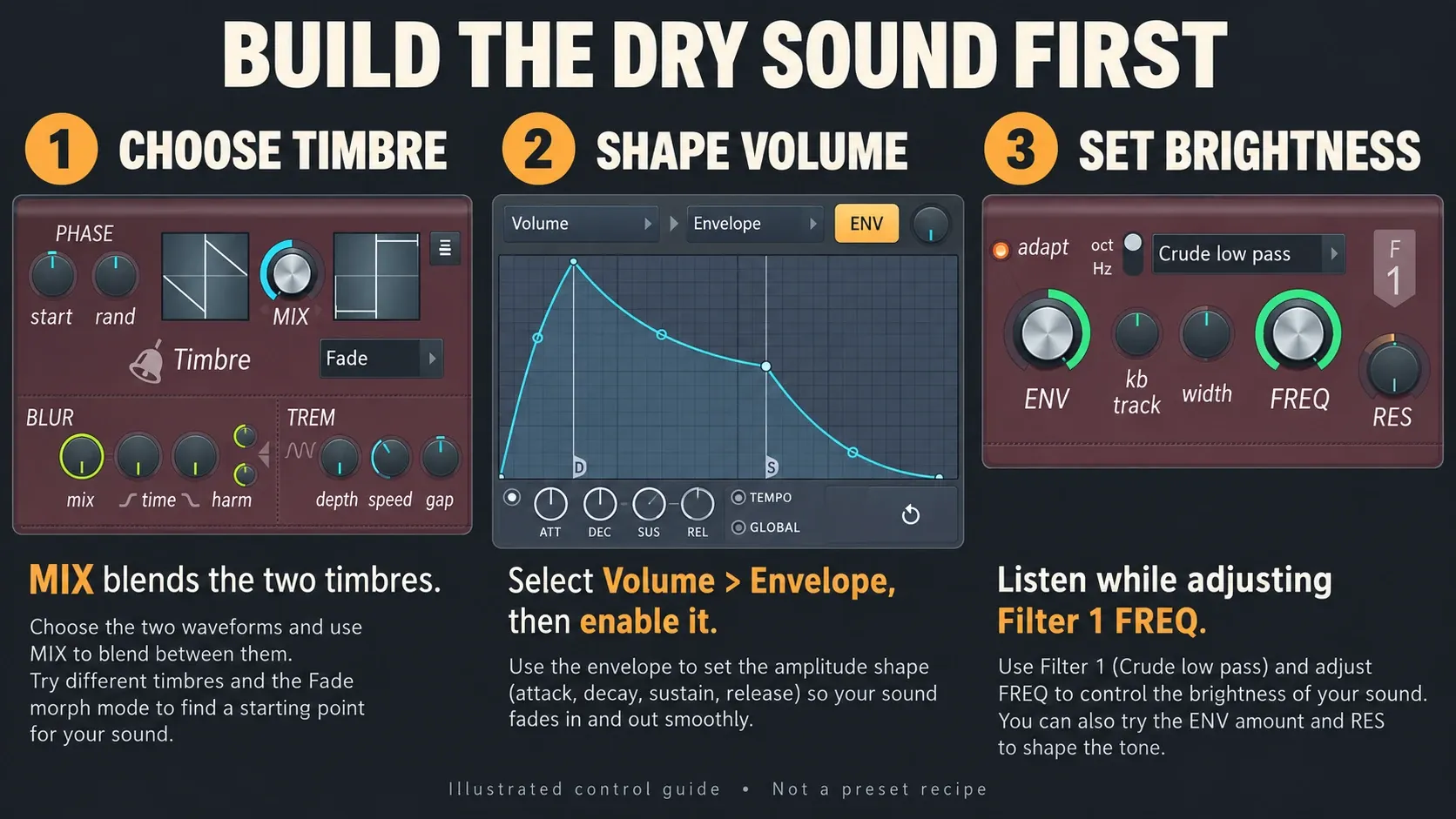
The default timbres are saw-like and square-like. In Fade mode, the Timbre MIX control blends them, so it doesn't act as a separate volume knob for Timbre 2. Start at the Timbre 1 end of that blend, then listen as you bring in Timbre 2. Set the part's pitch separately. If you'd rather choose a finished sound and make small tweaks, use the FLEX preset workflow instead.
Send Harmor to a named Mixer insert and leave room for later effects. Compare changes at similar loudness, because a jump in level can hide a worse tone. The Mixer routing guide deals with the routing and gain decisions; here the job is to build a usable instrument patch.
Shape partials with Timbre, filter, Prism and Harmonizer
Timbre sets the recipe of partials. A low-pass filter can pull down the upper partials and soften the result. Start with Filter 1 FREQ and a small resonance change before you draw custom curves or change the filter order.
Prism shifts partial frequencies. Depending on its amount, mode and mapping, it can push a harmonic tone toward something inharmonic or metallic. Harmonizer clones and transposes partials instead. They're different operations, so learn one before you combine them.
Pluck controls frequency-dependent decay, and its default shape makes high frequencies die away before low ones. Phaser creates spectral cancellations and can apply cancellation patterns to individual harmonics. Lumping all of these together as a “phase effect” hides the difference you need when choosing one.
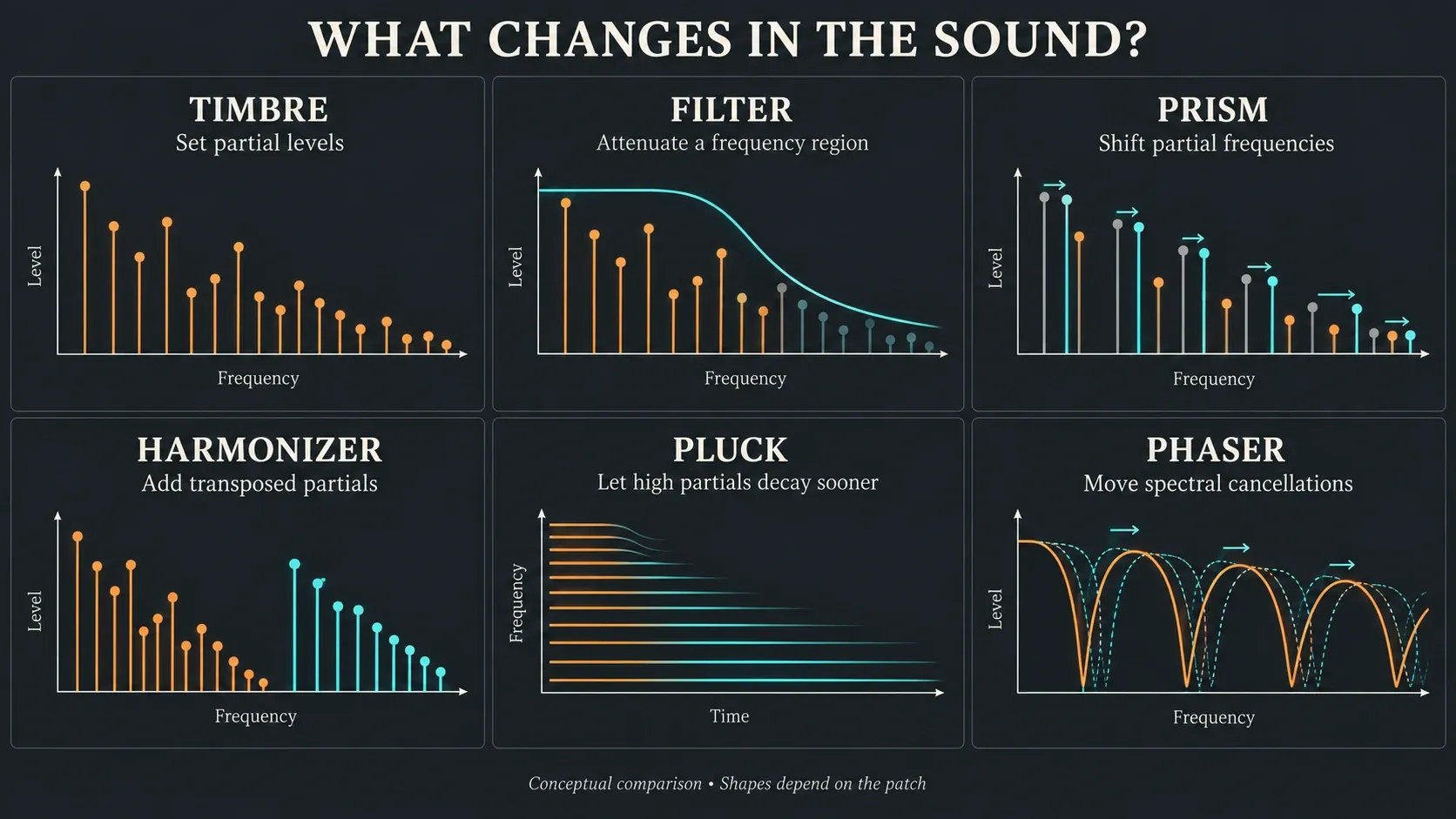
Loop the same phrase three times, changing only the filter, then only Prism, then only Harmonizer. Go back to the starting patch between comparisons and match the levels. Put each result into plain words, like duller, more metallic or denser, before you layer effects. For a specific bass recipe instead of an instrument overview, follow the Sytrus Reese bass lesson.
Use the ENV editor without getting lost
The first selector picks what changes; the second picks what drives it. Volume → Envelope controls a note's level over time. Filter 1 frequency → Keyboard mapping makes the filter respond to the note you play. If you can't find a control in the list, right-click it and choose Edit articulator.
For the first patch, select Volume and Envelope, switch the envelope on with the switch at the lower left, then edit the points. Use a quick attack and short decay for a pluck, or a slower attack and longer release for a pad, and adjust to the phrase instead of copying a fixed number.
Why do the ATT, DEC, SUS and REL knobs spring back? They're relative modifiers, and they behave differently from ordinary fixed ADSR dials. The manual explains that the displayed curve can snap back to how it looked while the modifier keeps changing playback. Edit the envelope points to set the base shape, and use the modifiers for relative changes and automation. If the points won't move, check FREEZE. If you hear no change, check the selected target, part and enable switch.
Several articulation sources can act on one target at the same time. Add just one filter envelope or LFO to begin with. Mod X/Y/Z mappings turn into useful performance controls later. For changes across the song, the Automation Clip workflow keeps arrangement-level movement visible in the Playlist.
Set unison for purpose, not maximum width
Harmor's unison adds subvoices to each note, and its order plus the pan, pitch and phase settings shape the result. Chorus, in the effects section, works on the combined audio instead. Try both if you need width, but compare the actual processor load, because neither name tells you which saves CPU or sounds better.
Two or three unison voices make a sensible starting point for listening; nothing forces that value. Spread pitch and pan gently. Compare low and high notes, then stereo and mono. A higher order means more synthesis work, and the manual warns that phase settings which smooth high notes can make low notes noisy.
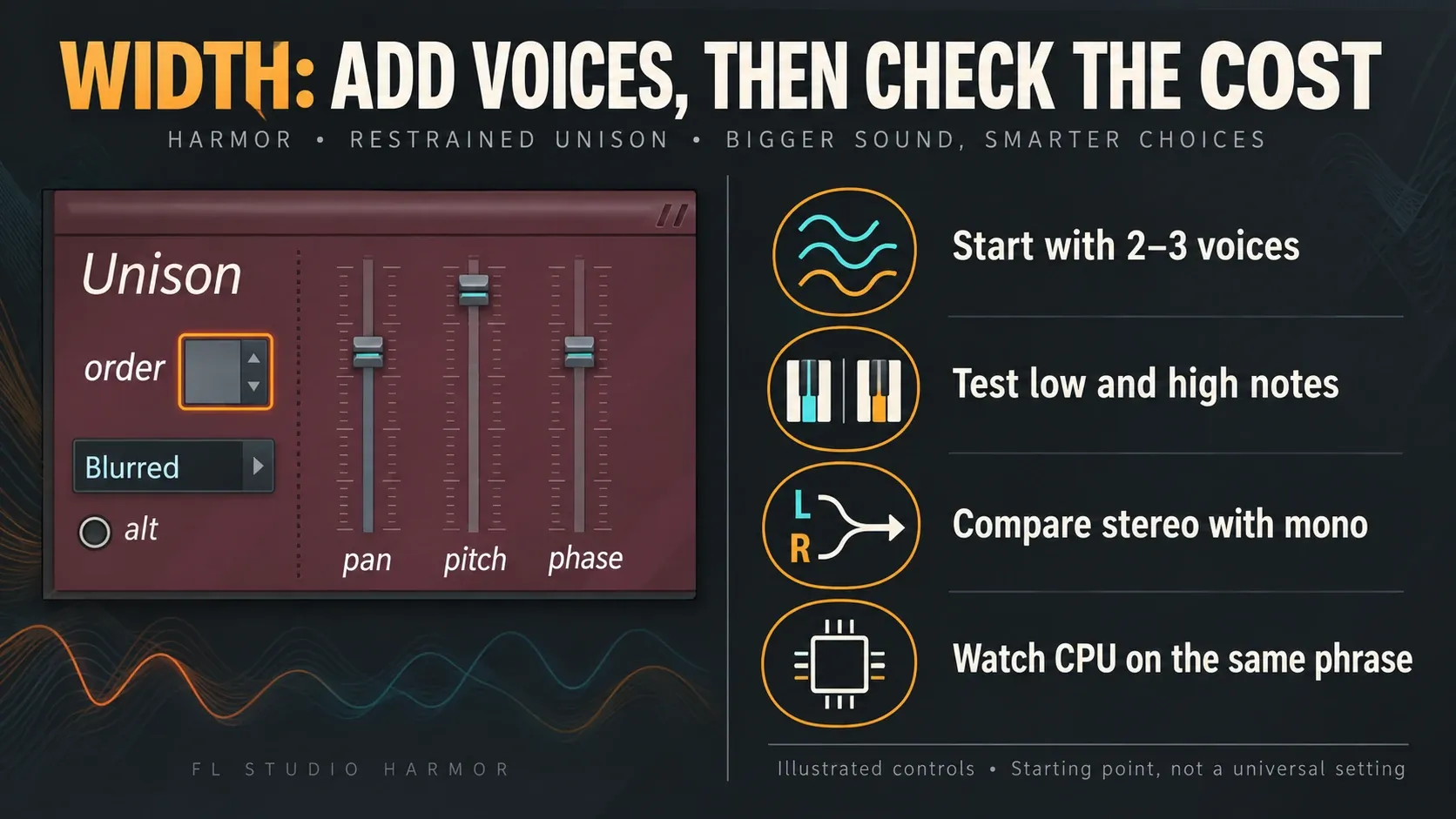
Unison index mapping can give each subvoice its own pitch, pan or other behaviour. Save it for a deliberately layered patch. If a simple sound lacks weight, go back to its timbre, pitch and envelope before multiplying voices.
Use Parts A and B when the patch needs two identities
A and B are independent synthesis sections. The selector picks the part you edit, and the switches at the ends of the mix slider turn each part on. Part Mix balances A and B but is not automatable. Use the parts' volume envelopes when you want their balance to change over time.
Link parts ties matching edits together while you design a patch. An external controller linked to one control won't automatically move its partner, so link each part's control separately. Harmor's internal automation keeps the linked relationships. Check the result with both parts audible, since different kinds of linking don't all behave the same way.
Part B can add a second attack, a higher texture or the side component of stereo resynthesis. It doesn't have to be active on every patch. For a multi-instrument chain with explicit routing, move on to the Patcher guide.
Build a Harmor patch in eight controlled steps
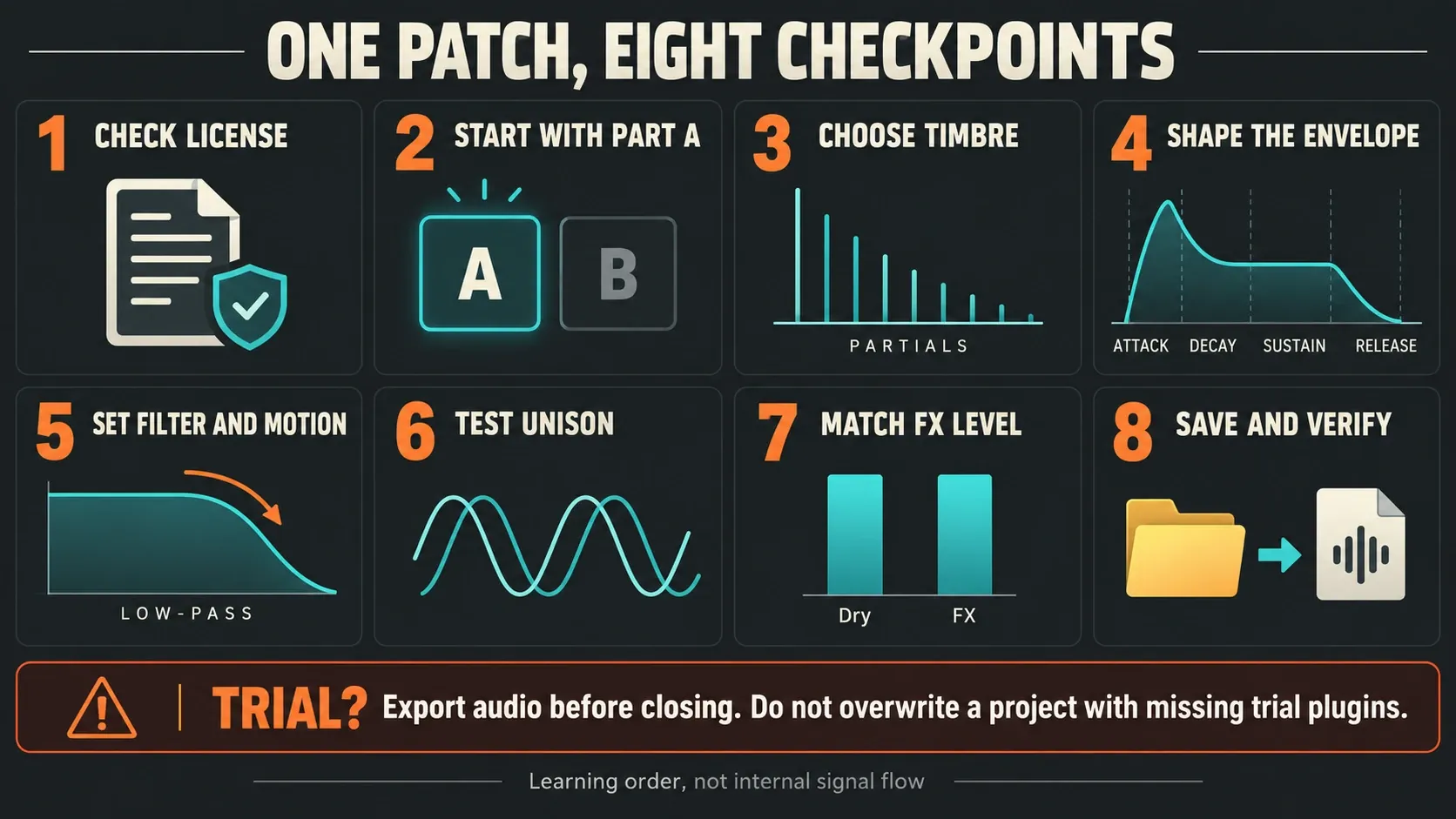
- Check the license. Confirm whether FL Studio and Harmor are unlocked. If either one is in trial, export the sound while it still plays and leave the reopen test until both are properly licensed.
- Start with Part A. Load an initialized patch, deactivate Part B and bypass unnecessary effects. Loop a short phrase covering the intended note range.
- Choose the timbre. Start with Timbre 1 on the MIX blend, set the part's pitch, and bring in Timbre 2 only if it helps.
- Shape the envelope. Select Volume → Envelope, enable it and edit its points so the attack, sustain and release fit the phrase.
- Set filter and motion. Adjust Filter 1 FREQ and resonance, then add one deliberate source of movement, such as a filter envelope or LFO.
- Test unison. Try a small order, compare low and high notes, and check mono playback and CPU on the same phrase.
- Match the FX level. Add only processing that helps, comparing the dry and effected sound at similar loudness in the arrangement.
- Save and verify. Save a named preset and a separate project copy, and keep any source audio. With both host and plugin licensed, reopen the copy and check the sound, envelopes and automation without overwriting the original.
The wrapper's Save preset as command saves the plugin state. It doesn't stand in for the project, the MIDI or linked source files. If an effect only improves the sound by making it louder, turn its output down and listen again before you keep it.
Resynthesize audio without confusing it with image synthesis
Choose the Resynthesis template from Harmor's presets. In IMG, use Image options → Analyze audio file, or drop an audio file into the image window. Start with a short recording whose pitch and timing you know well, so you can hear exactly what the synthesis changes.
In resynthesis mode, edits point back to the original sample data. The source audio is linked, not embedded in the FLP. Keep it in a stable project location and check that a moved project can still find it. A preset alone won't back up the audio file. To trim or repair the source before import, use the Edison editing guide.
Image synthesis works on editable gain and frequency image planes. Converting a resynthesis patch to that mode cuts its link to the original sample data, and the converted patch can't switch back to source-referenced resynthesis. Save a separate copy first. The manual's IMG section explains the tradeoff: you gain image-editing flexibility and lose the original source reference. Imported images are embedded, unlike the linked audio used for resynthesis.
Load stereo audio into both parts correctly
Use the Resynthesis template and load the same stereo file into Part A and Part B. In ADV, A supplies the mid component, while B has the side switch enabled. Set the A/B mix to 50% for the original stereo balance before you go further with sound design. That's a different technique from panning two unrelated samples left and right.
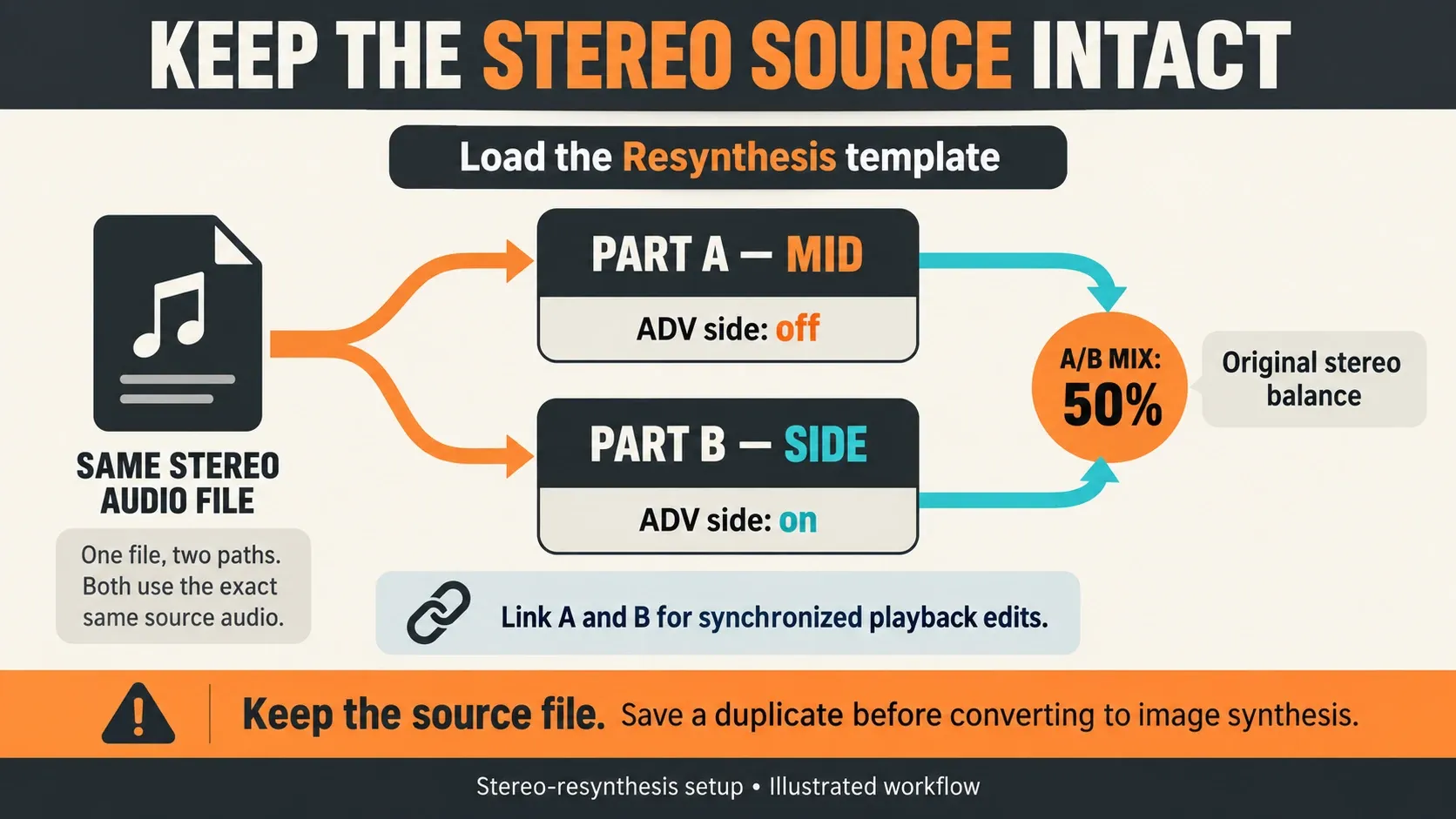
Link the parts when playback-position edits should stay in sync. If the result suddenly sounds mono, check that B is active, its side setting is right, both parts hold the same source and the balance hasn't been pushed to one end. Compare with the original recording before adding effects.
Control image playback, formants and scrubbing
In IMG, left to right is time and bottom to top is frequency or partial position. TIME sets the start offset, and the coarse and fine SPEED controls set the scan rate. The looping menu offers One shot, Loop and Ping pong. Find a useful start and loop before adding motion.
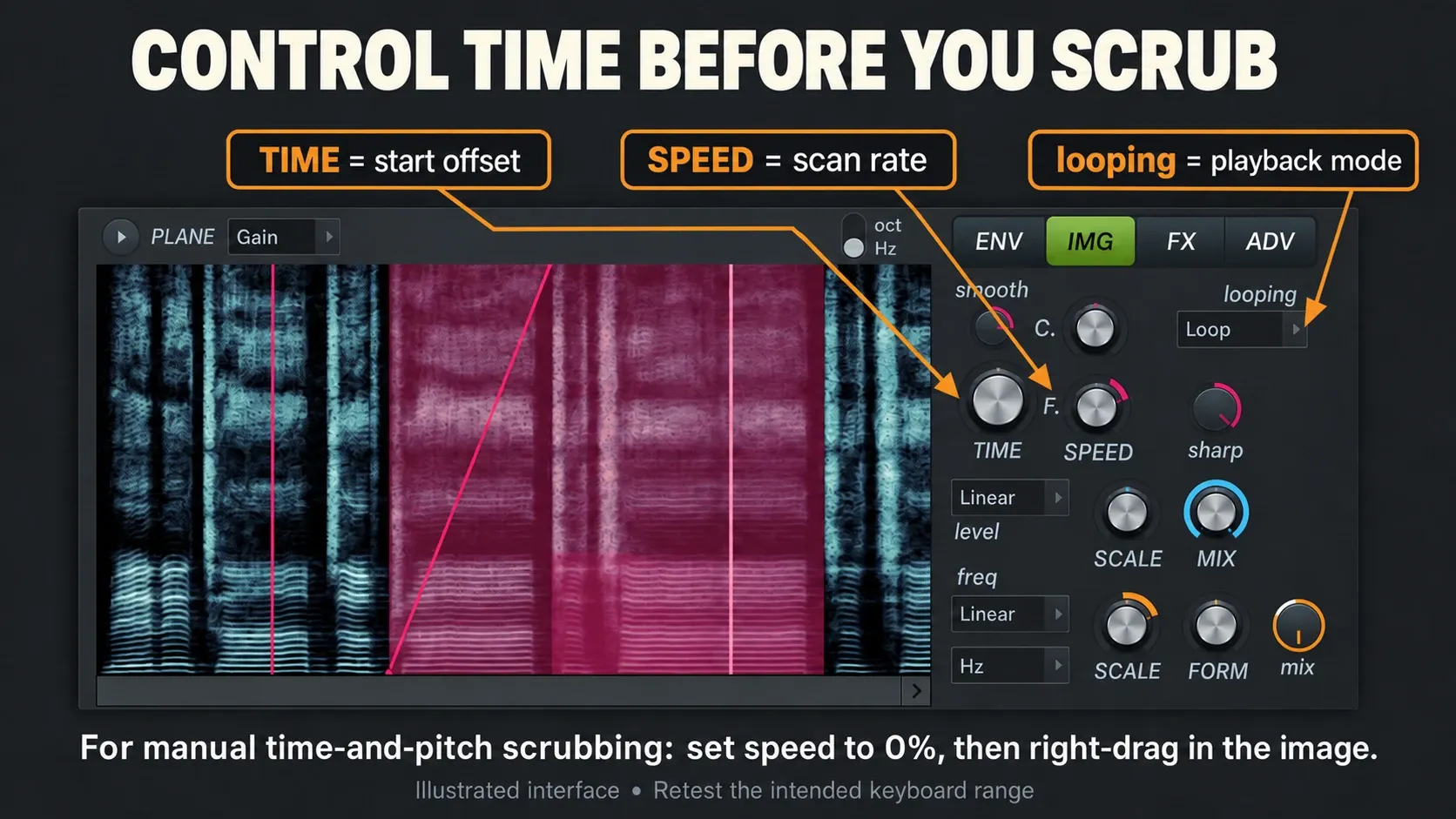
For manual time-and-pitch scrubbing, set speed to 0%, then right-click and drag in the image: moving sideways changes time, moving up and down changes pitch. For a working example, load the built-in Free scrubbing preset and read its info panel. Image-Line's explanation of the Tutorials and tips presets confirms these are playable demonstrations, and the gesture can be recorded in the native FL Studio version.
FORM changes the formant character. The manual describes formant preservation over a limited ±600-cent range, and that won't guarantee artifact-free transposition on every recording. Test the notes your part actually uses. A vocal that works near its original pitch may turn into a useful effect further away, but that's a different result.
Keep ordinary audio printing apart from this spectral workflow. If you want to commit a synth phrase to audio instead of turning it into a new resynthesized instrument, use the resampling and audio-printing guide.
Reduce Harmor CPU before committing the part to audio
Test the same phrase after each change: close visual feedback, cut unneeded unison, shorten overly long releases, then isolate Part B and the effects. High harmonic Blur settings can be expensive too. If you lower the ADV partial count, listen for lost brightness. Its range is 12–516 partials per voice, and going lower strips out high-frequency detail.
Rendering to audio can help once the sound is settled. Keep a named copy of the source project and listen to the render before you replace anything. Muting the audio output alone doesn't prove synthesis has stopped processing. The official optimization guide explains Smart Disable, including its risks for long tails and time-based behaviour. Check the real load and playback before relying on it.
Don't change system-wide buffer settings to diagnose a single Harmor knob. If several plugins struggle or you hear underruns, continue with the FL Studio high-CPU checklist. Keep the license and source-file checks even when you print audio, because they decide whether the editable original can be reused.
Choose the next lesson by the job
Use Harmor when partial shaping, deep articulation or resynthesis is the whole point. Use FLEX to work fast from finished presets, or 3xOSC for a simpler first patch. The Vital guide follows a separate wavetable-and-modulation route, and this Harmor tutorial won't teach you that instrument's controls.
Before buying an upgrade, check the edition comparison against your whole workflow. The stock-plugin learning order may point you to a tool you already own. For installation, organization and other instrument lessons, go back to the Plugins hub.
Harmor in FL Studio FAQ
Is Harmor included with FL Studio?
Harmor comes with All Plugins Edition and isn't part of the standard Fruity, Producer or Signature bundle contents. A separately owned license can also unlock it. An installed trial instance doesn't prove you own it.
Is Harmor additive or subtractive?
Its engine is additive: partials add up to create the sound. The familiar filter and envelope controls give you a subtractive-style way to shape that partial data before it becomes audio.
How many partials does Harmor use?
Up to 516 per note, per unison voice. ADV partial count can reduce the number to as few as 12 to trade high-frequency detail for lower synthesis load.
What is the difference between resynthesis and image synthesis?
Resynthesis keeps a reference to the source audio while you edit. Image synthesis uses editable gain and frequency images. Converting breaks the original audio reference, so save a separate resynthesis copy first.
Can Harmor load audio files?
Yes. Choose the Resynthesis template, then analyze an audio file or drop it into IMG. Keep that source file, because resynthesis audio is linked to the FLP and not embedded in it.
Why does Harmor use so much CPU?
Unison order, active parts, long releases, harmonic Blur, effects, quality settings and the visual-feedback display can all add to it. Test them one at a time on the same phrase; lowering the partial count also changes the sound.
Should a beginner learn Harmor?
Yes, but start with one initialized Part A patch and learn timbre, volume envelope and filter before resynthesis. If those basics are new to you, 3xOSC is a simpler first lesson.
Why did Harmor disappear after reopening my project?
A trial Harmor instance can be swapped for an empty channel when the project reopens. Keep the original project and unlock the plugin before reopening it. Don't overwrite a reopened copy while the trial plugin is missing, because that loses the stored settings.
Why is my Harmor resynthesis mono?
Check the Resynthesis template setup: load the same stereo file into A and B, keep B active with ADV side enabled, and set A/B mix to 50% for the original stereo balance. Part A supplies mid information and B supplies side information.
Why do Harmor's envelope knobs spring back?
ATT, DEC, SUS and REL are relative modifiers. Their display can snap back while the change still affects playback. Edit the envelope points for the base shape, and check the selected target, part and enable switch if the sound doesn't change.