FL Studio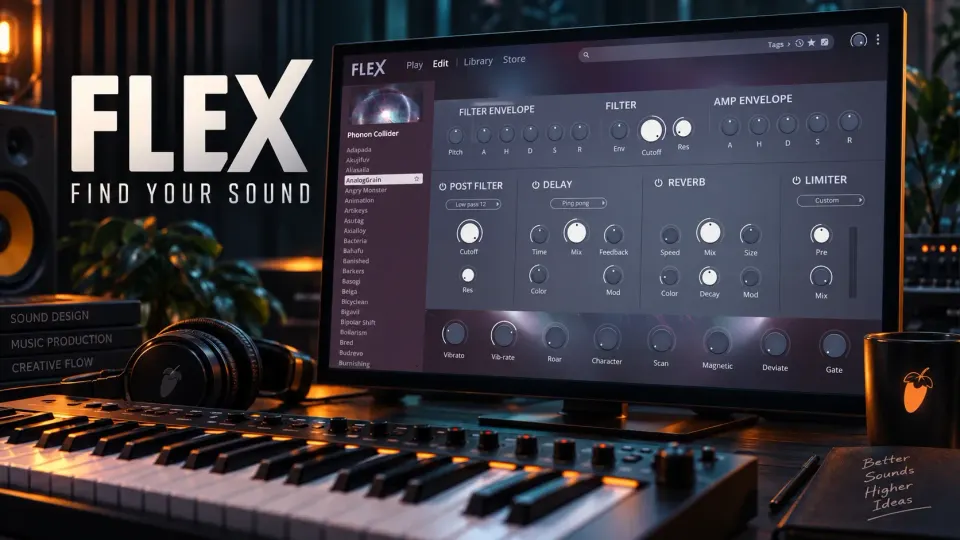
A FLEX preset can sound huge on its own and still leave no room for the vocal. Start with the part you need, audition it against the song and change only what gets in the way. That's where this preset-based instrument pays off: you get a useful sound without programming a synth from scratch.
This guide covers the FLEX that ships with FL Studio 2026: loading the instrument, picking packs, working in Play and Edit, automation, and recovering safely when a pack goes missing. FLEX comes with every FL Studio edition, but that doesn't make every pack free. If you're still choosing an instrument, the Sound Design learning routes put preset shaping next to oscillator programming and resynthesis.
What changed in FLEX for FL Studio 2026
The current FLEX release brings a redesigned browser, a new engine and a simpler Play view, with Edit opening the fuller set of controls. Image-Line keeps the original engine for legacy packs, so updating doesn't make an older pack obsolete.
The free Core Series holds more than 200 presets across eight packs: Core Synths, Core Bass, Core Brass, Core Winds, Core String, Core Guitars, Core Pianos and Core 808s. Core Series and later pack releases need FL Studio 2026 or newer. Core 808s gives you playable sounds; when the question is which notes belong in the song, use the separate 808 tuning guide.
Load FLEX and route the part
In the Channel Rack, click the plus button and choose FLEX. If it isn't in your favorites menu, find its generator entry in the Plugin Database. The Plugin Database guide explains the difference between an installed instrument and its menu shortcut. FLEX is native FL Studio content, so it doesn't need a custom scan folder the way a third-party VST might.
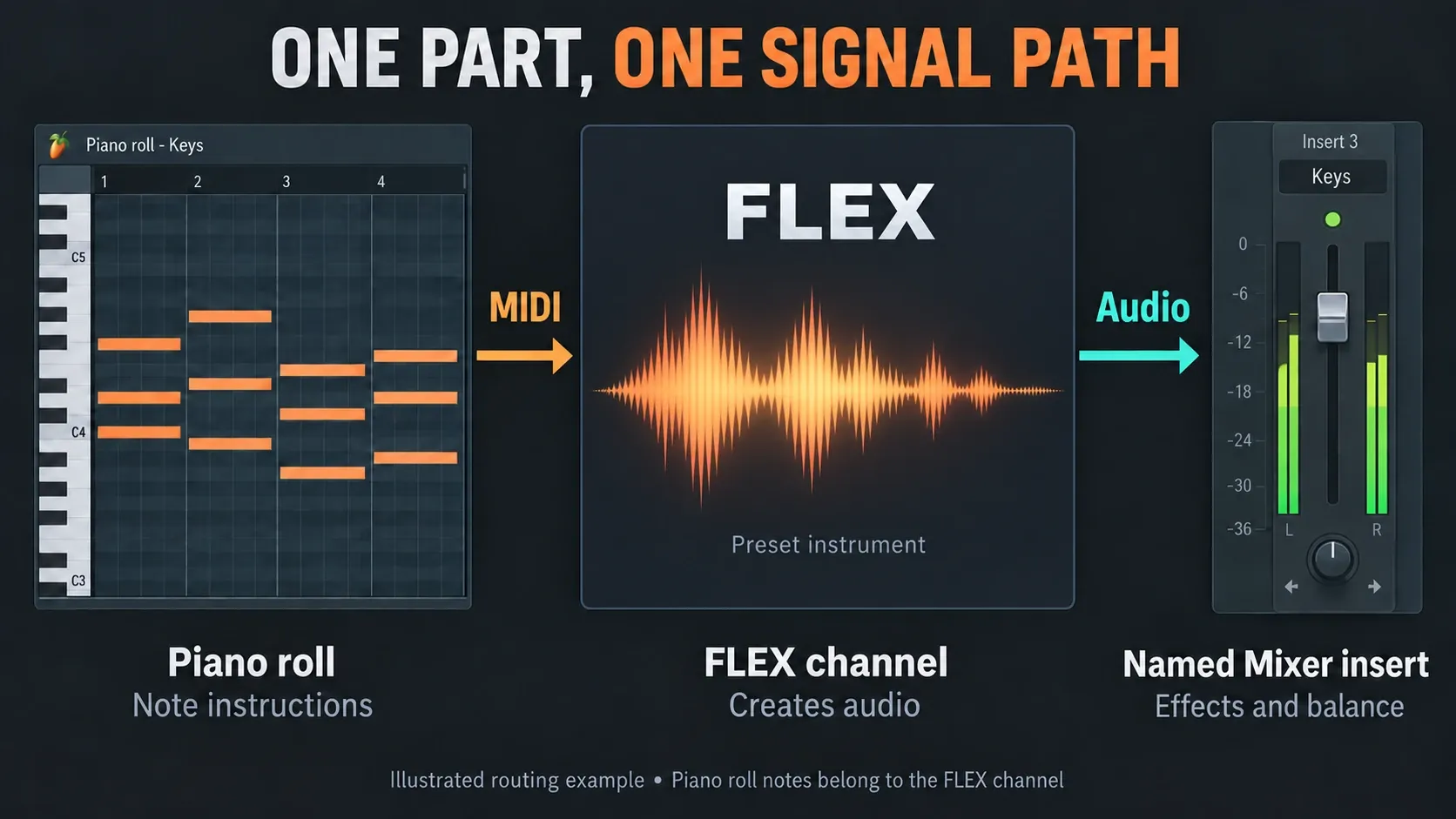
Send this channel to a named Mixer insert, then open its Piano roll and play the phrase you plan to use. The notes belong to the instrument channel, and FLEX generates the audio that reaches the Mixer. Our Piano roll guide covers drawing the phrase and changing note lengths.
If the part doesn't exist yet, sketch a few bars that reflect its real job. For bass, check the lowest and highest notes you'll need. For chords, include the full voicing and a gap between chords. Comparing one held note with a dense chord tells you very little about which preset fits.
Keep your candidates at similar perceived loudness. FLEX's Master Level is its final internal output control. Turning it down lowers the level going into later processors, but it can't undo distortion already created inside the patch. Use the Mixer for the song balance, and don't treat the Channel volume knob as an identical output trim, because native instruments can use it to change the level of each note voice.
Find presets with tags and favorites
In the FLEX browser controls, All covers installed presets. Recents only logs a preset once you've played at least one note. Favorite a useful sound by right-clicking its preset entry or pressing Shift+F; Alt+F toggles the favorites view. Keep keyboard focus in FLEX while you use these shortcuts.
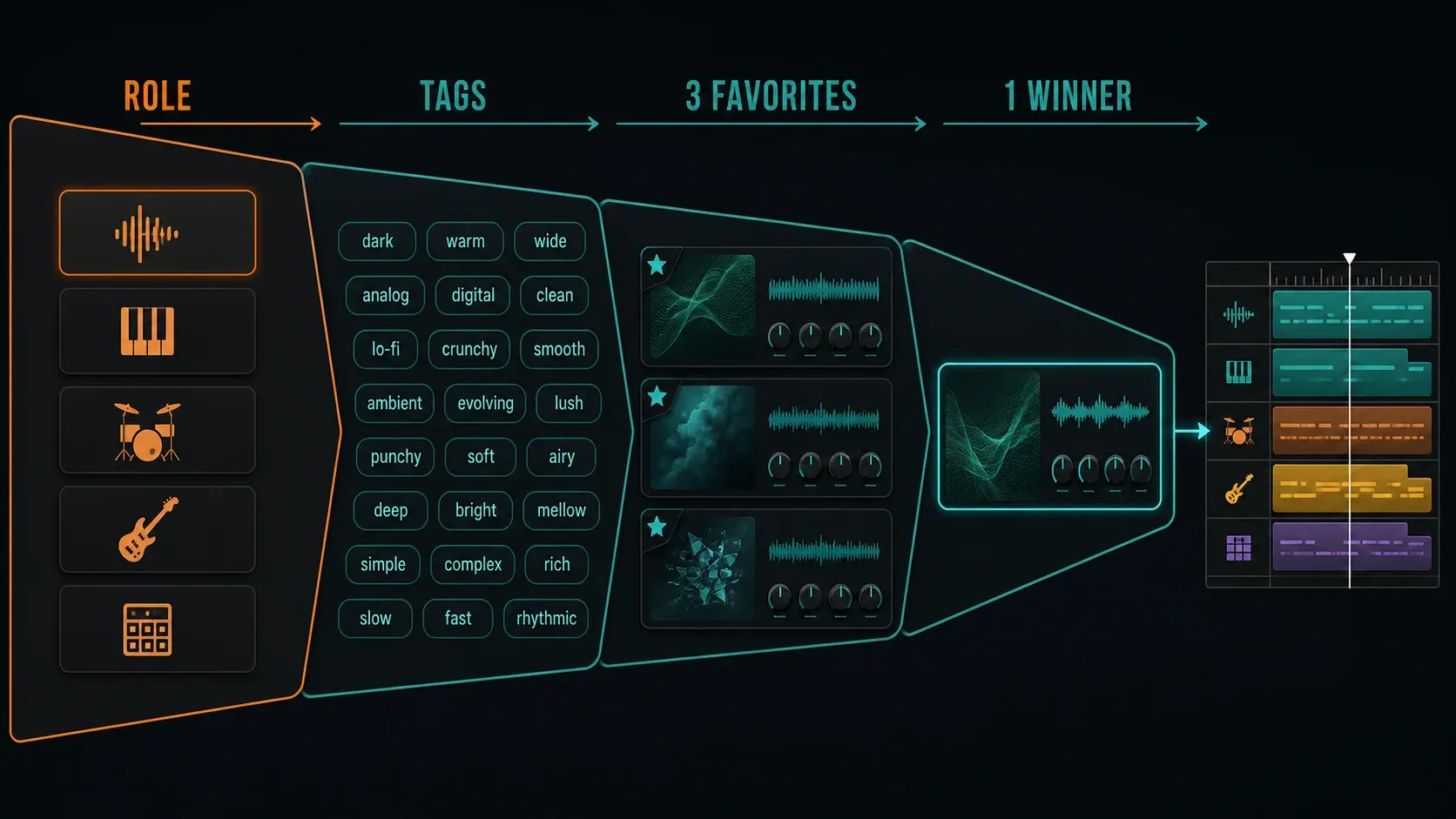
Type and Style tags narrow the list by sound, which beats guessing from an imaginative preset name. Choose All to require every selected tag, or Any to accept a match on any of them. Bass plus Short is a handy combination when those tags fit the part. Text search only looks at preset names, so it won't replace tag filtering.
Try five to eight candidates and keep a shortlist of about three. Those numbers are just a sensible browsing limit; FLEX doesn't care. Loop the busiest section, match loudness and pick the sound that needs the least fixing. If every option is too wide or too wet, try a different kind of preset before you stack corrective effects.
This library is separate from FL Studio's global Browser. The Browser and sample-folder workflow covers files, search locations and project content outside FLEX.
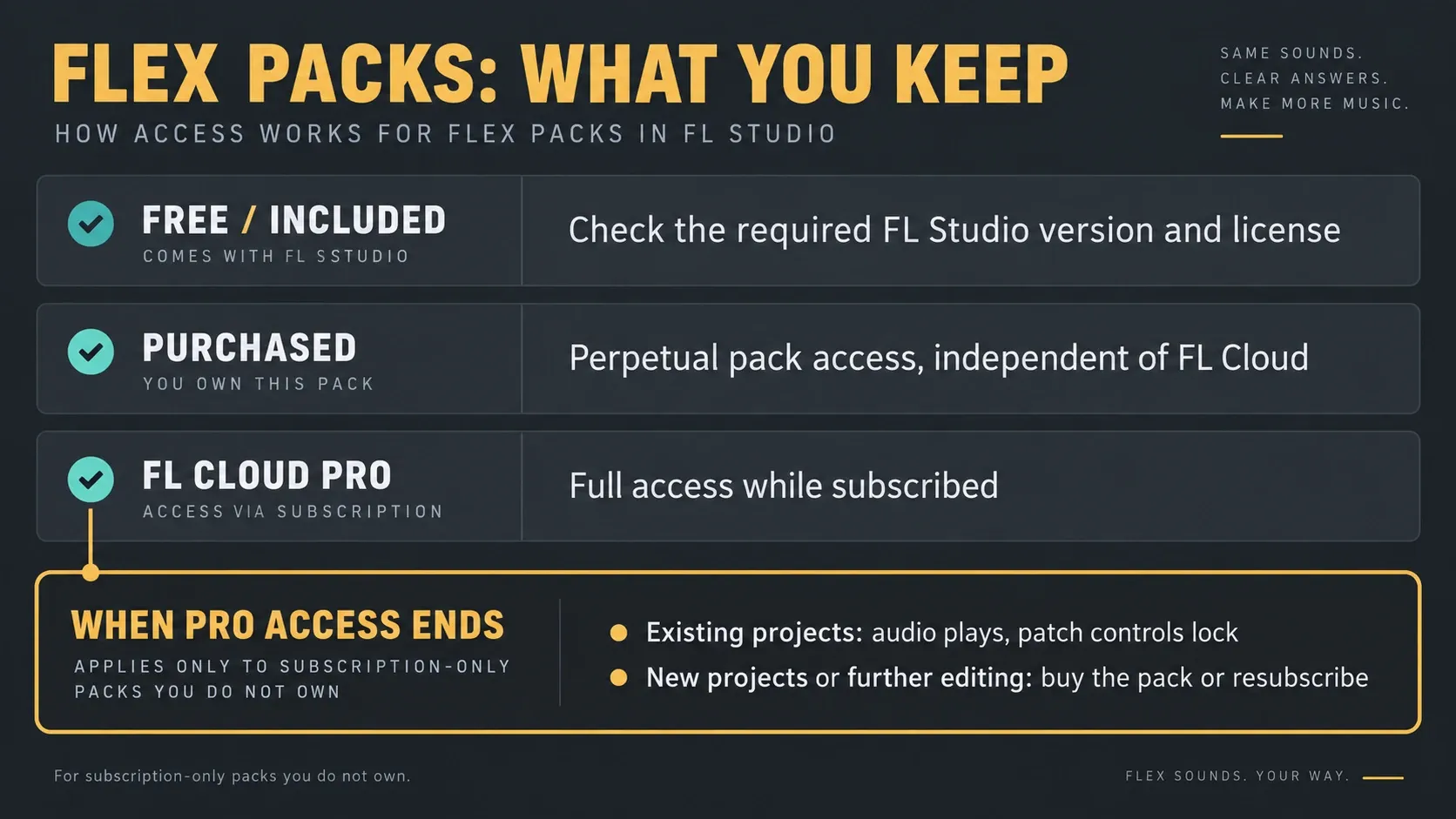
Free, purchased and subscription packs are different
Library holds installed packs plus packs you're entitled to install. Store is where you browse purchases and subscription content. Check a pack's status before you treat a visible card as a sound you own.
| Access | What to check | Project habit |
|---|---|---|
| Free / included | The required FL Studio version; some free packs also require a registered license | Let the pack finish downloading before you rely on it |
| Purchased | The Image-Line account that owns its perpetual license | Keep the pack name with your project notes for reinstalling or moving computers |
| FL Cloud Pro | Whether the pack is subscription-only for your account | Plan for continued editing, not just playback, when the subscription ends |
Image-Line's FLEX pack access rules spell out what happens when access ends: existing projects that use subscription-only packs you don't own still play audio, but their patch controls lock. Buying the pack or resubscribing unlocks them again. Once the Pro trial ends, those packs aren't available for new projects without a purchase or subscription. Packs you bought stay yours for good, whatever your Cloud plan.
If you buy a pack while subscribed, FLEX may ask you to install its perpetual-license version, so complete that step. For a handoff, note the exact pack and preset and make an audio reference. Receiving the project doesn't give a collaborator your pack rights.
Image-Line says installed packs can work offline. Downloading and installing need an online machine, and working offline doesn't turn subscription access into ownership. Check the project's pack access before you take a computer offline.
Use Play for macros and Edit for the rest
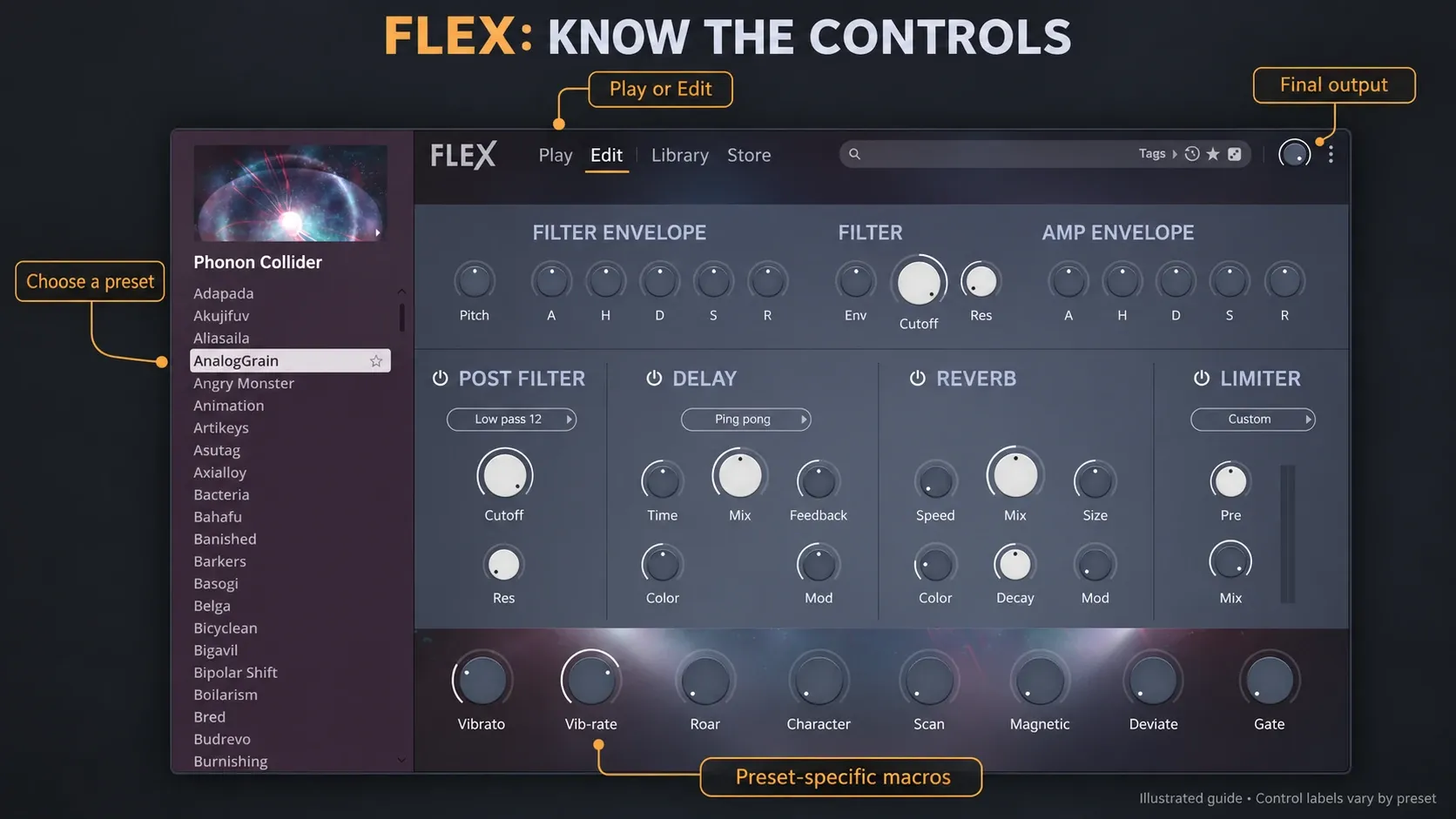
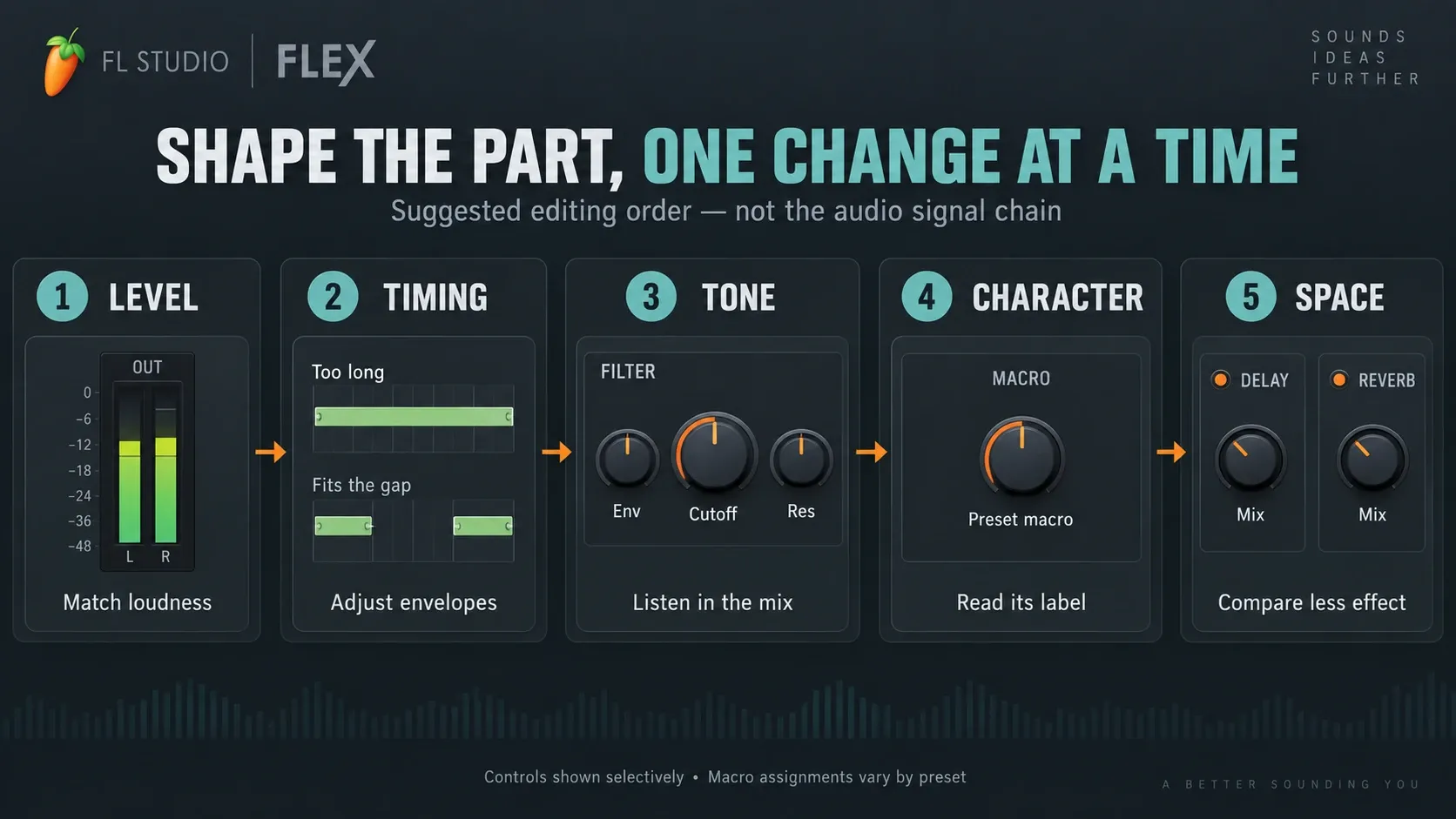
Play keeps the pack artwork and its macros in view. A preset can expose up to eight active macros, but how many, what they're called and what they control all vary. Read the label, move one control while the phrase loops, then put it back before judging the next. A knob in the same spot on another preset may do something completely different.
Edit adds the standard pitch, filter, envelope and master-effect controls. The main Filter belongs to the preset designer's setup, so its Cutoff, Res and envelope amount change that design. The separate Post Filter in the current interface, which the manual calls Master Filter, lets you choose the filter type. Look for the filter-type selector there and not in the main Filter panel.
The filter and amplitude envelopes use A, H, D, S and R modifiers, and their useful range depends on the preset. Change the timing while listening to the real gaps between notes. A short sample won't necessarily sustain just because you turn up Sustain or Release, and a shorter filter envelope can cut the sound off before the amplitude envelope finishes.
The exposed effects include delay, reverb and limiter processing. Some presets carry extra processing those panels don't show, so bypassing the visible reverb doesn't prove every reverberant element is gone.
The three-dot options menu can show panel locks, which hold selected panel settings while you browse. Unlock them when you want to hear a new preset's own settings. The artwork analysis options (oscilloscope, spectrogram, vectorscope and frequency histogram) help you inspect the sound, but no display can tell you whether it fits the arrangement.
I'd edit in this order: level, timing, tone, one character change, then space. That's a listening checklist; FLEX's audio signal chain runs differently. If the first three changes make the part work, you don't owe it another effect.
Build one FLEX part in eight steps
Before the recall test: use a licensed FL Studio installation and packs you're entitled to use. The FL Studio trial can save projects but can't reopen them until you buy a license. Export an audio reference before closing a trial session and leave the reopen test for later. An FL Cloud subscription doesn't unlock the host; see Image-Line's trial and project-reopening rules.
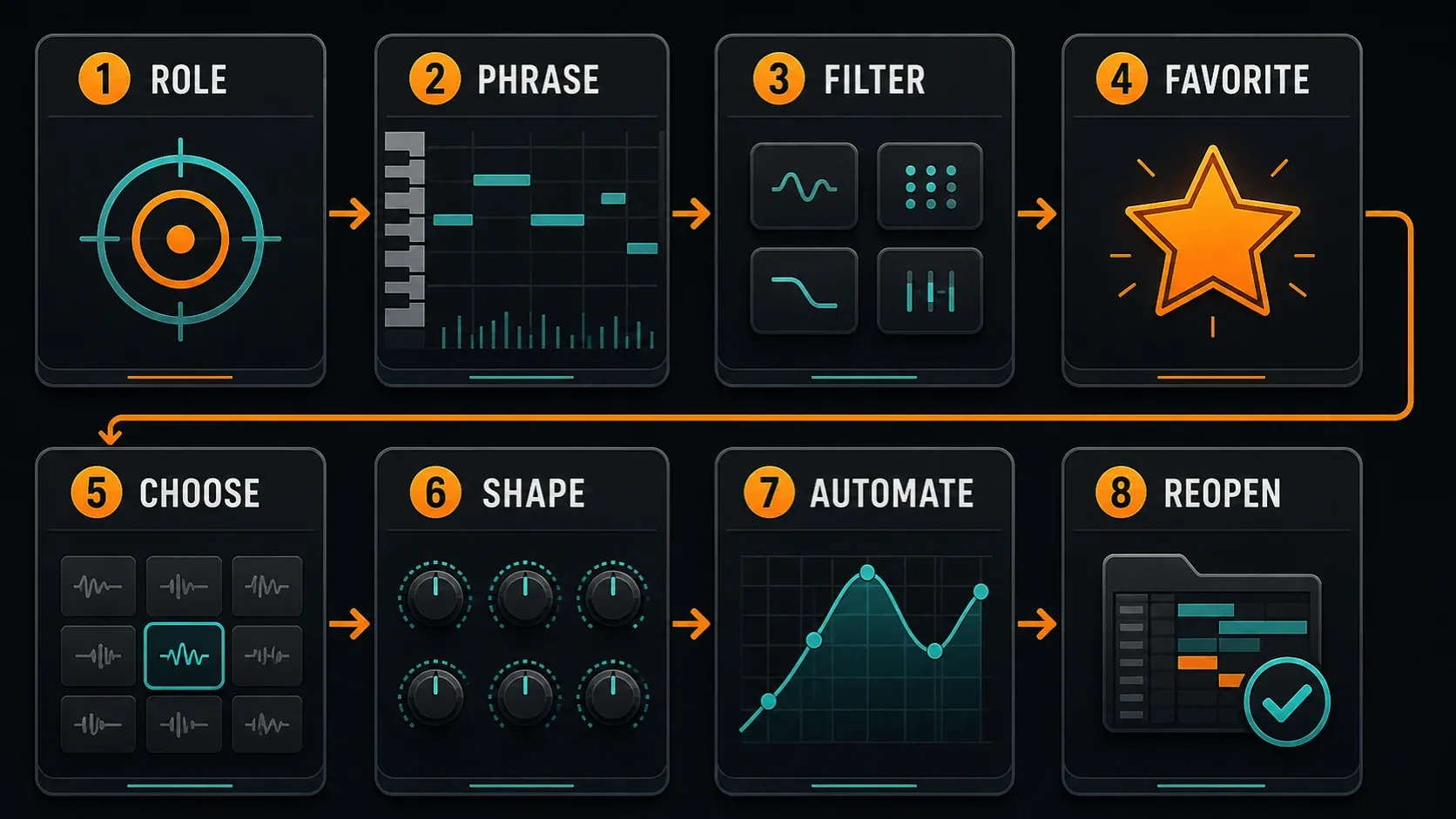
- Name the role. Pick a specific job, such as a short bass, a soft piano or a pad behind the vocal.
- Play the real phrase. Use the intended note range, shortest and longest notes, and full chord density through the named Mixer insert.
- Filter the browser. Choose a compatible pack or Type/Style tags that suit the role.
- Keep a small shortlist. Try about three favorites in the busy section at similar loudness. Three is just a practical limit.
- Choose the easiest fit. Keep the preset that leaves room for the other parts without heavy corrective processing.
- Shape one thing at a time. Check level, note timing, filter tone, one useful macro and the exposed effects.
- Add purposeful movement. Automate a relevant control only if the arrangement needs it, keep the starting value, and listen through the transition.
- Save and verify recall safely. With licensed FL Studio and the right pack access, save a separately named project copy, close and reopen it, then check the sound and any automation. In the FL Studio trial, export an audio reference before closing and wait until you're licensed to test reopening.
If the shortlist never produces a winner, change one part of the brief: register, note length, tag choice or the amount of space the arrangement leaves. Buying more presets is not the only next move.
Automate a FLEX macro without losing its starting value
Get a useful static sound first. Right-click an automatable FLEX control and choose Create automation clip. FL Studio's Automation Clip instructions also document creating a clip from the last-tweaked parameter. With this native instrument, start from the control's context menu.
Use a small range that stays musical at both ends. A drive or brightness macro can change loudness as well as tone, so check the transition in the mix. Start playback before the clip as well as inside it, because an initialized value can snap a control back to its starting state. The automation guide covers ranges, initialized controls and recorded Event data, so those steps aren't repeated here.
Keep the routing easy to follow before you add more processing. The Mixer workflow traces the channel into its insert, buses and output. A moving FLEX macro and an automated Mixer fader are two different targets.
Check CPU with the same preset and passage
Image-Line advertises up to 50% lower CPU use with second-generation FLEX packs. That condition matters: it is the vendor's claim for those packs, not a promise that every legacy preset or project will use half the CPU. When you compare versions, keep the same preset, notes, effects, host mode and audio settings.
For one demanding part, save a project copy and try changes one at a time: bypass an exposed effect, shorten a release that's longer than it needs to be, or remove overlapping notes the arrangement can do without. Each of these can change the sound, and none guarantees a fixed saving. Don't expect FLEX to offer a universal unison or voice-count macro.
For a finished part, a checked audio print can be more useful than squeezing its sound further. The resampling and consolidation guide explains how to keep the editable source and check the print. If unrelated instruments also stutter, use the whole-project CPU diagnosis instead of blaming one FLEX pack.
Fix missing packs before replacing files
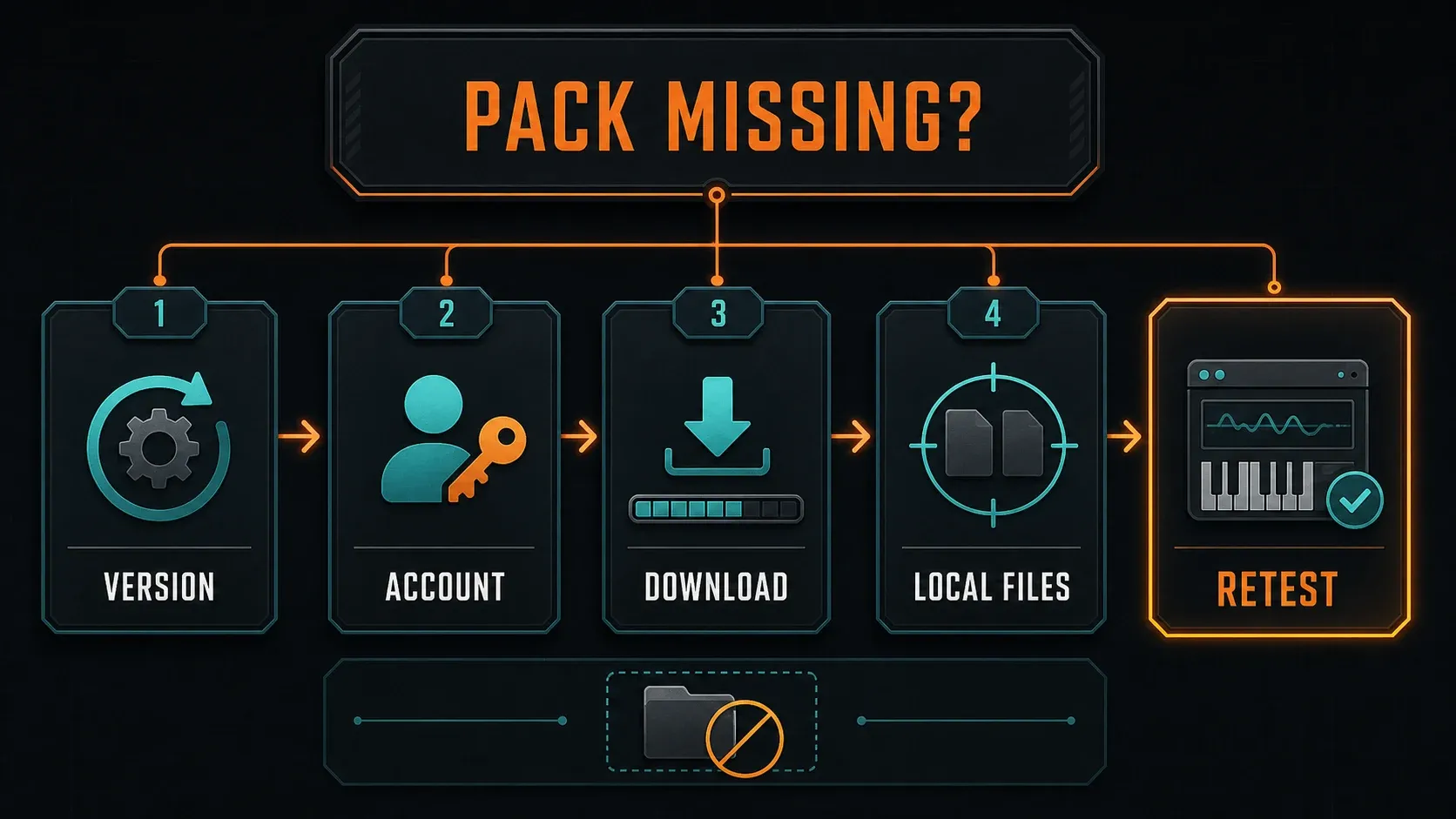
Check version and access first. FLEX hides incompatible packs. Confirm your FL Studio version, the account that holds the purchase or active subscription, and whether the pack is actually installed or only available in Library or Store. A cloud icon marks subscription content, so it doesn't mean you bought the pack outright.
Check the browsing view. A downloaded sound can be hard to find and still be on disk. Clear restrictive tags and look in All. Clicking the pack artwork switches between that pack's presets and the packs view. Check there before you blame a browsing problem on a damaged download.
Finish the download. Closing FL Studio during a pack download throws away the partial data. If FLEX itself is missing, check the installation and the generator menu; the FL Studio installation guide covers that separate problem. If FLEX loads but makes no sound, follow the meters with the no-sound troubleshooting path before you reinstall packs.
If a real connection or download error shows up, note the exact code and use Image-Line's FLEX error-specific support instructions. A timeout, a server-name failure and a secure-connection failure each need a different fix. Replacing local pack files shouldn't be your first move for every network error.
Find the real folder. Open Options > File settings and check User data folder. The default location ends in Documents/Image-Line, and FLEX packs live in its FLEX/Packs subfolder. Don't tack another Image-Line onto a path that already ends there. A custom User data location changes the starting point. The File settings documentation also warns against cloud-synced User data folders, where files can be moved or locked.
Repair only the affected pack. The FLEX manual names a matching .flexpack data file and .ini version file. Before you touch either, close FL Studio, back up both and confirm the exact pack can be downloaded again with your current access. Move only that matched pair to a backup location you can restore from, then reopen FLEX and download the pack again. Test in a project copy. If you can't identify the pair or get a replacement, stop at the backup and contact Image-Line support, and don't empty the FLEX or User data folder.
Move offline installations deliberately. The manual supports copying the whole FLEX folder from an online installation into the matching User data location on the offline machine. Purchased pack downloads may also be available under My Account > My Licenses. Follow that pack's installation instructions and keep folder names and capitalization intact. Back up the destination files before merging, and remember that copying files doesn't transfer someone else's license.
When to choose another instrument
Stay with FLEX when shaping at preset level solves the job. The 3xOSC tutorial is a better next lesson when you want to hear what oscillators and envelopes each contribute. The Harmor guide takes on deeper synthesis and resynthesis, which is a different task and not a required step up from FLEX.
For a small working toolkit, the stock-plugin selection guide matches instruments and effects to jobs, and the Plugins hub covers setup and organization. When a preset already fits, stop hunting for sounds and finish the part.
FLEX in FL Studio FAQ
Is FLEX free with every FL Studio edition?
FLEX comes with every FL Studio edition. Pack access is a separate matter: some packs are free, some need a registered license, and others need a purchase or FL Cloud Pro access.
What changed in FLEX for FL Studio 2026?
The update introduces a new engine, redesigned browser, Play view and eight free Core Series packs with more than 200 presets. Legacy packs remain supported. Core Series and subsequent pack releases require FL Studio 2026 or later.
How do I find useful FLEX presets quickly?
Define the part, filter by suitable Type and Style tags, then compare a small shortlist in the arrangement at similar loudness. Play a note to add a preset to Recents. Text search finds preset names, while tags help narrow down the sound's role.
What happens to FLEX packs when FL Cloud Pro ends?
For subscription-only packs you don't own, existing projects still play audio but the patch controls lock. Buy the pack or resubscribe to keep editing or use it in new projects. Purchased packs stay yours for good, with or without FL Cloud.
Can I use installed FLEX packs offline?
Image-Line says installed packs can work offline; downloading and installation need an online machine. Use the documented FLEX-folder transfer or account download procedure, and check your pack access. Offline use does not make subscription-only packs permanently owned.
Where are FLEX packs stored?
Look in FLEX/Packs inside the configured User data folder. The default base ends in Documents/Image-Line. Check File settings first, before adding a second Image-Line folder or assuming every computer uses the default path.
Why is a new FLEX pack missing?
Check version compatibility, account access and download status before you change any files. FLEX hides incompatible packs, and an interrupted download has to start over. Back up a damaged pack's matching .flexpack and .ini files before a targeted replacement.
Can I create a FLEX sound completely from scratch?
FLEX is built around presets. You can reshape its exposed macros, pitch, filters, envelopes and effects, but it doesn't give you a full oscillator and modulation programming environment. Choose another synth when designing that underlying structure is the point.
Does FLEX 2026 always use 50% less CPU?
No. Image-Line's up to 50% lower CPU claim applies to second-generation FLEX packs, not equally to every preset or project. Match the pack generation, preset, note load and buffer before comparing CPU readings.
Can I reopen a FLEX project in the FL Studio trial?
The FL Studio trial can save projects but can't reopen them until you buy a host license. Export an audio reference before closing and leave the recall test for later. An FL Cloud subscription doesn't take FL Studio out of trial mode.