FL Studio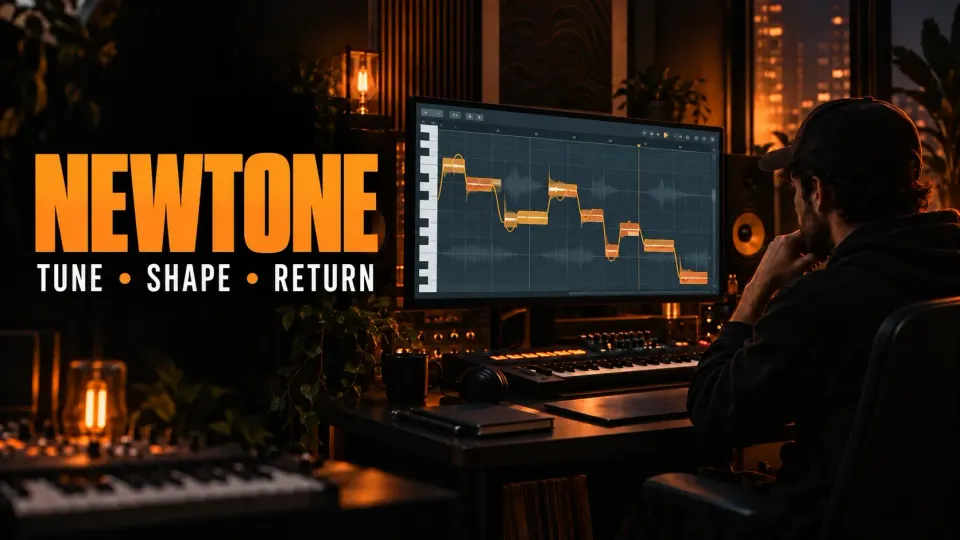
To use NewTone, open the Audio Clip's menu in the Playlist (the icon at its top-left corner) and choose Pitch correct sample, or load a file from NewTone's File menu with Ctrl+O. Wait for the analysis, set Center, Variation and Transition for the whole take, fix the notes that still stand out, then send the result back with Send to Playlist as audio clip. I'd run Make unique as sample first on any Clip that repeats, because every copy of a Clip shares one Channel by default.
The goal isn't to make every note perfectly straight. Good correction keeps the movement that belongs to the performance and fixes the notes, transitions or timing that pull attention away from it. Image-Line's manual says most corrections come down to the three global knobs plus a few note-by-note adjustments in Advanced Edit, and that's the workflow below: no single setting does the whole job.
What NewTone does
Image-Line’s NewTone manual describes the plugin as a pitch-correction and time-manipulation editor for vocals, instruments and other recordings. In its default Pitch mode, detected notes show up as blocks on a piano-roll-style pitch grid. The orange pitch trace shows the movement inside each note, and the block itself shows the average detected pitch.
That view makes NewTone useful for three related jobs:
- move a note closer to the intended pitch;
- reduce unwanted drift or vibrato without removing all expression;
- change note starts, ends and timing while keeping the edit tied to the detected phrase.
NewTone comes with FL Studio Signature Bundle and All Plugins Edition: the Image-Line edition comparison lists it, like Pitcher, as Signature Bundle and up, while NewTime and Edison start at Producer Edition. Image-Line lets you upgrade at any time by paying the price difference; our FL Studio editions guide compares the rest.
Prepare the recording before pitch correction
Start from a clean, dry or lightly processed audio file. Heavy reverb, delay, doubles and a loud backing track make pitch detection harder to read, because NewTone has to make sense of more than one moving sound. For a vocal, edit the take you chose first and keep an untouched copy in the project.
If the source still needs comping or recording cleanup, finish that before NewTone. Our guide to recording vocals in FL Studio covers clean takes and file handling. Pitch correction works best as a later editing decision; it can’t make up for picking the wrong take.
Keep a recoverable original: edit a copy made with Make unique as sample, which also clones the sample file, or save the corrected version under a new name. NewTone can save or send edited audio, but the source recording is still the reference if a correction later sounds too rigid.
Load audio and let NewTone analyze it
- Protect the other copies. In the Playlist, open the Clip menu and choose Make unique as sample, which the Playlist manual says clones the Clip and its sample file on disk; hold Shift to skip the save-location pop-up.
- Open NewTone. In the same menu, choose Pitch correct sample. In a Sampler Channel, right-click the waveform and choose Edit in pitch corrector, as the Sampler settings manual lists; inside NewTone, File > Load sample (Ctrl+O) opens any file.
- Wait for detection. Let the pitch analysis finish before judging the note blocks.
- Check the tempo. Right-click the Tempo value to open the sample properties (F2) and fix a wrong detected or embedded tempo. Sync stretches the sample to the project tempo, and Use project tempo on load uses the project tempo instead of the tempo stored in the file.
- Loop a phrase. Press L for loop mode, Space to play or stop, and Ctrl+Space to pause.
Slaved Playback mode (H) ties NewTone's playback position to FL Studio's transport and aligns the bars in NewTone and the Playlist; put FL Studio in Song Mode first. A Playlist selection then sets where NewTone starts, unless you right-click the Slave Playback button and switch on Ignore host selection, which follows the absolute song position instead. The same menu holds Ignore space bar key. I'd slave NewTone for any edit that depends on the beat, because a correction that sounds right alone can fight the drums or chords.
Read the pitch display before moving notes
Don’t correct every block the moment it appears. First compare three things: the note’s average position, the orange pitch trace inside it and how the phrase sounds in context.
| What you see | What it can mean | First move |
|---|---|---|
| Whole note sits above or below the target | The note center is sharp or flat | Move the note or increase its pitch-centering amount |
| Trace wanders inside the correct note | Drift or wide vibrato | Reduce variation only as far as needed |
| Pitch slides too slowly between notes | Transition is loose or intentional | Adjust transition after listening to the words and phrasing |
| One detected block contains two musical notes | Detection needs another boundary | Cut the block at the real note change |
| Consonant or breath appears as a strange note | Non-pitched material was detected | Leave it alone, shorten the note or separate the region |
The piano-roll background is a guide, not proof of the intended melody. The shaded blocks mark the nearest semitone; if you know the song's key, narrow the targets to its scale. The FL Studio scale-highlighting guide explains the same note-choosing logic in the Piano roll.
Correct pitch with Center, Variation and Transition
NewTone’s three global correction controls are the quickest way to a sensible starting point:
- Center moves detected notes toward the nearest semitone.
- Variation reduces pitch movement within notes, including drift and vibrato.
- Transition changes how quickly pitch moves between notes.

I’d raise Center first while looping a short phrase, then use less Variation than feels tempting. A heavy Variation setting can flatten the small movements that make a vocal sound human. Go easy on Transition too: tightening every connection can wreck slides and portamento that belong in the performance.
For local fixes, right-click a note and it snaps to the nearest semitone; for unsnapped fine tuning, hold Alt and drag the center of the note vertically. To move several notes to one pitch, hold Ctrl and click-drag vertically through them, then click the target note on the Piano roll ruler at the left. With Snap to scale on and a Scale chosen, vertical moves land only on that scale's notes. My pick for one stray note is right-click, because it lands on the semitone with no dragging. The broader pitch-correction guide for samples helps when the problem is the key of a whole loop rather than individual notes inside one performance.
The same moves build a harmony line: copy the lead Clip, run Make unique as sample on the copy, open it with Pitch correct sample, turn on Snap to scale and drag the notes to the harmony pitches before sending the result back. Our vocal harmonies guide covers the other ways to build the stack.
Split, join and move note boundaries
Pitch detection can put a boundary in the wrong spot or merge two sung notes into one block, so fix boundaries before detailed pitch changes. Press C for Cut mode, or hold Shift, and click where the split belongs. To join two slices, hold Alt in Cut mode and click both, or use Shift+Alt outside Cut mode; holding Ctrl in Cut mode and clicking the second note once the pointing finger appears joins them too. To move one edge of a note without its neighbor, hold Ctrl while you drag that edge left or right.
When timing needs work, drag a note or its edges while keeping an eye on the surrounding words and breaths. Where two notes join, their intersection moves together; Snap to grid sets horizontal snapping from none to 1/8 beat, and holding Alt overrides it for the moment. Keep timing edits small at first. Stretching one syllable changes the room left for the next, so a repair can move the problem somewhere else.
If the job is mostly tempo alignment across a bigger clip, use NewTime: Time-warp sample in the same Clip menu opens it, and the NewTime manual describes it as an editor for slicing, warping and time-correcting recordings. It comes with Producer Edition and up; our NewTime guide and time-stretching guide cover that route. NewTone earns its place when timing and pitch decisions hang on detected notes.
Edit one note in Advanced Edit mode
Advanced Edit gives per-note control over properties that the global knobs change across the whole file. Image-Line’s manual lists pitch, formant and volume controls, plus detailed pitch-variation and vibrato parameters.
Double-click a note to edit it in Advanced Edit mode, click the Advanced Edit button to stay there, and double-click the Piano roll to leave. The Pitch variation, Ramp-in and Ramp-out controls there work on that one note.
Use it when one note needs different treatment from its neighbors:
- correct the center of one missed note without increasing global correction;
- reduce a single unstable note while preserving vibrato elsewhere;
- change volume when a corrected note jumps forward or disappears;
- adjust formant when a larger pitch move changes the perceived vocal character.
Treat Formant as a character control, not a repair. Image-Line's manual ties formants to the resonances of the vocal tract, so moving the Formant control changes how big or old the singer sounds and can even change the apparent sex of the voice. Compare the edited phrase with the original and with the full mix. If a big correction still sounds wrong, the better answer is another take or a smaller musical change.
Choose Vibrato edit from NewTone's Edit menu and the Advanced Edit display switches to vibrato controls: frequency, start and end intensity and vibrato volume for that note. A fixed green line marks the estimated frequency of the natural vibrato; drag the blue line sideways to set the new frequency, from minimum at the far left to maximum at the far right, and drag the start and end levels up or down to change amount and phase. My rule: dial the natural vibrato out with Variation first, then bring some back, because the Vibrato control interacts with whatever vibrato is already in the take.
Send the corrected result back to FL Studio
Send to Playlist as audio clip puts the edited audio in the Playlist as an Audio Clip with markers at the note boundaries, and Send selection to Playlist sends only the selected part. The drag-selection button copies the selection, or the entire sample when nothing is selected, to a compatible spot you drop it on, such as the Playlist or a Channel window. For a Clip opened from the Playlist, Image-Line's route is to drag the edited sample from the editor onto the Channel Preview window.
Save sample as (Ctrl+S) writes a named file, and right-clicking the Save as button saves WavPack (.wv). I'd keep that file as WAV or as WavPack in lossless mode, because the manual warns against lossy formats for archiving project samples, and lossless WavPack files come out 30 to 70 percent smaller.
A second route sends the detected notes to the Piano roll as MIDI. Left-click the Create Score button to send the score to a Piano roll in the selected Channel and Pattern, or right-click it to copy the score to the MIDI clipboard; Save as MIDI writes a .mid file, and Export regions saves a region marker for every detected note and slice. Treat that MIDI as a rough transcription: pitch detection can read slides, breaths and fuzzy attacks as notes that need cleaning up before they drive a synth.
Once the audio is back in the Playlist, line it up against the source and keep only one audible version. Then carry on with level, EQ, compression and ambience. Our FL Studio vocal-mixing guide covers that later stage.
NewTone shortcuts
The keys and mouse moves below come from Image-Line's NewTone and Playlist manuals, so the table matches the steps above.
| Action | Shortcut |
|---|---|
| Open a Playlist Clip in NewTone | Pitch correct sample (P) in the Clip menu |
| Load sample | Ctrl+O |
| Save sample as | Ctrl+S |
| Sample properties | F2 |
| Play or stop | Space |
| Pause | Ctrl+Space |
| Loop mode on or off | L |
| Slaved Playback | H |
| Auto-scroll | A |
| Cut mode | C, or hold Shift |
| Join two slices in Cut mode | Alt+click both slices |
| Snap a note to the nearest semitone | Right-click the note |
| Fine tuning without snap | Alt+drag the note center |
| Select notes for a ruler move | Ctrl+click-drag vertically |
| Override horizontal snap | Hold Alt while dragging |
| Edit one note in Advanced Edit | Double-click the note |
| Leave Advanced Edit | Double-click the Piano roll |
| Undo the last edit | Ctrl+Z |
| Undo several edits | Ctrl+Alt+Z |
| Zoom horizontally | Ctrl+mouse wheel |
| Zoom vertically | Alt+mouse wheel |
| Scroll horizontally | Shift+mouse wheel |
| Zoom to a selection, or out to full view | Ctrl+right-click |
| Move the view | Ctrl+Alt+drag or middle-mouse drag |
| Scrub a note while stopped | Drag the middle of the note sideways |
NewTone vs Pitcher
Choose NewTone when you want offline, visible, note-by-note control. Choose Pitcher when the job is live pitch manipulation during playback or monitoring. Image-Line’s NewTone manual explicitly points to Pitcher as the related plugin for live pitch manipulation.
| Task | Better starting tool |
|---|---|
| Repair several notes in a recorded vocal | NewTone |
| Change timing and pitch together | NewTone |
| Export detected melody as MIDI | NewTone |
| Hear correction while singing or playing back | Pitcher |
| Create real-time harmony or MIDI-targeted correction | Pitcher |
The two tools can live in the same project but handle different moments. The Pitcher manual describes Pitcher as real-time pitch correction and harmonization that can follow MIDI from a keyboard or the Piano roll; it handles monophonic sources only, not choirs, chords or full mixes, and belongs first in the effect chain so chorus or reverb don't confuse its detection. It comes with Signature Bundle and up as well. My default is Pitcher while tracking or for a live harmony and NewTone for the take you keep, because one reacts during playback and the other lets you fix each note afterwards. Our FL Studio Auto-Tune guide covers the live-correction choices.
Common NewTone problems
The vocal sounds robotic
Back off Variation first, then check Center and Transition. A note can be accurately centered while retaining controlled movement. Also inspect whether note boundaries were cut at real musical changes.
NewTone detects the wrong notes
Check whether the source contains harmony, reverb, a double or bleed from instruments. NewTone does its best work when it can follow one clear melodic line, so split or clean the source before you force detected blocks onto a scale.
The timing no longer matches the beat
Verify the sample tempo, project tempo and Sync state. When using slaved playback, confirm FL Studio is in Song mode and judge the phrase against the Playlist position rather than in isolation.
The edited audio is not in the Playlist
Use Send to Playlist as audio clip, the send-selection command or the drag-selection control. Saving a sample creates a file; it does not by itself guarantee that the file has been placed at the correct Playlist position.
NewTone is missing from the installed edition
Check the license active on the machine. Image-Line lists NewTone for Signature Bundle and up, which leaves out Fruity and Producer Edition, and an upgrade costs the price difference between editions.
The edit changed every copy of the clip
Every instance of a Clip shares the same Channel by default, so an edit that lands on that Channel reaches every copy. Before opening a repeated Clip, run Make unique as sample on the copy you want to fix; it clones the Clip and its sample file, so the other copies keep the original take. Our Make unique guide explains each variant.
NewTone plays alone when I press Space
With NewTone slaved and in focus, each Space press plays NewTone alone rather than the FL Studio project, which breaks an edit you're checking against the song. Right-click the Slave Playback button and switch on Ignore space bar key: NewTone then ignores Space while it's slaved to FL Studio's transport.
A practical correction order
My preferred order: pick the right take, run Make unique as sample, fix detection boundaries, set a moderate global correction, repair only the notes that still pull attention, then listen against the full arrangement. Timing and formant edits come after basic pitch, because they can hide which change helped or hurt the phrase.
That order keeps NewTone working as an editor rather than an effect you crank to maximum. The result should support the performance without showing off the correction.
NewTone FAQ
How do you use NewTone in FL Studio?
Open the Audio Clip menu in the Playlist and choose Pitch correct sample, or load a file inside NewTone with Ctrl+O. Wait for the analysis, set Center, Variation and Transition for the whole take, fix the remaining notes by hand, then use Send to Playlist as audio clip.
Which FL Studio edition includes NewTone?
Image-Line lists NewTone for Signature Bundle and up, which includes All Plugins Edition. Fruity and Producer Edition don't include it, and an upgrade costs the price difference between editions.
How do I get the edited vocal back into the Playlist?
Use Send to Playlist as audio clip, which adds markers at the note boundaries, or Send selection to Playlist for one part; the drag-selection button also drops the audio where you release it. For a Clip opened from the Playlist, drag the edited sample onto the Channel Preview window.
What is the difference between NewTone and Pitcher?
NewTone edits recorded audio note by note after the take. Pitcher corrects and harmonizes pitch in real time and can follow MIDI control. Use Pitcher while tracking and NewTone for detailed fixes on the take you keep.
Can NewTone turn a vocal into MIDI?
Yes. Left-click the Create Score button to send the detected notes to a Piano roll, right-click it to copy them to the MIDI clipboard, or use Save as MIDI. Clean up notes that came from slides and breaths before they drive a synth.
How do I stop NewTone sounding robotic?
Lower Variation first, because it removes drift and vibrato inside notes, then recheck Center and Transition. Correct only the notes that pull attention and leave intentional slides alone.