FL Studio
FL Studio itself isn't free. Its trial never expires and exports audio, but it can't reopen its own saved projects without a licensed copy, and FL Studio Web offers a free starting route with separate terms. For a free switch, I'd pick by the job: LMMS for FL-style pattern beats if you don't record, Cakewalk Next or Waveform Free when you record vocals and load VST plugins, MPC Beats for pad-based beats, GarageBand on a Mac, and Audiotool or BandLab in a browser. REAPER is a 60-day evaluation, not a free DAW.
Most people searching for a free FL Studio alternative have already met the trial's locked-project message, or they've watched a beat tutorial and want something similar without paying yet. Below I start with what free FL Studio can and can't do, then match each free DAW to the job you do: pattern beats, beats with vocals, plugin-heavy work, a Mac, Linux or just a browser. Every app gets its documented limits next to its strengths, because the catch decides more than the feature list does.
Is FL Studio free?
FL Studio has a time-unlimited trial that can save projects and export audio. Saving is not the same as reopening: the trial cannot reopen its own saved project after the session ends. Buying and unlocking a suitable FL Studio edition is the normal route to continued independent editing. Image-Line also documents a licensed-collaborator workflow: a licensed user can reopen and resave the file for a trial user, provided the required products are covered by that license. The trial user can then edit it for one session; reopening after that session requires another licensed resave. Another trial restriction is that Make unique is unavailable in Playlist Clip menus.
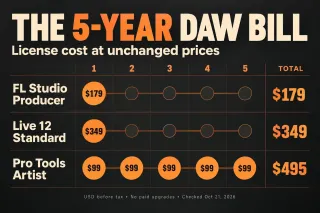
That makes the trial workable for finishing a beat in one sitting and exporting it, and frustrating for anything you want to come back to tomorrow. Paid editions carry Lifetime Free Updates, and Image-Line's edition comparison page lists them from $99. If you are close to buying, our FL Studio discounts guide sorts the legitimate ways to pay less, and the system requirements guide covers what your computer needs. The current download page lists Windows 10 or 11 on Intel or AMD (ARM isn't supported) and macOS 10.15.7 or newer.
The second free route is FL Studio Web, Image-Line’s browser studio. Its current product page says “Free to start” and recommends Google Chrome on a computer. It includes the Channel Rack, instruments, effects and FL Cloud sound integration. A Web project moves one way to Desktop with a separate desktop purchase and installation; desktop projects cannot open in Web. Our FL Studio Web guide covers access, browser requirements and the handoff.
Which free DAW fits the way you work
A free DAW is only useful if it does the job you open FL Studio for. My rule: start from that job, then check the catch before you spend a weekend learning a new program. If DAW is still a fuzzy term, our guide on what a DAW is explains the parts these programs share.
| Your main job | Free pick | The catch |
|---|---|---|
| Pattern beats with a step grid, no vocals | LMMS | Cannot record audio; VST2 instruments and effects on Windows, with Windows VST2 through Wine on stable Linux 1.2.2; no VST3 or native Mac VST support |
| Beats plus vocals on Windows or Mac | Cakewalk Next | Needs a free BandLab account; suggested specs are Windows 11 or macOS 10.15 and 16 GB of RAM |
| Unlimited multitrack with VST3, including Linux | Waveform Free | macOS 13 or later on a Mac; some extras are sold as expansions |
| Sampling and pad-based beats | MPC Beats | Records on 2 stereo audio tracks; download form and internet connection required |
| A traditional studio on Windows | Sonar free tier | Windows 11 only; periodic activation; some tools held back for Membership |
| First DAW on a Mac | GarageBand | Mac only, macOS 15.6 or later, Audio Units plugins only |
| No install, any computer | Audiotool or BandLab | Both are cloud-based and BandLab needs a connection to save; Audiotool plugins need its VST Bridge app |
| Staying with FL Studio | FL Studio trial or FL Studio Web | The trial can't reopen saved projects; Web is free to start, with separate desktop licence requirements |
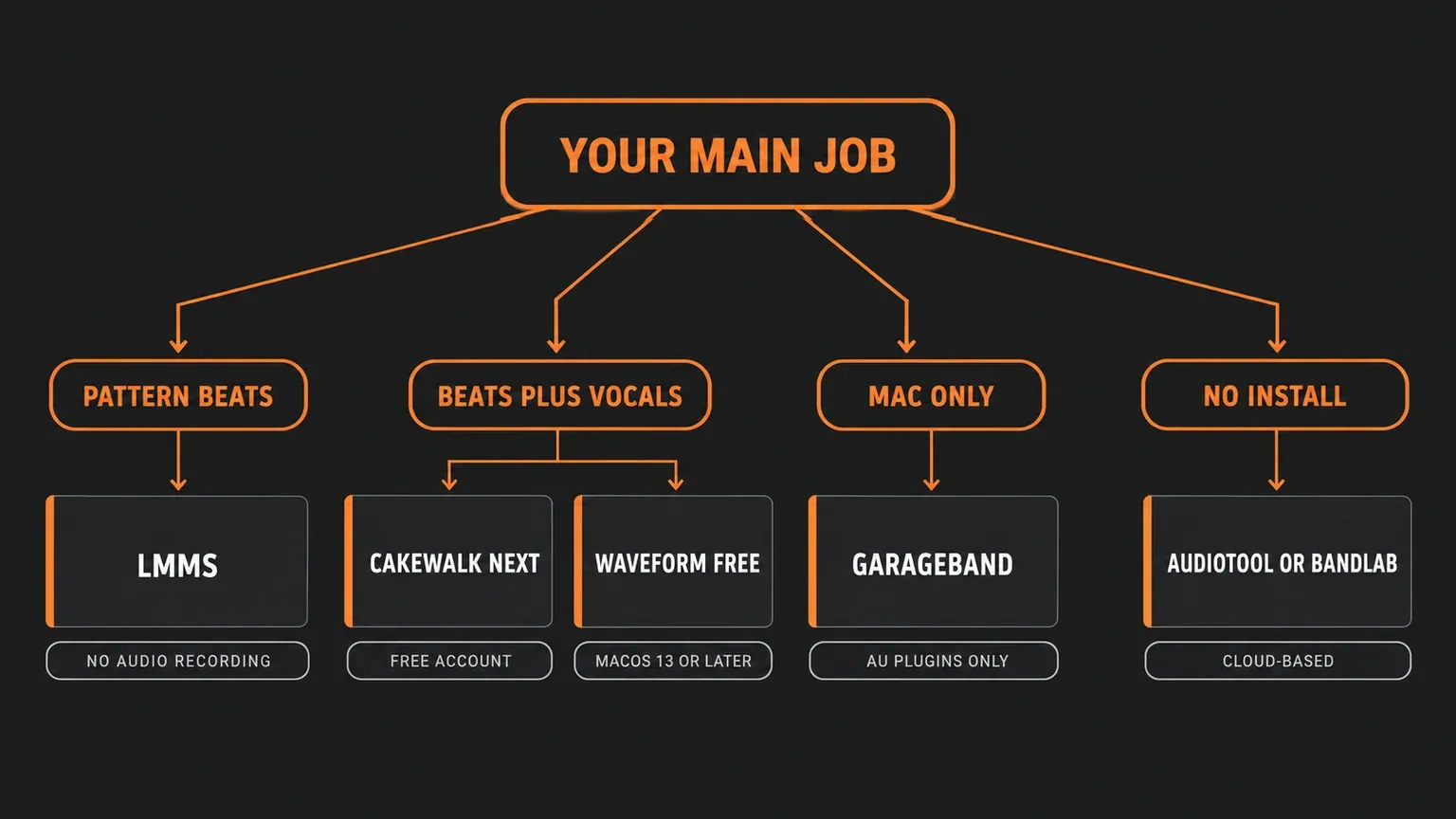
I rank these by how much of FL Studio's pattern workflow they preserve. LMMS is the nearest match because it has its own pattern grid and Piano Roll. After that come DAWs with pads or a step sequencer built into a conventional timeline: MPC Beats, Cakewalk Next with its pad controller, Sonar's Step Sequencer and Waveform's Step Clip.
LMMS: the closest match to FL's pattern workflow
LMMS is free and open source and runs on Linux, Windows and macOS. Its home page lists a Beat+Bassline Editor, a Piano Roll Editor and VST and SoundFont support. The Beat+Bassline Editor is the part that feels familiar to FL Studio users: instruments sit in rows with steps you click on, much like FL's Channel rack, and those patterns are arranged in a Song Editor that plays the role of FL's Playlist. Melodies go into the Piano Roll. If you learned beats with FL's step sequencer, LMMS needs the least relearning of anything on this page.
The limits are just as clear. The LMMS manual's Song Editor page says it plainly: "LMMS can't edit recorded sounds, nor can LMMS record sound!" You can place an audio file on a Sample track, so vocals recorded in another program can be imported, but there's no record button for a microphone. An experimental recording plugin exists only as an open pull request on GitHub, opened in October 2025 and still unmerged, so no release includes it.
Plugin support is narrower than FL Studio's too. On stable LMMS 1.2.2, VeSTige loads Windows VST2 plugins; the Linux route uses Wine rather than native Linux VST files. The VeSTige manual page is for the 1.3.x branch, so its native Linux VST2 support should not be read as a feature of stable 1.2.2. Plugin architecture and the installed Wine build still matter. The LMMS settings page adds that LMMS "does not yet support VST3 plugins". macOS isn't on the VeSTige list at all, and the GitHub request for VST on macOS is still open. On a Mac, plan on LMMS's built-in instruments and SoundFonts. If a synth you rely on comes only as VST3 or AU, LMMS can't load it, so check the developer's format list before you move; our free plugins guide notes the formats for its picks.
Then there's the version question. The stable release on the LMMS download page is 1.2.2, dated June 25, 2020. Development continues in the 1.3 branch: the 1.3.0-alpha.2 release of September 6, 2026 adds native Linux VST2 support, native ARM64 builds (Windows 11 on ARM, macOS 11 on Apple M1 or newer, Linux), new native plugins, detachable windows, microtonal tuning and the SlicerT beat slicer. The same notes warn that "Crashes may happen", that project files may break, and that projects saved in it can't be reopened in older versions. I'd keep real projects on the stable release and treat the alpha as a test drive; if you try it, keep a copy of every project from before you opened it there.
Cakewalk Next and Sonar: the free Cakewalk options now
Older lists of free DAWs still recommend Cakewalk by BandLab. That program has ended. BandLab's Sonar page says activation renewals for Cakewalk by BandLab have stopped, which it calls "the official end of development and support"; the same FAQ gives two different dates for the cutoff, both in 2025. Old Cakewalk by BandLab projects open in Sonar. Two free products replace it, and they suit different people.
Cakewalk Next is the one for beatmakers. Cakewalk says it is "now completely free to use" with a free BandLab account. The free version includes unlimited tracks, virtual instruments, built-in effects and support for VST and AU plugins, along with a Piano Roll, audio recording, a 16-pad controller that Cakewalk describes as made for "beatmakers and MPC-style music production", and XSampler, which turns a dragged audio clip into a playable, sliceable instrument. It runs on Windows and macOS; the suggested specs are Windows 11 or later, or macOS Catalina 10.15 or later, with 16 GB of RAM. A paid BandLab Membership adds unlimited BandLab Sounds and Splitter stem separation, but the core app works without it. Cakewalk also says Next "is not a direct replacement for Cakewalk by BandLab". It's a new product built around simpler workflows, and Cakewalk points anyone who wants the traditional studio to Sonar.
Sonar's free tier is the traditional studio. Cakewalk says Sonar is "fully functional for free in evaluation mode", with a multi-track Piano Roll, a built-in Step Sequencer and what Cakewalk calls a more traditional studio and mixing workflow. The free tier leaves out Cakewalk Assist, Custom Workspaces, the Core Plugin Suite and the Theme Editor, allows one Arranger Track instead of unlimited, and runs the TH-U amp simulator in demo mode. Its suggested system is Windows 11 or later, so it's not a Mac option. The free license "is currently indefinite", but it needs periodic online or offline activation, like the paid one.
Waveform Free: unlimited tracks on Windows, Mac and Linux
Tracktion calls Waveform Free a "fully featured, completely unlimited free DAW", and the feature list backs that up for most home studios. Version 14 loads VST, VST3 and AU plugins, records audio, and includes the 4OSC synth, Micro Drum Sampler, Micro Sampler and a Rompler. For beats, it offers inline MIDI editing, Step Clips for quick step programming and a pattern generator for ideas. Retrospective Record is there so you don't lose a take you played before pressing record.
It runs on macOS 13 or later (Intel or Apple Silicon), 64-bit Windows 10 and 11, and Tracktion lists it as tested on Ubuntu 24.04. On Linux, Waveform Pro features unlock automatically, which is why it's my first pick there. Paid feature expansions start at $30, but the free core has no track limits. Its inline MIDI and Step Clips take the place of FL's separate Channel rack and Playlist pairing, so expect more relearning than with LMMS. In exchange you get recording and VST3.
MPC Beats: pad-first beat making
Akai's MPC Beats page offers the software as a free download through a form. It ships with 2GB of samples, loops and instruments, genre templates such as Trap, Dance and Pop, and over 80 audio effect plugins, and it accepts third-party VST and AU plugins. Akai describes it as beat-making software "based on the legendary MPC workflow", and it works with a long list of pre-mapped USB controllers, so it suits producers who build beats from samples and hands-on playing more than those who click steps into a grid.
Its main limit is recording: Akai says you can record instruments or vocals on 2 stereo audio tracks, enough for a hook and a verse but not for stacked vocal sessions. The requirements list Windows 10 (21H2) to Windows 11, or macOS Ventura to Tahoe, plus an internet connection.
GarageBand: the free start on a Mac
On a Mac, GarageBand is already there or one download away. The GarageBand App Store listing marks it free and Mac only, and it currently requires macOS 15.6 or later. It offers up to 255 tracks, Drummer, Smart Controls, Flex Time, multi-take recording, and iCloud to keep projects updated across several Macs or bring in songs started in GarageBand for iOS. For recording a song with vocals and guitar, it's the easiest free start on Apple hardware.
Two things matter for FL Studio users. Apple's listing describes tracks, Apple Loops, Drummer and Smart Controls, and doesn't advertise a step-pattern grid like FL's Channel rack. It also takes third-party plugins only as Audio Units: Apple's guide to using Audio Units plugins in GarageBand covers AU plugins and Audio Unit Extensions, nothing else. If you're weighing GarageBand against Logic Pro or FL Studio for Mac, our best DAW for Mac comparison goes through each by workflow.
Browser DAWs: Audiotool, BandLab and Soundation
A browser DAW is the answer when you can't install software, for example on a school laptop. I'd still move a song to an installed DAW once it matters, because keeping your own copy of the whole project is easier there. FL Studio Web, covered above, belongs in this group too.
Audiotool says it runs in your browser with "no track or feature caps", 37 built-in synths, drum machines and effects, real-time collaboration, and recording of vocals or instruments straight from the browser. It can even use your own VST3 plugins, but only through the Audiotool VST Bridge, a companion app you install on Windows, macOS or Linux. So "no install" stops being true the moment you want plugins.
BandLab's download page FAQ says its app and DAW "are completely free to download and use". On a PC it runs in a browser, with Chrome recommended. You can keep working offline, but saving needs a connection, and you can't keep your songs as project files on your own device; you can export the song as one audio file or download each track. That's fine for sketching and collaboration. It's a real limit if you want local backups of whole projects.
Soundation's plans page lists Free, Starter, Creator and Pro options. Check the selected plan's export formats, billing cycle and final price in your currency before building a whole song around it.
REAPER’s trial and Ardour’s download options
REAPER often shows up in free lists. It's a trial: the REAPER download page offers "a free, fully functional 60-day evaluation" with no registration. After that, the REAPER purchase page asks $60 for a discounted license or $225 for a commercial one, both with upgrades through version 8.99. It's inexpensive. It just isn't free, and our FL Studio vs REAPER comparison explains how its workflow differs from FL's.
Ardour is open source. Its own ready-to-run downloads ask for payment, while its source code is free to build. That is not the only way to get a binary: the Ardour FAQ says Linux users generally get it without payment from their distribution’s repositories. Check the package version and support route there. On Windows or macOS, a paid official build is the simpler route than compiling it yourself.
Taking your FL Studio ideas to another DAW
An .flp file is FL Studio's own project format, so plan on moving the parts of a song rather than the project. Melodies and drum patterns travel as MIDI; our guide to exporting MIDI from FL Studio covers single parts and whole songs. Finished sounds travel as audio stems, one WAV per Mixer track, as shown in our stem export guide. Samples are already files on your drive, so copy the folders you used. FL Studio's own instruments, such as Sytrus or FLEX, don't come along, so render those parts to audio if you want to keep their sound.
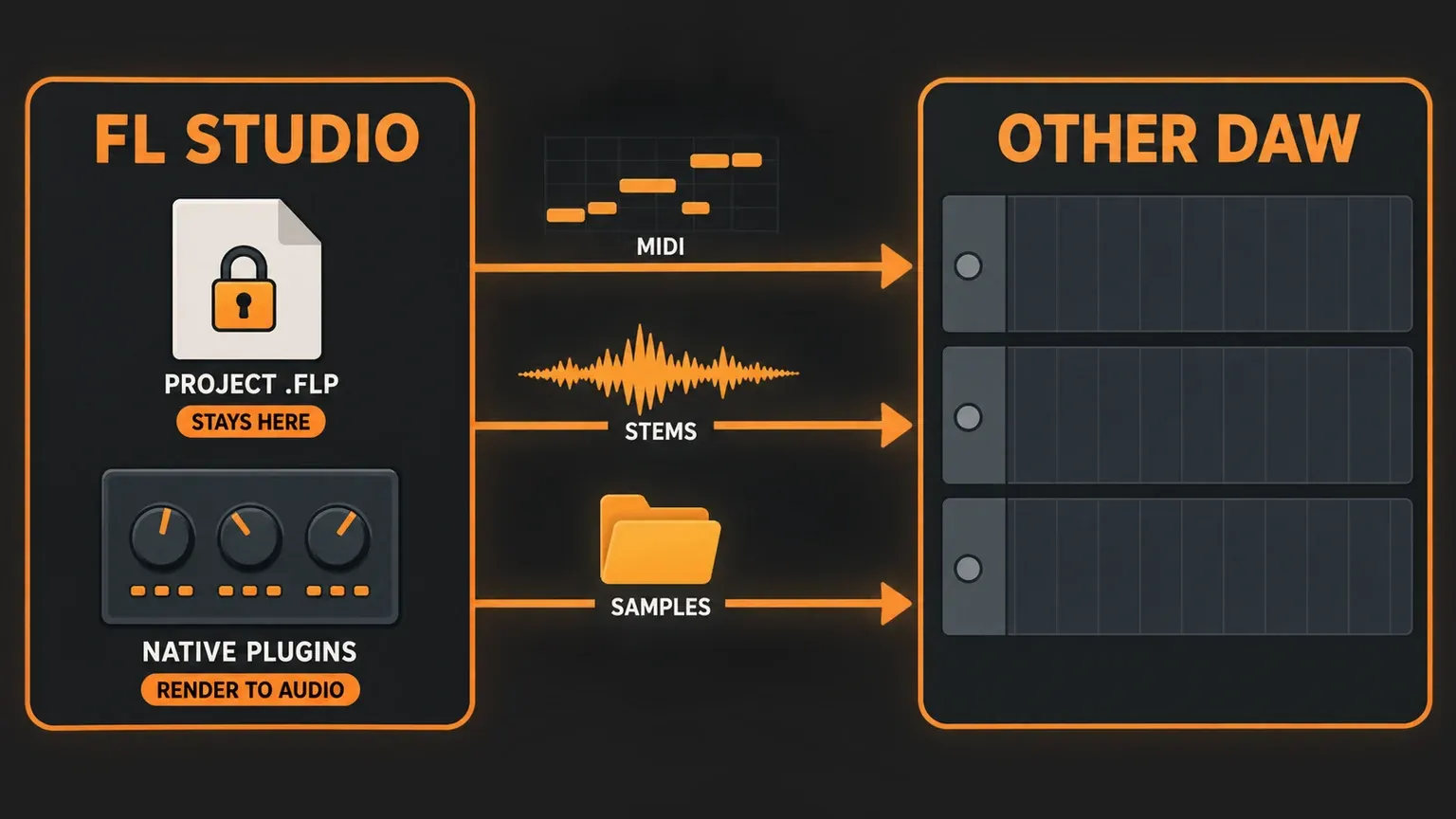
The trial makes the order important. Export the MIDI and stems before you close a trial project. If you close it first, reopening needs a suitably licensed copy—your own, or the licensed-collaborator resave route described above. Our song export guide shows the full-mix export too.
Quick answers
Which DAW is totally free?
LMMS is free and open source with no paid tier. Waveform Free, Cakewalk Next, MPC Beats, GarageBand on a Mac, Audiotool and BandLab are free to use, with optional paid extras for some. REAPER and FL Studio are trials, not free DAWs.
Is FL Studio 100% free?
No. The trial has no time limit and lets you save and export audio, but it cannot reopen its own saved projects without a licensed copy; Make unique is also unavailable. A licensed collaborator can resave a compatible project for a return session, as described above. FL Studio Web advertises a free starting route; moving to Desktop requires a separate desktop purchase and installation.
Is there a DAW better than FL Studio?
For some jobs, yes. Among free DAWs, LMMS comes closest for pattern-based beats. Our comparisons of FL Studio vs Ableton Live and FL Studio vs Logic Pro show where paid alternatives pull ahead and where FL stays stronger.
What can I use on a phone or a Chromebook?
On a Chromebook, start with a browser DAW such as Audiotool or BandLab and check that your browser and school or work restrictions allow it. For a phone, I'd start with BandLab's native Android app or iPhone and iPad app, which are free to use with optional paid extras; the current Apple listing requires iOS or iPadOS 16 or later. Browser support alone does not promise a usable phone or touch interface. Image-Line recommends a computer with Google Chrome for FL Studio Web. For FL Studio's phone app, see our guide to FL Studio Mobile vs desktop.
Which free DAW works on Linux?
Waveform Free, which unlocks its Pro features on Linux, and LMMS, which also loads Windows VST2 plugins through WINE. Ardour is also available from Linux distribution repositories without compiling it yourself, as well as from free source code or paid official builds. FL Studio has no Linux version; our FL Studio on Linux guide explains the unofficial Wine route.
My verdict: if you love FL's pattern workflow and don't record vocals, try LMMS first; if you record, I'd start with Cakewalk Next or Waveform Free; and if you're on the FL trial, export your stems and MIDI before you close the project.