FL Studio
VST, short for Virtual Studio Technology, is the plugin standard Steinberg introduced in 1996. A VST plugin is an instrument or effect that runs inside a host program such as a DAW: the host sends it audio or MIDI notes, and the plugin sends back processed sound or new notes. People also say "VST" loosely for any audio plugin. FL Studio loads VST, VST3 and CLAP plugins on Windows and macOS, plus Audio Units (AU) on macOS.
If a tutorial told you to "load a VST", or a download page offers five buttons with five different format names, this page sorts it out. I cover what a VST plugin actually does, the three kinds you will meet, how VST differs from "plugin" and "DAW", the formats on a typical download page, why VST3 replaced VST2, which version to pick, and how FL Studio presents a third-party plugin. Installation and scanning steps have their own guides, linked where they come up.
What a VST plugin actually does
Steinberg's VST 3 developer portal describes VST as the interface that brings software synthesizers and effects into digital audio workstations. Its What is VST page explains the working model. A plugin is an audio processing component used inside a host application. The host supplies audio or event (MIDI) data in small blocks, the plugin processes each block, and the host takes the result and carries on.
From the host's side, Steinberg says, a VST plugin is "a black box with an arbitrary number of inputs, outputs (Event (MIDI) or Audio), and associated parameters." The host doesn't need to know how a reverb or a synth works inside. It only needs the inputs, the outputs and the list of parameters, which is why the same plugin can run in many different programs. Depending on the host, those parameters can be automated, which is how a slow filter sweep gets written into a song. For FL Studio, our automation guide shows how to capture a third-party plugin's control with Tools > Last tweaked.
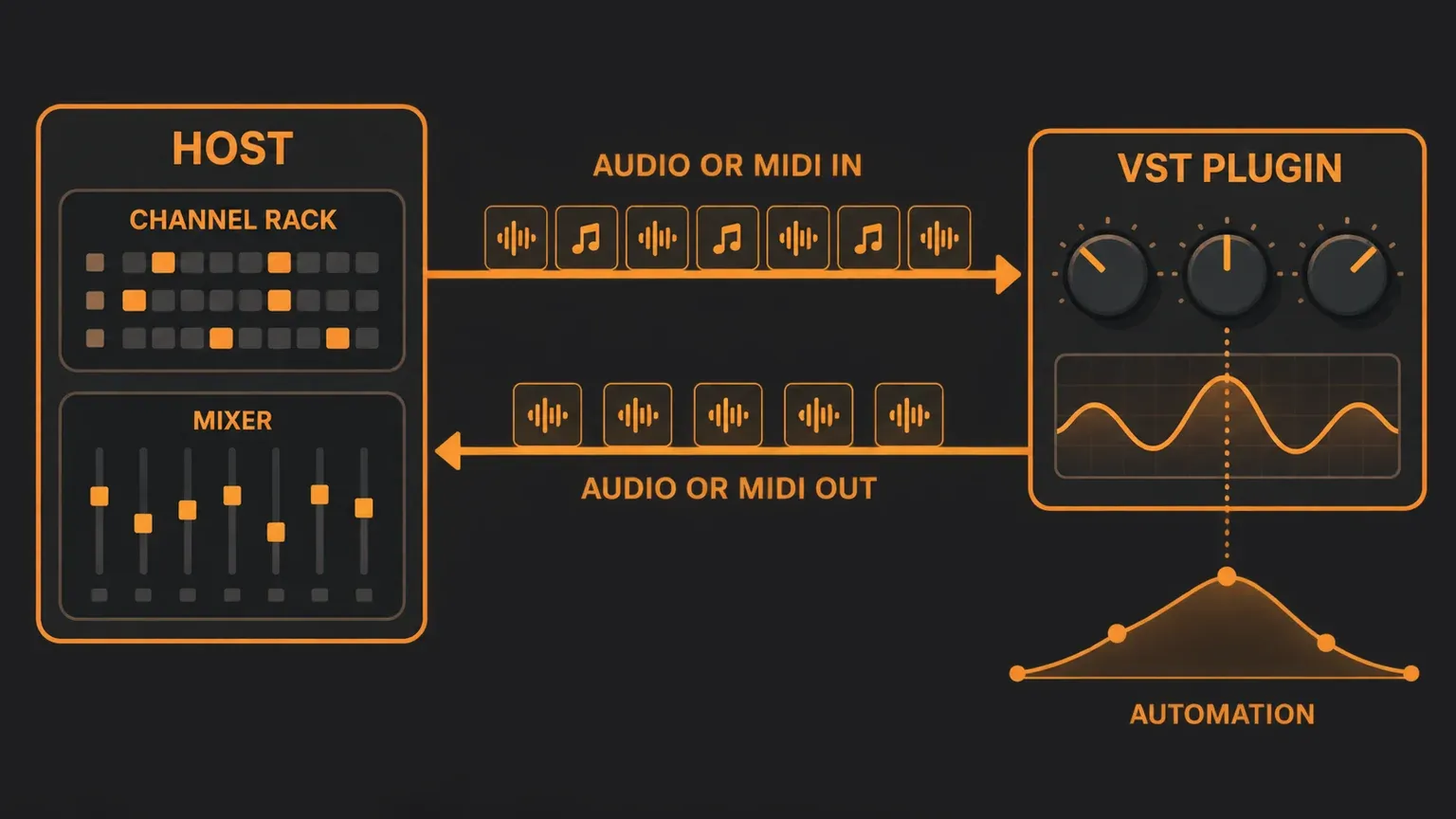
That also explains why a plugin file is not something you open by double-clicking. Steinberg notes that the file is packaged differently on each platform: a DLL inside a folder structure on Windows, a bundle on macOS and a package on Linux. In every case it waits for a host to load it.
VST instruments, effects and MIDI effects
Wikipedia's Virtual Studio Technology article splits VST plugins into three kinds:
- Instruments (VSTi) generate sound. Synthesizers, samplers and drum machines belong here, such as the free Vital synth or Native Instruments' Kontakt sampler, which you set up through Native Access.
- Effects process audio that already exists: EQ, compression, reverb, delay, distortion.
- MIDI effects change notes on their way to an instrument, for example by transposing them or turning a held chord into an arpeggio.
The same article dates instruments to VST 2.0 in 1999, the version that let plugins receive MIDI.
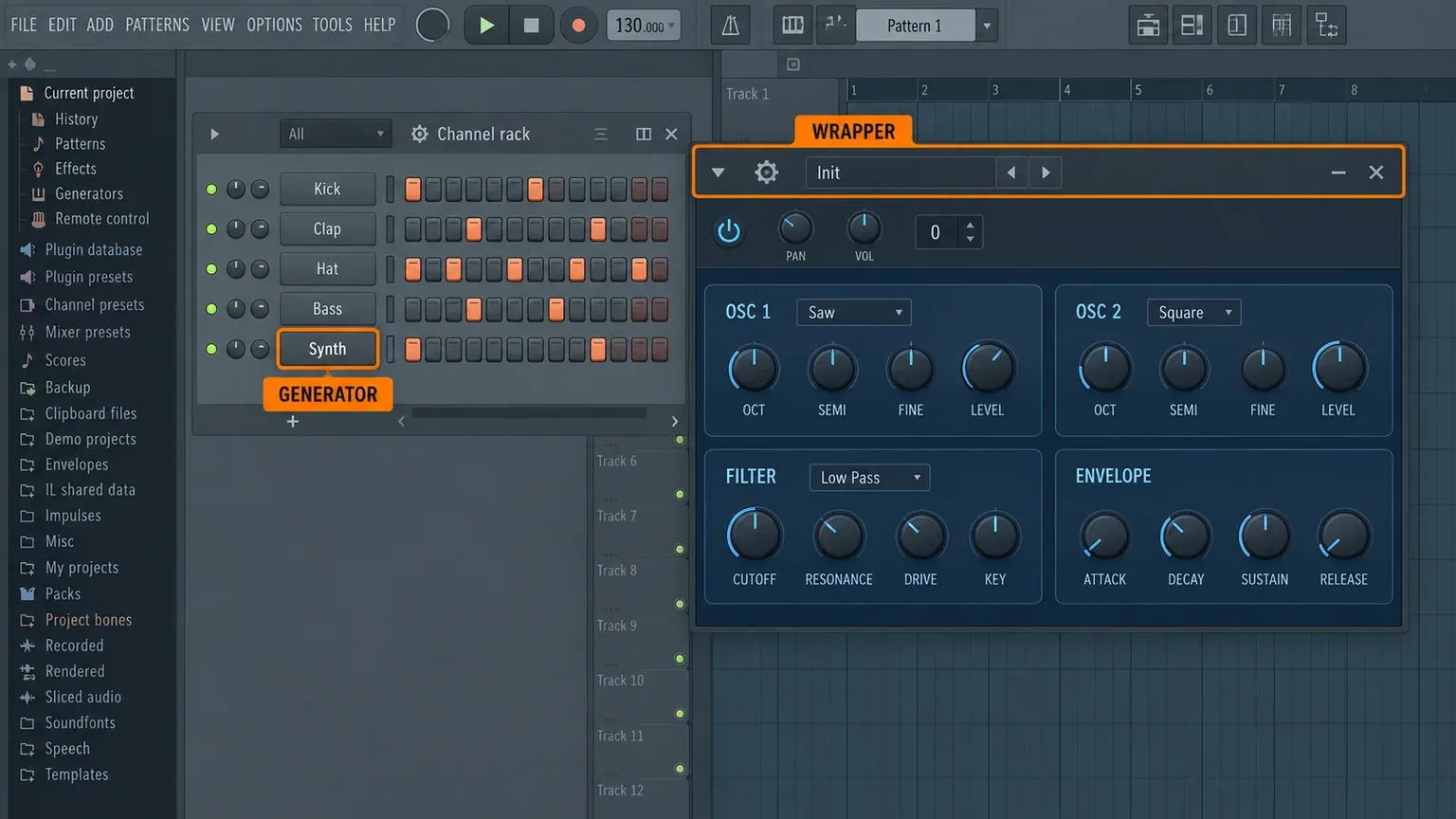
FL Studio files the first kind under another name. Image-Line's guide to installing and using plugins says: "FL Studio categorizes VST instruments as 'Generators' because some also generate control or note data, rather than sound." Generators load into the Channel rack, one instrument per channel. Effects go into the slots of a Mixer track, and Image-Line's effects overview allows up to 10 per track, with Patcher as the way to hold more. Our Mixer guide and Patcher guide cover both.
VST vs plugin vs DAW
These three words get mixed up constantly, so here is the short version:
- A plugin is the general idea: a component that adds an instrument or effect to a host program.
- VST is one plugin format, Steinberg's. AU, AAX and CLAP are other formats, and FL Studio has its own native format.
- A DAW is the host, the program where you arrange, record and mix. Our What Is a DAW guide walks through its parts.
So every VST is a plugin, but not every plugin is a VST. In everyday talk, though, producers say "VST" for nearly any plugin, whatever its real format, so "load a VST" in a tutorial usually just means "load a plugin". Image-Line's plugin format FAQ puts the practical difference in one line each: an FL plugin only works in FL Studio, a VST plugin works in all VST host programs, and an AU plugin works on macOS.
A plugin can't replace a DAW. It does its one job, making a sound or changing one, while the host handles the song around it.
The plugin formats you will see on a download page
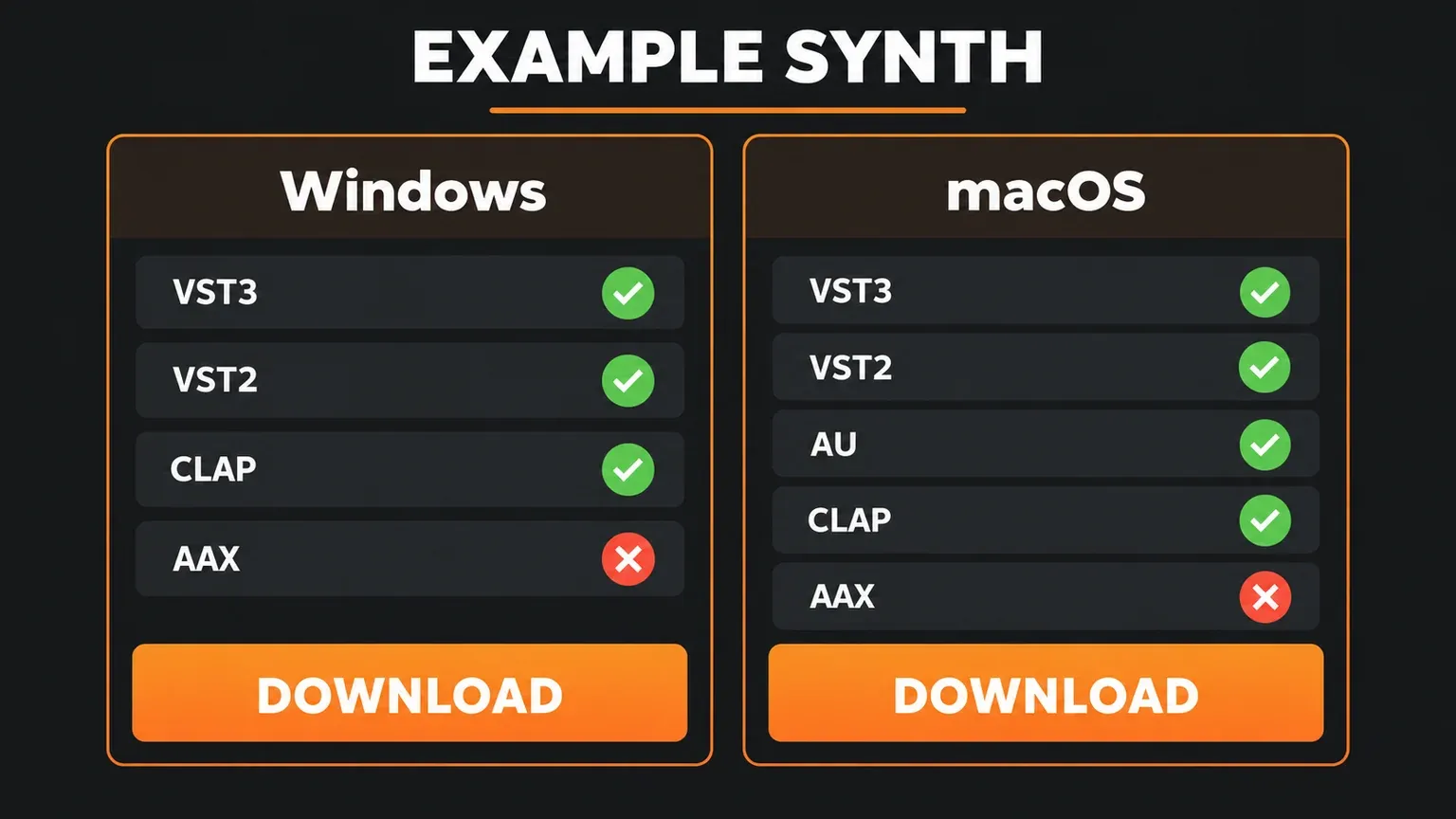
For FL Studio, Image-Line's list of supported plugin formats is the reference. On Windows, FL Studio loads 32 and 64-bit VST 1 and 2, VST3, CLAP and its native format. On macOS, it loads 64-bit VST 1 and 2, VST3, 64-bit AU, CLAP and native plugins. Here is what each name on a download page means:
| Format | Where it runs | What to know |
|---|---|---|
| VST2 (often just "VST") | Windows and macOS hosts | The older Steinberg version. FL Studio still loads it, but new developers can no longer release it. |
| VST3 | Windows and macOS hosts | The current Steinberg version, with the .vst3 extension. It isn't compatible with VST2, so it installs as a separate plugin. |
| AU (Audio Units) | macOS only | Apple's format. FL Studio for Mac loads it, and Logic Pro supports it for third-party plugins. |
| AAX | Avid hosts such as Pro Tools | Not on FL Studio's supported list, so skip it for FL Studio. |
| CLAP | Hosts that support it, including FL Studio 2024.1 and later | An open, MIT-licensed format and the newest name on this list. |
| FL Studio native | FL Studio only | Image-Line's own format, used by FL Studio's stock plugins. |
Image-Line's plugin guide calls AU "Apple's equivalent to VST", tied to macOS. Apple's Logic Pro guide to Audio Units covers third-party plugins as Audio Units and Audio Unit Extensions, which is why Mac plugin installers often include an AU build. Avid's AAX developer page describes AAX as the format for Pro Tools, VENUE S6L and Media Composer. Our comparisons of FL Studio vs Logic Pro and FL Studio vs Pro Tools cover how those programs differ beyond plugins.
CLAP, short for CLever Audio Plug-in, is the newcomer. The CLAP project site describes it as a standard for DAWs and audio plugins to work together, and its code is released under the MIT license. Its list of hosts, dated November 2024, includes FL Studio, Bitwig Studio, REAPER and Studio One, and Image-Line says FL Studio has supported CLAP since version 2024.1.
VST2 vs VST3: why new plugins ship as VST3
Wikipedia's history dates VST3 to 2008 and reports that Steinberg stopped maintaining the VST2 developer kit in September 2013 and stopped distributing it that December. Steinberg's licensing FAQ is blunt about the rest: a developer may distribute a VST2 plugin only if they signed the VST 2 license agreement before October 2018. A developer who never signed it can't release a VST2 version, which is why a recent plugin may offer no VST2 build at all.
The two formats aren't interchangeable. Steinberg's overview of VST 3 benefits says VST3 "is not compatible with the older VST (1 & 2) versions." A project saved with the VST2 build of a plugin looks for that build. Steinberg's FAQ on VST 2 compatibility explains how a developer can mark a VST3 version as the replacement for its VST2 counterpart, but that depends on both the plugin and the host. If older projects use the VST2 version, keep it installed.
What VST3 adds, according to that same Steinberg page:
- Processing only when needed. A VST3 plugin can skip processing while no audio reaches its inputs, which can save CPU. How much depends on whether the plugin uses the feature.
- Flexible inputs and outputs. Steinberg notes that side-chains are easy to offer. Our sidechain compression guide shows the routing on the FL Studio side.
- Sample-accurate automation, so parameter changes land exactly where you drew them.
- A resizable plugin window.
- Note expression, which carries articulation data for each individual note, so an instrument can shape one note of a chord without touching the others.
The license changed as well. Steinberg's VST 3.8.0 release notes, dated 20 October 2025, say "VST 3 is now open source, released under the MIT license", and the same release adds MIDI 2.0 support.
Which version to download
When a developer offers several installers and formats, I'd go through them in this order:
- Match your operating system. Image-Line's plugin guide warns that VST plugins for Windows and macOS are not compatible, so use the installer made for your system. It adds that it is common to find free VST plugins with a Windows version but no macOS version, so check before you count on one for a Mac.
- Pick 64-bit. FL Studio has been 64-bit only since version 20.9. On Windows, a 32-bit plugin still runs through an automatic bridge, which Image-Line puts at about 2% extra CPU per plugin. FL Studio for Mac loads only 64-bit plugins. Bit depth decides how much memory a plugin can use, and in Image-Line's words, "It has nothing to do with 'audio quality'."
- Take VST3 when it's offered. It's the current format. On a Mac, Image-Line recommends the VST build over AU if your projects ever open on Windows, since VST is the only way to keep a project compatible across both systems. It also says VST "may have slightly less processing overhead" than AU, and that AU doesn't support MIDI output. If one format gives you trouble, Image-Line suggests trying the other, and its plugin troubleshooting page gives the same tip for VST2 and VST3 on Windows.
- Use CLAP if you like on FL Studio 2024.1 or later, when the developer offers it.
- Keep the format older projects use. Install the new format alongside it rather than replacing it.
An Apple Silicon Mac adds one more layer. In native mode, FL Studio automatically bridges VST plugins built for Intel processors, while macOS handles Intel AU plugins itself, and Image-Line says to rescan the first time you use each mode. Our Apple Silicon plugin guide covers native mode vs Rosetta in detail.
How FL Studio shows a VST plugin
Every VST, AU or CLAP plugin opens inside FL Studio's wrapper. Image-Line's wrapper manual page calls it "a software interface/layer between instrument / effect plugins and FL Studio". On screen it's the strip across the top of every third-party plugin window, and its menu and settings tabs hold the parts you'll use most:
- Presets, including Save preset as, next to whatever preset system the plugin has.
- Add to plugin database, which flags the plugin as a favorite. Our plugin database guide shows how to organize those folders.
- Smart disable, which stops FL Studio processing a plugin while it's inactive. Image-Line says this "can dramatically reduce CPU load, in certain projects", and warns that it can interfere with time-based, envelope-based or long-decaying effects. Our high CPU guide explains when to turn it off for one plugin.
- Make bridged, a Processing tab option that runs the plugin in a separate process outside FL Studio. Only VST plugins can be bridged.
FL Studio finds plugins by scanning. In Options > File settings > Manage plugins, Find installed plugins with Verify plugins switched on sorts new plugins into Effects and Generators, and they show up under Plugin database > Installed > Generators > New or Effects > New. Image-Line explains why Verify matters: a fast scan recognizes VST plugins by their .dll file name, while Verify plugins collects each plugin's unique ID, so FL Studio can still load it in old projects after the file is renamed. Step-by-step instructions are in our plugin installation guide, and plugin not showing in FL Studio covers a scan that misses something.
Where VST files live
Steinberg's plugin locations page lists the standard VST3 folders: C:\Program Files\Common Files\VST3 on Windows and /Library/Audio/Plug-ins/VST3 on macOS. Hosts scan those folders and everything inside them at startup. A VST3 plugin carries the .vst3 extension, and on Windows what looks like one file is really a folder holding the plugin binary, as Steinberg's plugin format page describes. Older VST2 plugins on Windows are .dll files.
The simplest rule is to run the plugin's installer and keep its default location. Image-Line warns against one place in particular: "DO NOT install plugins to the FL Studio installation folder", because its Plugins\VST folder is reserved for legacy native FL Studio plugins. Our install guide lists the folders FL Studio checks on each system.
FL Studio's own plugins are not VSTs
FL Studio's stock instruments and effects, such as Sytrus, FLEX and Fruity Limiter, use Image-Line's native format. Image-Line's instrument overview calls native instruments "the most flexible with 'per note' slides and Right-Click automation linking". Our stock plugin guide picks the ones worth learning first.
The reverse direction works too. Image-Line's knowledge base says that since 2021 its plugins are no longer sold separately in VST or AU format; instead, FL Studio itself loads as a plugin inside other hosts, as VST on Windows and macOS and as AU on macOS. According to the FL Studio VST manual page, the output goes to the host, play, stop and tempo stay in sync, and the multiple-output version can send Mixer tracks to up to 16 separate stereo outputs.
Is VST free?
The standard is. Steinberg calls the VST SDK "available as a free technology, open in use for any developer", and since version 3.8.0 it carries the MIT license. Individual plugins are a separate question: each developer decides whether to give theirs away or charge for it. Free plugins can be excellent, and our free plugins for FL Studio list picks thirteen and explains how to get them from the developer instead of a repack site.
Quick answers
What does VST stand for?
Virtual Studio Technology. Steinberg released the VST specification in 1996, alongside Cubase 3.02, according to Wikipedia's history of the format.
What is a VSTi?
A VST instrument: a plugin that generates sound, such as a synth, sampler or drum machine. FL Studio lists them as Generators.
What is a VST3 plugin?
A plugin in the current version of Steinberg's format, with the .vst3 extension. It installs as a separate plugin next to any VST2 version, because the two formats are not compatible.
Can I use VST plugins in Logic Pro or Pro Tools?
Apple's Logic Pro guide covers third-party plugins as Audio Units, so look for the AU build there. Pro Tools uses Avid's AAX format. Check the developer's product page for those builds.
Do more plugins slow FL Studio down?
Every running plugin uses some CPU, and some use far more than others. Image-Line's wrapper page puts the extra cost of a bridged plugin at roughly 1 to 2% CPU, and Smart disable can cut the load of idle ones.
Next time a download page offers five buttons, pick your system, take VST3 or CLAP, add AU if you also work in Logic, and leave AAX to Pro Tools users.