FL Studio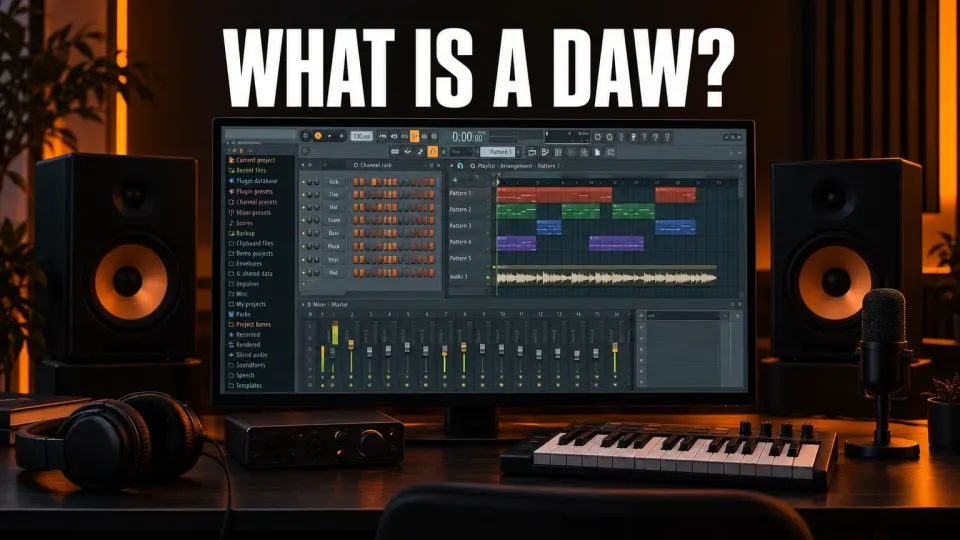
A DAW, or digital audio workstation, is the program you make music in. It records audio, plays virtual instruments, lets you arrange and edit everything on a timeline, and mixes the result into a finished song. FL Studio, Ableton Live, Logic Pro, Pro Tools, REAPER and GarageBand are all DAWs. Most people say it as one word that rhymes with "saw".
If a beat tutorial told you to "open your DAW", this is the program it meant. Below I explain what a DAW does, show its standard parts using FL Studio as the worked example, separate it from tools that only look similar, and finish with what you need to start and what it costs.
What a DAW does
Wikipedia's digital audio workstation article defines a DAW as an electronic device or application software for recording, editing and producing audio files. The device part is real but rare: a DAW can be a single program on a laptop, a stand-alone unit, or a large studio system with many components. For almost everyone reading this, a DAW is software.
Whatever the brand, a DAW does the same handful of jobs:
- Record sound from a microphone, a guitar or any other source connected to your computer.
- Play instruments: virtual synthesizers, drum machines and samplers that you trigger from a MIDI keyboard, your computer keyboard or the mouse.
- Arrange recordings and note parts along a timeline into an intro, verses, choruses and the rest of a song.
- Edit anything you recorded or wrote: cut it, move it, copy it, fix it.
- Mix every part with volume, panning and effects such as EQ, compression and reverb.
- Export the final mix as an audio file you can share or upload.
Image-Line's FL Studio workflow overview describes the same loop in its own terms: load instruments and samples, play them live or enter the notes by hand, record external sounds such as a microphone, then play the whole mix back through the mixer with effects. The project saves as an .flp file (or a .zip that bundles its samples), and the song exports to .wav, .mp3 or .ogg.
The quiet superpower is undo. Wikipedia calls the ability to undo a previous action perhaps the most significant feature a DAW has that analog recording doesn't. On tape, recording over a good take meant losing it. In a DAW you undo and try again, which is why our FL Studio undo and redo guide is worth reading in your first week.
The main parts of a DAW, shown in FL Studio
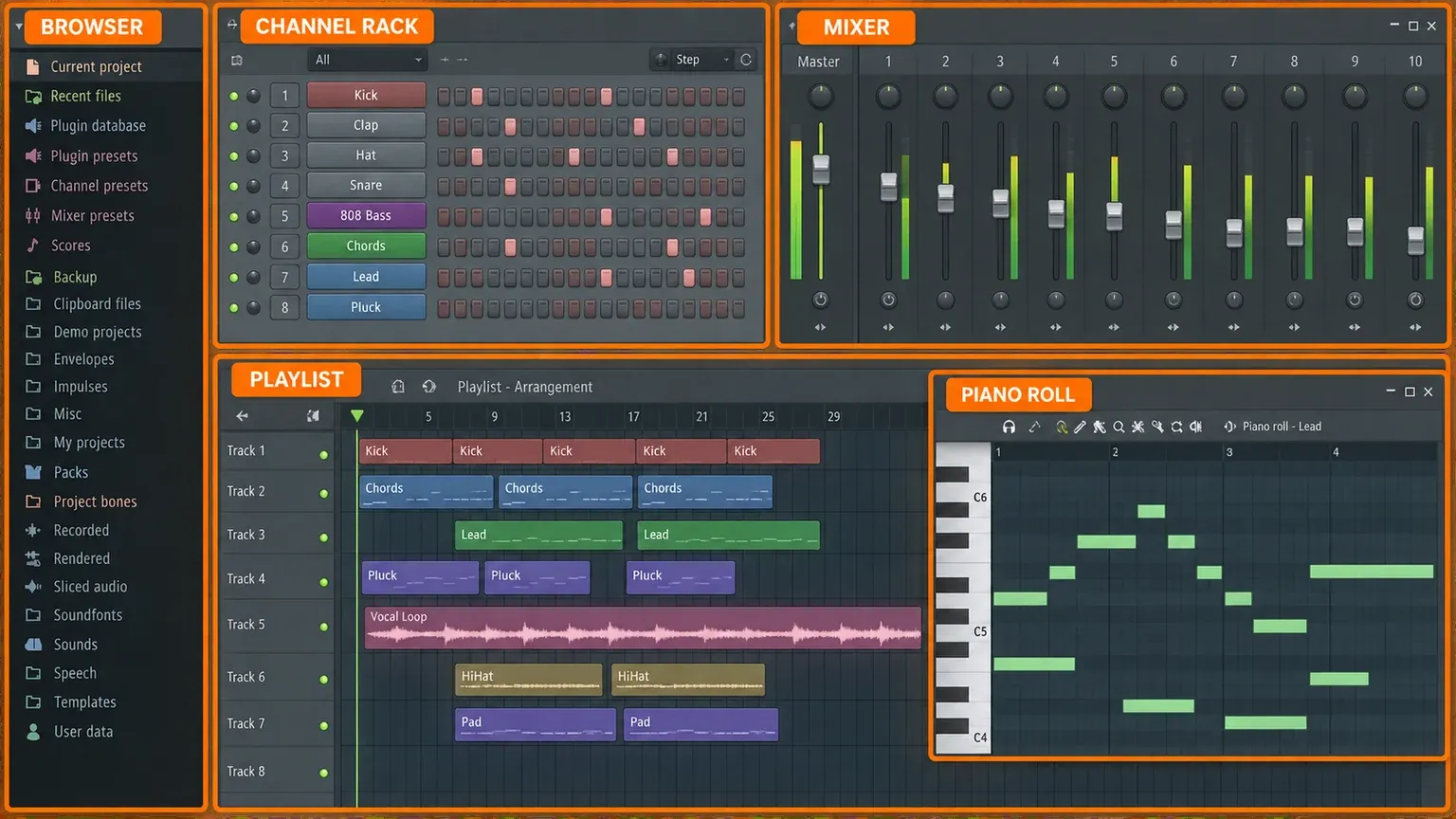
Nearly every DAW is built from the same five parts, even when the names and layouts differ. FL Studio puts each part in its own window with its own function key, which makes it a handy way to learn them. On a Mac, read Alt as Opt and Ctrl as Cmd.
| Part of any DAW | What it does | FL Studio window | Key |
|---|---|---|---|
| File browser | Finds samples, presets, plug-ins and projects | Browser | Alt+F8 |
| Instrument rack | Holds the instruments and samples in the song | Channel rack | F6 |
| Note (MIDI) editor | Writes and edits melodies, chords and drum hits | Piano roll | F7 |
| Arrangement timeline | Lays the parts out across the length of the song | Playlist | F5 |
| Mixer | Balances levels and adds effects | Mixer | F9 |
If the windows ever end up scattered or off screen, Ctrl+Shift+H puts all of them back in their default positions.
Browser
The Browser is the library panel. Image-Line's workflow overview describes it as the place to access audio files, plug-ins and presets, and you drag items from it into the song. Our FL Studio Browser guide walks through its tabs.
Channel rack: the instruments
Image-Line suggests thinking of the Channel rack as a rack of synthesizer and sampler modules. Each row is one instrument or sample, and each sends its sound to a Mixer track. The row of step buttons beside each channel is FL Studio's step sequencer, the quickest way to program a drum pattern. The Channel rack guide and the step sequencer guide go deeper.
Piano roll: where notes are written
Every DAW has a note editor, often called a piano roll. Image-Line's Piano roll manual page describes the layout: pitch runs up the vertical axis and time runs left to right, the same principle as the paper rolls that once played player pianos. You draw notes with the mouse or record them from a keyboard. Our Piano roll guide covers the tools.
Playlist: the arrangement
The Playlist is the song's timeline, where everything that plays in the final track is sequenced. It holds three kinds of clips: pattern clips with notes, audio clips with recordings, and automation clips that move a control over time. Playlist tracks in FL Studio aren't tied to one instrument or Mixer track, so any track can hold any clip, which surprises people who arrive from other DAWs. The Playlist guide explains how to work with it.
Mixer: balance and effects
All audio in FL Studio passes through the Mixer, as Image-Line's Mixer manual page puts it. Each instrument feeds a Mixer track where you set its level and add effects, and the tracks flow into the Master track that becomes your final mix. Our Mixer guide explains routing. When the song is done, File > Export renders it to an audio file, as our guide to exporting a song shows.
Audio and MIDI: the two kinds of material
A DAW works with two kinds of material, and mixing them up causes a lot of early confusion.
Audio is recorded sound: a vocal, a guitar take, a drum sample. You can cut it, stretch it and add effects to it, but the performance is baked in.
MIDI is note data, not sound. It stores which note played, when, for how long and how hard. An instrument plug-in turns that data into audio as the song plays. Because the notes stay editable, you can fix one wrong note, or move a piano part to a synth, without playing it again. That editing happens in the Piano roll.
You don't need a MIDI keyboard to start, because FL Studio can turn your computer keyboard into a piano. When you're ready to capture performances, our guides to recording MIDI and recording audio pick up from there.
Plug-ins: instruments and effects inside the DAW
Plug-ins are add-on instruments and effects that run inside a DAW. An instrument plug-in makes sound from MIDI notes; an effect plug-in changes the sound that passes through it, the way an EQ or a reverb does. Most DAWs ship with their own set, and many more are available from other developers.
Plug-ins come in standard formats, so one plug-in can work in many DAWs. According to Image-Line's list of supported plug-in formats, FL Studio on Windows loads VST, VST3, CLAP and Image-Line's own native format, and FL Studio on macOS also loads Audio Units (AU), Apple's format. CLAP is the newest of the group; the name stands for CLever Audio Plug-in.
A plug-in is not a DAW. It runs inside a host program, the way an app runs inside an operating system. Start with what FL Studio already includes in our stock plugins guide, then look at the best free plugins and learn how to install plugins in FL Studio.
Three ways DAWs build a song
This is where DAWs really differ, and for a beginner it matters more than any feature list.
The linear timeline
Most DAWs follow the model of a multitrack tape recorder: tracks stack from top to bottom, time runs left to right, and the song plays from start to finish. Ableton's own Session View manual describes its Arrangement View that way, noting that in all traditional sequencing programs everything happens along a fixed song timeline. It suits singers, bands and anything you record in takes.
Clip launching
Ableton Live adds a second view built for playing live. In Session View each clip has a triangular button at its left edge that launches it at any moment, so you can trigger loops in any order and shape a song on the fly before committing it to the timeline. Our FL Studio vs Ableton comparison covers how that changes day-to-day work.
Patterns
FL Studio grew up as a pattern sequencer. You build short patterns, such as a four-bar drum loop or a chord part, in the Channel rack and Piano roll, then paint those patterns into the Playlist as many times as the song needs. The workflow overview is clear that you aren't locked into this: FL Studio can work as a track-based sequencer, a pattern-based one, or a combination of the two. Our guide to looping patterns and the make a beat walkthrough show it in practice.
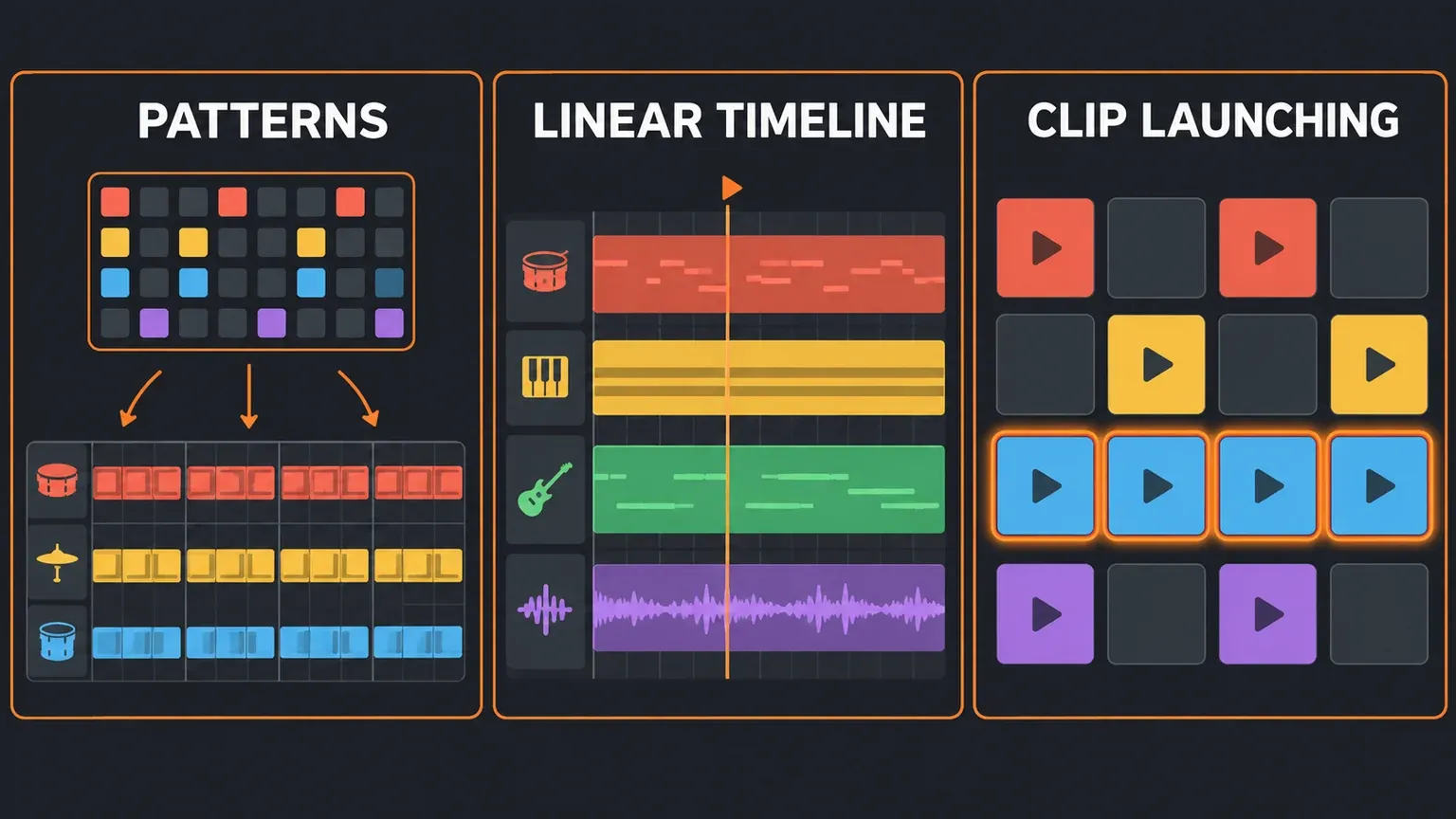
My advice is to pick the workflow before the brand. If you think in loops and beats, patterns feel natural. If you record yourself playing whole songs, a linear timeline is the straight line from idea to track. If you want to perform live, clip launching is the reason to look at Ableton.
DAW, audio editor, notation app or plug-in?
Several kinds of music software overlap with DAWs. This table sorts out the common mix-ups.
| Software | Built for | Is it a DAW? |
|---|---|---|
| FL Studio, Ableton Live, Logic Pro, Pro Tools, REAPER | Recording, instruments, arranging and mixing whole songs | Yes |
| GarageBand | Making music on a Mac, free | Yes, an entry-level one |
| Audacity | Recording and editing audio | Partly: an audio editor with limited DAW features |
| MuseScore Studio | Writing sheet music | No, it's notation software |
| VST, AU or CLAP plug-ins | One instrument or effect | No, they run inside a DAW |
Is FL Studio a DAW?
Yes. Image-Line calls FL Studio a DAW on its FL Studio download page, and the manual compares its channel, Playlist track and Mixer track setup with the workflow found in most other DAWs. The doubt usually comes from its roots: FL Studio was originally called Fruity Loops and started out as a simple step sequencer. Today it records audio, hosts plug-ins, arranges and mixes like any other DAW.
The one catch is the edition. Image-Line's edition feature list says the entry-level Fruity Edition is aimed at users who need the Piano roll and pattern clips but not audio recording, so recording a microphone or guitar takes Producer Edition or higher.
Is Audacity a DAW?
Not fully. The Audacity team describes its program as an audio editor with limited DAW functionality. The Audacity FAQ answer on the DAW question says it can do more than a plain editor, such as non-destructive editing and realtime effects, but still lacks MIDI editing and virtual instruments, two features DAWs traditionally have. For a podcast, a voice-over or cleaning up a single recording, Audacity is a good free tool. For producing music with instruments, you want a DAW.
Is GarageBand a DAW?
Yes, and a beginner-friendly one. Apple's GarageBand page describes plugging in a guitar or microphone, building drum tracks, working with loops and playing instruments from a USB keyboard. It is free and Mac only; the current GarageBand App Store listing requires macOS 15.6 or later. On the same page Apple points to Logic Pro for Mac, which it says turns your Mac into a full recording studio. If you're choosing on a Mac, our best DAW for Mac roundup and FL Studio vs Logic Pro comparison cover the trade-offs.
What about notation software like MuseScore?
MuseScore Studio is free software for writing sheet music. It accepts input from a MIDI keyboard, but it's built to produce a score rather than to record and mix audio tracks, so it isn't usually counted as a DAW. The two work well together: MuseScore exchanges files with other programs through MIDI and MusicXML, so you can write a part in notation and finish it in a DAW. Our guide to importing MIDI into FL Studio covers that hand-off.
What you need to run a DAW
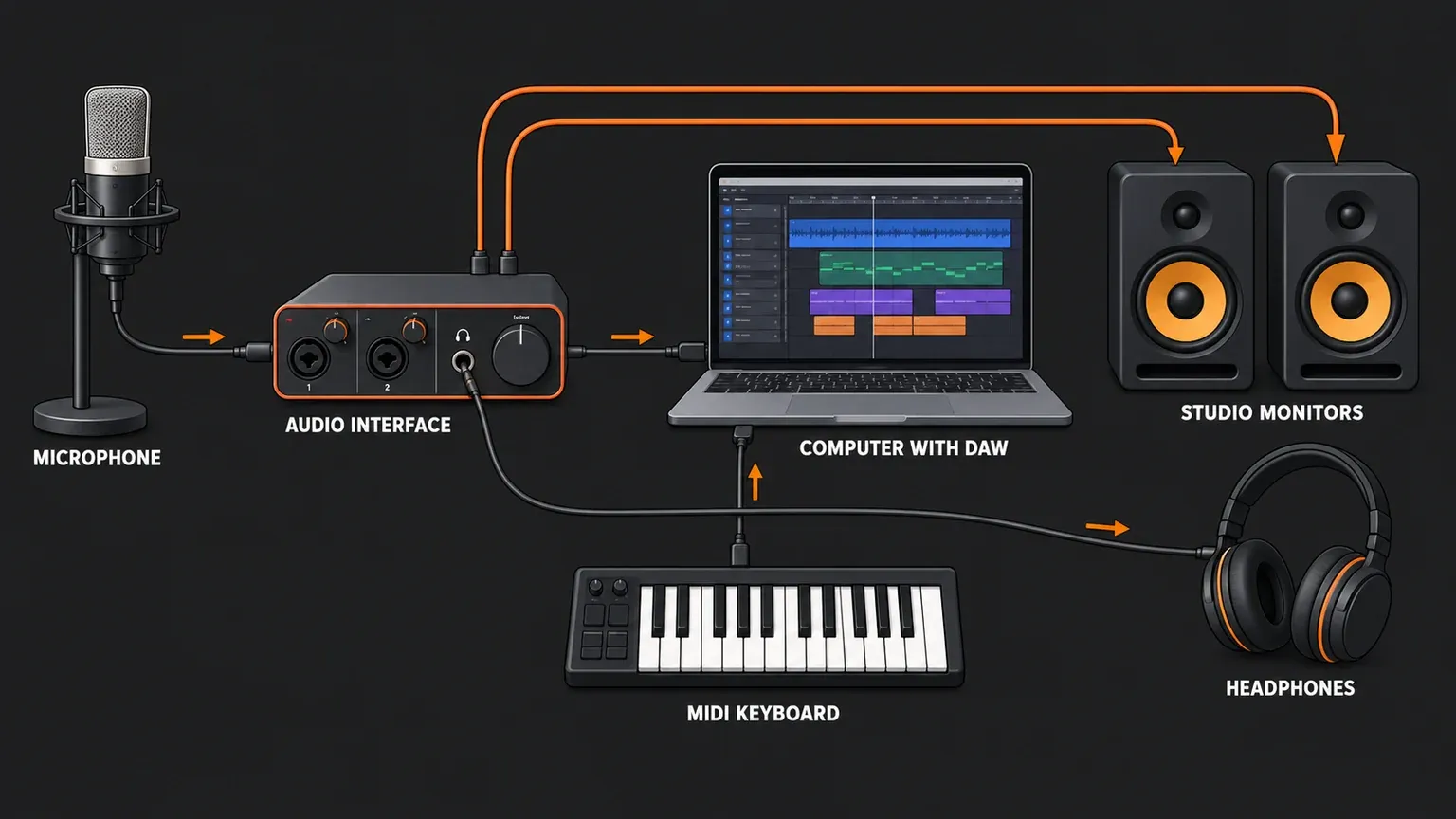
Wikipedia lists four traditional parts of a computer-based DAW: the computer, a sound card or audio interface, the software, and at least one input device, which can be as simple as a mouse and keyboard. That last point matters, because it means you can start with what is already on your desk.
For a first beat, all you need is the computer and a pair of headphones. Image-Line's download page lists Windows 10 or 11 (Intel or AMD; ARM is not supported) or macOS 10.15.7 Catalina or later, with 4 GB of RAM and 4 GB of free disk space as the minimum. For smoother performance it recommends a quad-core CPU, 8 to 16 GB of RAM and an SSD. Our FL Studio system requirements guide has the details.
The rest comes when you need it:
- An audio interface when you want to record a microphone or guitar into the computer. It also gives you proper outputs for headphones and speakers.
- A microphone for vocals and acoustic instruments. Our guides to recording vocals and recording guitar show the steps.
- A MIDI keyboard when clicking notes in with the mouse starts to slow you down. It sends notes, not sound, so the DAW's instruments do the rest. See how to map a MIDI controller in FL Studio.
- Studio monitors, the speakers producers mix on, once you start finishing songs and want to hear them out loud.
One setting is worth knowing from day one: the audio buffer. Image-Line's audio settings page explains that the buffer holds audio before it goes to your sound device. A longer buffer lowers CPU load and reduces glitches, but the delay between pressing a key on a MIDI keyboard and hearing the note is at least as long as the buffer. If playback crackles, raise it; if playing feels laggy, lower it. Our crackling audio fix goes further.
Recording has a few extra requirements. Image-Line's guide to recording audio lists Producer Edition or higher and, on Windows, an ASIO driver. Image-Line highly recommends the ASIO driver made by your interface's manufacturer, since the generic FL Studio ASIO driver can add latency. On macOS 10.14 and later, FL Studio also needs permission to use the microphone. If something doesn't show up, see our fixes for an audio interface that isn't detected and a microphone that isn't working.
How much does a DAW cost?
Anywhere from nothing to a few hundred dollars, and you can use several of them before paying anything.
Free: GarageBand costs nothing on a Mac. Audacity and MuseScore Studio are free too, though as covered above neither is a full DAW.
FL Studio: the download page states that the trial is fully functional and never expires, with every feature, no time limit and no audio watermarks, and you can export finished tracks to WAV or MP3 at full quality. The one limit is that the trial can't reopen saved projects. The paid version is a one-time purchase in four editions: Fruity, Producer, Signature Bundle and All Plugins Edition. Each comes with Lifetime Free Updates, and the FL Studio Browser manual page carries Image-Line's promise that no one will be forced into a subscription to use FL Studio. One license covers both Windows and Mac. Current prices are on Image-Line's FL Studio pricing page, and our FL Studio discounts guide covers sales, student pricing and upgrades.
REAPER: the REAPER license page lists a $60 discounted license and a $225 commercial license, before VAT and local taxes. The discounted license covers personal use, individuals and businesses with yearly gross revenue up to USD 20,000, and educational or non-profit organizations. You get 60 days of evaluation with full functionality, and a new license includes upgrades through version 8.99. Our FL Studio vs REAPER comparison weighs the two.
Everything else: for Ableton Live, Logic Pro and Pro Tools, check each maker's own site on the day you buy rather than a price quoted in an old article. Our comparisons of FL Studio and Ableton and FL Studio and Pro Tools cover how they differ in use.
My advice: don't buy anything in your first week. GarageBand is free, and FL Studio and REAPER both let you work in the full program before paying, so you can find out which workflow clicks before you spend money.
Which DAW should a beginner pick?
Match the DAW to what you want to make and the computer you have:
- Beats, hip-hop and electronic music: FL Studio. The pattern workflow and step sequencer get a beat going fast, and Image-Line calls Loop Starter a great place to start if you're completely new to music production. Our Loop Starter guide and FL Studio tutorial for beginners are the next steps.
- A Mac and no budget: GarageBand first, then Logic Pro if you outgrow it.
- Performing live: Ableton Live, for Session View's clip launching.
- Recording a band or guitar on a budget: REAPER is worth a serious look for its price and long evaluation, and FL Studio Producer Edition records audio too.
- Working toward studio jobs: read our Pro Tools comparison first, since many major studios went digital after Pro Tools arrived in 1991.
- A phone or tablet: our FL Studio Mobile vs desktop comparison explains what the mobile app can and can't do.
Whichever you choose, give it a month before judging. The parts described here turn up in some form in every major DAW, so the skills carry over if you switch later.
A short history of the DAW
Early digital audio workstations in the 1970s and 1980s were held back by expensive storage and slow computers. According to Wikipedia, Soundstream built what could be considered the first DAW in 1978, and many major recording studios switched to digital after Digidesign introduced Pro Tools in 1991.
FL Studio's story, as Image-Line tells it on its FL Studio product page, began in Belgium in 1997 as a simple, fun step sequencer. Its early demos spread through download sites in the early 2000s, and Image-Line says that in 2007 Soulja Boy took a beat made in the trial version, using only its stock sounds, to number one on the Billboard Hot 100. What once took dedicated studio hardware now runs as a single program on a laptop.
Quick answers
Do you need a DAW to make music?
Not to write music: an instrument and a voice memo will capture a song idea. To record, arrange and mix it into a finished track on a computer, you need a DAW, and a free one is enough to start.
Can a DAW run on a phone or in a browser?
Yes. Simple smartphone DAWs are called mobile audio workstations (MAWs). Image-Line makes FL Studio Mobile for iOS and Android, which creates and saves complete multi-track projects. The FL Studio Browser manual page also notes that projects created in FL Studio Web can be downloaded and opened in FL Studio on the desktop.
Is a VST a DAW?
No. VST is a plug-in format, not a program you build whole songs in. A VST instrument or effect runs inside a DAW such as FL Studio.
If you have FL Studio open, press F6, F7, F5 and F9 one after another. Those four windows plus the Browser are the whole DAW in miniature, and every tutorial on this site builds on them.