FL Studio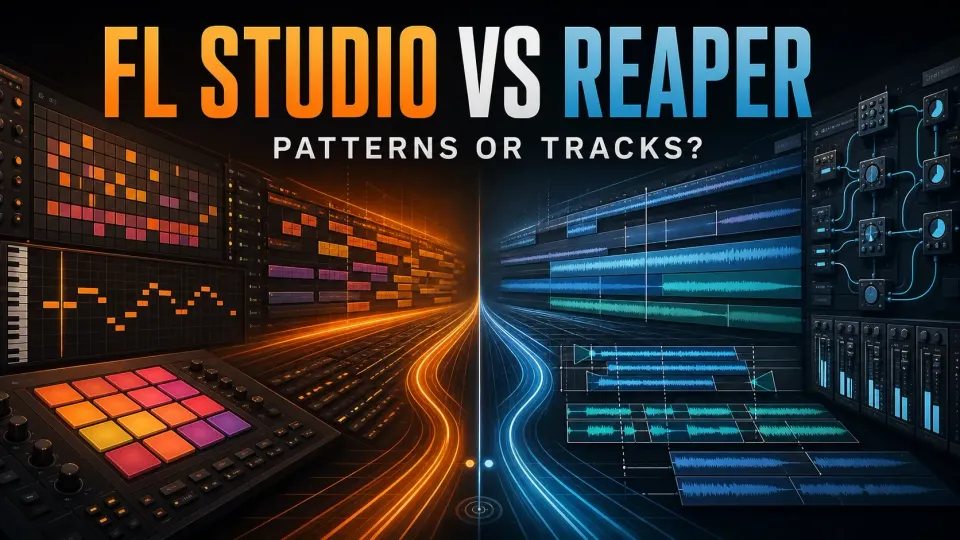
Try FL Studio first if your songs start with drum patterns, samples and Piano Roll notes. Try REAPER first if you spend more time recording takes, editing audio and building repeatable delivery workflows, or if you need native Linux support. Both can make beats and record instruments, though recording in FL needs the right edition. I'd decide by how you work, because neither app makes your music more professional.
Image-Line's latest-release announcement lists FL Studio 2026.1.7b, and Cockos's download page lists REAPER 7.82. Compare the same editing, routing and revision tasks in both apps, including the plugins and project handoff your work needs.
FL Studio vs Reaper: the quick verdict
| Your recurring constraint | Better first trial | Why |
|---|---|---|
| You build drums, melodies and variations as patterns | FL Studio | Channel Rack, Step Sequencer, Piano Roll and Playlist already form one loop. |
| You record many takes or edit long performances | REAPER | Tracks, item takes, fixed item lanes, swipe comping and Razor Edits stay close to the timeline. |
| You want instruments, presets and sounds ready immediately | FL Studio | The included creative toolkit is broader, though it changes by edition. |
| You already own the third-party instruments you need | REAPER | The smaller host can be built around an existing plugin library. |
| You need a native Linux DAW | REAPER | Cockos ships Linux builds; Image-Line does not list a native Linux build. |
| You want one feature set with price based on usage | REAPER | There is one REAPER version; license eligibility decides $60 versus $225 in the US. |
| You value updates to the edition you own without a version cutoff | FL Studio | Image-Line promises Lifetime Free Updates for the purchased edition. |
| You want to reshape shortcuts, mouse behavior and toolbars | REAPER | Customization is part of the core system rather than a side feature. |
| You want the default setup to teach the workflow | FL Studio | The interface presents a stronger opinion about how an idea becomes an arrangement. |
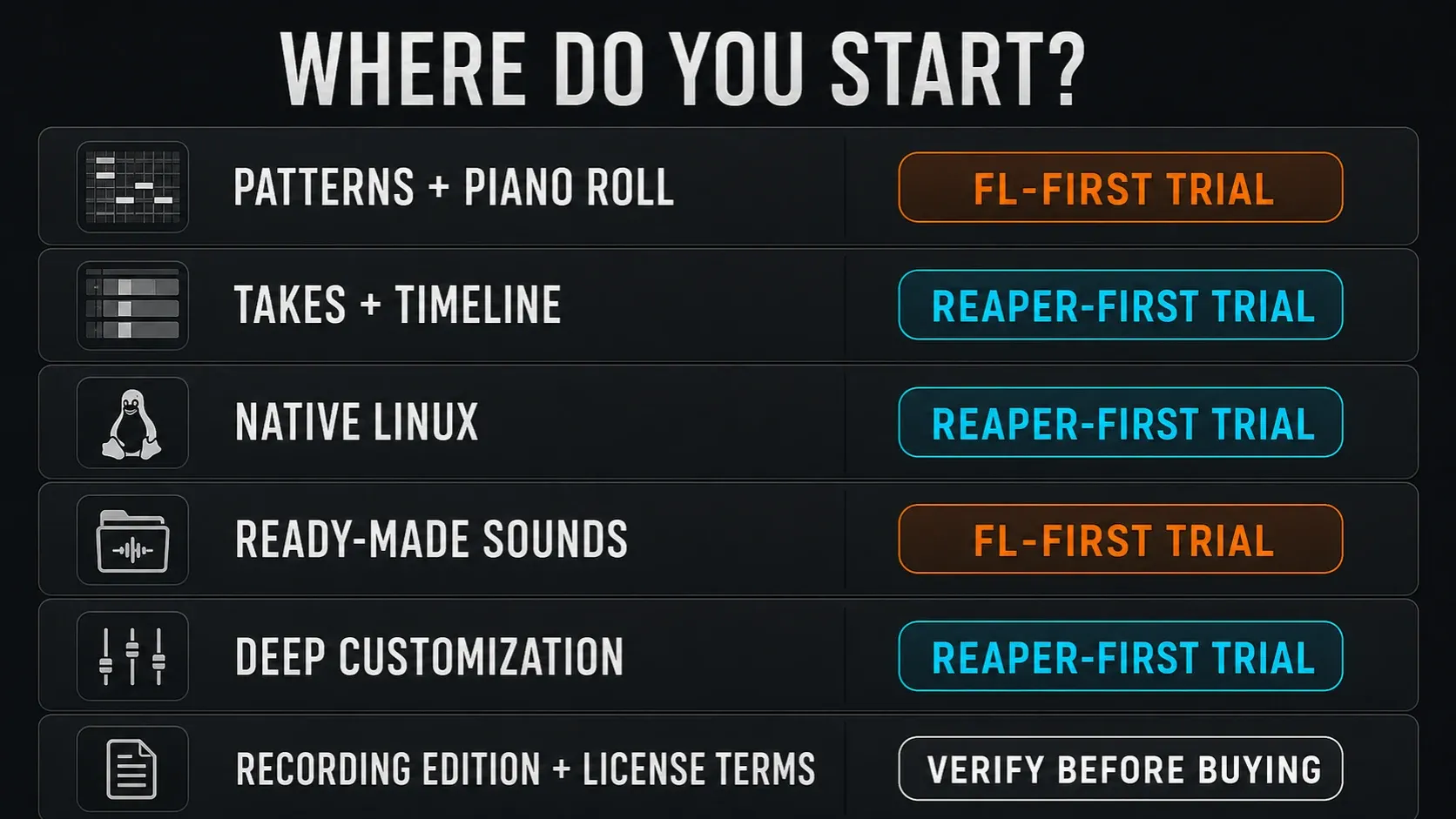
Use the table to decide what to try first. If you program drums on Monday and record a twelve-take vocal on Tuesday, both recommendations apply to you, so build a small project that covers both jobs. Write down the setup and editing work you keep repeating; that tells you more than points on a feature list.
The central difference is ready-made patterns versus configurable tracks
FL Studio keeps source channels, reusable patterns and the song arrangement apart. Notes and steps live on channels inside a pattern, and Pattern Clips put that material in the Playlist next to Audio and Automation Clips. The Playlist documentation also describes Instrument and Audio Track modes that tie the Playlist, Channel Rack and Mixer together. That lets you work in a more conventional track layout and still keep patterns. Our Playlist guide explains the practical setup.
REAPER starts from tracks and media items. Cockos’s media and routing overview confirms a track can hold audio, MIDI, video or still-image media, and tracks can also host instruments or work as folders and buses. There’s no fixed audio-versus-MIDI track type to pick, though clear names and deliberate routing still matter.
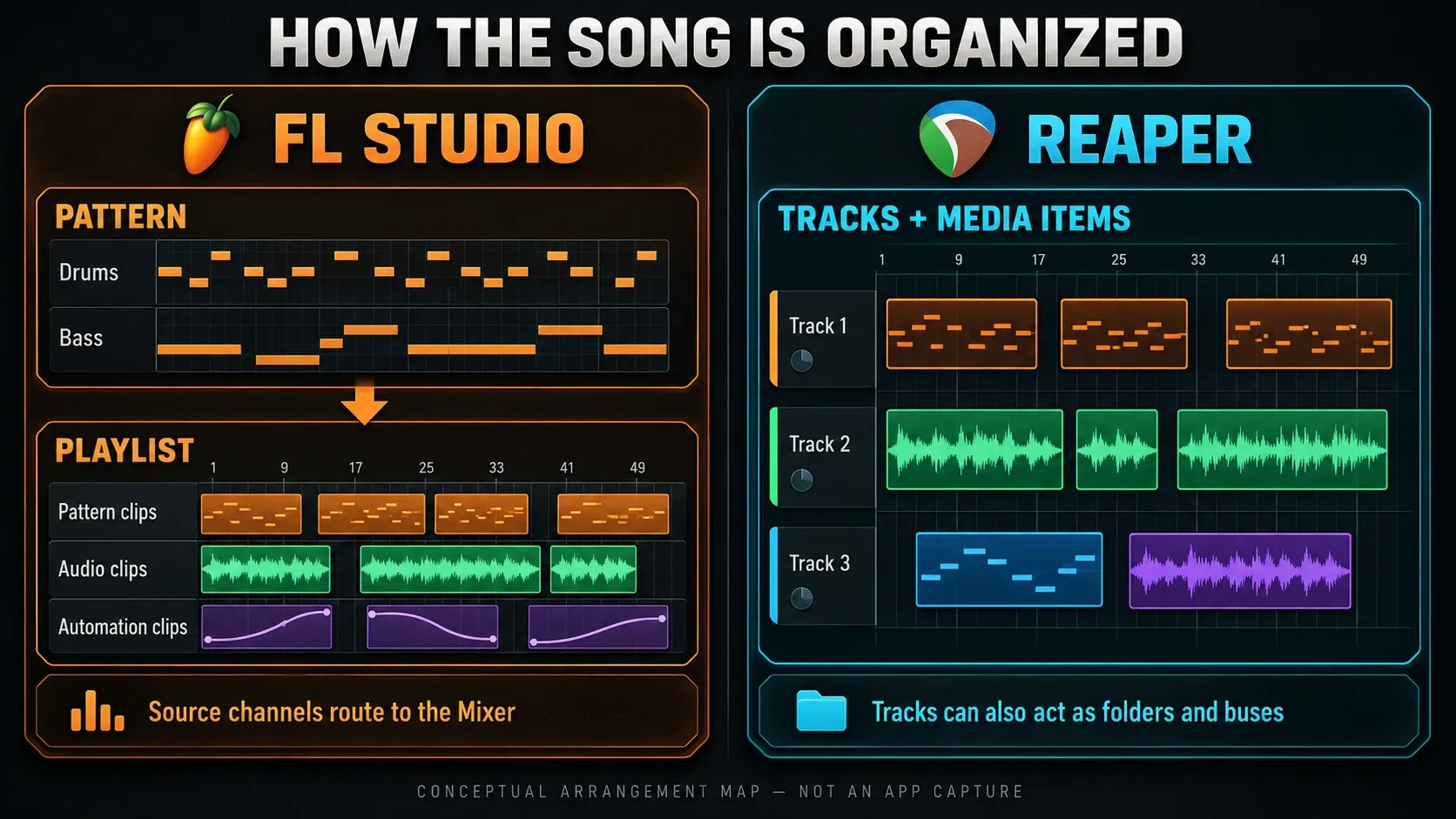
Neither model is more advanced. Trouble starts when you keep translating between them. A pattern-minded producer may spend ages rebuilding a compact programming loop in REAPER, while a track-minded editor may spend just as long wiring FL Playlist lanes, Channel Rack sources and Mixer tracks into a familiar linear map. That translation cost is what I'd test first; ignore the reputations.
Beat making and MIDI favor the system that needs less preparation
FL Studio keeps step programming and note editing close together. The Step Sequencer guide covers loading samples and building drum patterns. Image-Line’s Piano Roll documentation explains note properties and controller editing, though native slide-note behavior doesn’t work the same way in every third-party instrument. Use our Piano Roll guide for the FL controls. Then count how many steps it takes to enter a phrase and make a variation in each app.
REAPER can make the same music. MIDI items open in its MIDI editor, tracks can host instruments, the included ReaSamplOMatic5000 plays samples, and ReaSynth and ReaSynDr cover basic synthesis. Where it differs is preparation. Before the first eight bars feel like your usual production environment, you may need to build a drum template, choose note names, map shortcuts or add a third-party instrument.
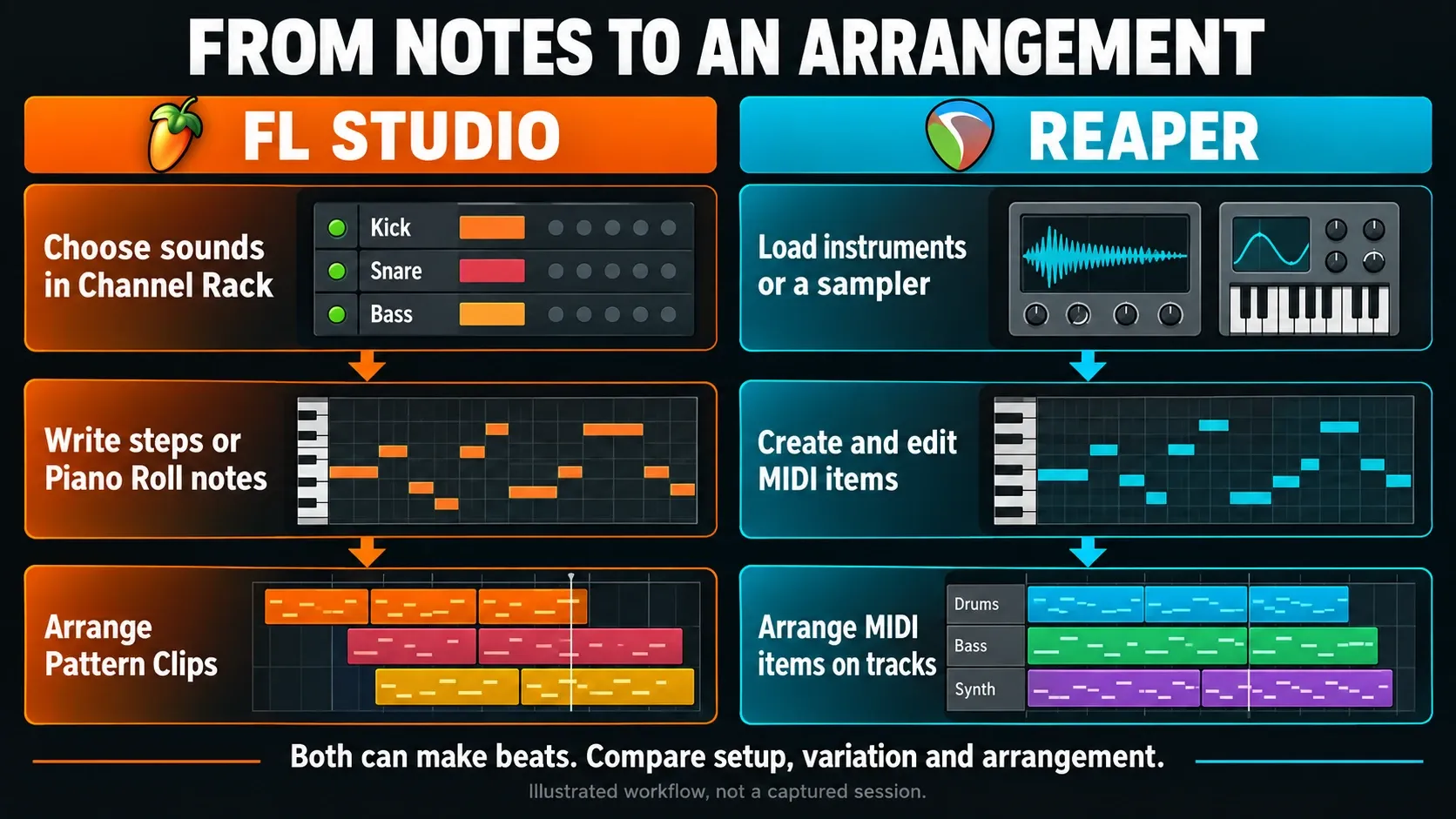
That setup time isn’t automatically wasted. If the template survives twenty projects, that first hour in REAPER can buy you a faster personal workflow. Keep swapping tools instead of finishing arrangements, though, and customization has turned into procrastination. My rule: start with the defaults and change only a bottleneck you can name.
Recording and comping expose the strongest default-workflow split
FL Studio records vocals and instruments in Producer Edition and above, according to Image-Line’s audio-recording instructions, so Fruity Edition isn’t a like-for-like recording alternative to REAPER. Name the Playlist tracks, assign Mixer inputs and keep the recorded files with the project. Our vocal-recording guide explains that setup. Recording doesn’t automatically include every optional pitch-editing plugin, though.
REAPER’s current track system fits repeated performance work naturally. Cockos’s REAPER 7 feature page documents fixed item lanes for takes and alternate versions, plus swipe comping that builds a composite while the source material stays on the timeline. Track edit grouping, fades, crossfades and item-level operations also suit multitrack revisions. None of that makes your microphone or converter sound better. It just cuts down the organizing work around the recording.
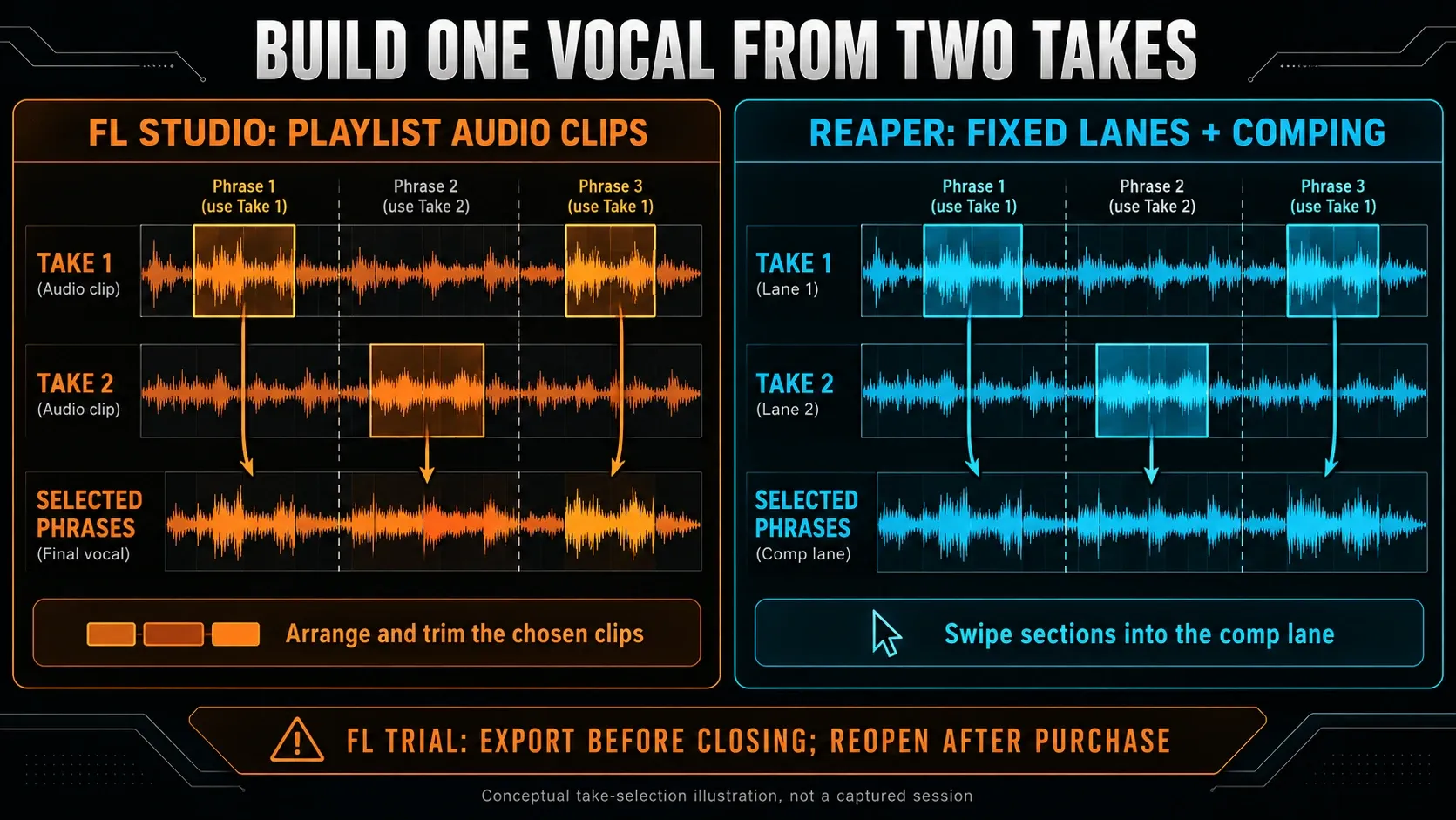
Record two short takes, combine the useful phrases and fix one timing problem. Check input naming, file placement and how easily you can replace a phrase. In the FL Trial, pick a recording-capable trial edition and export before closing; test reopening only after you purchase and unlock the required plugins. For latency, use the same interface, driver and sample rate and measure what happens. An identical buffer setting doesn’t guarantee an identical round-trip delay. The audio-settings guide explains the FL checks.
Arrangement, editing and automation reward different revision habits
FL Studio’s visible Pattern, Audio and Automation Clips make repeated sections and reusable control shapes easy to spot. Change a pattern and every occurrence updates, while “make unique” splits off a later variation. That’s great when a song grows from loops, but it can also bite you: careless reuse changes more places than you meant to.
REAPER treats media items, regions, envelopes, item takes and lanes as timeline material. Razor Edits can select across media and automation, regions can move whole sections, and item properties let you change individual events without creating a new pattern object. That direct handling may feel calmer for dialogue, live instruments, long sound-design files or versioned edits.
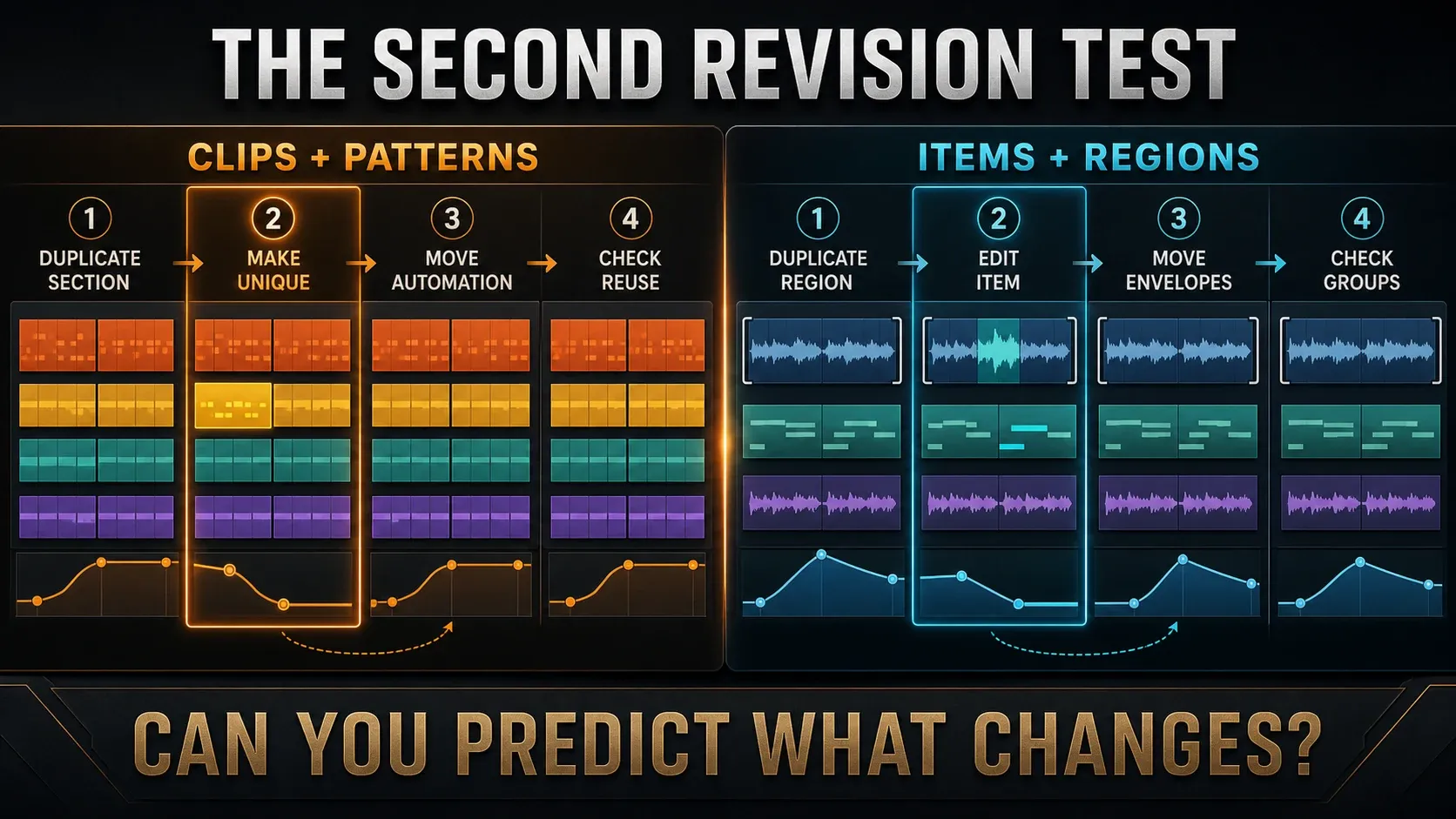
Arrange a chorus, duplicate it, change the fill and check the automation. Then undo and try a different transition. Can you predict which copies will change together? The answer tells you far more than the number of editing commands an app has.
Mixing, routing and rendering do not create a sound-quality winner
FL Studio’s Mixer documentation describes insert tracks, effect slots and sends. Routing stays clear in a template when channels are already assigned and named. The FL Studio Mixer guide covers the setup. Keep in mind that a bus, a reverb send and a sidechain are three different connections; a signal doesn’t pass through them one after another.
Cockos documents a nested folder system for grouping, routing and bussing, plus sends, receives, multichannel tracks and automation. REAPER tracks support up to 128 routable channels and 128 MIDI buses. Those ceilings say nothing about whether a small mix will be clearer, though. For some workflows its more practical advantage is render flexibility: you can render tracks, regions and media items in combinations and queue the instructions for later batch work.
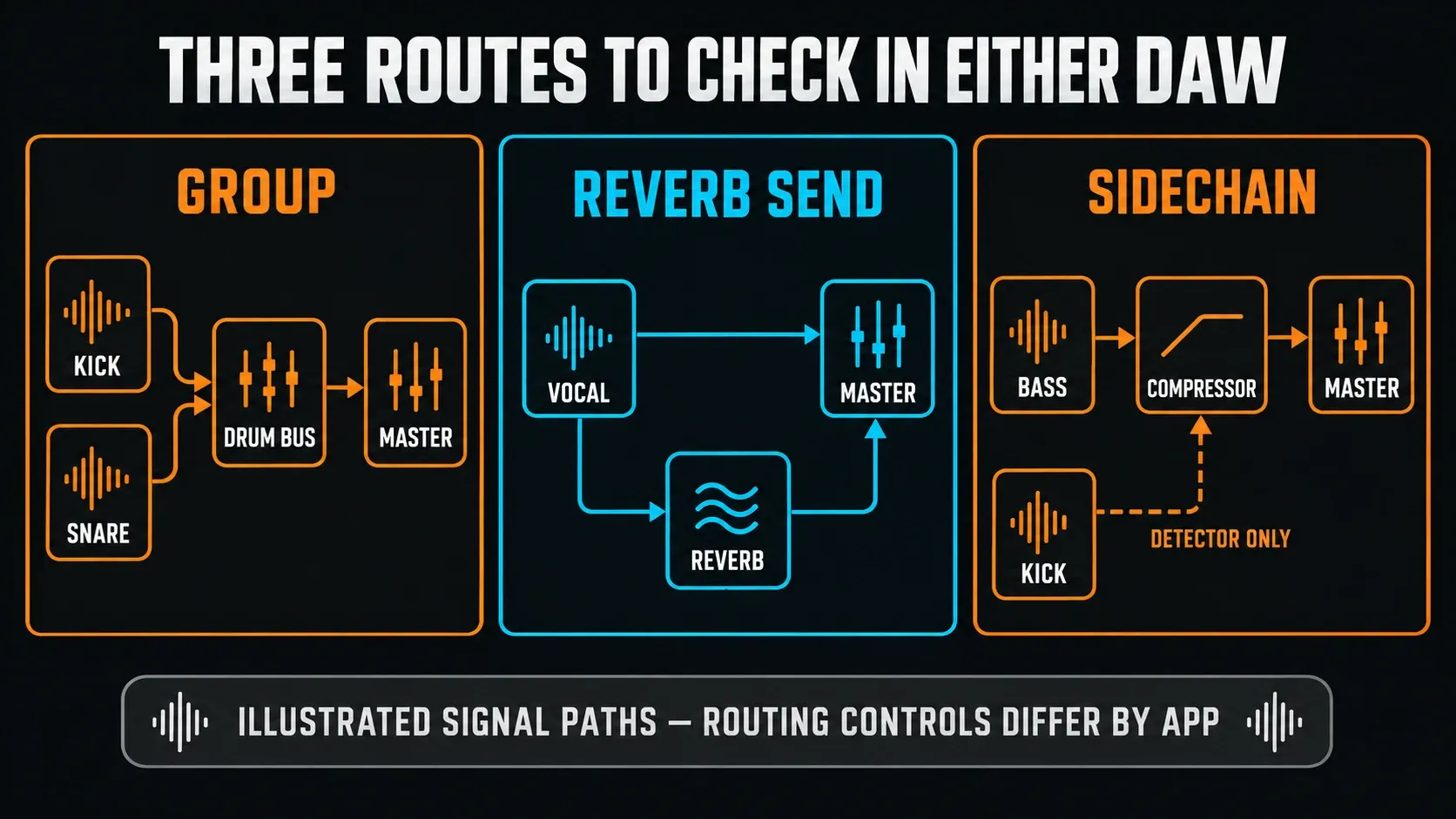
Set up one reverb send, a drum bus and sidechain compression, then export a mix and separate parts. Each one is a different route. A reverb send is parallel processing, while a compressor’s sidechain can receive a detector signal instead of audible program material. Compare level-matched results and check pan laws, processing, resampling and export options before you blame the DAW. Image-Line explains why rendered and monitored audio can differ, and separately built mixes won’t necessarily null.
Included tools: creative library versus processing toolkit
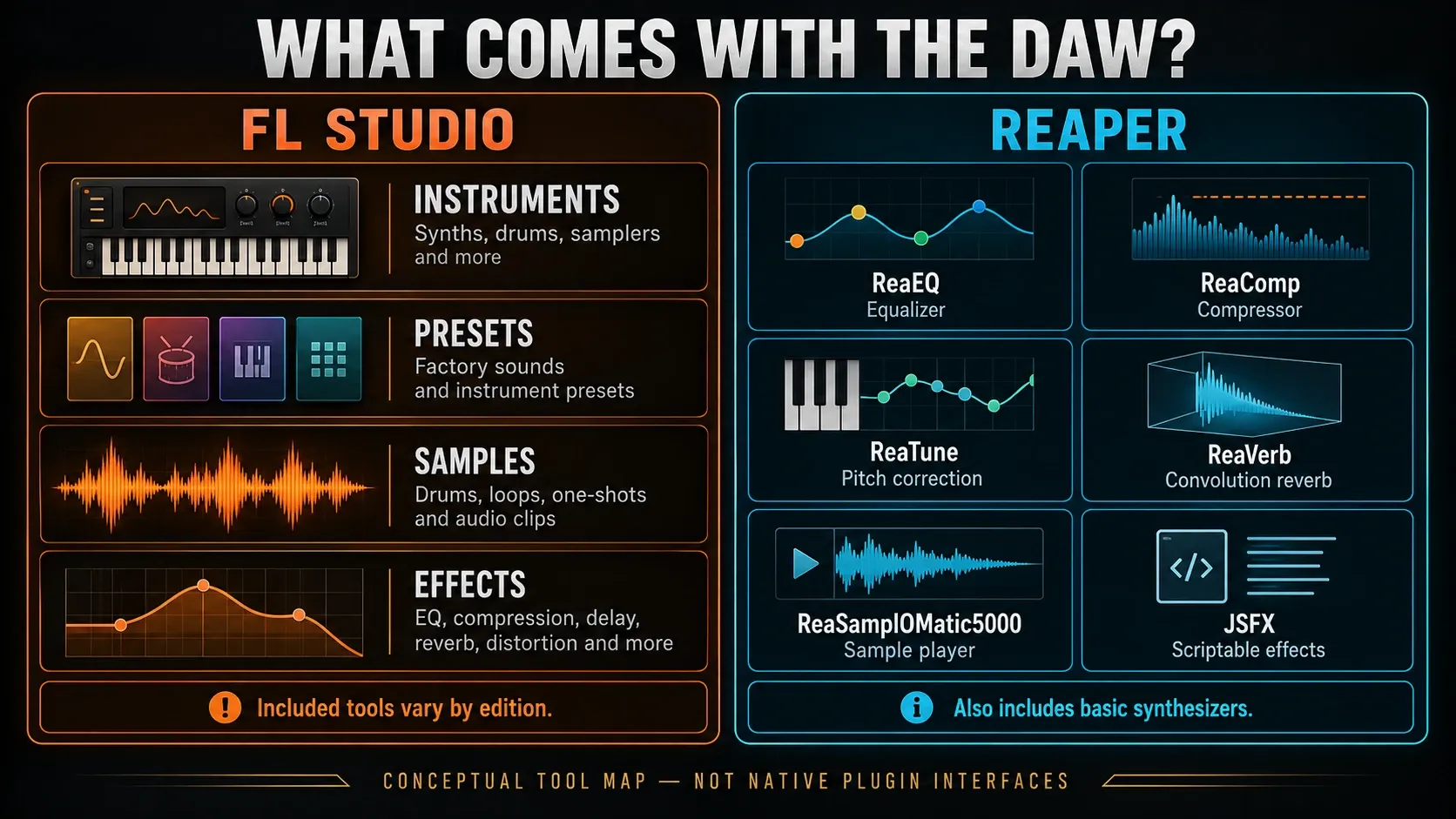
FL Studio ships a more opinionated creative library: instruments, effects, presets, samples and generators that vary by edition. So an empty installation can take an in-the-box sketch much further, but that also makes the exact FL Studio edition part of the comparison. The stock-plugin guide and free-plugin guide help you separate the tools you need from attractive duplicates.
REAPER is far from empty. Cockos’s technical feature page lists ReaEQ, ReaComp, ReaLimit, ReaTune, ReaVerb, ReaSynth, ReaSamplOMatic5000, ReaSynDr and many other ReaPlugs and JSFX. Its strengths are processing, routing and programmable utilities. The ready-to-play side (instruments, presets and sound content) is smaller, so if you produce in the box, price out the instruments and samples you’d add.
Plugin format matters as much as plugin count. Image-Line’s supported formats include VST2, VST3, CLAP and native FL plugins, plus Audio Units on macOS. Cockos lists VST/VST3, LV2, CLAP and JSFX, with DX on Windows and AU on macOS. A compatible format is just the first check. You also need the right operating-system build, license and preset transfer. The plugin-installation guide covers the FL side.
Customize REAPER without losing a working setup
REAPER lets you change shortcuts, mouse behavior, toolbars, themes and screensets, and build custom actions or scripts. That can remove a lot of repeated work, but every borrowed extension or script is one more dependency to track. Before you rely on one, make sure you can restore it on a replacement computer.
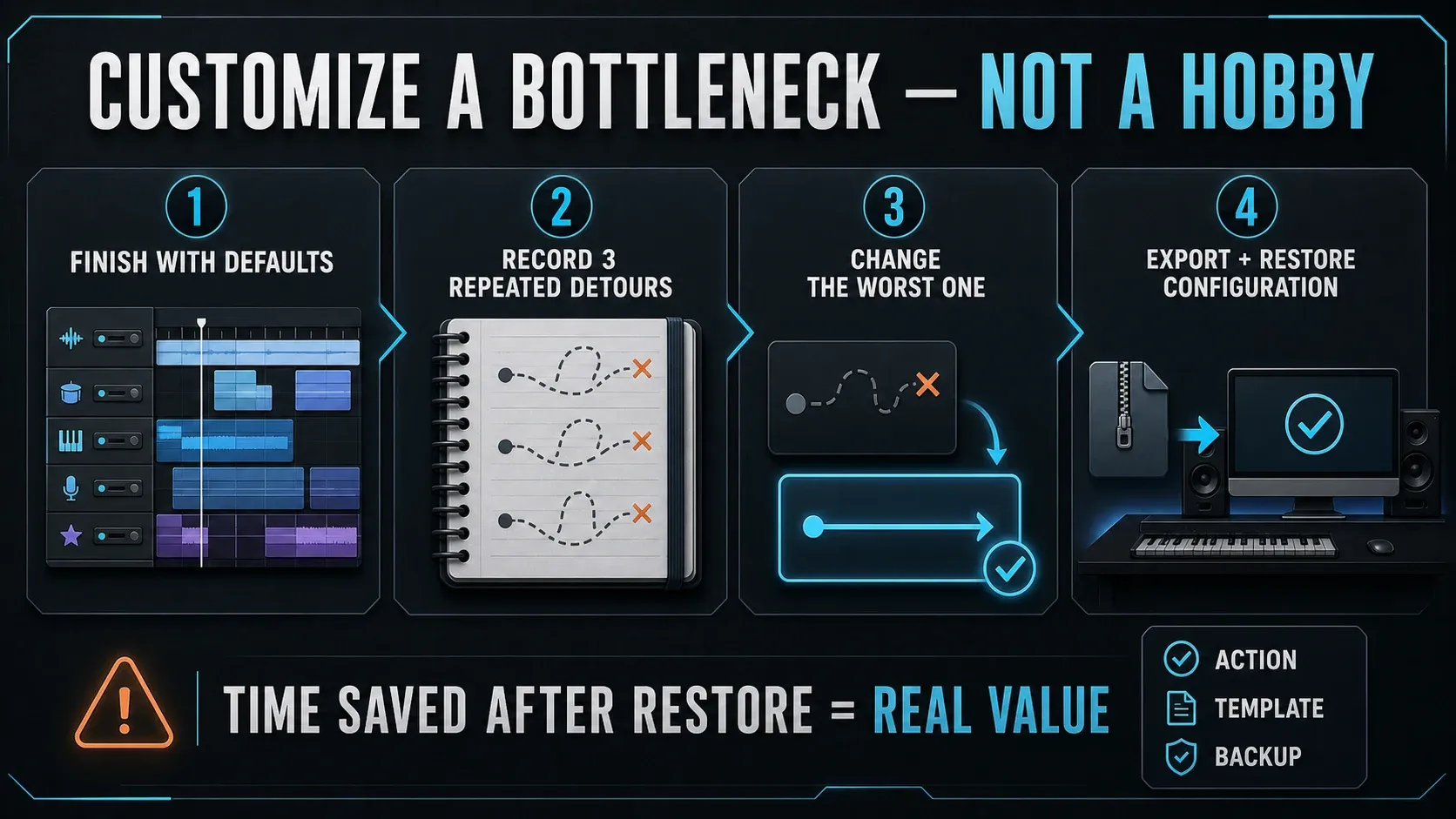
Finish a project with the defaults and note three detours you keep taking. Fix the worst one, then back up the configuration and any scripts or extensions it needs. Test the restore in a separate setup so the working one stays safe. Keep in mind that a configuration export doesn’t back up third-party plugin installers, licenses or song media.
FL Studio is customizable too, but its main creative windows keep stronger identities. Someone who wants every mouse gesture remapped may find that restrictive; someone who wants tutorials and collaborators to see the same environment may find it reassuring. The beginner project route is the better test of how FL wants you to work by default.
Platforms can decide before features do
Image-Line’s current installer page lists Windows and macOS builds, including Intel and Apple silicon on Mac, and no native Linux version. Its cross-platform license guidance lets one owner install on their own supported Windows and Mac computers, but it doesn’t let you share an account with another producer.
Cockos ships REAPER for Windows, macOS and Linux, including several Linux architectures. That native Linux route settles the question for some studios. It doesn’t make every commercial VST or authorization manager cross-platform, though, so check the Linux build of each plugin, audio system and hardware driver. The separate FL Studio on Linux guide explains why an unofficial compatibility layer falls short of a native supported host.
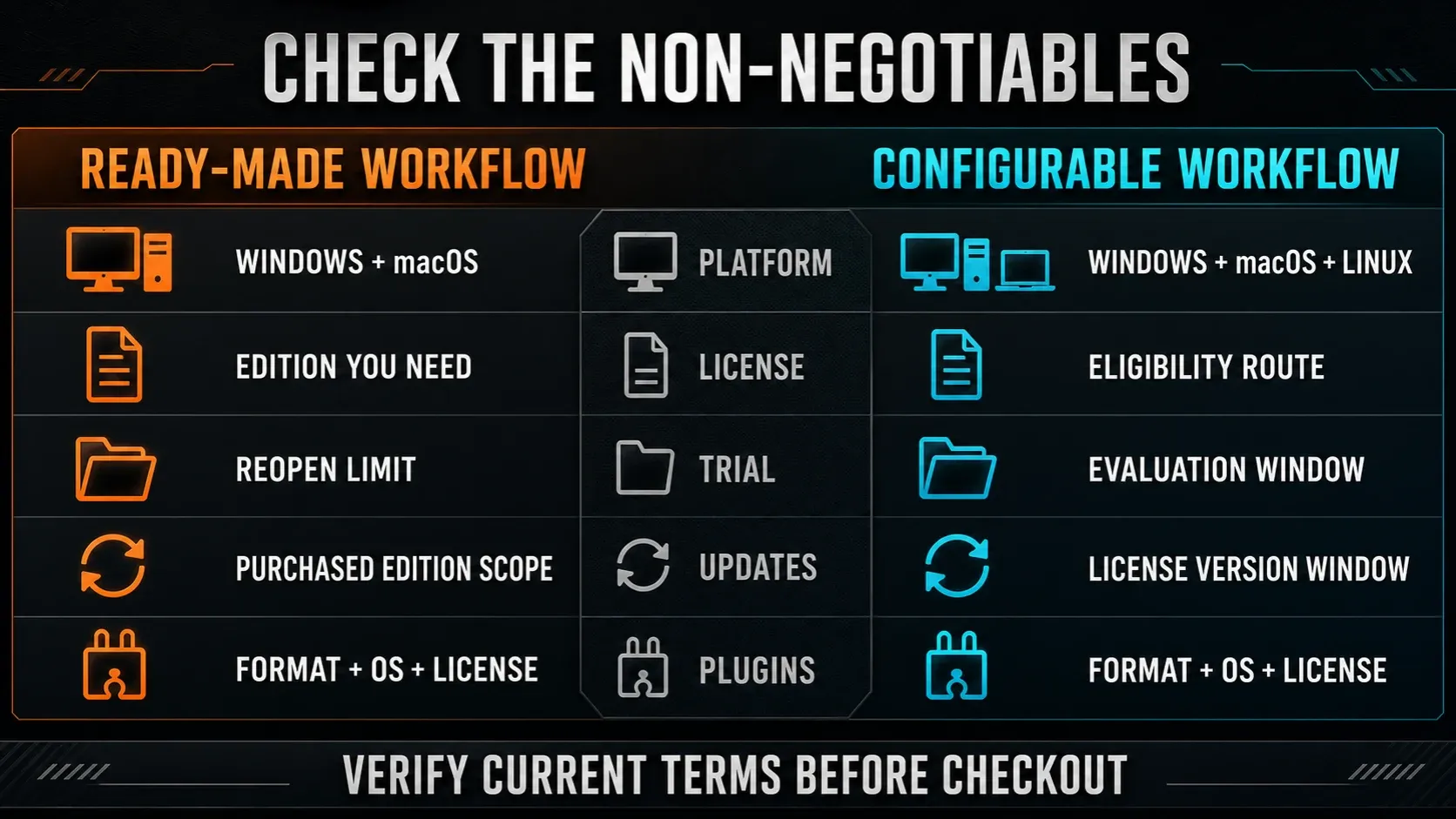
Check your actual computer instead of a broad platform label. Our FL Studio system requirements guide covers the supported FL side. REAPER’s download page separates modern and legacy Mac builds and lists current Windows/Linux packages. Plugin availability and project recall are still separate checks.
Price and updates require a usable-license comparison
REAPER’s current purchase page lists a $60 discounted license and a $225 commercial license in US dollars before VAT or local taxes. The discounted license covers personal-only use, educational or nonprofit organizations, and commercial use where yearly gross revenue stays at or below $20,000. There’s a single feature set, and how you use the license sets the price. Purchases are final, so evaluate first.
A new REAPER 7 license includes free updates through version 8.99; it doesn’t cover every future major version. You can install the same key on several computers as long as REAPER runs on only one at a time. The current download asks for no registration or personal details, and you get a fully functional 60-day evaluation.
Image-Line’s pricing page starts FL Studio at $99 in the US and promises Lifetime Free Updates for the edition you buy. Higher editions, optional plugins and continuing FL Cloud services cost extra. Fruity Edition leaves out audio recording, so if you record, compare REAPER with Producer Edition or above instead of the smallest FL price tag. The discount guide covers legitimate savings without guessing at the next sale.
The trials differ in a way that changes your test. The FL Trial has no time limit and allows saving and exporting, but you can’t reopen saved projects until you purchase and unlock. Its trial documentation says feature availability follows the edition you select at startup. REAPER gives you a fully functional 60-day evaluation. In FL, save the project and export important parts before closing, then mark recall as unavailable until purchase instead of counting it as a failed workflow test.
Buying an FL edition doesn’t unlock every installed trial plugin. Unlock the plugins you need before reopening and keep an untouched backup. Never re-save a project while trial plugins are missing, because Image-Line warns that their settings can be lost. A paid FL Cloud subscription doesn’t unlock the FL Studio application either.
Projects do not move between FL Studio and Reaper as native sessions
An FLP won’t turn into an editable REAPER session, and an RPP won’t turn into an FL project. Move audio and MIDI instead. Export parts from a common start point, keep a full-mix reference, and include tempo, time signatures and a plugin inventory. MIDI carries notes and performance data, but the original instrument sound stays behind. Image-Line’s export documentation explains the available audio and MIDI routes. Check the exported files in the destination before you delete anything.
Keep the original project and its media. Templates, DAW-specific automation, routing and plugin state all need separate attention on the other side. Once you’ve imported the exchange files, check bar alignment, duration, edits and effect tails. If you swap sessions with someone every week, agree on file names, sample rate, start position and revision labels before anyone changes DAWs.
Who should choose FL Studio?
Start with FL Studio when patterns, sample selection and detailed mouse-led MIDI work sit at the center of most sessions. The same goes if you want a broad creative toolkit before buying third-party instruments, or if a consistent Windows–Mac owner workflow matters. It’s also the easier first trial if you want the product’s defaults to teach you a recognizable route from beat to arrangement.
Don’t pick it because someone decided your genre belongs to FL. Record and revise your real project. If vocals or instruments matter, budget for a recording-capable edition and build the routing deliberately.
Who should choose Reaper?
Start with REAPER when repeated takes, detailed timeline edits, flexible routing, batch delivery or native Linux support dominate your work. It also makes sense when you already own the instruments and samples you need, or when a carefully backed-up custom configuration will remove real recurring friction. I'd call its discounted license exceptional value, as long as you meet the eligibility terms.
Don’t pick it because customization sounds exciting in the abstract. A default project has to make sense already, and you need a way to restore every critical script, extension and shortcut. One stable template beats a folder full of experiments.
Test a small project before buying or switching
Use the same audio interface, samples, MIDI controller and third-party plugins in both. Begin with factory defaults, and load an existing template only if it reflects the setup you really use every week.
- Build a beat. Program drums, bass and chords with the same source sounds where possible; make one variation.
- Arrange two sections. Turn the idea into an intro and main section, then change the transition.
- Record two takes. Capture a real input and combine the useful phrases. In FL, use a recording-capable edition or trial edition.
- Edit and route. Revise MIDI and audio, add an automation move, and check a bus, send and sidechain separately.
- Export before closing. Save a backup and export a reference, aligned audio parts and MIDI for one editable phrase. Check the exported files.
- Check recall where permitted. Reopen in REAPER while the evaluation or license permits use. In FL Trial, stop after saving and exporting; reopening requires purchase and unlocking, including necessary trial plugins. In unlocked FL, reopen a backup and verify media, plugins and routing.
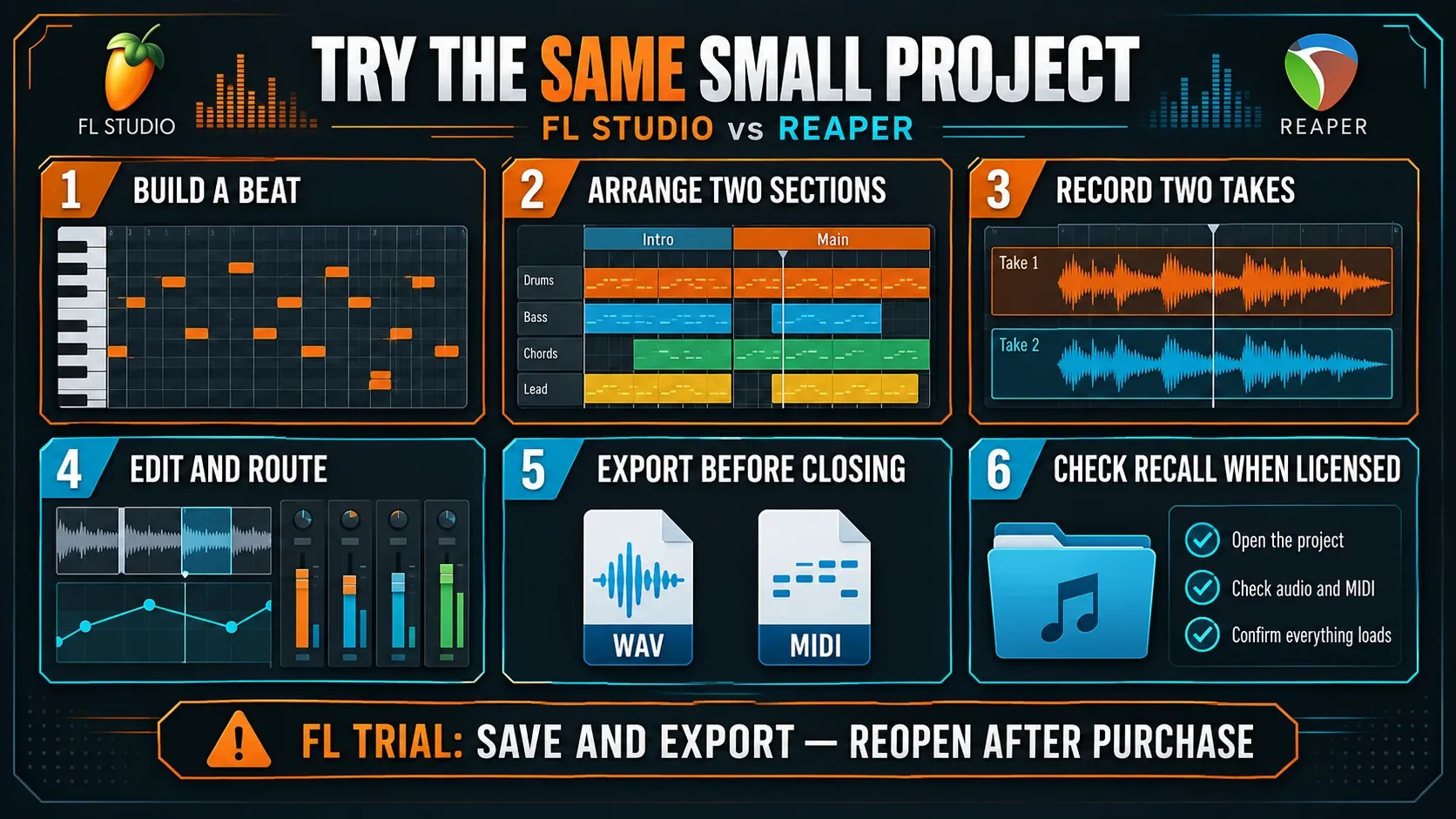
Allow extra time for installation, downloads and unfamiliar controls, and don't judge either app by how fast the first session goes. Write down what you had to search for and what you repeated. My rule: a setup step you can save in a template doesn't count against the app, while cleanup you redo on every song does. If you customize REAPER, also check that you can safely restore your configuration and its dependencies.
FL Studio vs Reaper FAQ
Is Reaper better than FL Studio?
There is no universal winner. REAPER is often the cleaner fit for recording, detailed timeline editing, custom routing and native Linux use. FL Studio is often the cleaner fit for pattern-based production, Piano Roll work and a broader ready-made instrument and sound ecosystem.
Is FL Studio or Reaper better for beginners?
FL Studio gives a new beat maker a more visible path from pattern to arrangement. REAPER can feel clearer to someone who already understands tracks, takes and linear recording. The better beginner DAW is the one whose default project matches your first complete song; the shortest feature tour proves nothing.
Can you make beats in Reaper?
Yes. REAPER records and edits MIDI, hosts virtual instruments, and includes ReaSamplOMatic5000, ReaSynth and ReaSynDr. It may require more template, sampler and sound-library setup than FL Studio’s Channel Rack, Step Sequencer and Piano Roll workflow.
Which is better for recording vocals?
REAPER’s track lanes, takes, swipe comping and timeline editing give it a strong default recording workflow. FL Studio records vocals in Producer Edition and above and can be efficient inside a prepared Playlist and Mixer template. Fruity Edition is not the correct recording comparison.
Does Reaper have stock plugins and instruments?
Yes. REAPER includes ReaPlugs, hundreds of JSFX tools, ReaSynth, ReaSamplOMatic5000 and ReaSynDr. Its processing toolkit is deep, but its ready-made instrument, preset and sample ecosystem is smaller than FL Studio’s and may require third-party additions.
Is Reaper really $60?
The discounted license is $60 in the US before applicable tax when the buyer meets Cockos’s personal, education/nonprofit or commercial-revenue criteria. The commercial license is $225. Check current eligibility and local checkout rather than assuming the discounted price applies.
Does Reaper include lifetime free updates?
No. A new REAPER 7 license includes free updates through version 8.99. FL Studio’s different promise is Lifetime Free Updates for the edition purchased; higher editions, optional plugins and continuing services remain separate costs.
Can Reaper open FL Studio projects?
Not as native editable FLP sessions. Move the production with consolidated stems, MIDI, tempo and time-signature notes, a full reference and a plugin inventory. DAW-specific routing, automation, instruments and editing structures must be rebuilt or rendered.
The useful verdict
For a beat maker who rarely records, I'd start with FL Studio: reusable patterns and a ready-made sound toolkit suit that way of writing. For someone who mostly manages takes, edits audio in detail, runs Linux or needs configurable delivery, I'd start with REAPER. Either way you still have to organize files, learn routing and check plugin compatibility.
Try the small project before you migrate an important session. If both apps suit you, compare the edits you’ll be repeating next week. Still weighing another DAW? The FL Studio and Ableton comparison covers that shortlist, and the Logic Pro comparison covers the Mac-based alternative. Once you’ve chosen, go back to Compare & Buy for the edition and license decision.