FL Studio
FL Studio Web is Image-Line's browser version of FL Studio, found at fl.studio. There is nothing to download: you sign in and make beats in a browser tab. As of October 5, 2026 it is still in beta, free during the beta for eligible users, and works best in Google Chrome on a computer. It is a simplified starter studio, not the full desktop program, and projects move one way only: a Web project opens in FL Studio 2025.2 or later on Windows or Mac, but a desktop project can't be opened in Web.
Most of the news coverage that ranks for FL Studio Web dates from launch week in December 2025 and still talks about a waitlist. Below is what Image-Line says today about access, cost and browsers, what is inside the app, how a Web project reaches the desktop program, and when I would pick Web, Desktop or Mobile. Anything that can change during the beta carries its check date.
FL Studio Web at a glance
| Question | Answer (checked October 5, 2026) |
|---|---|
| What it is | A browser-based music studio from Image-Line at fl.studio |
| Status | Beta, with new features added from user feedback |
| Download | None; it runs in a browser tab |
| Cost | Free during the beta for eligible users; the FL Cloud Sounds library has a 7-day free trial |
| Browser | Works best in Google Chrome; more browsers are promised |
| Devices | Opens on phones and tablets, but works best on a computer |
| What is inside | Channel Rack, instruments, effects, FL Cloud sounds and guided lessons |
| Projects | Open in FL Studio 2025.2 or later on PC or Mac; desktop projects can't open in Web |
| Support | Discord, joined from the top bar of the Web dashboard |
How to get into FL Studio Web now
Go to fl.studio and click Get started. As of October 5, 2026, that button leads to a sign-in page, and the page says nothing about a waitlist. Attack Magazine's launch report on the FL Studio Web beta said you sign up with your Image-Line account. If you don't have one yet, the FL Studio manual's list of Image-Line links points to a free account sign-up.
Is FL Studio Web free?
For now, yes, with a condition. The FL Studio Web FAQ on fl.studio says: "During the beta, FL Studio Web is free to use for eligible users." Image-Line doesn't define "eligible" on any page I checked, and it hasn't said what Web will cost after the beta. Read "free" as the current beta terms, not a final price.
The same FAQ says FL Cloud Sounds, the built-in library of samples and loops, comes with a 7-day free trial. Don't mix that up with the 30-day free trial on Image-Line's FL Cloud page, which is the subscription offer for the desktop program.
What happened to the waitlist?
Image-Line announced FL Studio Web in December 2025. MusicRadar's December 16, 2025 announcement coverage and Attack Magazine both described beta access through a waitlist, and plenty of videos and posts still tell you to join it. The current fl.studio page has a sign-in instead. If an article sends you to a waitlist form, check its date.
When is the full release?
No date has been announced. In the staff FAQ on the Image-Line forum, posted in December 2025, Image-Line said it would open Web to FL Studio customers "after a period of Beta Testing. TBA." As of October 5, 2026, neither fl.studio nor the FL Studio product page gives a general release date, and fl.studio still talks about adding features "over the coming weeks and months."
Browser, device and system requirements
Image-Line's current answer is short: "FL Studio Web currently works best in Google Chrome. Support for more browsers is coming soon." The December 2025 staff FAQ widened that to Chromium-based browsers such as Edge or Brave and warned that non-Chromium browsers, which include Firefox and Safari, may have issues. Attack's launch report said Web could "still be accessed in most browsers." I would start in Chrome and treat anything else as experimental until Image-Line updates its FAQ.
Screen size matters more than raw power. Image-Line says you can open FL Studio Web on a phone or a tablet, but it "is best experienced on a computer for now," with mobile improvements planned. The staff FAQ is blunter: Web is optimized for larger screens, meaning desktop computers or large tablets, while FL Studio Mobile remains the flagship for Android and iOS phones. If your main device is a phone, our FL Studio Mobile vs Desktop comparison is the better starting point.
Image-Line's Web pages don't list operating systems. Attack's launch report said Web runs on macOS, Windows and Linux, on ARM and x64 processors, with no installation and no admin permissions needed. That fits a browser app, but it is the magazine's launch description, not an Image-Line support list. If you are comparing Web with the desktop program, our FL Studio system requirements guide covers what the full version needs.
What is inside FL Studio Web
Image-Line describes Web as "the essential tools and patterns from FL Studio, streamlined for the browser." The fl.studio FAQ lists the Channel Rack, instruments, effects and FL Cloud sounds, plus step-by-step onboarding from your first session. The FL Studio product page puts it more plainly: Web runs in your browser "with a simplified set of tools, made as a place to start."
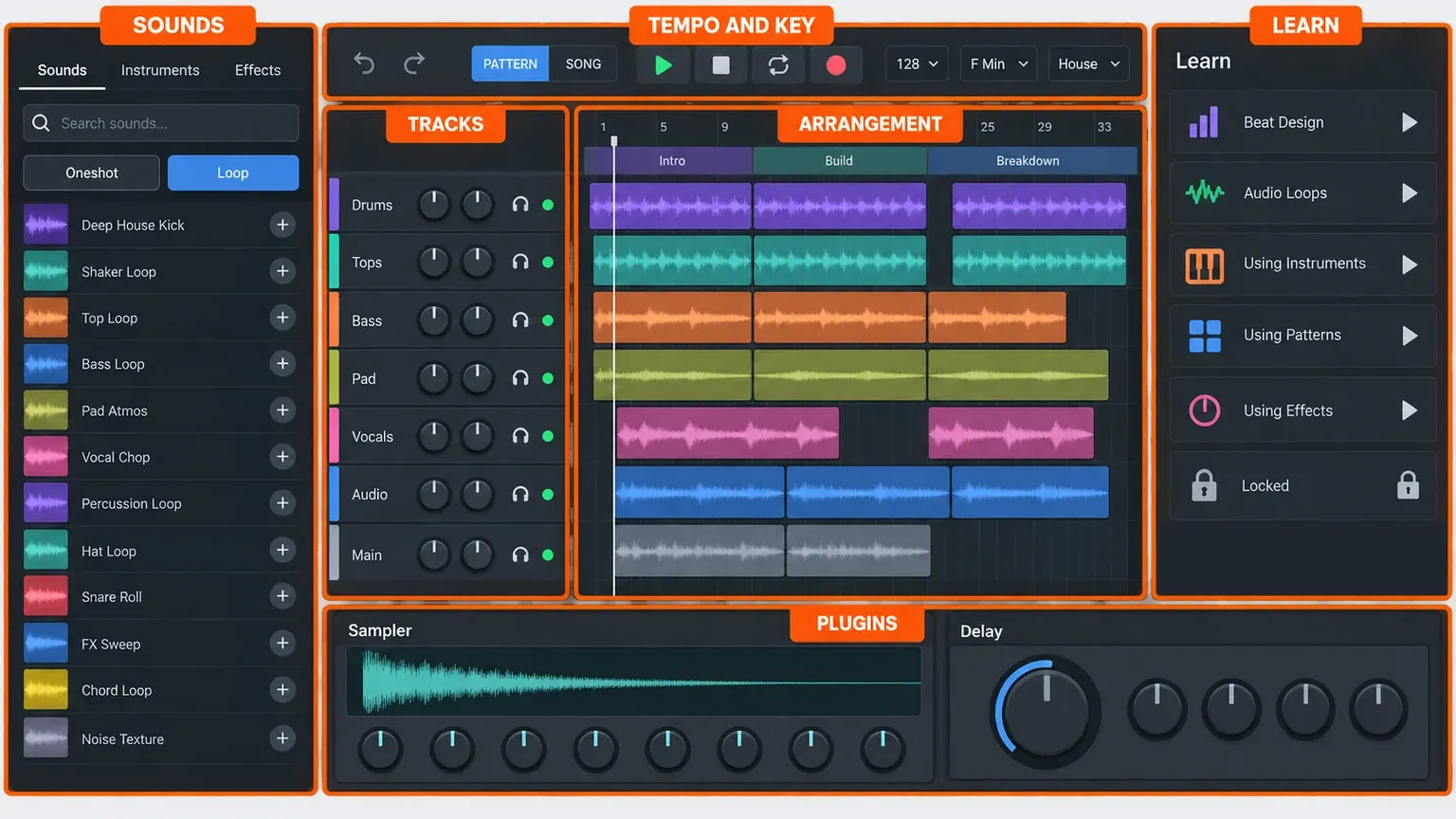
Image-Line's own product image on fl.studio shows how that fits on one screen. Sounds, Instruments and Effects tabs sit on the left with search and one-shot or loop filters. The top bar holds tempo, key, scale and genre selectors. Tracks and their patterns fill the middle, next to an arrangement with named song sections. A Learn column lists lessons such as Beat Design, Audio Loops, Using Instruments, Using Patterns and Using Effects, with a locked lesson at the end, and plugin editors such as a sampler and a delay open along the bottom. It is a marketing image of a beta, so expect changes.
Polarity Music's early-access first look from December 2025 adds detail that may have changed since:
- a dashboard where you create and manage projects;
- a sound panel with one-shots, loops and instruments, including synths, samplers, a slicer, a mini synth and audio tracks;
- effects including a bit crusher, distortion, filters, a compressor, a delay, Parametric EQ 2, Hyperchorus and reverb;
- BPM, scale and genre choices that filter the sounds and steer a pattern generator;
- a step sequencer, an arrangement view, automation lanes and audio stretching;
- MIDI keyboard input, audio recording and a Learn area with interactive guides.
The same write-up noted limits: most instruments are sample-based, and audio pitch can only be changed through samplers, not directly on audio tracks. Attack's launch report mentioned an assistant that walks you through the main controls and can be switched off, plus drum MIDI generation trained on specific genres.
What I wouldn't count on yet: Image-Line's pages don't document a Piano roll, a Mixer or exporting a finished WAV or MP3 from Web. The route Image-Line does document for taking a project further is the desktop handoff below. If you end up in the desktop program, our Channel Rack guide covers the full version of the part Web borrows most from.
How to move an FL Studio Web project to FL Studio Desktop
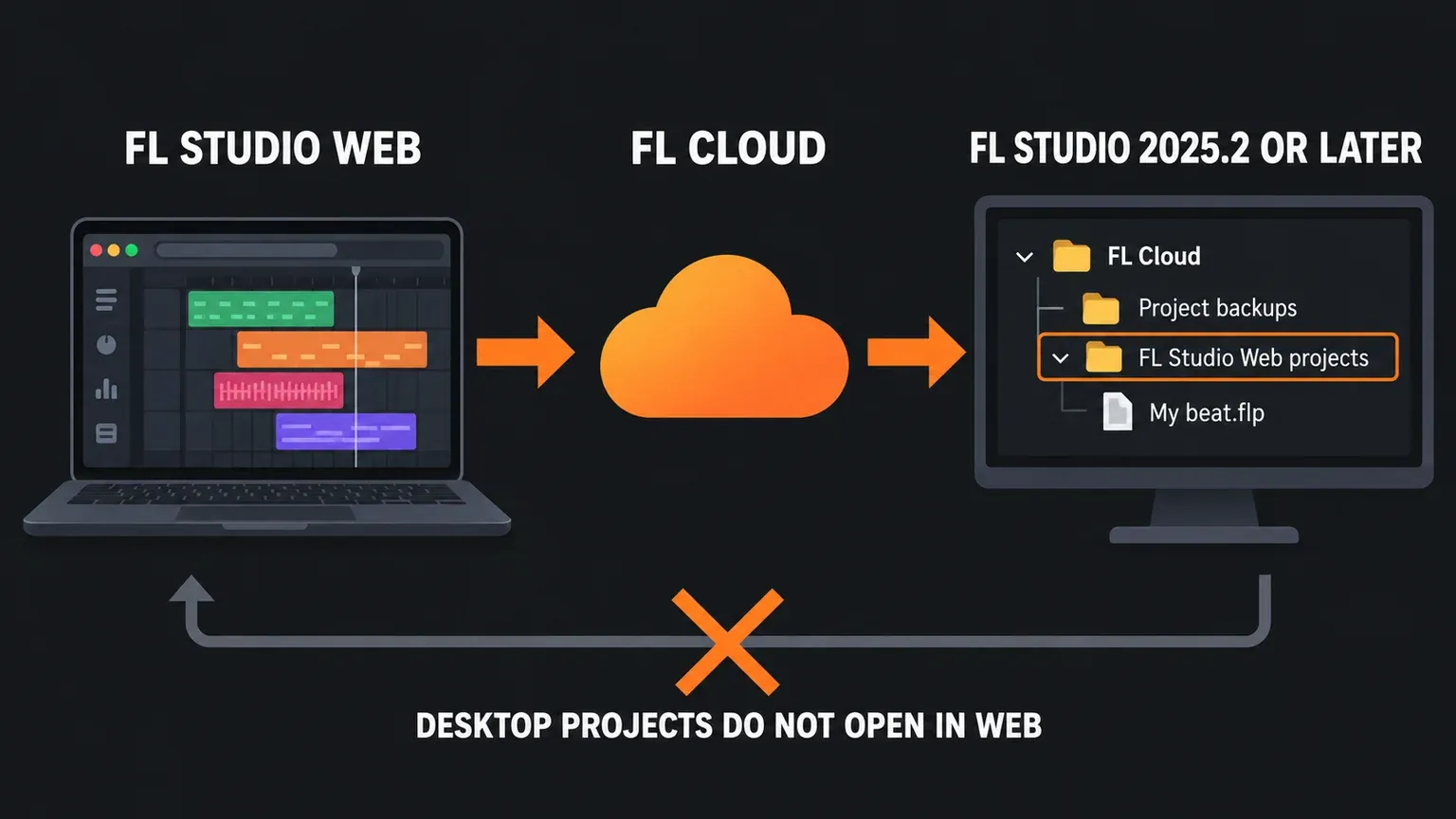
This is the bridge Image-Line built on purpose. You need FL Studio 2025.2 or later: the FL Studio 2025.2 release news added "Support for FL Studio Web projects." Any current version qualifies. The manual's What's new page lists FL Studio 2026 (July 7, 2026), with maintenance update 2026.1.7 on September 28, 2026; our FL Studio 2026 guide covers how to update.
- Open FL Studio 2025.2 or later on Windows or Mac. Make sure it is signed in with the same Image-Line account you use for FL Studio Web.
- Open the Browser with Alt+F8 (Opt+F8 on a Mac) and expand the FL Cloud folder.
- Open FL Studio Web projects. In FL Studio 2025.2 the staff FAQ called this folder "My FL Studio Web Projects," so the name depends on your version.
- Download and open your project. The FL Studio Browser manual page lists these as projects "on the cloud" that "you can download and open" in FL Studio Desktop, and the staff FAQ says they are .flp files that open like any local project.
- Save it to a folder on your computer with File > Save as, so your desktop edits have their own copy.
One catch if you don't own FL Studio yet. Image-Line's FL Studio download page says the trial "won't reopen project files (.flp)": you can save and export, but once you close FL Studio the project stays locked until you buy an edition. Web projects are .flp files, so plan around that limit before you count on finishing a Web beat in the trial. Our download and install guide walks through getting the desktop program running.
Once the project is on your computer, the FL Studio Browser guide shows the rest of that panel, including the FL Cloud Sounds tab.
Why desktop projects can't open in FL Studio Web
fl.studio is clear about it: "At this stage, it's not possible to open desktop projects inside FL Studio Web." The staff FAQ gives the reason. FL Studio Desktop "supports a range of features and plugins that don't exist on FL Studio Web," and Image-Line will "see what can be done here in future." A desktop project full of plugins Web doesn't have would have nothing to load them into.
Don't confuse this with FL Studio 2026's cloud project backups. File > Save and back up to FL Cloud puts a desktop project under FL Cloud > Project backups in the Browser, so you can move it between computers. That is desktop to desktop. It doesn't make desktop projects open in Web, and fl.studio still says they can't as of October 5, 2026. Our FL Cloud project backup guide covers that feature, its storage limits and restores.
FL Studio Web vs FL Studio Desktop vs FL Studio Mobile
Web doesn't replace either of the others. The fl.studio FAQ calls it a new way to start creating music in your browser, "not a replacement," and says all versions keep getting regular updates, with Lifetime Free Updates included.
| FL Studio Web | FL Studio Desktop | FL Studio Mobile | |
|---|---|---|---|
| Runs on | A browser, best in Chrome on a computer | Windows and macOS; one license covers both | iOS and Android phones and tablets |
| Install | None | Download and install | App from your device's app store |
| Cost | Free during the beta for eligible users | Paid editions, a free trial and free updates | A separate purchase |
| Scope | Simplified starter tools and lessons | The full DAW with its full plugin and feature set | Complete multi-track projects on a phone or tablet |
| Projects | Open in Desktop 2025.2 or later | Can't open in Web | Open in FL Studio on the desktop |
| Best for | First beats, sketches and learning | Finished songs, recording and mixing | Making music on a phone |
Image-Line's FL Studio Web support article says the three products are built by independent teams, and that work flows between them: Slicer 2, added to FL Studio 2025.2, was originally created for Web and ported to Desktop. Image-Line expects more plugins, tools and features made for Web to reach Mobile and Desktop.
My take. If you have never made a beat and don't want to install anything yet, start in Web and work through the lessons. If you already own FL Studio, Web is a sketchpad for a borrowed or work computer where you can't install software, not a reason to change how you work. If you already know you want to finish songs, record vocals or use your own plugins, skip ahead to the desktop program and our FL Studio tutorial for beginners.
Getting help and sending feedback
Image-Line's support article says all FL Studio Web support runs through its Discord community. Log in to FL Studio Web, go to the top bar of the dashboard and click Join Discord. The link only shows in the dashboard while you are logged in. To get a faster answer, include a short description of the problem, your browser and device type, and screenshots or a screen recording if they help.
For ideas and suggestions rather than problems, fl.studio points to the feedback form in the FL Studio Web dashboard.
Quick answers
Can you download FL Studio Web?
No. It runs in a browser tab, so there is nothing to install. If you searched for an FL Studio download, you want the desktop program for Windows or macOS, which our install guide covers.
Is FL Studio Web the full FL Studio online?
No. Image-Line calls it a simplified set of tools made as a place to start, and the full desktop version remains a Windows and macOS program. There is no official way to run the full desktop FL Studio inside a browser.
Does FL Studio Web work on a Chromebook?
Image-Line hasn't published a ChromeOS statement for Web. Chrome is its recommended browser, so a Chromebook is worth trying, but treat that as unconfirmed. Image-Line also says Web is best experienced on a computer for now.
Does FL Studio Web work on Linux?
Image-Line's Web pages don't name operating systems, while Attack's launch report listed Linux. The desktop program officially runs on Windows and macOS only, so on a Linux computer Web is the official FL Studio route worth trying first, in Chrome or another Chromium browser. Image-Line itself doesn't promise Linux support for Web. For running the full program, our FL Studio on Linux guide covers Wine, Bottles and what to check.
Does FL Studio Web replace FL Studio Mobile?
No. Image-Line says Web exists alongside Desktop and Mobile, and its staff FAQ calls Mobile the flagship for Android and iOS phones.
I already own FL Studio. Do I get anything in Web?
On the pages I checked, Image-Line doesn't tie Web access to an FL Studio license. The December 2025 staff FAQ said Web would open to FL Studio customers after beta testing, with no date. What owners already have is the other half of the bridge: FL Studio 2025.2 or later opens Web projects from the FL Cloud folder.
Are there other browser DAWs?
Yes. MusicRadar's launch coverage named Soundation, Amped Studio and Moises AI Studio as other browser-based options. They are separate products from separate companies, and this page doesn't compare them.
If you open FL Studio Web today, start with the first lesson in the Learn column and keep your first project short. When a beat outgrows the browser, the FL Cloud folder in the desktop Browser is where it lands.