FL Studio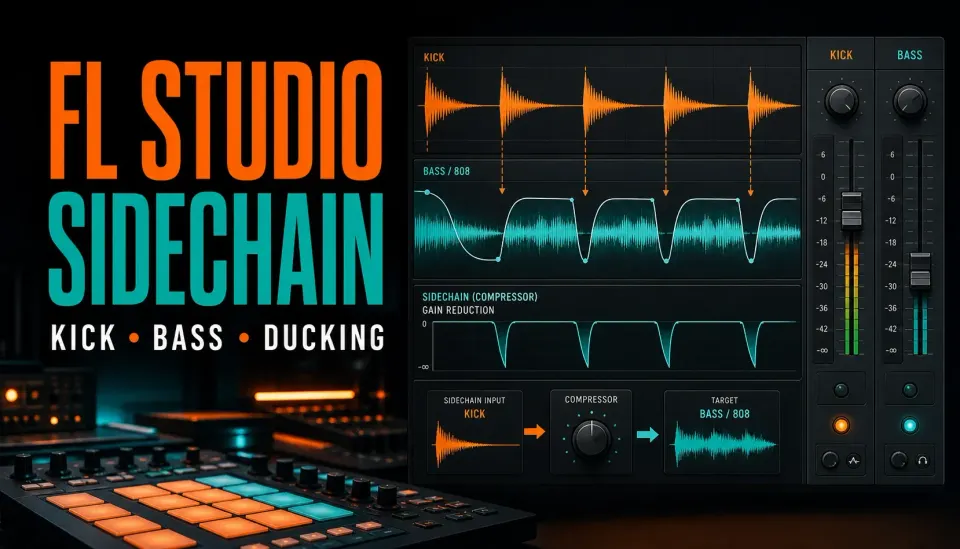
Sidechain compression in FL Studio lets one sound control the level of another. The usual setup uses the kick as the trigger and the bass or 808 as the target, so Fruity Limiter briefly pulls the low end down every time the kick hits.
For a clean first pass, put the kick and bass on separate Mixer inserts, create a sidechain route from kick to bass, load Fruity Limiter on the bass, open COMP, select the kick in the Sidechain selector, then tune Threshold, Ratio, Attack and Release while the full pattern plays. Start with enough gain reduction to hear the shape, then back it off until the kick has room without hollowing out the bass.
What sidechain compression actually does
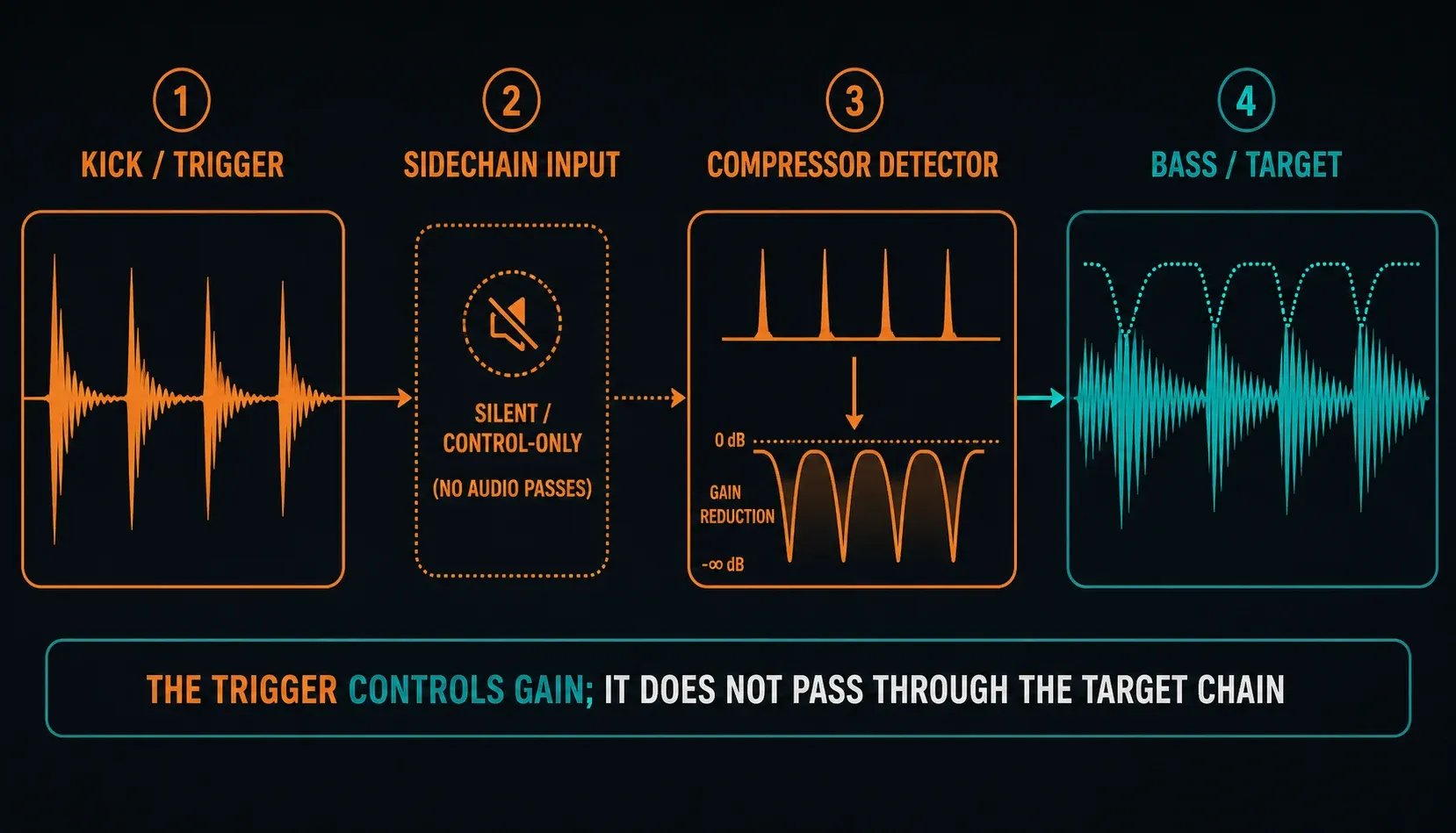
A normal compressor listens to the same audio it turns down. A sidechain compressor listens to a different detector signal. The bass still runs through Fruity Limiter, but the kick tells its compression envelope when to react. That's why the sidechain route is silent at the destination: it carries an unheard copy of the trigger audio to the detector, and it doesn't add the kick to the bass output.
The wording causes a lot of needless confusion. Producers say “sidechain the kick to the bass,” “sidechain the bass,” and “duck the 808” for the same relationship. A clearer sentence is: the kick triggers gain reduction on the bass. Name the trigger, the target and the parameter you're changing before you touch a menu.
Sidechain compression can free up headroom, make a kick transient easier to hear or add an obvious pumping groove. Those are different goals. A transparent low-end fix might need only a small, short dip, while a house pad may want a deep envelope that becomes part of the rhythm. If you can't say which result you're after, every knob move turns into guesswork.
Choose the method before you build the route
FL Studio gives you several ways to create a duck. In one bar they can sound alike, then behave very differently once the kick velocity, the pattern or the source changes.
| Method | What drives the duck | Use it when |
|---|---|---|
| Fruity Limiter | Actual sidechain audio level | You want compressor behavior that responds to the trigger |
| Fruity Peak Controller | Envelope extracted from the source track | You want to move volume, a filter or another linked parameter |
| Volume automation | A curve you draw or trigger deliberately | You want the same visible timing on every event |
Start with Fruity Limiter if you want classic sidechain compression. Reach for Peak Controller when the useful target isn't only volume, or when you want the kick envelope available as an internal controller. Choose automation when repeatable timing matters more than reacting to the kick's level. None of them is automatically more “professional.” The right method is the one whose ducking envelope and response you can predict.
Prepare the kick and bass routing first
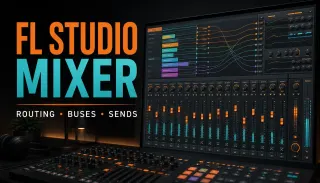
Open the Mixer with F9 and check that the kick and the bass or 808 move different insert meters. If they share one insert, the compressor can't turn down only the bass. The FL Studio Mixer routing guide covers Channel Rack assignment, sends and signal flow in full; here you only need two named inserts and their Master routes.
- Play the kick alone and verify the Kick insert meter moves.
- Play the bass alone and verify the Bass or 808 insert meter moves.
- Leave both inserts routed audibly to Master.
- Disable any old kick-to-bass audio send that would create an audible duplicate path.
That last check matters. A normal send passes audio, while a sidechain-only route feeds a compatible detector without adding the kick to the target's audio chain. The current Image-Line Mixer routing manual documents the source-to-destination direction and warns that routing choices can change the source's Master path.
Fruity Limiter sidechain: the six-step setup
- Select the Kick Mixer insert. The source must be selected before you create its route.
- Right-click the routing switch under the Bass or 808 insert. Choose Sidechain to this track. Reserve the “only” version for when the trigger should not remain audible.
- Load Fruity Limiter on the Bass or 808 insert. The processor belongs on the sound being turned down, not on the kick.
- Open the COMP tab. Fruity Limiter opens with limiter controls visible; sidechain compression uses its compressor section.
- Choose the kick in the Sidechain selector. Do not assume it will always be input 1 when several control routes reach the track.
- Lower Threshold and raise Ratio until gain reduction appears. Then tune Attack, Release and Knee against the full pattern.
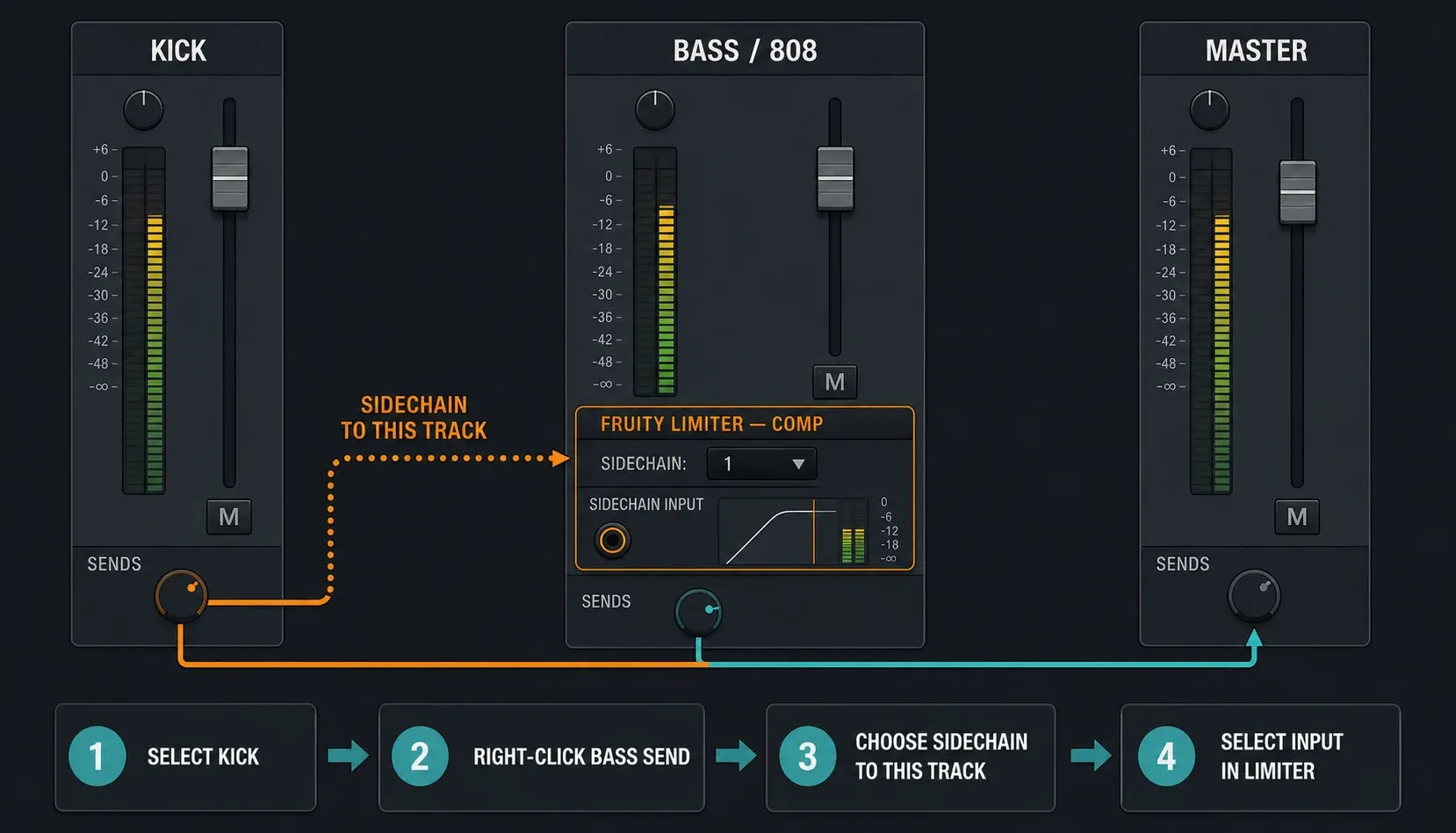
The official Fruity Limiter manual uses the same direction: route the source track to the Mixer track hosting Fruity Limiter, then pick that source inside the compressor. If the Sidechain selector offers nothing, the plugin is usually telling you the route doesn't exist yet.
Now bypass and re-enable Fruity Limiter at a comparable output level. If the kick only sounds clearer because the whole bass got much quieter, you haven't judged the envelope yet. A fair comparison asks whether the timing improved, not which version won a loudness contest.
Tune Threshold, Ratio, Attack and Release by job
Threshold decides which trigger peaks cause compression. Ratio decides how strongly the target is reduced after the detector crosses that threshold. Attack controls how quickly space opens; Release controls how quickly the bass returns. Knee rounds the transition around threshold and can make the onset less abrupt.
| Control | If it is too gentle | If it is too extreme |
|---|---|---|
| Threshold | The kick may not trigger enough reduction | Every small trigger variation can hold the bass down |
| Ratio | The overlap may remain unchanged | The duck can feel like a hard mute |
| Attack | A slow attack can let kick and bass collide first | An abrupt edge can shave the target's opening character |
| Release | A short return can chatter or distort | A long return can keep the bass low into the next phrase |
| Knee | A hard transition may be obvious | A very soft transition can make the response less decisive |
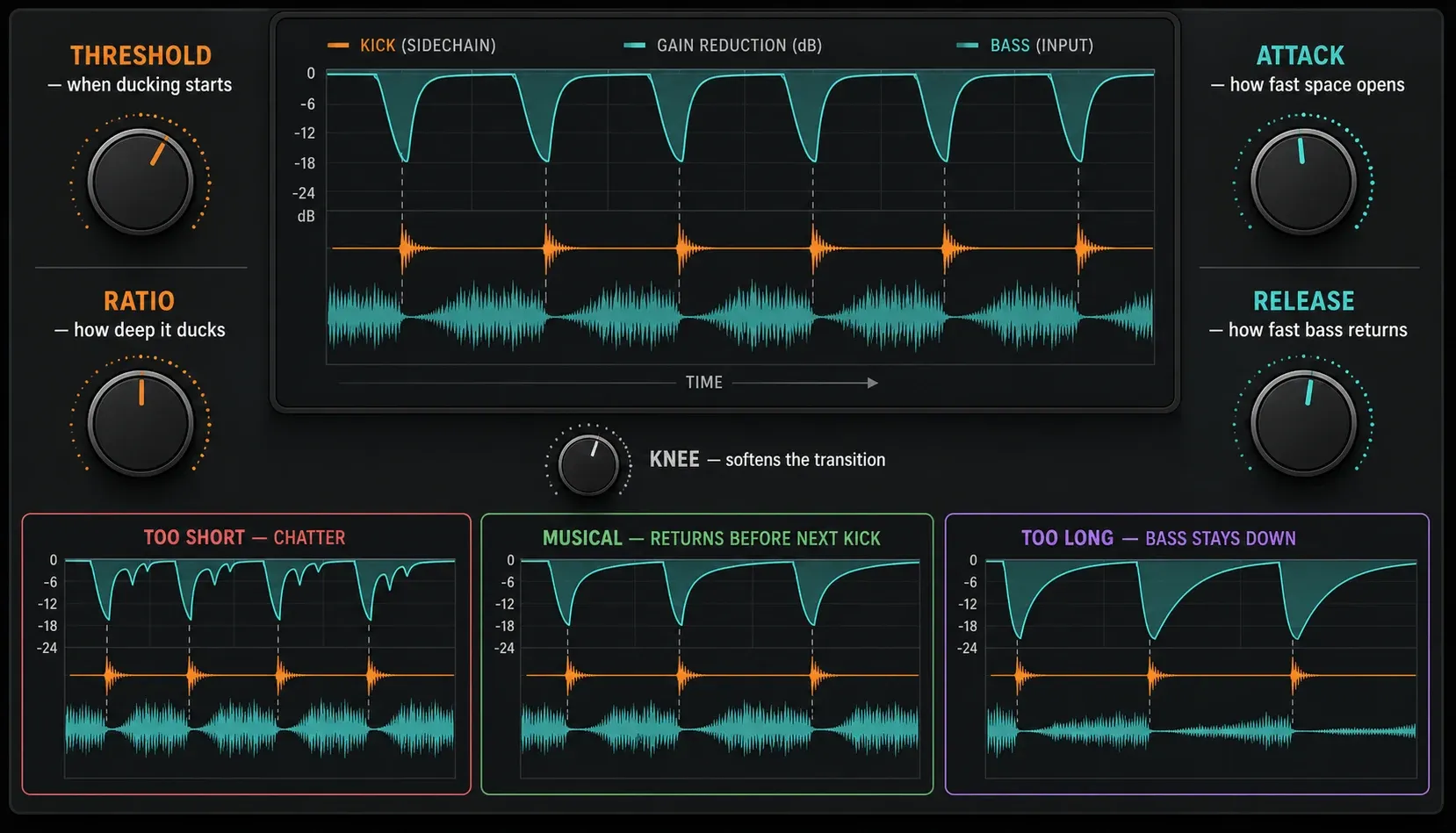
There's no universal attack or release setting. A short clicky kick, a long acoustic kick and a clipped ghost trigger each hand the detector a different envelope. The Image-Line manual names Release as the main influence on the return and notes that setting it too low can cause distortion. Use the display to confirm what you hear, not as a substitute for listening.
Sidechain a kick to an 808 without hollowing the low end
The question most people type is “how to sidechain kick to 808 FL Studio,” and the honest answer isn't “always duck harder.” Bypass the compressor first. If the kick and 808 already sit in different moments, pitches or frequency areas, extra ducking can strip weight without fixing any collision.
When they do overlap, start with enough depth to hear the shape, then shorten the recovery until the 808 comes back before its musical body feels missing. Slow the attack until the kick and 808 start to smear, then pull it back toward a cleaner opening. Finally, lower the Ratio or raise the Threshold until the effect stops drawing attention to itself, unless audible pumping is the sound you want.
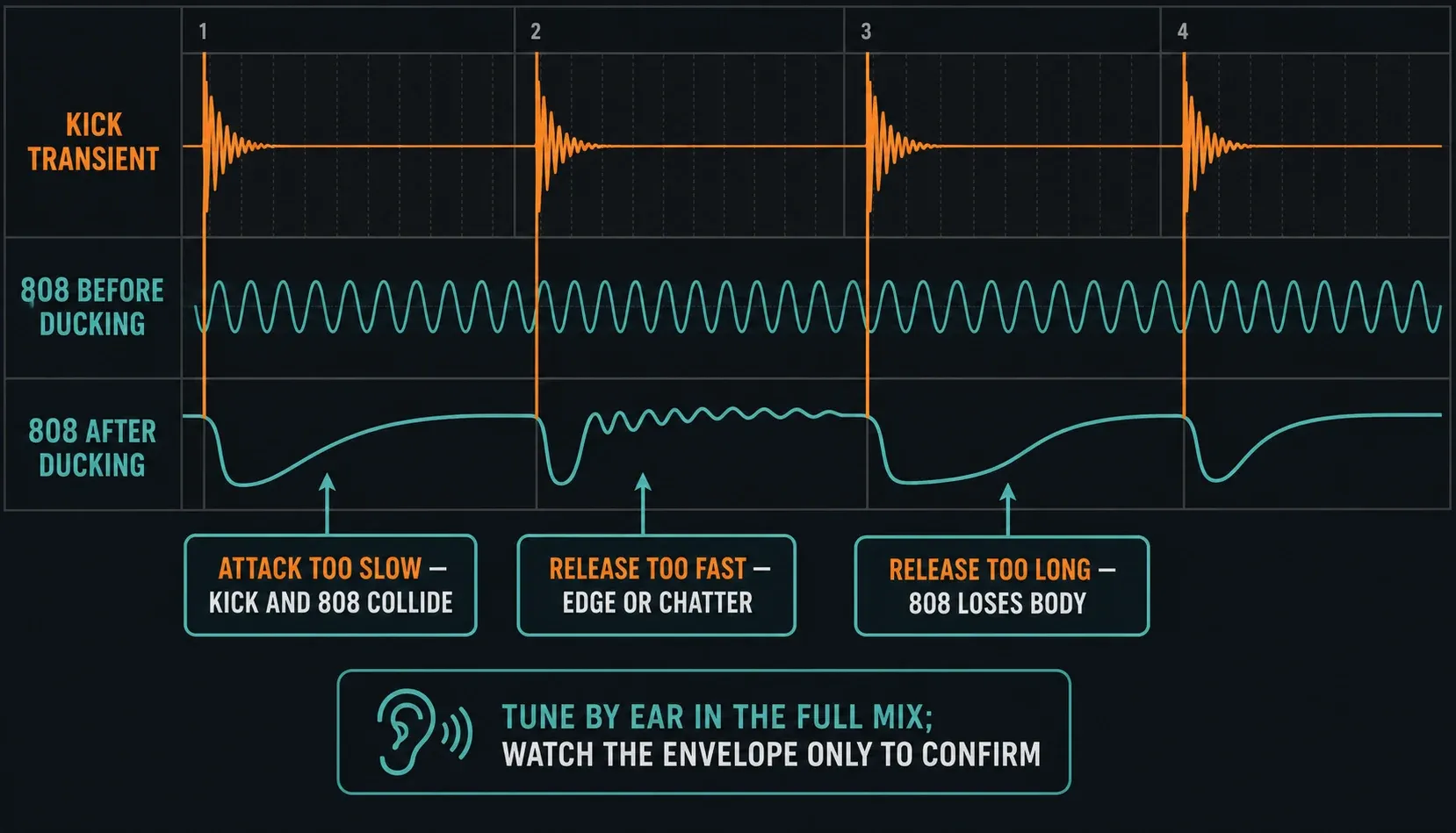
A long 808 note exposes timing mistakes more clearly than a short bass stab. Listen through fills and doubled kicks, not just a one-kick loop. A compressor that feels tidy on four equal hits can pump unpredictably once the real trigger level changes. If you want the same dip regardless of velocity, a drawn curve may be the cleaner way to control it.
Use Fruity Peak Controller for linked-parameter ducking
Fruity Peak Controller isn't another compressor input. It goes on the source track, reads that track's envelope and exposes an internal controller you can link to another parameter. The current Fruity Peak Controller manual describes the usual ducking setup: raise Base, turn Volume negative, then link the target control to the Peak controller output.
- Load Peak Controller on the kick insert.
- If the kick must remain audible, turn off the plugin's default Mute switch.
- Set Base high enough for the target's normal state, then move Vol negative so kick peaks pull the controller down.
- Right-click the target control, choose Link to controller, and select the Peak Controller output.
- Shape Decay and Tension; use Ramp if an abrupt linked control clicks.
This method pays off when the target is a filter cutoff, reverb level or some other automatable parameter. It can control volume too, but remember what you've built: the source envelope is moving a linked control. If the kick is extremely quiet, Peak Controller may not produce the response you expect, so check its envelope before you debug the target.
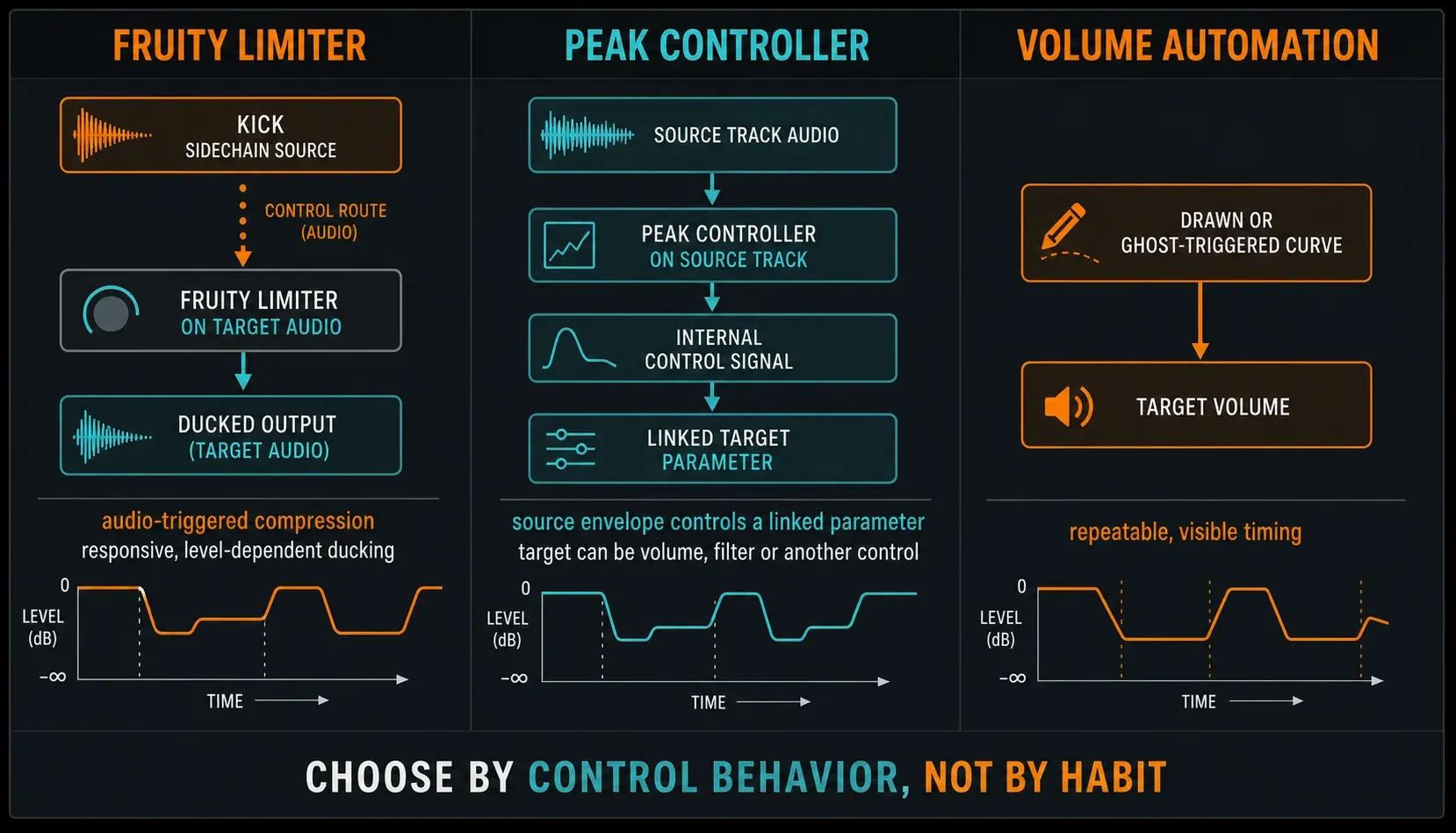
Use volume automation when timing should ignore trigger level
An FL Studio Automation Clip can draw the exact dip and recovery you want. Place the curve on a dedicated gain control such as Fruity Balance rather than the Mixer fader if you want to preserve an easy manual fader for later balancing. Copy the curve with the kick pattern or trigger it from a ghost note in a compatible envelope tool.
The big strength is repeatability: every event can use the same shape even when the audible kick changes velocity or drops out for a bar. The weakness is upkeep. Move a kick and the drawn automation has to move with it, unless your trigger system follows the pattern. The broader FL Studio shortcuts guide helps with editing speed, and the FL Studio automation guide covers clip creation, linking and event automation in depth.
Don't call a drawn volume curve “compression” when you explain the project to someone else. Both methods duck the level, but a compressor responds to a detector and a threshold, while automation follows timing you drew. Naming the method correctly makes later changes much easier.
Troubleshoot no input, a silent kick or bad pumping
| Symptom | Likely cause | First check |
|---|---|---|
| Sidechain selector is empty | No control route reaches the target | Select kick, then create the route to bass |
| Input is selected but no gain reduction appears | Wrong COMP mode, threshold or source identity | Confirm COMP, selector and detector movement |
| The kick disappears | “Sidechain to this track only” removed its Master route | Restore Kick → Master while keeping the control route |
| The bass is always quiet | Threshold too low or release too long | Raise threshold, shorten release, then bypass-check |
| The return clicks or chatters | Envelope changes too abruptly | Lengthen attack/release or soften the knee |
| The pump changes with kick velocity | Compressor is responding to trigger level | Use a consistent ghost trigger or volume automation if needed |
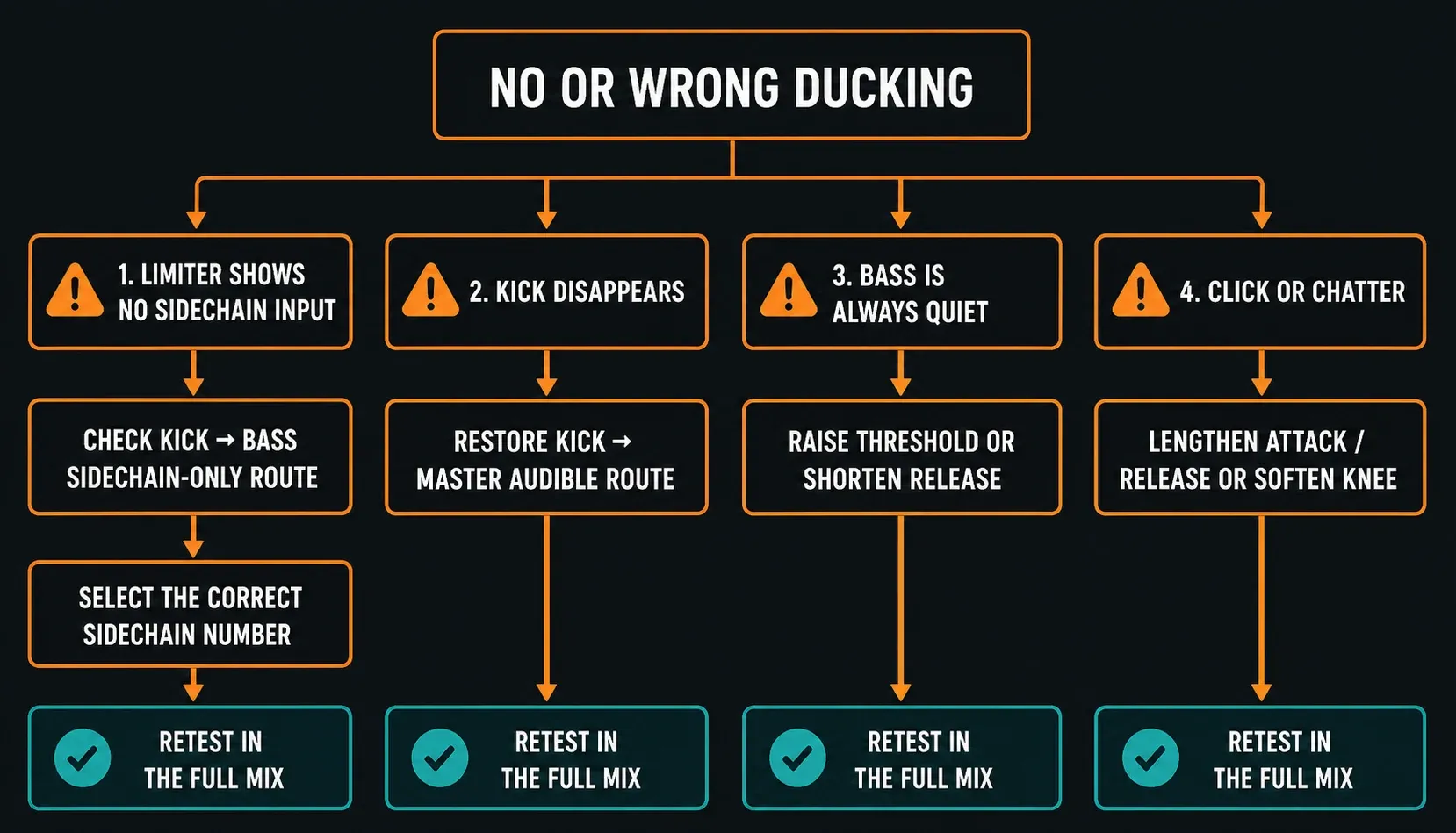
Debug in signal-flow order. Check the source meter, the target meter, the dotted control route, the selected detector input, the compressor's gain reduction and, last, the audible Master paths. Twisting Threshold and Release at random won't repair a missing route. If playback itself crackles or lags, fix the device and buffer first with the FL Studio audio settings guide; sidechain tuning can't solve driver latency.
A compact sidechain decision checklist
- Name the trigger, target and parameter being changed.
- Confirm the problem exists with sidechain bypassed.
- Choose compressor response, linked control or drawn timing.
- Keep audible Master paths separate from control-only routes.
- Tune depth first, timing second, then reduce the effect to the amount the mix needs.
- Test fills, velocity changes and sections without the kick.
- Compare bypass at a fair level and keep the simpler version when both work.
That last step keeps sidechain from turning into a ritual. A clean arrangement and sensible levels may already make the space you need. Use ducking because the relationship gets better, not because the genre usually has it. The FL Studio mixing guides keep sidechain alongside the Mixer, the vocal-mixing workflow and the mastering workflow, without treating one technique as the answer for every mix.
Frequently asked questions
How do I sidechain a kick to bass in FL Studio?
Put kick and bass on separate Mixer inserts, select the kick, right-click the bass routing switch and choose Sidechain to this track. Load Fruity Limiter on the bass, open COMP, select the kick in the Sidechain selector, then tune the compressor.
Should Fruity Limiter go on the kick or the bass?
Put Fruity Limiter on the sound you want to turn down, usually the bass, 808 or pad. The kick remains the sidechain source that controls Fruity Limiter's detector.
Why does the sidechain input not appear in Fruity Limiter?
The target track has not received a valid Mixer sidechain route, or the route points in the wrong direction. Select the kick first, create the route to the track hosting Fruity Limiter, then reopen the Sidechain selector.
Why did my kick disappear after I created the sidechain?
You probably chose Sidechain to this track only, which can remove the kick's audible route to Master. Restore Kick to Master and keep the separate control-only route to the bass.
What are the best sidechain settings for kick and 808?
There is no universal preset. Set enough threshold and ratio to hear the duck, then tune attack so the kick opens cleanly and release so the 808 returns before it loses body. Reduce the depth after the timing works.
Is Peak Controller better than Fruity Limiter for sidechain?
Neither is always better. Fruity Limiter gives level-dependent compression from a sidechain source; Peak Controller turns the source envelope into an internal controller that can move volume, a filter or another linked parameter.
Do I always need to sidechain kick and bass?
No. Bypass the processor and listen first. If the kick and bass already separate through timing, pitch, tone and level, extra ducking can take away weight without making anything clearer.