FL Studio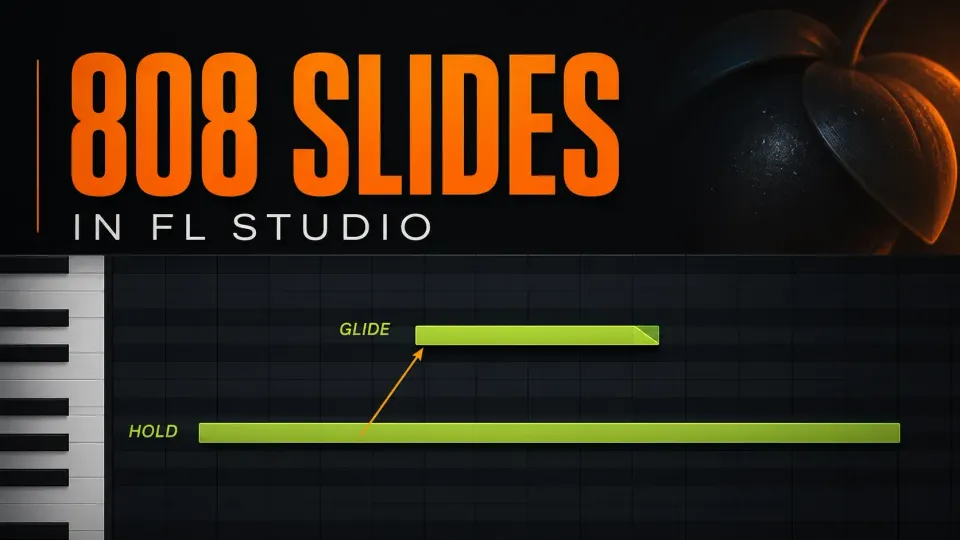
To make an 808 slide in FL Studio, put a normal note in the Sampler's Piano roll, then add a Slide note that overlaps it at the pitch you want to reach. Keep both notes in the same color group. The Slide note starts the bend and its length sets how long the move takes, while the ordinary note has to keep sounding until the bend is done.
The triangle note isn't another bass hit. It steers a sound that's already playing. You don't need Channel Mono or Porta for this Sampler method. If your 808 comes from a third-party instrument such as Serum or Vital, jump to the plugin section, because VST instruments don't support native Slide notes.
Make one working 808 slide in seven steps
- Protect the original. Save a separate project version and use a spare Pattern for the test. Keep the original sample file. If you're on the standard FL Studio trial, read the saving limitation below before you close anything.
- Choose the right Channel. Load an 808 one-shot into a Sampler Channel in the Channel Rack, not as an Audio Clip in the Playlist. Check its tuning, then open that Sampler's Piano roll.
- Draw the sounding note. With Slide mode off, draw one ordinary note. Play it from the start and check that the sample stays audible for the whole move you want.
- Add the target. Switch on the Piano roll Slide toggle and draw a shorter note at a different pitch, starting after the ordinary note begins. Keep it fully inside the ordinary note's length and in the same color group.
- Place the landing. Move the Slide note so it starts where the bend should begin. Drag its right edge to where the target pitch should be reached, and lengthen the ordinary note if you need to.
- Check the properties. For a pitch-only test, give the two notes the same velocity, pan and modulation values. Switch Slide mode off again before you draw another ordinary bass hit.
- Listen from before the first note. Check the start pitch, the movement and the landing, then play it again with the song. Change one thing at a time: the target pitch, the start position or the Slide-note length.
Under Image-Line's standard trial rules, you can save a project but can't reopen it in the trial. Reopening needs a suitable purchased license covering the plugins the project uses. A saved test copy is useful, but it doesn't lift that limitation.
Choose the method from the instrument
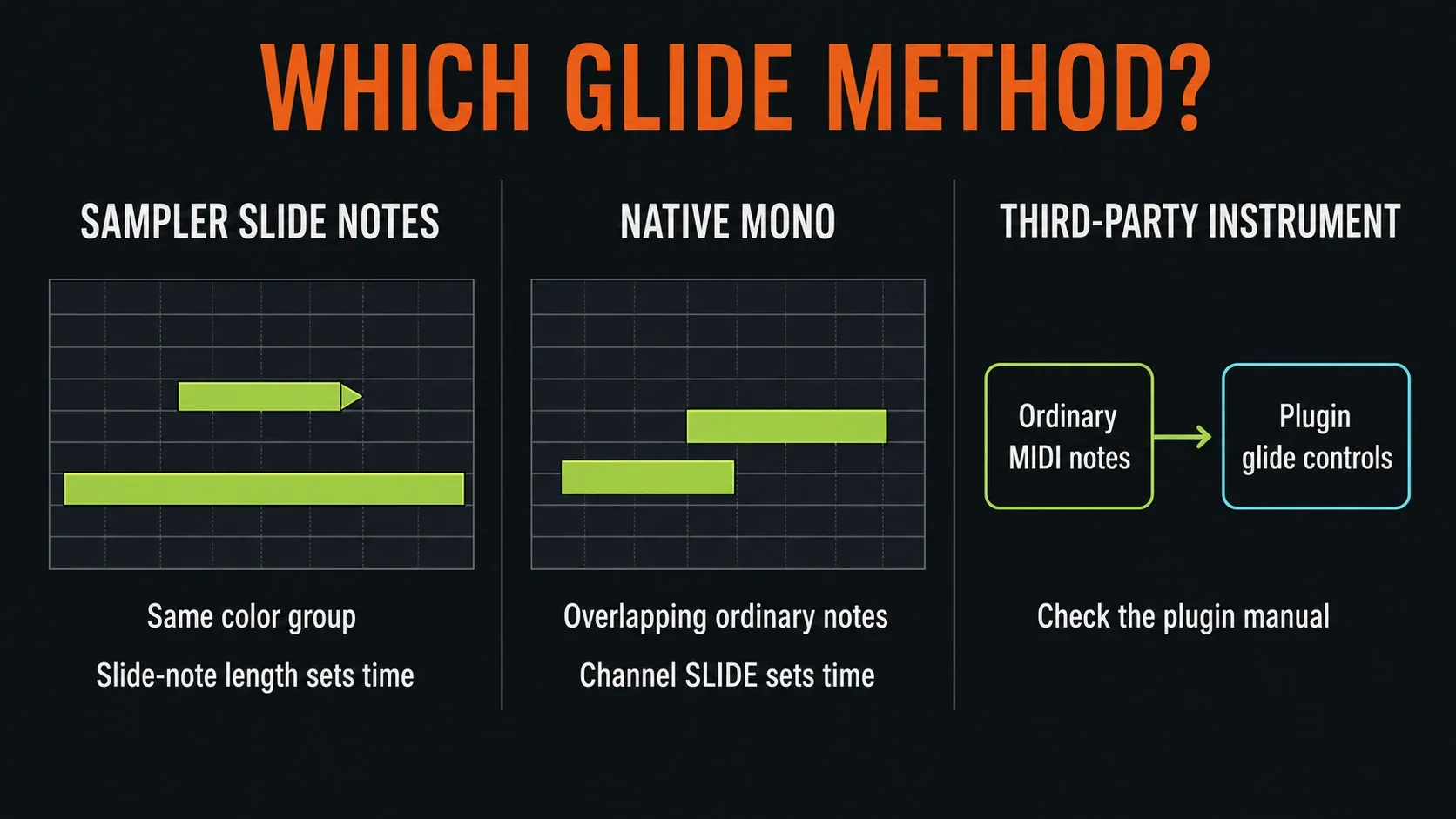
Use the first route for an 808 one-shot in the native Sampler. Channel Mono is an alternative for moving between ordinary overlapping notes in supported native instruments. A third-party plugin normally has its own glide controls. Don't switch on every control named Slide, Porta or Mono and then try to work out what happened.
If you can't tell which instrument the notes belong to, start with the Channel Rack guide. An Audio Clip dragged into the Playlist isn't the Sampler setup used here.
Check tuning and available sound first
A smooth glide can still land on the wrong note. Follow the 808 root-note and cents workflow if the Piano roll labels don't match the pitch you hear. Tuning has to be right first; this guide is about controlling the movement between notes.
Hold a plain note before you add a slide, and listen for the point where the 808's body fades out. Drawing a longer MIDI note can't create recorded sound that isn't there. For a first test, use a long enough one-shot or shorten the bend. You can build a sustained source later.
Keep existing pitch automation and pitch-envelope movement out of the test copy. If ordinary notes at different pitches don't respond as expected, sort out the sample's pitch and time-stretch settings before changing the Slide notes. Don't reset the whole song to troubleshoot one Channel.
Draw the carrier, then its overlapping target
The ordinary note is the carrier: it triggers the 808. The Slide note gives it a destination, not a second attack. In the Piano roll's Slides and Portamento documentation, Image-Line explains why the two must overlap. If the ordinary note ends too early, the slide gets cut short.
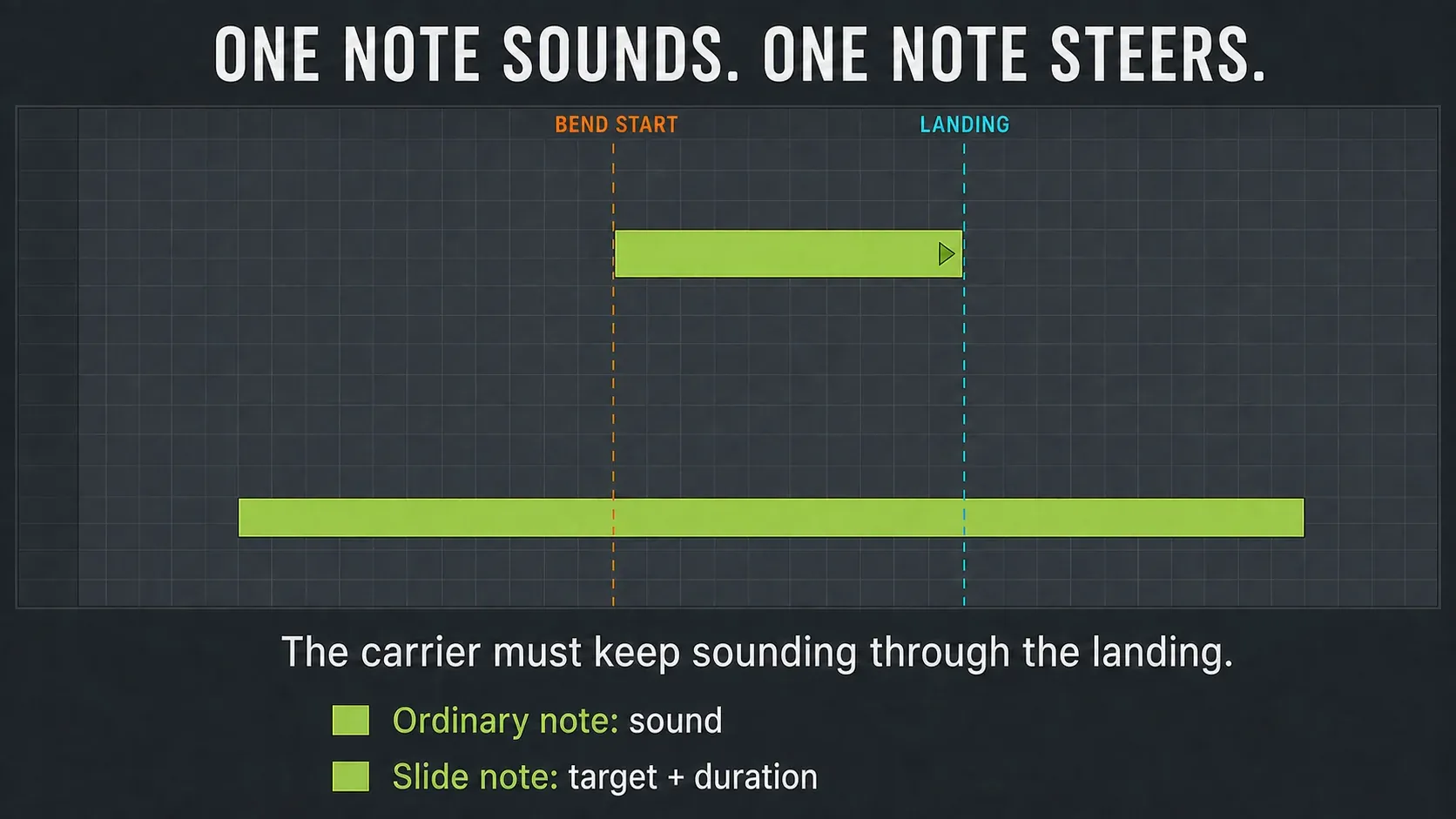
Start with one ordinary note and one target in the same Piano roll. A gray ghost note from another Channel isn't your sounding carrier. Check the Channel name at the top if you have several 808 layers.
Click the Slide toggle to draw the target, and click it again to leave Slide mode. You can double-click an existing note to open Note Properties and check its Slide setting. The Piano roll editing guide covers selection and snap if the note won't resize where you want.
For an upward bend, put the target higher; for a downward bend, put it lower. Its left edge sets when the movement starts and its right edge sets when it should arrive. Keep the carrier sounding across that whole stretch. Starting playback halfway through the pair makes a poor first test, so replay from before the carrier.
Control speed with the Slide note's length
Keep the start pitch, target pitch and bend start fixed. Shorten only the target Slide note to arrive sooner, or lengthen it to arrive later. Moving the whole note changes the start time too, which makes the comparison harder to hear.
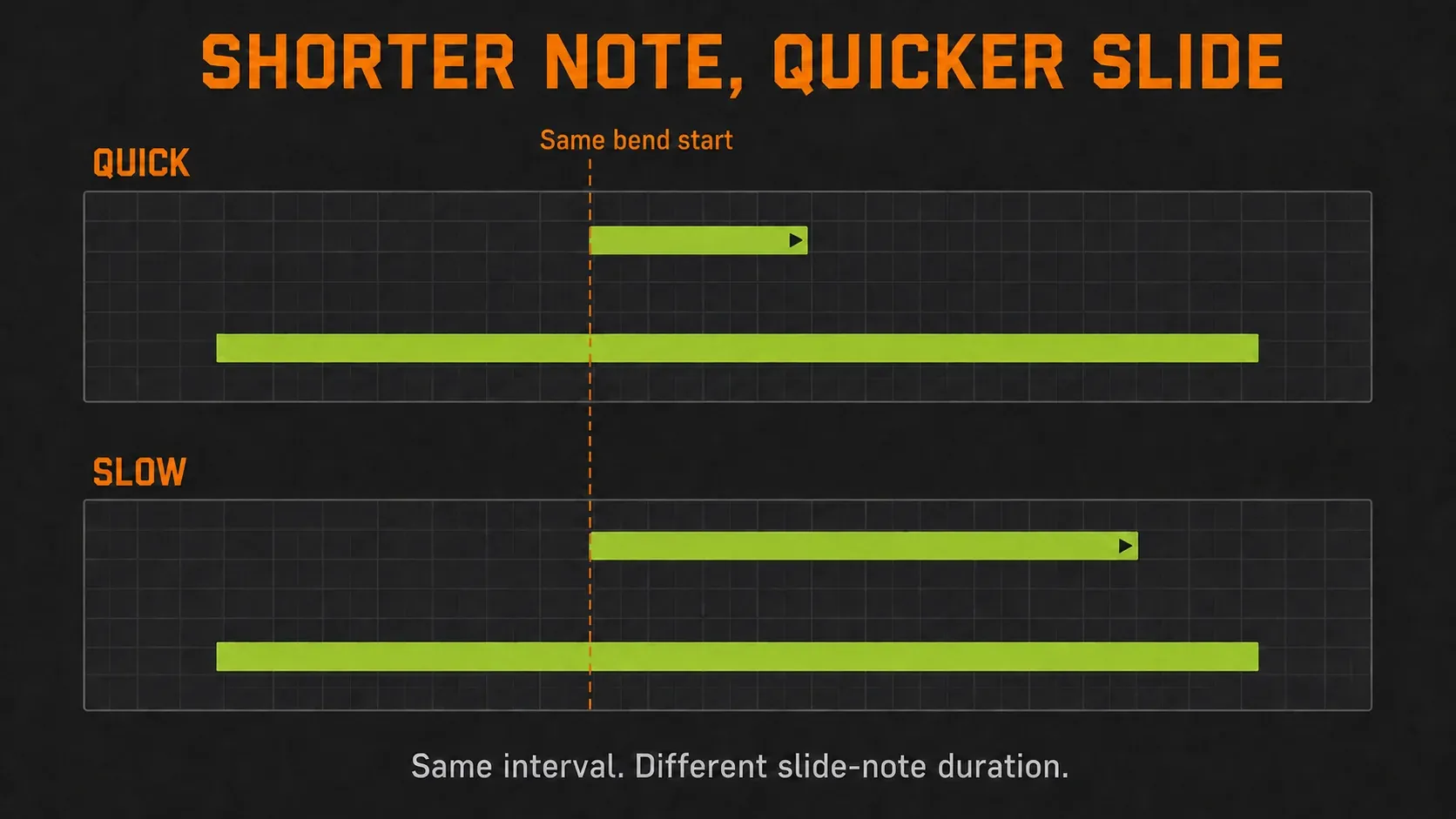
There's no required setting in milliseconds or beats. A big interval covered quickly feels different from a small move over the same time. Pick the landing first, then adjust the journey. If you lengthen the Slide event, leave enough carrier length and audible sample tail to reach its new end.
The Channel SLIDE knob is Portamento Time for the separate Mono/Porta approach, and it doesn't set the length in this native Slide-note test. Keep the two methods apart while you learn them.
Match colors and check more than pitch
Slide events only act on their own color group. For a simple bass line, use one group for both the carrier and its target. In Note Properties, check Color; for notes already selected, the Piano roll menu's Edit → Change color command applies the chosen group.
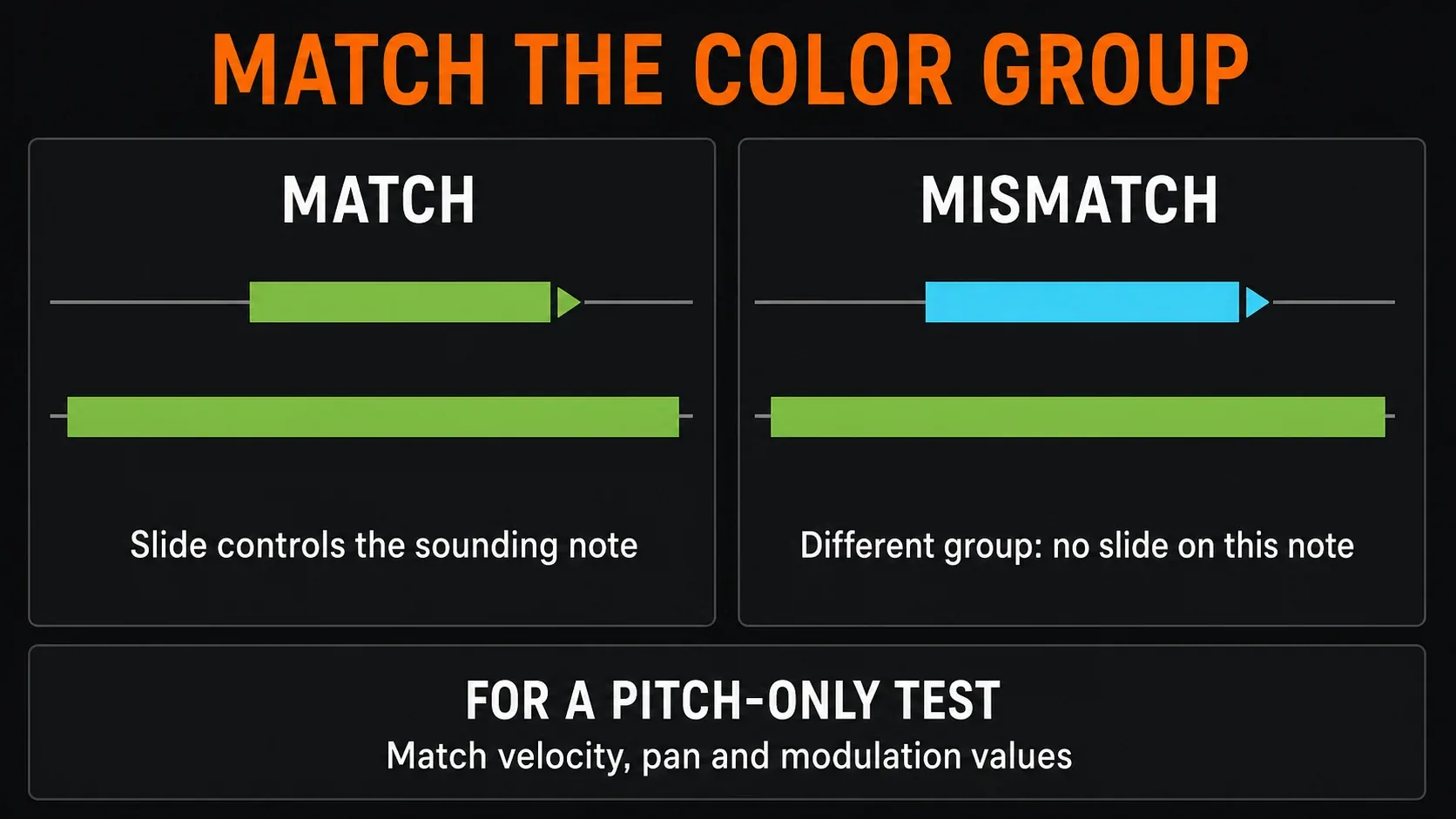
The target also carries velocity, pan and modulation properties. A lower Slide-note velocity can make the bass quieter as it bends, and a different pan or filter-related value can shift its placement or tone. Match those values for the first test, then change them on purpose. Mod X and Mod Y can point to different destinations in native instruments, so they won't always control the same filter settings.
If several ordinary notes overlap in the same group, a Slide event can move the whole chord together, using the highest note as its pitch reference. Test an 808 with a single carrier before you layer voices. Here, colors are processing groups and do more than decorate.
Try a slide up and back down
Here's a small timing exercise; you don't have to follow it exactly. In 4/4, count four quarter-note beats. Use a tuned sample with enough audible tail for the exercise, and pick a register you can hear clearly.
| Event | Pitch example | Start | End |
|---|---|---|---|
| Ordinary carrier | C4 | Beat 1 | End of beat 4 |
| First Slide note | C5 | Beat 2 | Beat 3 |
| Return Slide note | C4 | Beat 3 | Beat 4 |
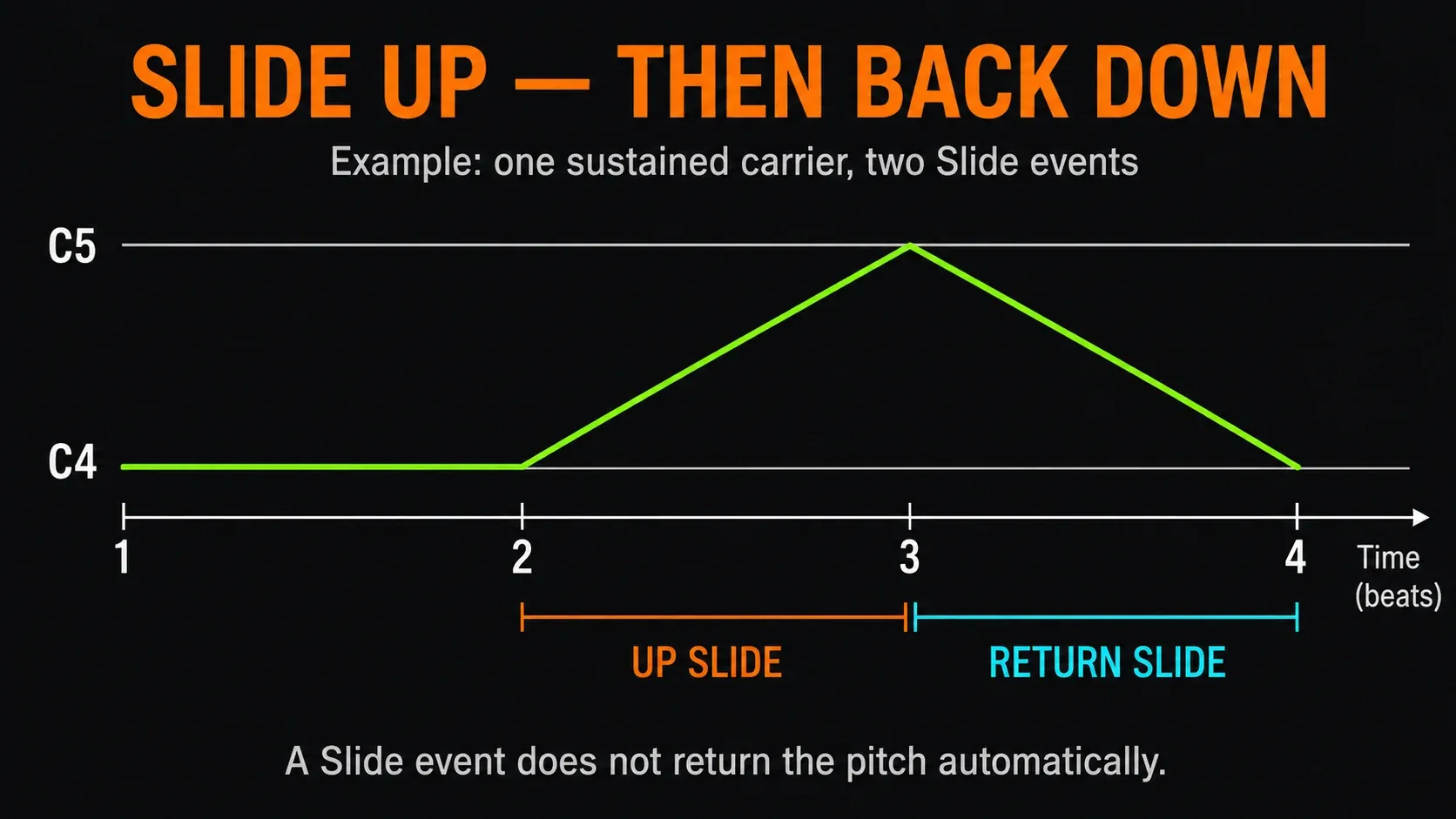
Keep all three events in the same color group. The first target bends up over one beat, and the second bends back over the next. A Slide event doesn't snap the carrier back when it ends, so add the return event when you want that movement. At the original pitch row, the return event may sit on top of the carrier: check the selected note's Slide flag instead of assuming every visible rectangle is a new hit.
C4 and C5 are just example Piano roll labels, one octave apart; your sample may belong in a different register. Transpose the whole test if you need to. Once it works, shorten the events or move the gesture toward the end of a phrase. Use the scale-highlighting guide to get your bearings, but pick landing notes against the actual harmony.
Use native Mono or Porta as an alternative
For the ordinary-note method, remove the test's Slide events, open Miscellaneous Channel Settings → Polyphony, switch on Mono and overlap two ordinary notes in the same color group. Adjust SLIDE to change the transition time. Image-Line's Channel polyphony and Gate reference separates this from MAX, and setting MAX to 1 won't stand in for Mono.
Mono works separately for each note-color group, so different groups can still produce more than one voice overall. Keep a single group for the bass test. The manual also separates Mono's release behavior from MAX cutting extra voices, so “one voice” doesn't promise a release tail that goes silent instantly.
Porta switches on Channel portamento. A Piano roll Portamento flag is another per-note transition control, and its rectangle doesn't set a custom glide time the way a silent target event would. Leave Porta and those flags out of the basic Mono test. These host controls work with supported native instruments, not third-party VST/AU plugins, and some native instruments also lack the pitch-bend support they need.
Make a third-party plugin glide
Image-Line's VST Slide-note limitation is clear: native Piano roll Slide notes aren't supported. Switching on FL Studio's Channel Mono or Porta won't make VSTs understand them.
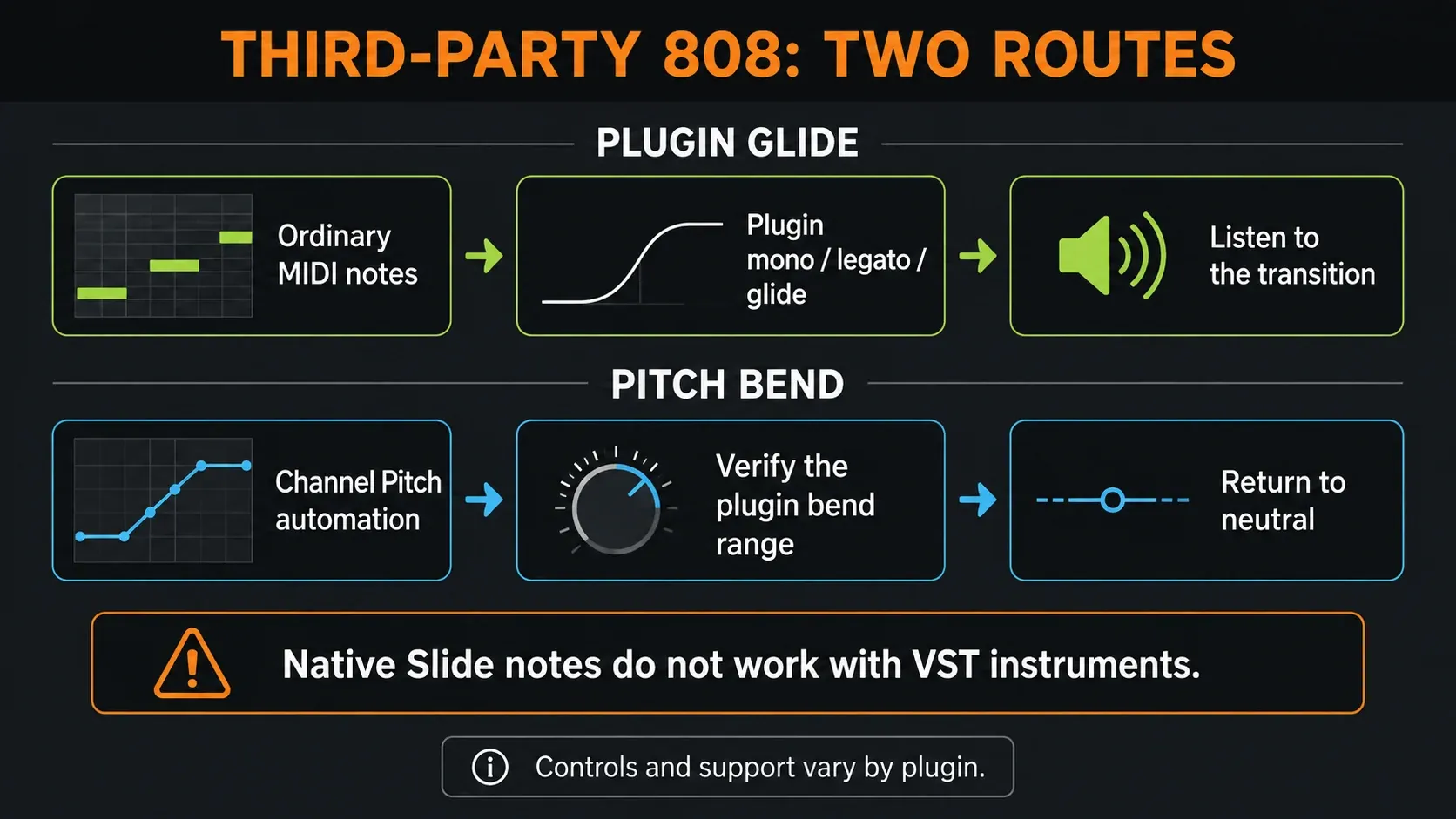
In Serum, Vital or another third-party instrument, look in that plugin's manual for its own mono/legato and glide or portamento controls. Names, retrigger behavior and whether notes must overlap all vary. Use ordinary MIDI notes for that route. No shared knob value makes every instrument behave the same way.
If the instrument responds to pitch bend, Channel Pitch automation is another option. Check the bend range in both FL Studio and the instrument, listen to where it lands, and bring the automation back to neutral before the next unbent note. A maximum knob position doesn't necessarily mean an octave.
The Wrapper's Send pitch bend range option only helps plugins that understand that message. It's off by default because some plugins misread it, so don't switch it on blindly as a cure-all. If the instrument has neither usable glide nor usable pitch bend, loading a long enough rendered one-shot into Sampler is a different workflow; keep the original instrument safe first.
When the sound ends before the slide
Check three separate limits: the ordinary note, the Volume envelope and the sample itself. A long rectangle doesn't guarantee a long sound. On the other hand, the Sampler can keep playing after note release when its Volume envelope is off, as the Sampler playback documentation explains.
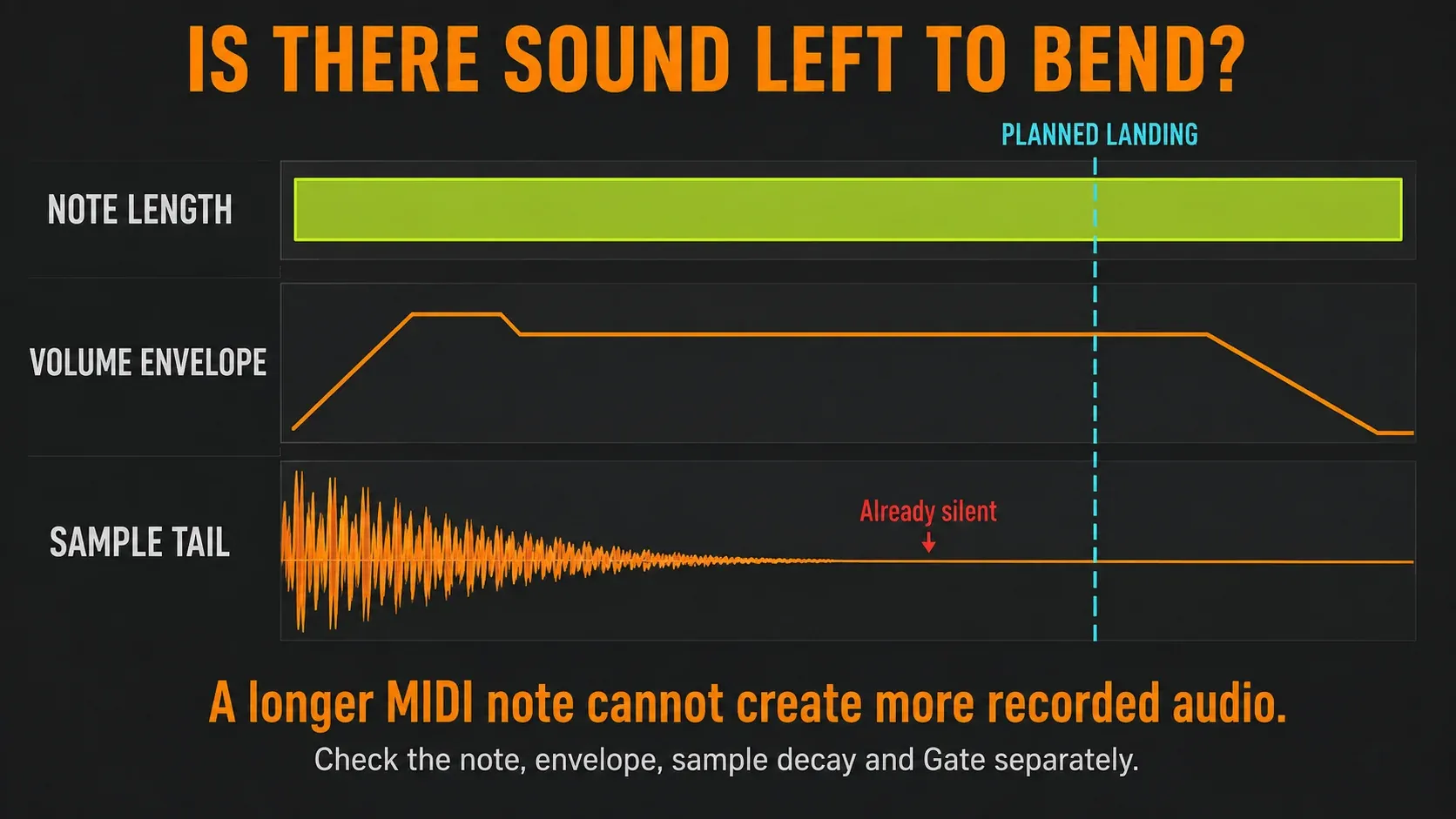
For deliberate control over note length, switch on the Sampler Volume envelope. Sustain sets a level and Release sets the fade after the note is released, but neither can create extra audio once a one-shot has faded. Start with a suitable sustain level and a short release, then listen for clicks or unwanted tails instead of copying an all-knobs-zero preset.
Under Miscellaneous Channel Settings → Time, Gate can cut note events short, and turning it fully clockwise removes that limit. Change it only in your test Channel, then play it again. Also check whether another Channel in a Cut group is sending note-off messages to the 808.
For a short sample, the easiest fix is often a longer source or a shorter bend. Sampler loop points can repeat a chosen region while the note is held, but badly matched boundaries can click or change the character. Keep the original file, listen to the loop, and remember that manual Sampler loop settings are saved in the project and never written into the source sample.
Fix the symptom you actually hear
| Symptom | First check |
|---|---|
| The triangle note is silent | It needs an audible ordinary carrier. Turn Slide mode off to draw that carrier. |
| Nothing bends | Check the instrument, correct Channel, overlap and color group. |
| The bend stops early | Compare carrier length, envelope, sample decay and Gate with the intended landing. |
| The glide gets quieter or changes tone | Compare velocity, pan and modulation properties before adding compression. |
| It stays at the target pitch | That is normal for the continuing carrier. Add a return Slide event if needed. |
| Two bass hits play instead | Inspect whether the target is an ordinary note rather than a Slide event. |
| A VST ignores the triangle | Use plugin-owned glide or verified pitch-bend automation. |
| The landing is out of key | Check tuning and the musical target; EQ will not fix a wrong note. |
Fit the slide into the beat
A slide earns its spot when the arrival matters: a chord change, an answer to the melody or a turn at the end of a phrase. Keep some notes steady so the movement stands out. The drum-pattern walkthrough helps you place the bass around the kick, and Pattern variations let different phrases use different fills.
Once the notes behave, use the 808 mixing guide for low-end balance; it isn't a place for pitch repair. If the sample can't hold the phrase you want, look at a more controllable source in the 3xOSC 808 walkthrough.
For the rest of the track, follow the complete beatmaking workflow or pick the next task in Beatmaking & Drums. Once the arrangement is settled, the Mixing hub covers what comes next.
FL Studio 808 slide FAQ
How do I make an 808 slide in FL Studio?
In the Sampler's Piano roll, draw an ordinary note, then a Slide note at the target pitch that overlaps it. Use the same color group and keep the carrier sounding until the target ends. The length of the Slide note sets how long the bend takes.
Why does my 808 Slide note make no sound?
A Slide event can't trigger sound on its own during playback. It must overlap an ordinary note you can hear. Switch Slide mode off before you draw the carrier.
Does a Slide note need Mono or Porta enabled?
Not for the Sampler Slide-note method. Channel Mono and Porta are separate ways to move between notes in supported native instruments.
How do I make an 808 slide faster?
Shorten the native Slide note while keeping its start and target pitch the same. For the separate Channel Mono/Porta method, turn down SLIDE, the Portamento Time control.
Why does my 808 stop before reaching the target?
The carrier, the envelope, the sample's decay or Gate may end the available sound too early. Find which one ends first, then lengthen the available sound or shorten the bend.
Why does the 808 get quieter during a slide?
The Slide event can change velocity and other note properties as well as pitch. Match its values to the carrier for a neutral test, and listen for the sample's own natural decay too.
Do FL Studio Slide notes work with third-party VSTs?
No. Use the instrument's own glide controls with ordinary notes, or pitch-bend automation if it supports that. Check the instrument's bend range instead of assuming it matches FL Studio.
How do I make the 808 slide back down?
Add another same-color Slide event at the return pitch while the carrier is still sounding. When the first event ends, it doesn't bring the carrier back to its original pitch by itself.