FL Studio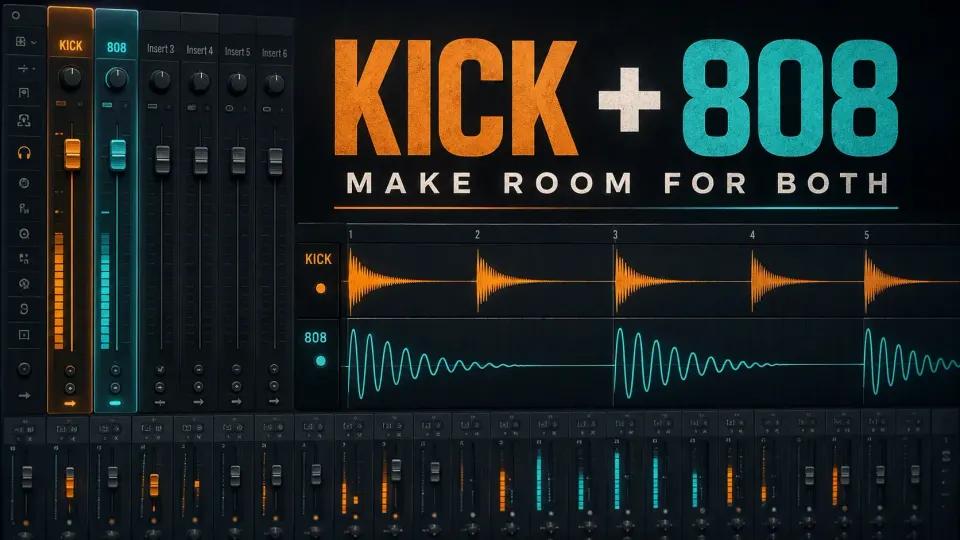
To mix an 808 in FL Studio, give it its own Mixer insert, set its level in the full beat and decide what the kick should bring to the pair. Fix unwanted note overlap before you reach for EQ. After that, try a small corrective cut, gentle saturation or kick-triggered ducking, but only when you can name the problem each move solves.
A clear 808 doesn't have to be the loudest sound in the project. You should be able to follow the bass phrase without losing the kick rhythm or burying the melody. This guide works in the desktop FL Studio Mixer with its native effects.
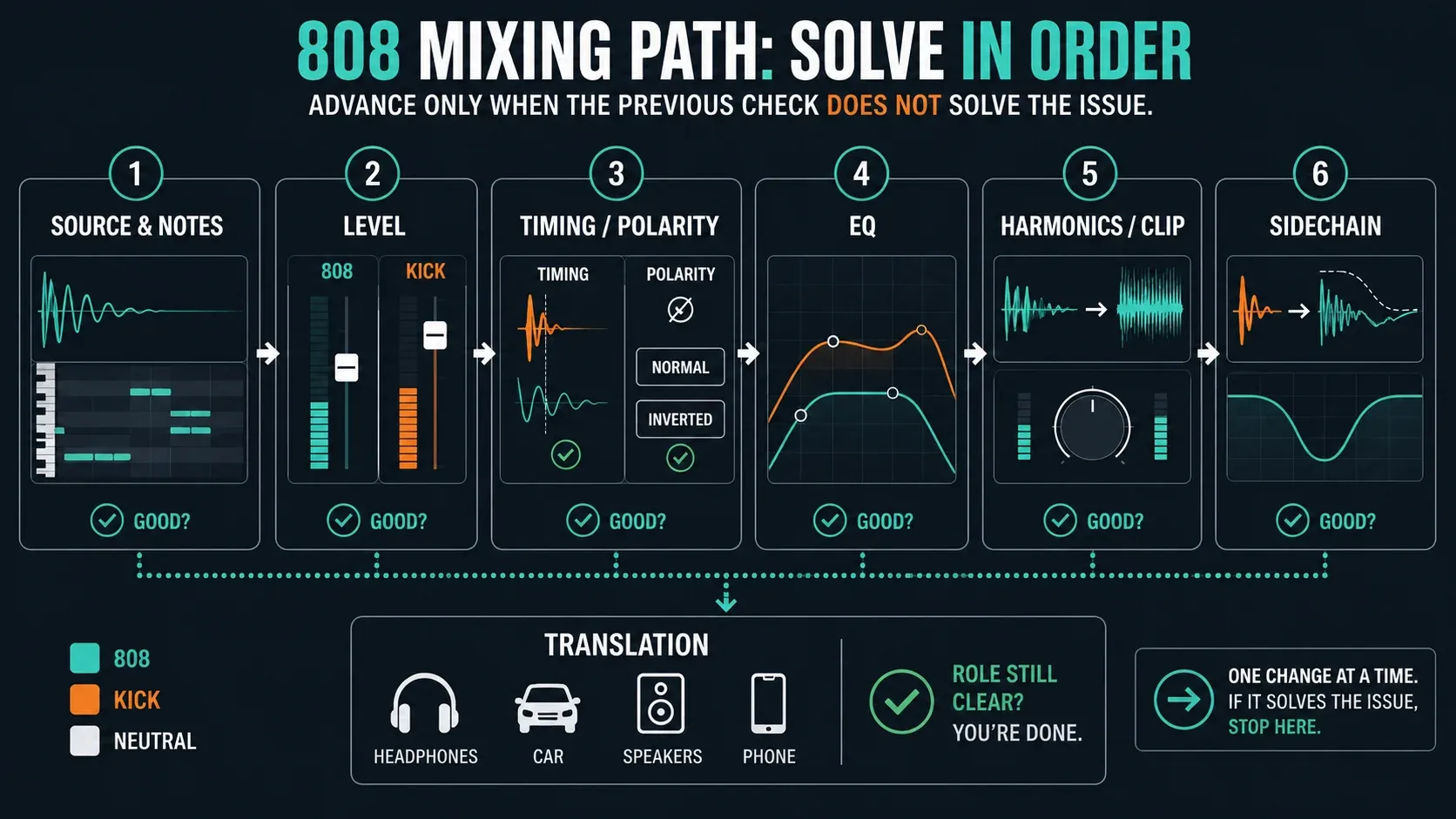
Mix an 808 in ten listening decisions
- Check the source. Confirm the 808 is in tune and its note endings fit the phrase.
- Separate the routes. Put the kick and 808 on different named Mixer inserts.
- Balance in context. Set the bass level with the busiest representative section playing.
- Choose the roles. Decide which sound supplies the attack and which supplies the sustained weight.
- Listen to the overlap. Shorten an unwanted tail or change a collision only if the groove survives.
- Compare polarity. Test the normal and inverted 808 with the kick across several notes, not just one hit.
- Make a useful EQ move. Locate unwanted energy, try a small cut and compare with bypass.
- Test harmonics. Add gentle saturation only if it improves audibility at a matched playback level.
- Duck when needed. Use the kick to trigger 808 gain reduction only where overlap still obscures the attack.
- Check translation. Compare normal playback, a small speaker, mono and a level-matched reference.
Stop adding processors once the relationship works. These are listening decisions, not ten effects you're required to load. The Beatmaking & Drums hub places this lesson after building and tuning the bass part, and the Mixing hub connects it to routing, sidechain and whole-song balance.
Fix the source and phrase first
EQ can't turn a wrong note into the right one. Use the 808 tuning workflow if the bass disagrees with your melody. If the pitch is fine until a bend, check the 808 slide and return-glide settings before you start mixing around the mistake.
Mute the kick briefly. Do two bass notes blur together? Does a tail continue through a gap you intended to leave empty? For a sample playing in Sampler, shortening a Piano roll note is not a reliable fix unless the playback envelope responds as intended. Enable and shape the Volume envelope, then listen to its release. Image-Line documents these Sampler envelope controls; other instruments have their own envelope behavior. Preserve wanted slides rather than cutting every overlap.
Now listen to the kick on its own. If both sounds have long bass tails, try a shorter kick before you build a complicated chain. If the 808 already has a punchy attack, try leaving the extra kick off some accents. For a source you can control more closely, build an 808 with 3xOSC. To change where the parts collide, work on the kick and bass rhythm. Neither problem has to become an EQ problem.
Route kick and 808 separately
Save a new project version first. Assign the kick Channel to one Mixer insert and the 808 Channel to another using their Mixer Track selectors; name the inserts KICK and 808. Verify by playing one sound at a time. A Playlist lane name alone does not establish this route. The FL Studio Mixer guide explains the wider signal flow.
In an inherited template, check the real 808 insert, any bass bus and the Master. Turn your monitors down before bypassing an effect, since removing compression or limiting can expose louder peaks. Bypass one stage at a time and restore it if it was part of the intended sound. Keep a known, audible route to the Master for both instruments.
Don't mix up the Mixer fader with the gain going into its effects. The fader sits after the effects, so if a processor distorts at its input, pulling that fader down just makes the distorted output quieter. Lower the Channel level or a suitable gain stage before the processor instead. This follows Image-Line's Mixer routing and control reference.
Set the 808 level in the full beat
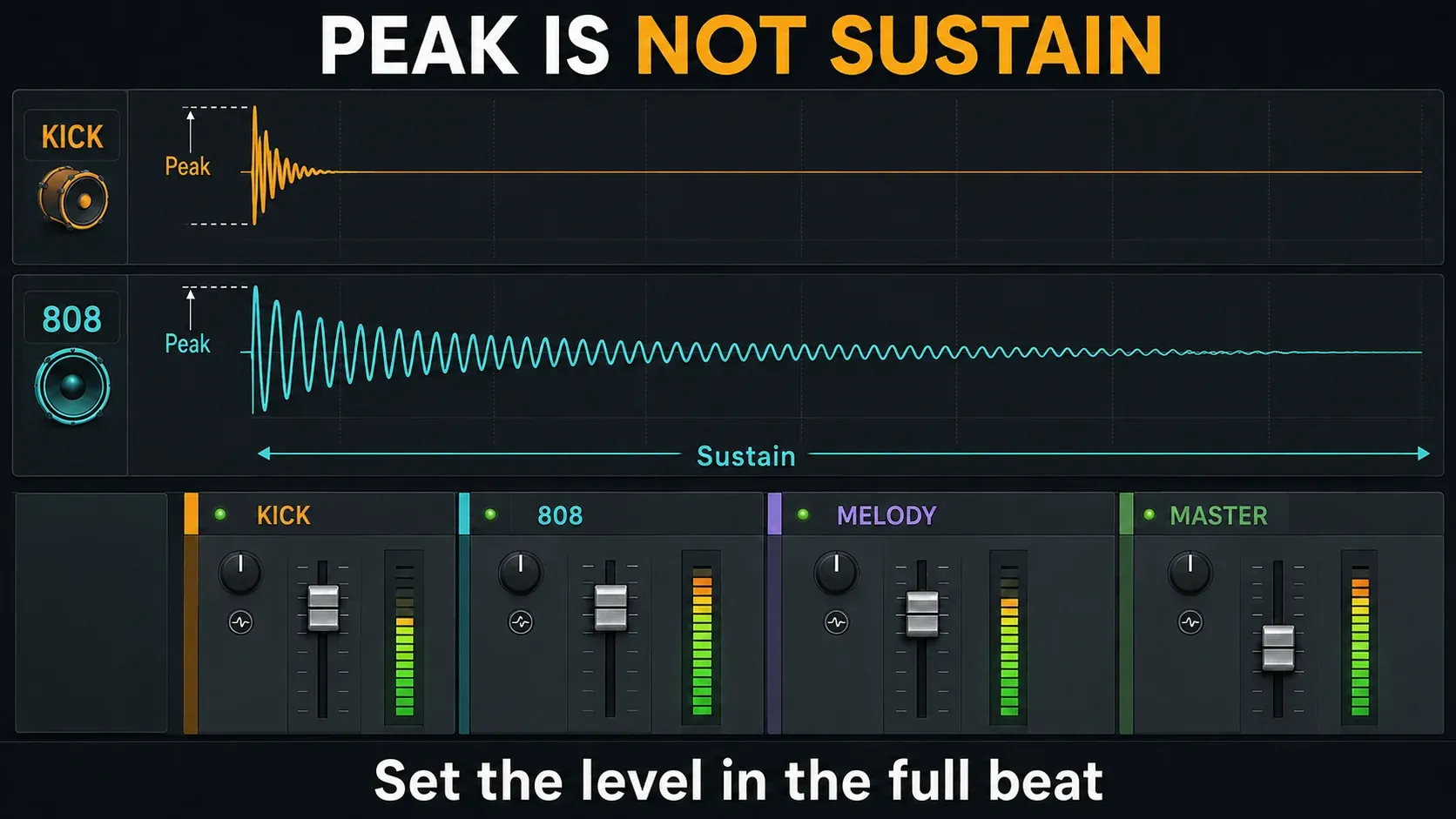
Pull the 808 down, loop a busy section and bring it up until the bass phrase is easy to follow. Keep the kick, melody and vocal space in the picture. If a small bass boost buries everything else, try lowering a competing part or shortening its low notes instead.
There's no required 808 peak of −6 dB, and no universal rule that it has to sit a fixed number of decibels below the kick. A short attack and a long bass body can hit similar peak levels and still feel very different. Image-Line's explanation of peaks, loudness and clipping is useful here, because a peak meter can't judge balance on its own.
Leave room for the combined signal. An internal floating-point insert reading above 0 dB isn't automatically a clipped file, but a saturating plugin can still distort, and the final output or a fixed-bit-depth render can clip. Don't use that internal headroom as an excuse to ignore the Master. Save whole-track loudness decisions for mastering the finished mix.
Give the kick and 808 different jobs
Try describing the relationship in one sentence: “The kick supplies the front edge; the 808 carries pitch and sustain.” That gives you something to protect when an effect changes the sound. An attack-heavy 808 with the extra kick saved for selected accents is another valid choice.
A shorter kick can leave more room for a long 808 tail. That doesn't mean every short kick sits above every bass note in frequency, or that long kicks are off limits. Audition the pair across the real phrase, because a combination that works on the lowest note may behave differently once the bass moves up.
Turn the monitoring down for another comparison. Can you still pick out the kick rhythm and the bass line separately? If not, figure out which cue went missing. “Needs more punch” might mean a buried kick attack, an overly long bass tail or too little audible bass tone, and each of those needs a different fix.
Compare timing and polarity without breaking the groove
Loop a collision you can actually hear. First try trimming an unnecessary tail or nudging the kick placement slightly. Keep the original handy and undo the change if the groove gets worse. No single offset lines up every kick with every pitched 808.
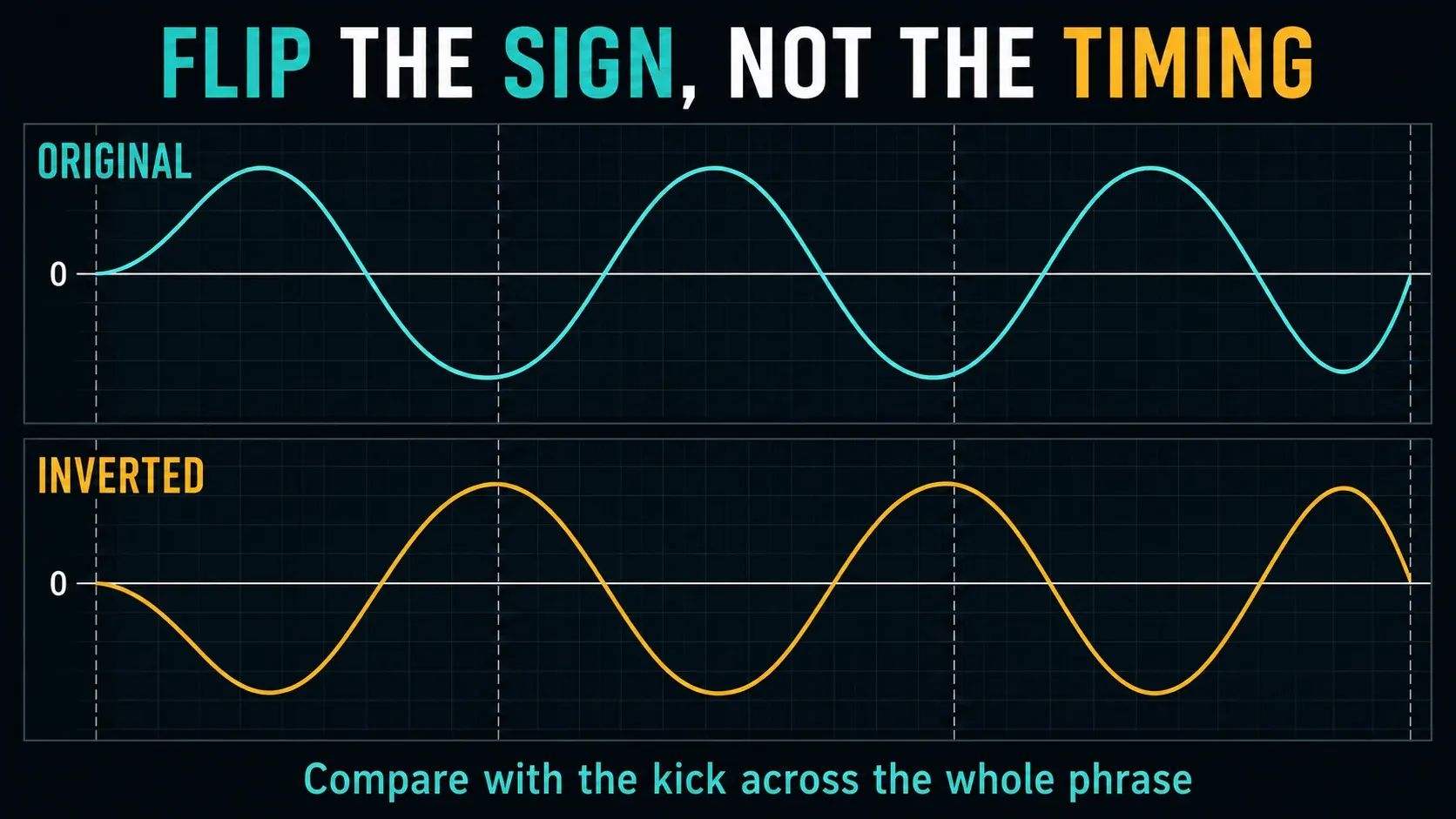
The Mixer control called Invert phase flips waveform polarity, so positive values become negative and the other way round. It doesn't move the note or fix every possible phase relationship. Toggle it on the 808 insert while the kick plays, then compare several bass notes and sections. Listen for a more useful combined attack and body, not a prettier-looking wave.
Polarity can change the combined level even though the solo 808 level stays the same. Compare the pairing at a similar perceived loudness, then check the individual balance again. If neither position gives a repeatable benefit, keep the original. Be careful not to flip just one stereo channel by mistake, since that's a different operation.
EQ the problem, not a frequency chart
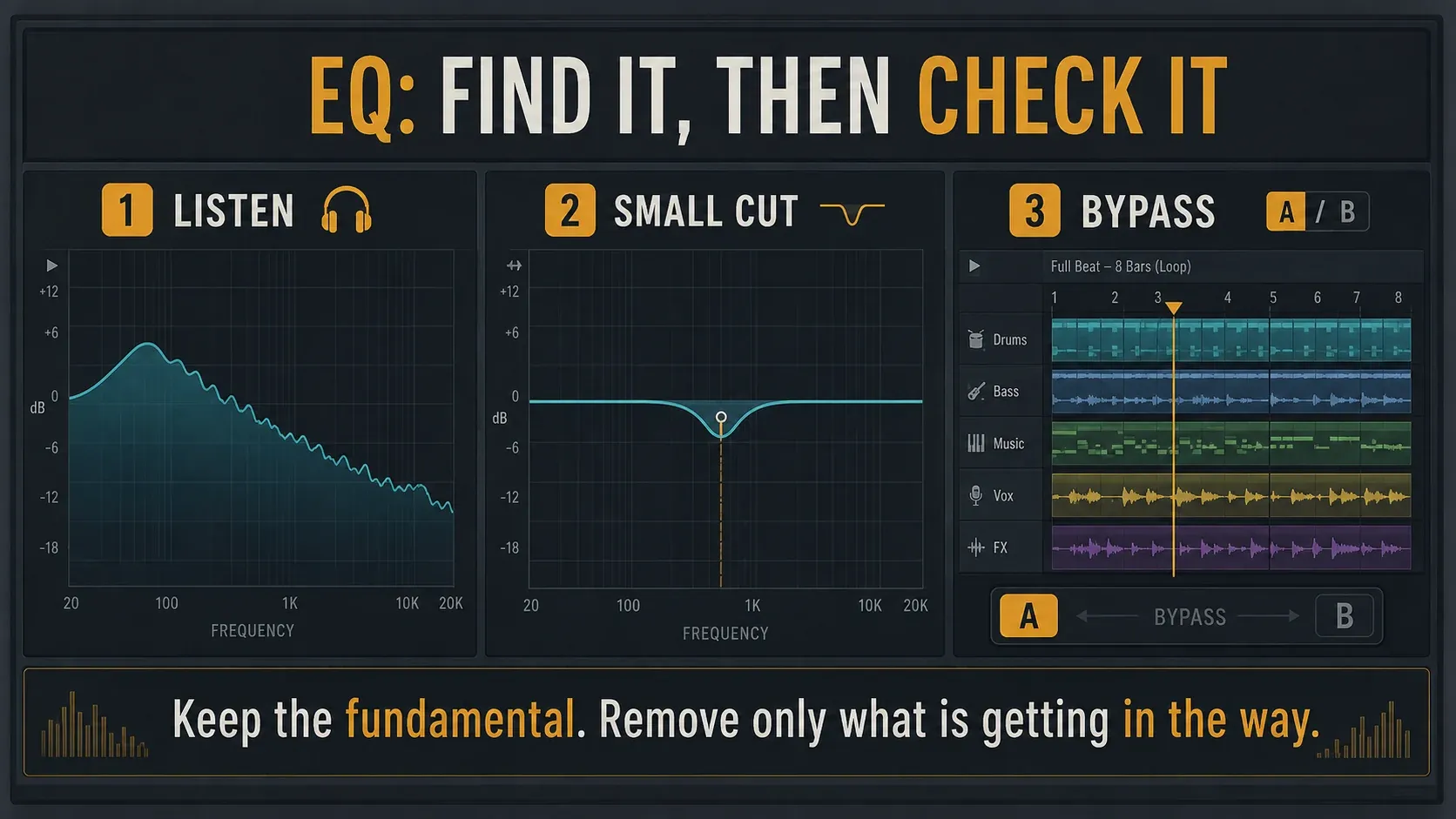
Use Fruity Parametric EQ 2 on the part that needs correcting. Start with a flat response, and identify the unwanted ring, excess weight or masking before you pick a filter. If you can't hear a problem, the spectrum isn't a reason to invent one.
For a focused listening check, turn on Band solo on shift and hold Shift while you select a band token. The Parametric EQ 2 manual explains the audition modes. Release the solo, make a small cut and compare in the full beat. A dramatic narrow boost can make almost any region sound nasty, so it doesn't prove that region needed removing.
A high-pass or low shelf may tame unwanted low energy, but audition your actual lowest bass note before you keep it. Cutting below some frequency the internet prescribed can strip useful weight too. For kick overlap, try reducing only the energy that masks the part you want to hear. Avoid deep permanent holes that leave the 808 thin whenever the kick stops.
EQ can also change how layered signals combine, so check the kick again after any significant adjustment. You don't need to pick linear phase automatically. Use the complete Parametric EQ 2 walkthrough when you need filter-mode detail instead of another bass preset.
Add harmonics only when they help
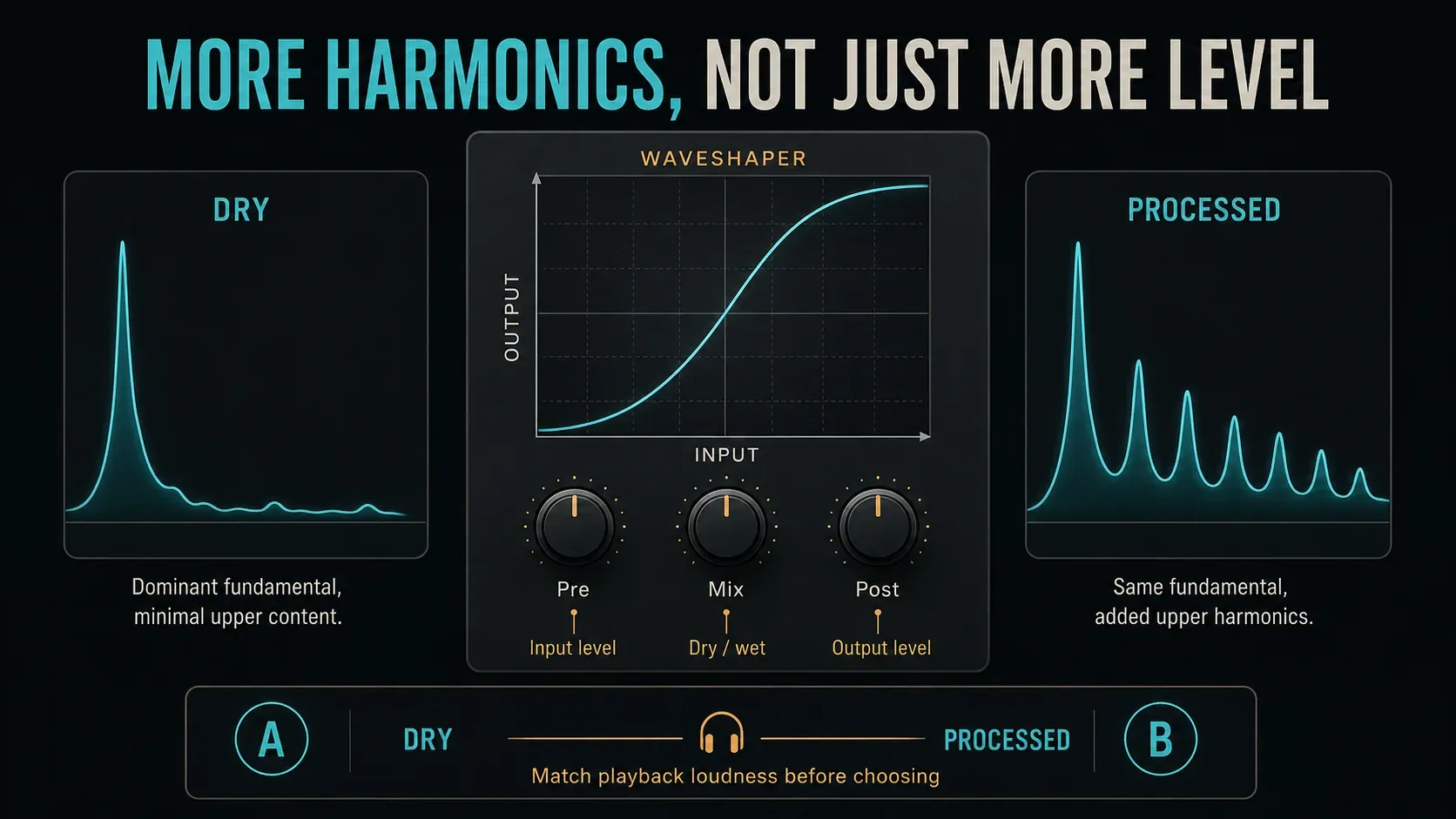
If the 808 has plenty of weight on full-range playback but vanishes on a phone speaker, more sub gain may only make the bigger system boomier. The phone may not reproduce that fundamental well. A little saturation can add upper harmonics that make the phrase easier to recognize, but it can't make every speaker play deep bass. iZotope's 808 mixing demonstration shows this harmonic approach.
In Fruity WaveShaper, bend the input-to-output curve gently and compare a low wet mix. Pre changes the input level, Mix blends dry and processed audio, and Post changes the output level. Pull Post down as needed so the bypassed sound doesn't lose the comparison just for being quieter. The WaveShaper control reference documents those names and functions.
Compare in both directions: is the bass phrase clearer on the small speaker, and is it still under control on headphones or monitors? If distortion turns the bass into a low-mid blur, ease off the curve, Pre or wet mix. A source that already has suitable harmonics may not need any extra saturation.
You can place Wave Candy after the effect to inspect its spectrum, waveform or meter. It also has a vectorscope for stereo information. These are diagnostic views, not evidence that “more harmonics” automatically means a better mix.
Soft Clipper is optional
Try Fruity Soft Clipper if you want to round an 808's peaks or add deliberate color. Its THRES sets where compression starts and POST adjusts the level afterward. Above the threshold it can add saturation; Image-Line points toward Fruity Limiter when more transparent clip protection is the aim.
Start gently, match the apparent output level to bypass and listen to the attack and tail. Leave it off if the result is flatter or harder to follow. A deliberately distorted bass tone is a creative choice; an overloaded Master that makes the whole beat crackle is a different problem. Adding more compression to an already dense sample can make things worse.
Sidechain only the overlap that needs space
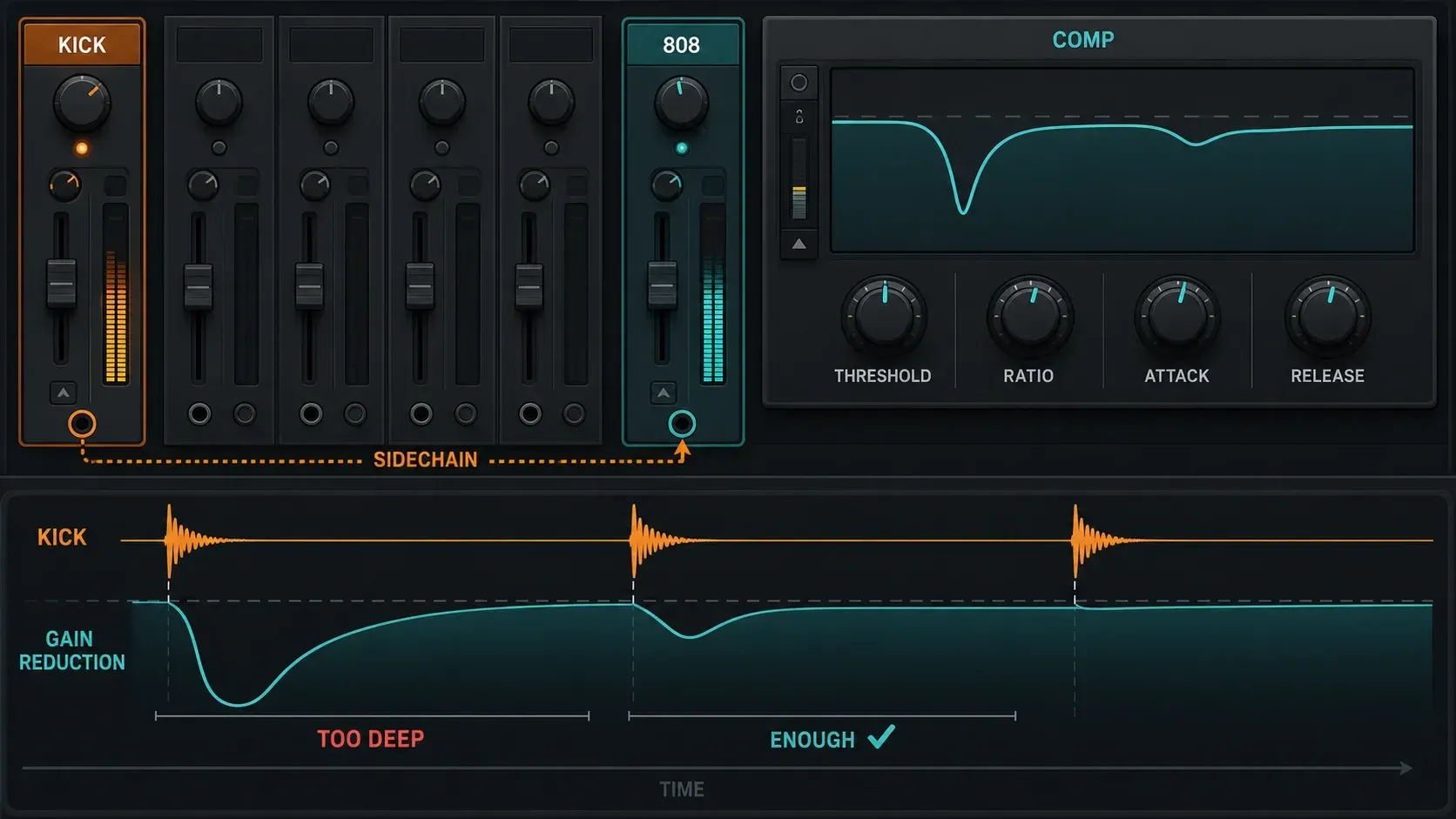
If the kick still vanishes on shared hits, let it trigger a compressor on the 808. Keep both instruments on their own inserts, then:
- Select KICK. Right-click the send switch beneath the 808 insert and choose Sidechain to this track. Avoid the “only” variant here: it removes the source's Master send.
- Load Fruity Limiter on 808. In COMP, right-click SIDECHAIN and select KICK. Do not assume its number will always be 1.
- Lower THRESH and increase RATIO until the shared hits get enough space. Adjust COMP attack and release against the actual rhythm. Too-fast release can distort; too-slow recovery can leave an unwanted gap.
COMP is a control view, not a limiter-bypass button. For compressor-only use, Image-Line specifies maximum CEIL and minimum ATT in LIMIT. Keep gain sensible; the limiter stage is not physically removed. See the Fruity Limiter signal flow and sidechain instructions.
If KICK is missing from the selector, check the routing direction. If you can hear the kick through the 808 insert, make sure the send level is zero, since a sidechain-only signal should control the effect without adding an audible kick route. If ducking disappears after you move the kick fader, remember that the normal Mixer send is post-fader.
Fruity Limiter ducks the whole 808 signal, so choose it when the entire bass should step back around the kick. Use frequency-selective movement when the upper harmonics should stay present while only the low band moves; continue with the other FL Studio sidechain methods for that route. Don’t keep piling on ducking because a preset promises a cleaner mix.
Check mono and small speakers
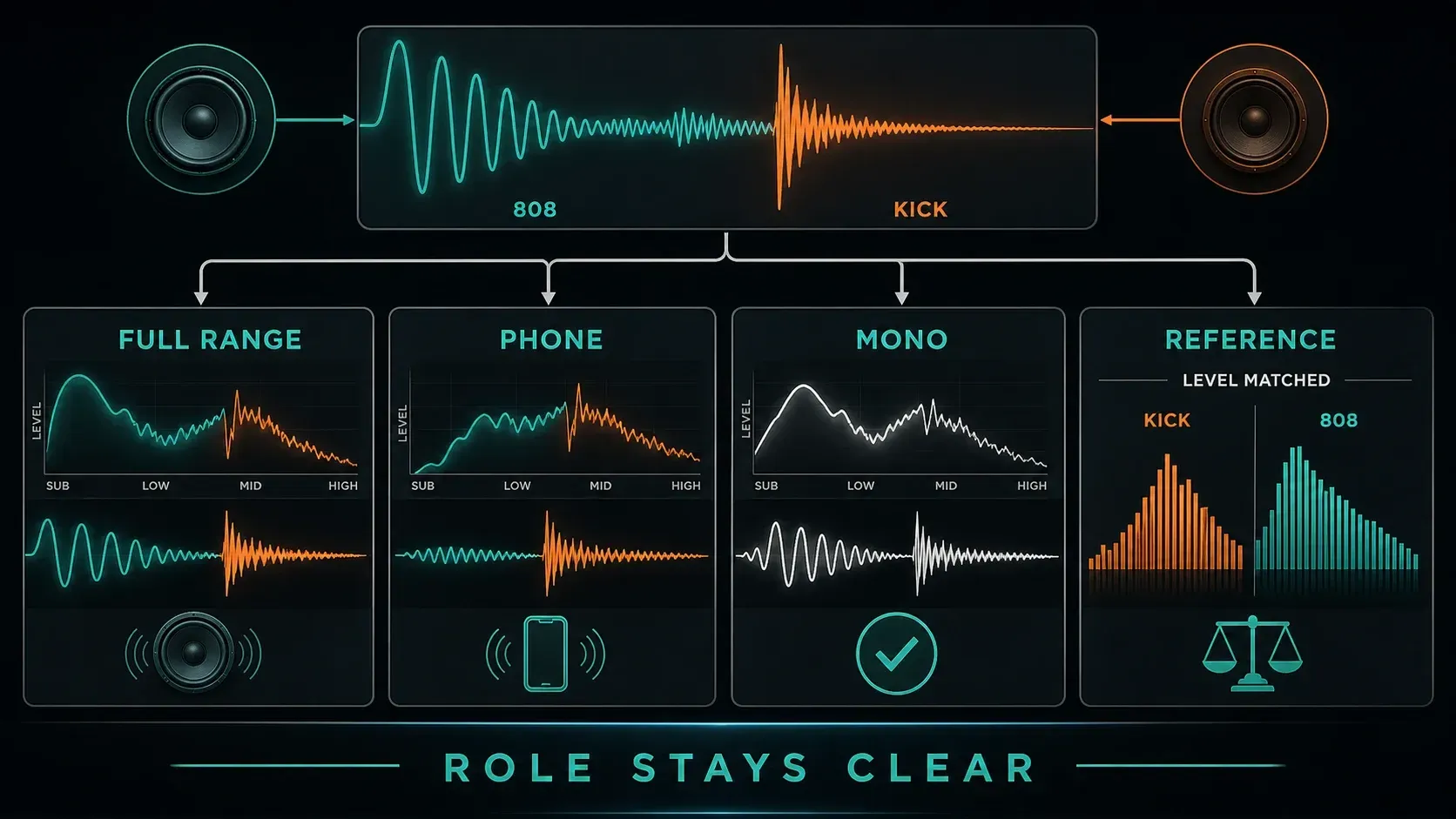
On a standard Mixer insert, Stereo separation sums toward mono when turned right; fully clockwise is mono. The center is the normal unchanged position. Compare on the Master for a whole-mix check, then restore the original setting. A truly mono signal with no stereo processing has no left/right difference for this control to change.
If the bass turns hollow in mono, bypass its widening or stereo effects one at a time at a safe monitor level. Turning the knob further won't fix cancellation that already happened when the channels were summed. Keep the fundamental steady; intentional width in the upper harmonics is something to test, not an automatic failure. The mono compatibility guide takes that diagnosis further.
Listen on your usual monitors, on a small speaker or phone, and in mono. Add another familiar system when you can. These checks should expose repeatable problems, not demand identical bass from a phone and a subwoofer. If only the phone lacks the deepest weight but the phrase still reads clearly, don't wreck the full-range balance chasing bass the device can't play.
Use a reference with similar arrangement density at a comparable perceived level. Compare the kick's front edge, the bass tail and the room left for the melody. Keep the reference free of processing meant only for your own mix. Then listen through a transition, not just the loudest loop. The full beatmaking workflow helps you place this check before final loudness and export decisions.
Quick fixes for an 808 that will not sit
- Loud but muddy: check overlapping tails, competing low notes and excessive distortion before adding another EQ.
- Kick disappears: audition the source pairing and timing; compare polarity, then restrained ducking if needed.
- Quiet on a phone, boomy elsewhere: test harmonics at matched playback level instead of another sub boost.
- Distorts even after lowering the fader: inspect gain before the effect and distortion already present in the sample.
- Sidechain pumps or clicks: reduce the amount and rework attack/release against the bass phrase.
- One note is much louder: compare the source envelope, velocity and monitoring response before compressing every note.
- Mono loses the bass: trace stereo processing; do not mistake width reduction for a universal repair.
The final test is musical: can you follow the bass line, hear the kick accents you intended and still understand the rest of the beat? Save a new version once those relationships work. The 808 doesn't need yet another plugin.
FL Studio 808 mixing FAQ
What effects should I put on an 808 in FL Studio?
Start with source choice, note endings and level. Add corrective EQ, saturation, peak shaping or sidechain only for a problem you can hear. An already processed sample may need no extra effects.
What EQ settings should I use for an 808?
There is no universal frequency preset. Locate unwanted energy or masking in the actual phrase, try a small cut and compare with bypass. Check your lowest note before keeping a high-pass filter.
How loud should my 808 be?
Loud enough to carry its role without burying the kick, melody or vocal space. Do not chase a fixed peak or a fixed decibel gap below the kick. Check the combined output and compare processed versions at similar playback loudness.
Should I sidechain the kick to the 808?
Only if their overlapping hits need more separation. The kick controls a compressor on the 808; it is the bass that ducks. Use Sidechain to this track and keep the kick's audible Master route.
Should an 808 be mono?
Keep the low end steady and test the full mix in mono. Stereo upper harmonics can work if they survive summing. In the Mixer, fully clockwise Stereo separation is mono; restore the original setting after comparing.
Why is my 808 loud but muddy?
Overlapping tails, a competing kick or melody, excessive distortion and too much low energy can all blur the bass. Listen to those relationships before boosting more sub or adding compression.
Why can I not hear the 808 on my phone?
The speaker may not reproduce its deepest fundamental well. Gentle saturation can add audible harmonics, but check that the full-range mix still works. More sub gain alone may make larger speakers boomier without helping the phone.
Should I put Soft Clipper on every 808?
No. Keep it only when deliberate peak rounding or color improves the part at a matched playback level. It is not a fix for wrong notes, unwanted overlap or an unbalanced Master.