FL Studio
Fruity Soft Clipper is a soft limiter included in every FL Studio edition. Anything above THRES gets rounded by gentle soft-knee compression, and POST sets the level after it. How much you hear depends on the level going in, so set that level before the plugin, lower THRES until the loudest peaks start to change, then match the output to bypass with POST. Use it on one drum or 808 first, on a bus for shared peaks, and on the master only for small final moves.
Soft Clipper has no input knob, so the level coming into it is set outside the plugin. If the signal never reaches THRES, little changes. If hard drum or 808 peaks push through the bend, those peaks get reshaped, and the sound turns denser, more aggressive or plainly distorted. The official manual calls it a CPU-friendly soft limiter and warns that a little saturation brings warmth while too much sounds distorted.
The sections below cover drums, 808s, buses and the master track in that order, then draw the line between Soft Clipper, Fruity Limiter and Fruity WaveShaper.
Image-Line's editions comparison lists Fruity Soft Clipper as included in all editions, so Fruity Edition has it too, and the FL Studio editions guide covers what else changes between editions.
What Fruity Soft Clipper actually does
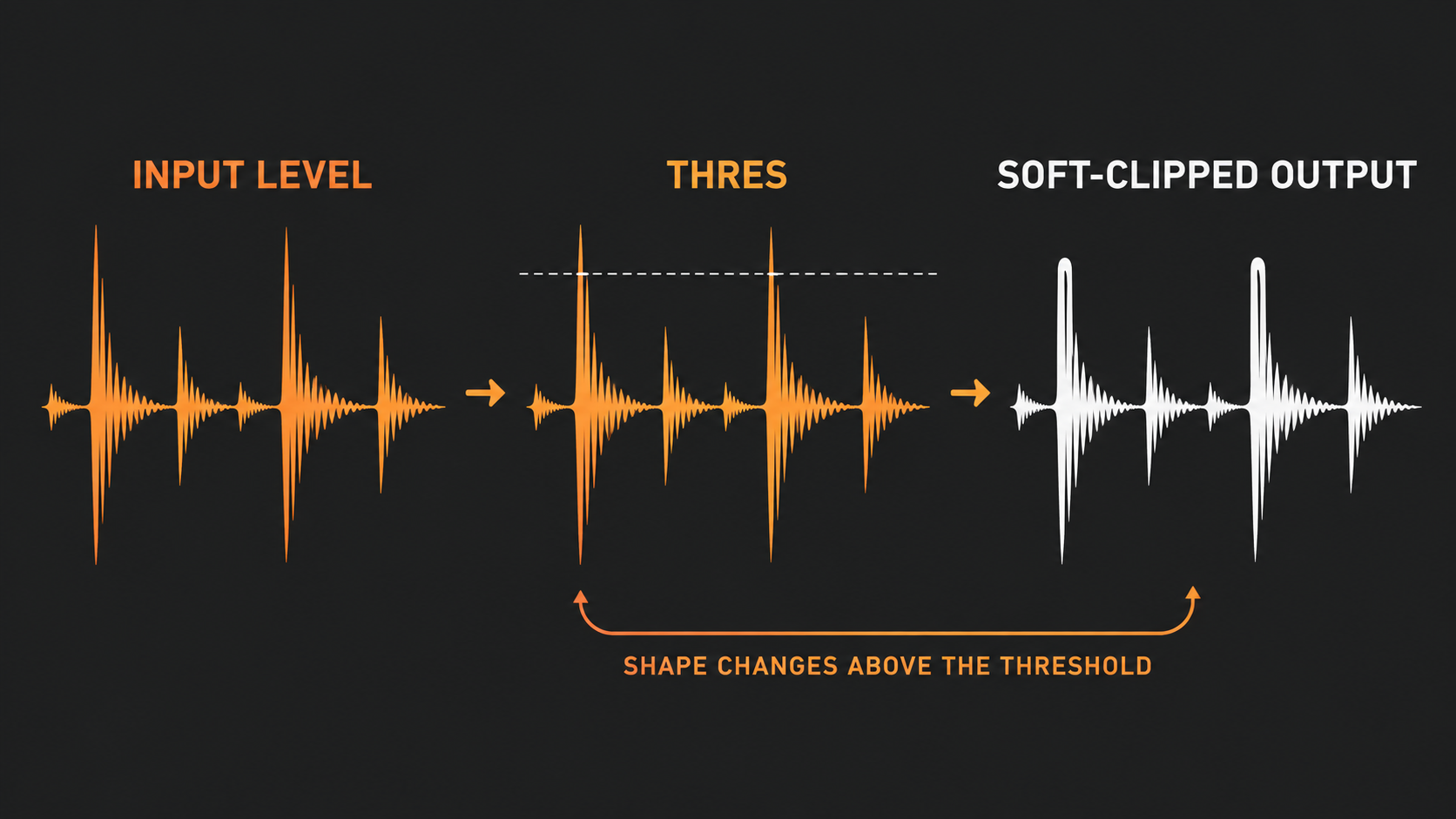
A digital peak can keep climbing until it hits the available ceiling and clips abruptly. Fruity Soft Clipper bends the input-to-output relationship before that hard edge. Quieter material follows the near-diagonal part of the curve, while anything above THRES enters the rounded region, where a bigger increase at the input gives a smaller increase at the output.
That bend is why soft clipping changes punch and tone at the same time. The loudest transient drops relative to the body of the sound, and the nonlinear curve adds harmonic change. On a kick or snare, a little can make the hit feel tighter. Push further and the transient loses its shape while the added distortion takes over.
Soft Clipper does not fix every red meter. The Mixer manual says insert Mixer tracks are practically impossible to clip, and only the Master track or a track routed to an ASIO output can clip. So a red peak on an insert track does not mean that track is distorting, and a master overloaded by several loud channels needs a balance fix before any clipper. The FL Studio clipping guide separates channel, bus and master overload so you can repair the right stage.
Read the interface from left to right
The manual lists four parts, and none of them sets the level going in:
- THRES: the level above which Soft Clipper compresses the signal.
- POST: the level applied after the compression.
- Output Meter: shows the level leaving the plugin.
- Levels display: the graph of input on the horizontal axis against output on the vertical axis. Hold the cursor over it to read the input to output mapping in the hint bar, or drag in it to move the threshold.
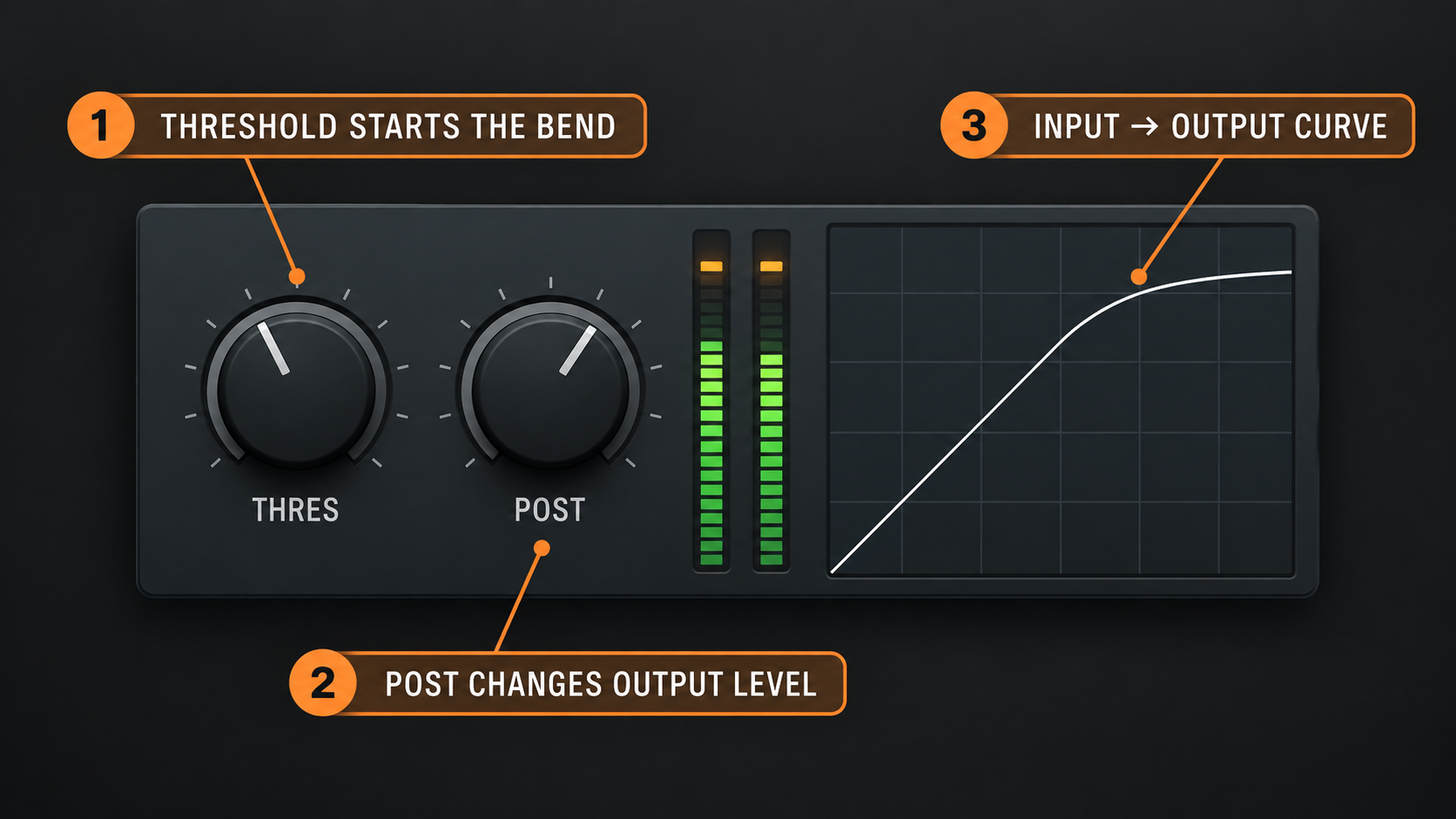
The graph is the quickest way to read the plugin. A straight diagonal would mean input and output rise together. Past the threshold, marked by the brighter horizontal line toward the top, each step of input gives less output. It is a transfer map, not a timeline or a loudness history.
Input level and THRES work as one system
THRES alone doesn't decide how much clipping you get. It decides where the curve starts affecting the signal, and how much audio reaches that region depends on the level before the plugin.
Two setups can therefore produce a similar amount of peak shaping:
- Feed a hotter signal into a higher threshold.
- Feed a quieter signal into a lower threshold.
The hotter path comes out louder, so match POST before comparing the two. Either way, lowering THRES lets more of the signal into the curve, and raising the level before Soft Clipper pushes more of it into the same curve. I set the level going into Soft Clipper before touching THRES, because whether you hear the saturation depends on that level.
In the FL Studio Mixer, the track fader sits after the effects chain. Pulling that fader down changes the level leaving the track, not the level already hitting Soft Clipper. The FL Studio Mixer manual names two routes for level ahead of the effects: the Channel Rack volume knob, or routing one Mixer track into another. I change the level going in with the Channel Rack volume or a routed Mixer track, because the fader comes too late in the chain. The FL Studio gain staging guide sets those levels from source to master.
Use POST for output matching, not for driving the clipper
POST sits after the compression stage. Turning it up makes the processed output louder without driving more signal into the transfer curve, and turning it down won't undo the harmonic and transient changes that already happened.
That makes POST the comparison control. Match the active level to the bypassed level, then decide whether the clipped version has a better transient, tighter low end or more useful density. I match POST to the bypassed level before judging, because the louder version wins a quick comparison even when its shape got worse. The FL Studio loudness guide explains why peak level, perceived loudness and integrated loudness are separate checks.
Bypass with the switch on the Soft Clipper effects slot, or use the track FX master switch to hear the whole chain in and out together. Then run this loop:
- Set the source balance before Soft Clipper.
- Lower THRES until the loudest peaks begin to change.
- Stop and listen for loss of attack, low-end fuzz or harsh upper harmonics.
- Set POST so the active and bypassed versions play at the same listening level.
- Keep the version that serves the groove, not the louder one.
If bypass feels weak only because the active path is louder, the comparison is not finished. I lower THRES only until the loudest peaks start to change, because everything above it enters the soft-knee curve and each step down reshapes more of the sound.
A controlled workflow for drums
Soft Clipper behaves most predictably when the drum balance already works. Get the kick, snare and percussion relationship right first, then decide whether one sound or the whole drum bus needs peak shaping.
On an individual insert, the plugin reacts to one source, which makes it the easiest place to learn what the curve does. A sharp snare can be rounded off without touching the hi-hats, and a kick can be made denser without forcing every percussion transient through the same threshold. I learn the curve on one drum insert first, because only that source crosses THRES there.
On a drum bus, the parts interact. A kick can push the bus over THRES and reshape whatever plays at that moment, including a snare tail or cymbal. That can glue a group together, but it can also make the groove duck or smear in ways that are harder to trace. Set the level into the bus while the full pattern plays, not from one solo hit.
Treat Soft Clipper as the last shaping step on the drum path, after the obvious balance and tone problems are sorted. A big EQ boost before it drives the boosted band harder into the curve, while the same EQ after it changes tone without changing what hits the clipper. Slot order is part of the setting. To move an effect, select the Mixer, hover over the effect and scroll the mouse wheel. The FL Studio Mixer guide covers slots, routing and sends.
Use it on an 808 only after kick and bass agree
An 808 can have a big sustained body, a short click at the front, or both, and Soft Clipper reacts to whichever part crosses the threshold. If only the attack reaches the bend, the plugin mostly reshapes the front. If the sustained bass gets driven deep into the curve, distortion runs through the whole note and can change its perceived pitch and texture.
Before clipping an 808, settle three things:
- Kick relationship: decide whether the kick and 808 overlap, trade space or behave as one combined hit.
- Note-to-note consistency: lower notes and sample envelopes can produce different peak behavior across the pattern.
- Playback range: added harmonics can make the bass easier to hear on small speakers, but too much distortion weakens the clean fundamental.
Use Soft Clipper on the 808 insert when you want to shape that instrument. I clip an 808 on its own insert unless the kick and 808 should react as one hit, because on a shared bus the louder sound decides when the curve engages. The 3xOsc 808 guide covers the synthesis and envelope decisions to settle before peak shaping, and the FL Studio 808 mixing guide covers kick and 808 balance.
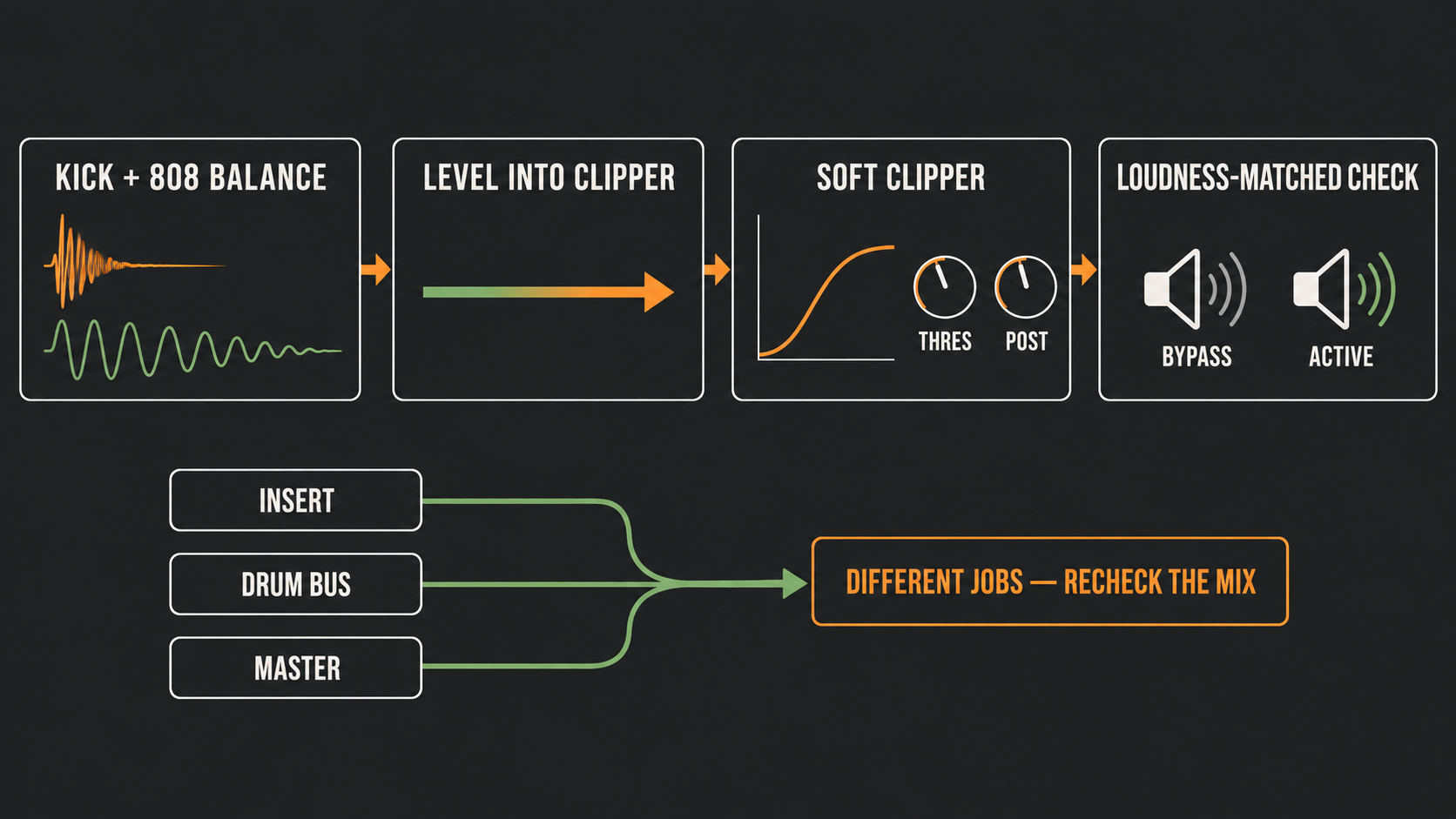
Insert, bus and master placement are different decisions
The same plugin works at three levels, and its reach widens with the routing:
| Placement | What crosses THRES | Best use | Main risk |
|---|---|---|---|
| Individual insert | One kick, snare, 808 or other source | Focused transient and tone shaping | Over-processing the source before it reaches the mix |
| Drum or instrument bus | The combined group | Shared peak control and glue between the parts | One loud element reshapes other sounds at the same moment |
| Master | The complete mix | Small final peak shaping when the mix already holds together | Hiding balance problems and distorting several elements together |
Master placement calls for the smallest moves and the widest checking. A threshold that helps one chorus can hurt a busier drop. I keep master moves small, because the whole mix crosses one threshold there. Listen through the whole arrangement, compare at matched level and leave final output protection to the tool that suits your delivery chain. The FL Studio mastering guide covers that final chain.
Do not treat Soft Clipper as permission to ignore headroom upstream. The master gets every routing decision made before it. If one kick is steering the whole curve, fix the kick or the drum bus instead of asking the master clipper to solve the mix.
Soft Clipper versus Fruity Limiter versus Fruity WaveShaper
These processors overlap, but each gives you a different amount of control.
- Fruity Soft Clipper: choose it for fast, characterful peak shaping from a fixed soft curve and two direct controls.
- Fruity Limiter: a single-band compressor, limiter and gate with sidechain, built for limiting full mixes or compressing single sounds. Its CEIL sets the level above which the signal is limited, and SAT saturates anything that reaches the red region. The Fruity Limiter manual notes that ATT also sets a look-ahead delay that affects latency, so keep attack at 0 ms or turn on automatic plugin delay compensation when you blend its output with the dry signal. I reach for Fruity Limiter when the job is transparent protection, because Image-Line points to it for more transparent clip protection. The Fruity Limiter compression guide covers its threshold, ratio, knee, attack and release workflow.
- Fruity WaveShaper: choose it to draw the transfer curve yourself. I switch to Fruity WaveShaper when the fixed curve is the problem, because it is the stock effect that lets you draw your own. The official WaveShaper manual covers the spline graph, the Pre, Mix and Post controls and Oversample, which helps avoid aliasing.
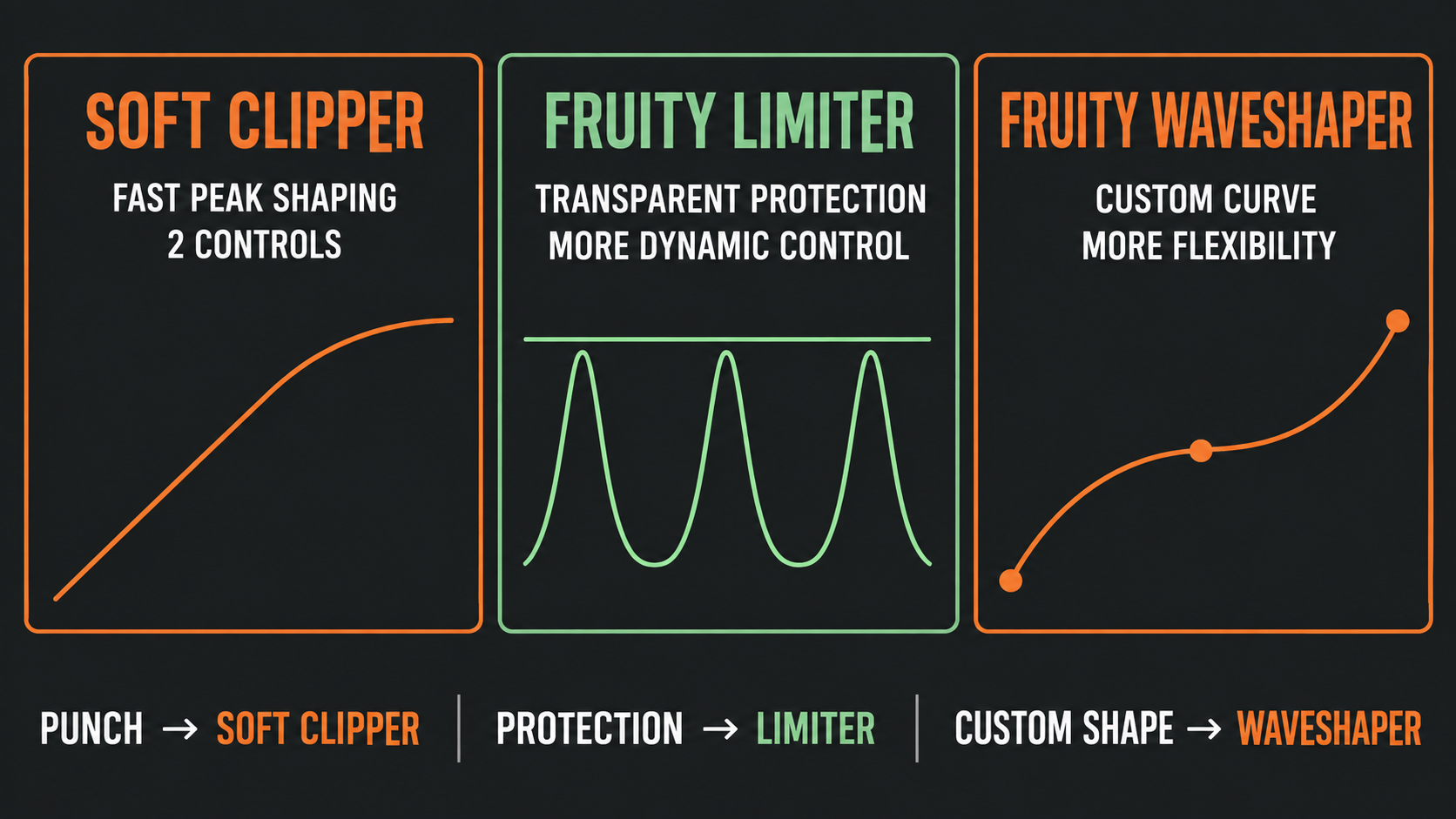
A more complex plugin is not better by default. Use the simplest processor that gives the job the control it needs. Soft Clipper wins when its fixed curve sounds right and you do not need to design a new one. The FL Studio stock plugins guide lists the other effects that ship with FL Studio.
Common Soft Clipper mistakes
| Symptom | Cause | Correction |
|---|---|---|
| Turning THRES changes nothing | The level going in never reaches the curve | Raise the level before the plugin or lower THRES while the loudest section plays, and watch the Output Meter |
| The active version always sounds better | POST makes it louder than bypass | Lower POST and compare at the same listening level |
| The track fader does not change the distortion | The fader sits after the insert effects | Change the Channel Rack volume or route the source through another Mixer track |
| The kick loses its attack | Too much of the transient enters the bend | Raise THRES, lower the level going in or move the processing to a more focused stage |
| The 808 sounds fuzzy through the whole note | The sustained body is driven into the curve | Lower the level going in or shape the envelope and tone before clipping |
| The drum bus changes every time the kick hits | The kick dominates the shared threshold | Rebalance the group or clip the kick on its own insert |
| The master is loud but small | Peak reduction removed too much transient contrast | Back off the clipper and fix the mix, or switch to Fruity Limiter for more control |
| An insert meter shows red | Insert tracks are practically impossible to clip | Check the Master track and the balance before adding a clipper |
A repeatable Soft Clipper setup order
- Choose the level where the problem sits. Source, bus or full mix.
- Fix balance, envelope and tone first. Clipping comes after the obvious problems.
- Place Soft Clipper after anything that should drive it. An EQ boost before it pushes that band harder into the curve.
- Play the loudest, densest part of the arrangement. The curve reacts to the peaks you feed it.
- Set the level going in with the Channel Rack volume or a routed track. The track fader sits after the effects.
- Lower THRES until the loudest peaks start to change. Stop when attack or low end starts to suffer.
- Match POST to bypass. Use the slot switch to compare at the same level.
- Check the full pattern or arrangement. One isolated hit hides bus interaction.
- Move to Fruity Limiter for transparent protection. Its CEIL sets the level above which the signal is limited.
- Move to Fruity WaveShaper when the fixed curve falls short. Draw the curve and add Mix and Oversample.
Frequently asked questions
Is Fruity Soft Clipper included in every FL Studio edition?
Yes. Image-Line lists Fruity Soft Clipper as included in all editions, so Fruity Edition has it too.
What does Fruity Soft Clipper do?
It is a CPU-friendly soft limiter. Anything above THRES gets gentle soft-knee compression, which rounds the peaks and adds saturation, and POST sets the level after it.
How low should THRES go?
Lower it until the loudest peaks start to change and stop when attack or low end starts to suffer. THRES is the level above which Soft Clipper compresses, so each step down sends more of the signal into the saturation.
Why does the Mixer fader not change the Soft Clipper sound?
The track fader sits after the effects, so it changes the level leaving the track, not the level hitting the plugin. Use the Channel Rack volume or route the source through another Mixer track to change the level going in.
Does Fruity Soft Clipper have an input knob?
No. Its controls are THRES, POST, the Output Meter and the Levels display. Fruity WaveShaper is the stock effect with a Pre control for the level going in.
Is Fruity Limiter or Soft Clipper better on the master?
Fruity Limiter for transparent protection, since Image-Line points to it for that job and its CEIL control sets the limit. Soft Clipper fits small peak shaping on a mix that already holds together.
Can an insert track clip in FL Studio?
The Mixer manual says insert tracks are practically impossible to clip, and only the Master track or a track routed to an ASIO output can clip. A red insert meter points to a level to fix before the master, not to distortion on that track.