FL Studio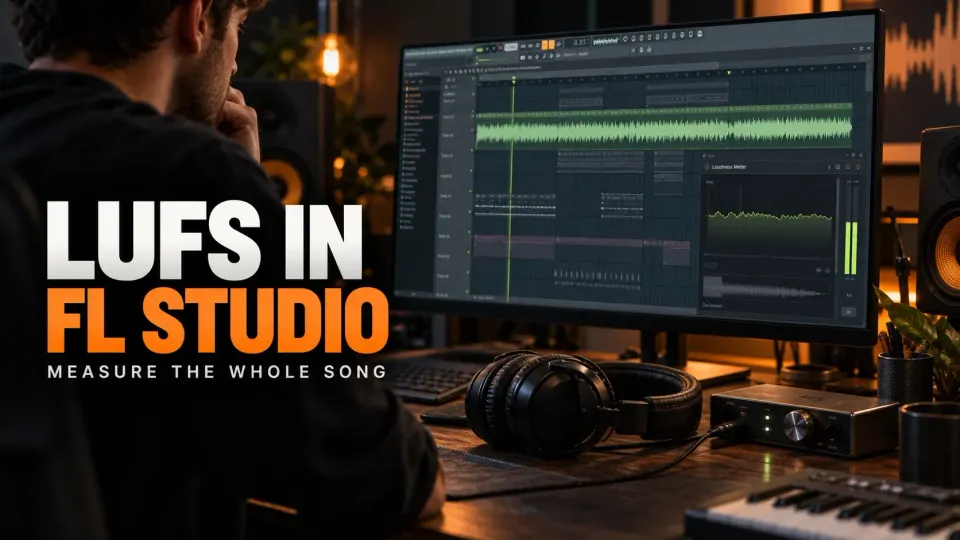
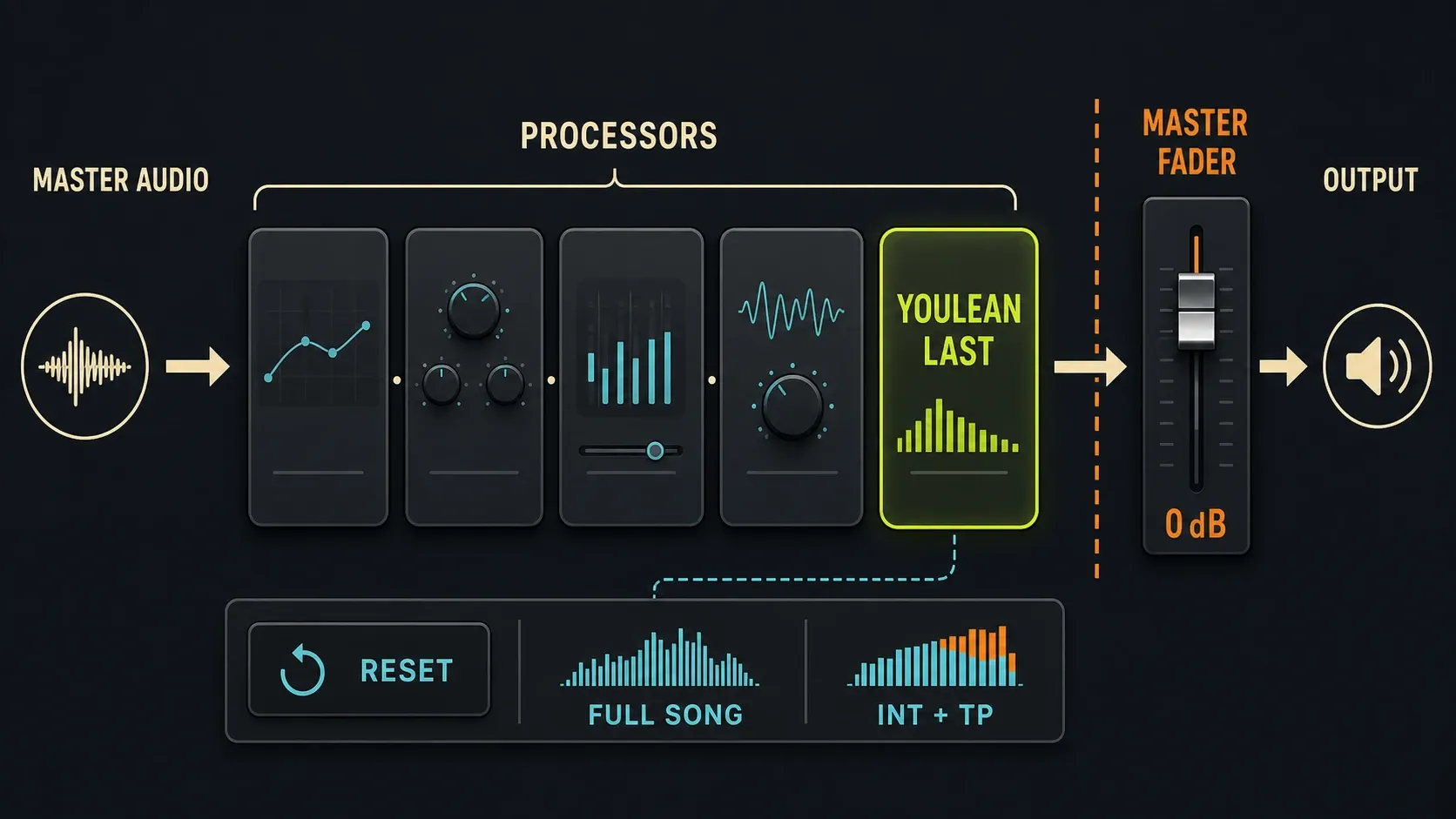
To measure LUFS in FL Studio without touching your master, put Youlean Loudness Meter Free in the last Master effect slot, clear its measurements and play the whole song once. Read Integrated LUFS and maximum true peak together. Before you trust the numbers, check what comes after that slot: the Master fader and built-in Mixer controls can still change the signal you export. Then compare both readings with the streaming loudness standards for your platform.
Prefer a built-in option? Emphasizer measures Integrated LUFS in every current FL Studio edition, and Emphasis adds Short-term and Momentary readings. Both are audio processors, so keep the sound you want when you use their meters. Below, you'll pick a measurement route and check it against the finished file.
Using FL Studio Trial? Finish the renders you need before saving or leaving the current session. Image-Line's Trial limitations allow saving, but reopening those projects requires purchasing FL Studio. Don't walk away from needed work just to open an empty analysis project.
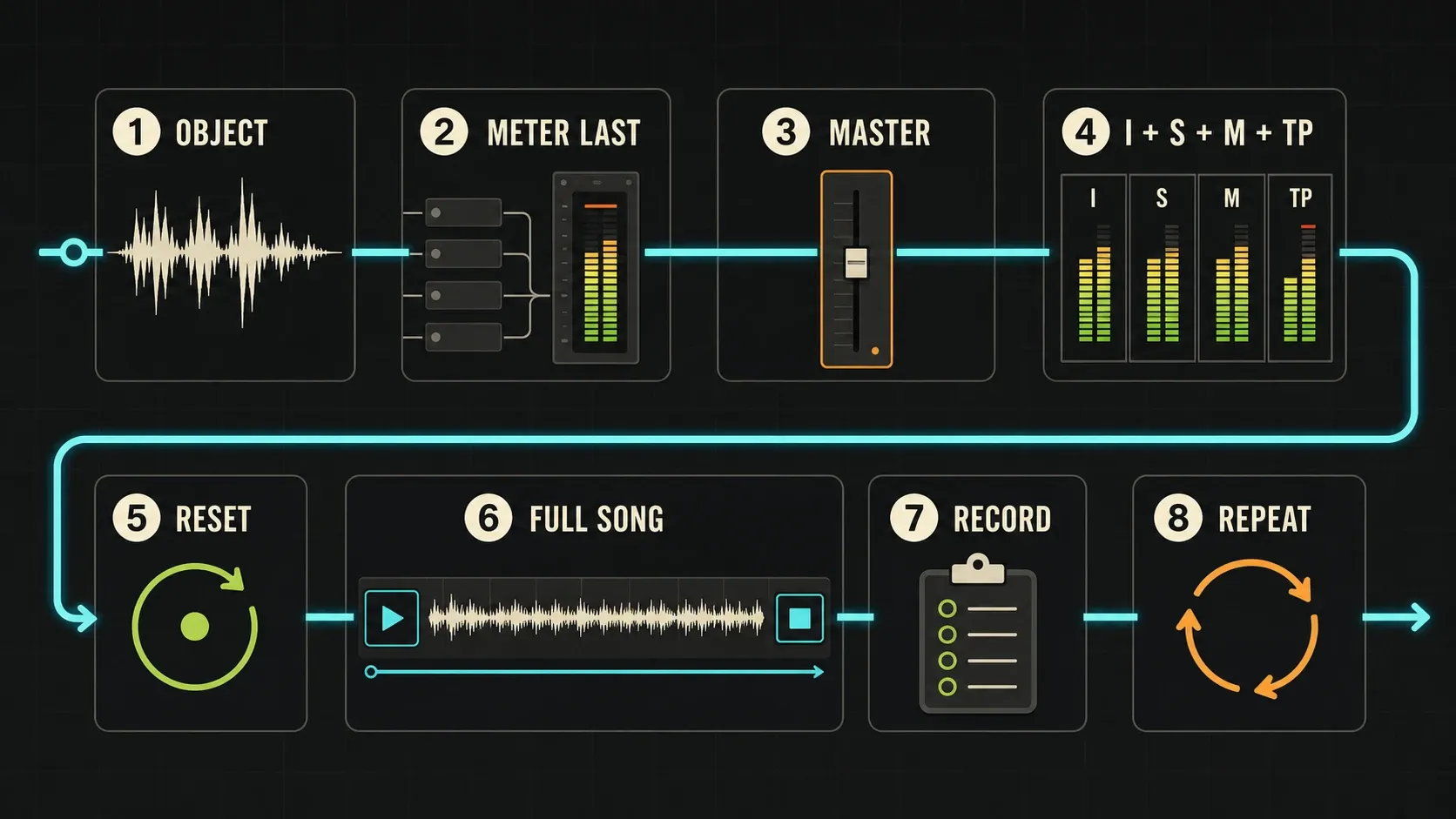
Measure LUFS in FL Studio in eight steps
- Label and protect the version. Decide what you are measuring: a premaster, a finished master or an exported file. In Trial, finish needed renders before saving or leaving the session; otherwise save a copy before you change the signal path.
- Put Youlean last. Load it after the limiter and any other Master-slot processors, so it reads their combined output without adding mastering processing of its own.
- Check the downstream controls. The documented last-slot setup assumes a 0 dB Master fader. Built-in Master EQ, pan and stereo separation also need to be neutral for a simple slot-to-output comparison. If you set them on purpose, keep them and check the rendered file separately.
- Choose the readings. Use Integrated (INT) for the complete song, Short-term and Momentary for movement, and maximum true peak (TP) for peak headroom. Match the meter's channel configuration to the signal.
- Clear the previous pass. Reset all measurements, make sure measuring isn't paused and put the playhead before the first sound.
- Play the complete arrangement. Use Song playback, include the ending and effects tail you intend to keep, and don't loop, seek or stop during the pass.
- Write down the result. Note the version, the measured range, Integrated LUFS and maximum dBTP. Flag any verse or chorus whose Short-term reading deserves a closer listen.
- Check the delivery. After any correction you can justify, reset and run it again. Analyze the exported file on a clean playback path, without putting the mastered audio through processing a second time.
What LUFS measures and what it cannot tell you
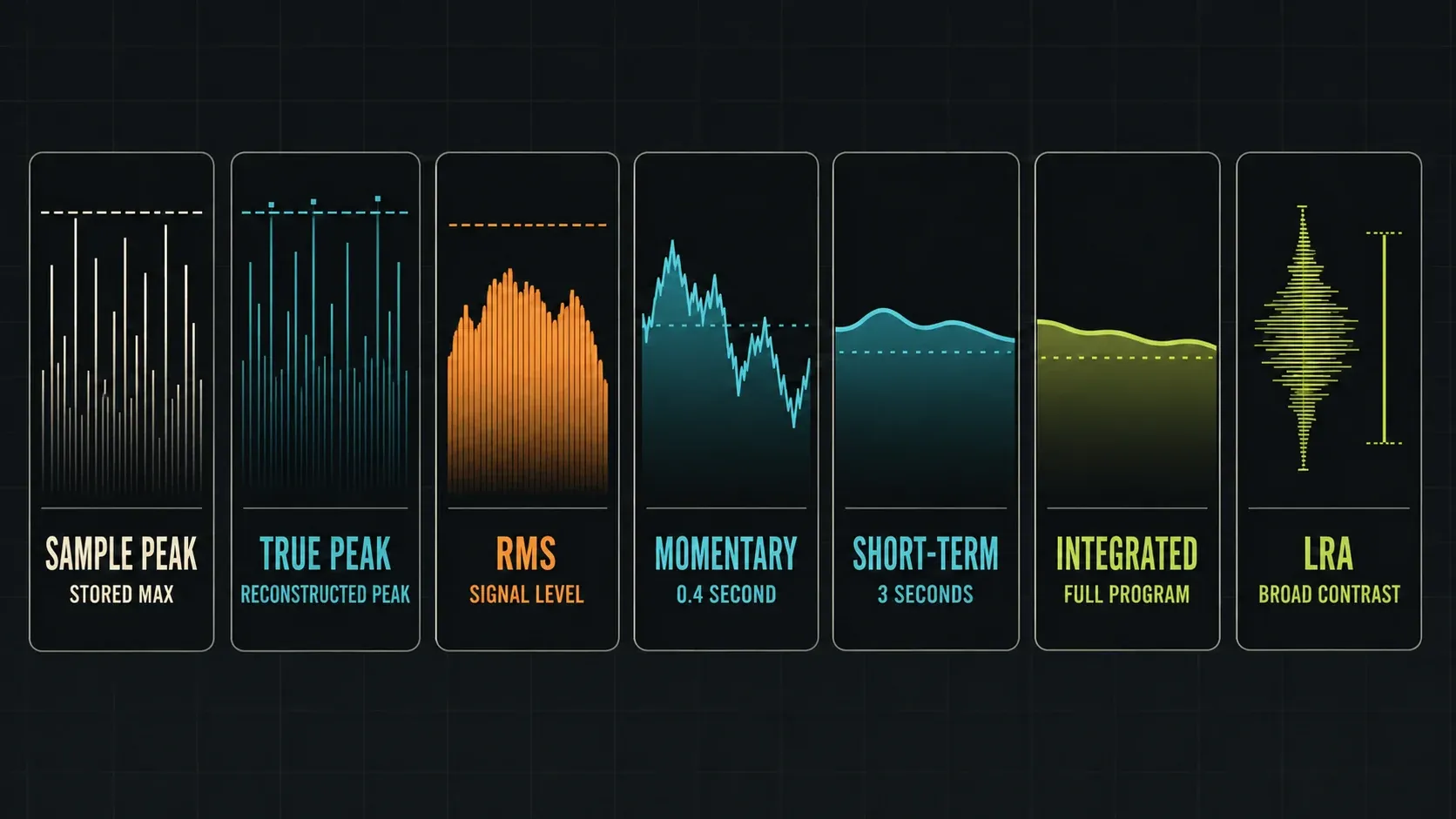
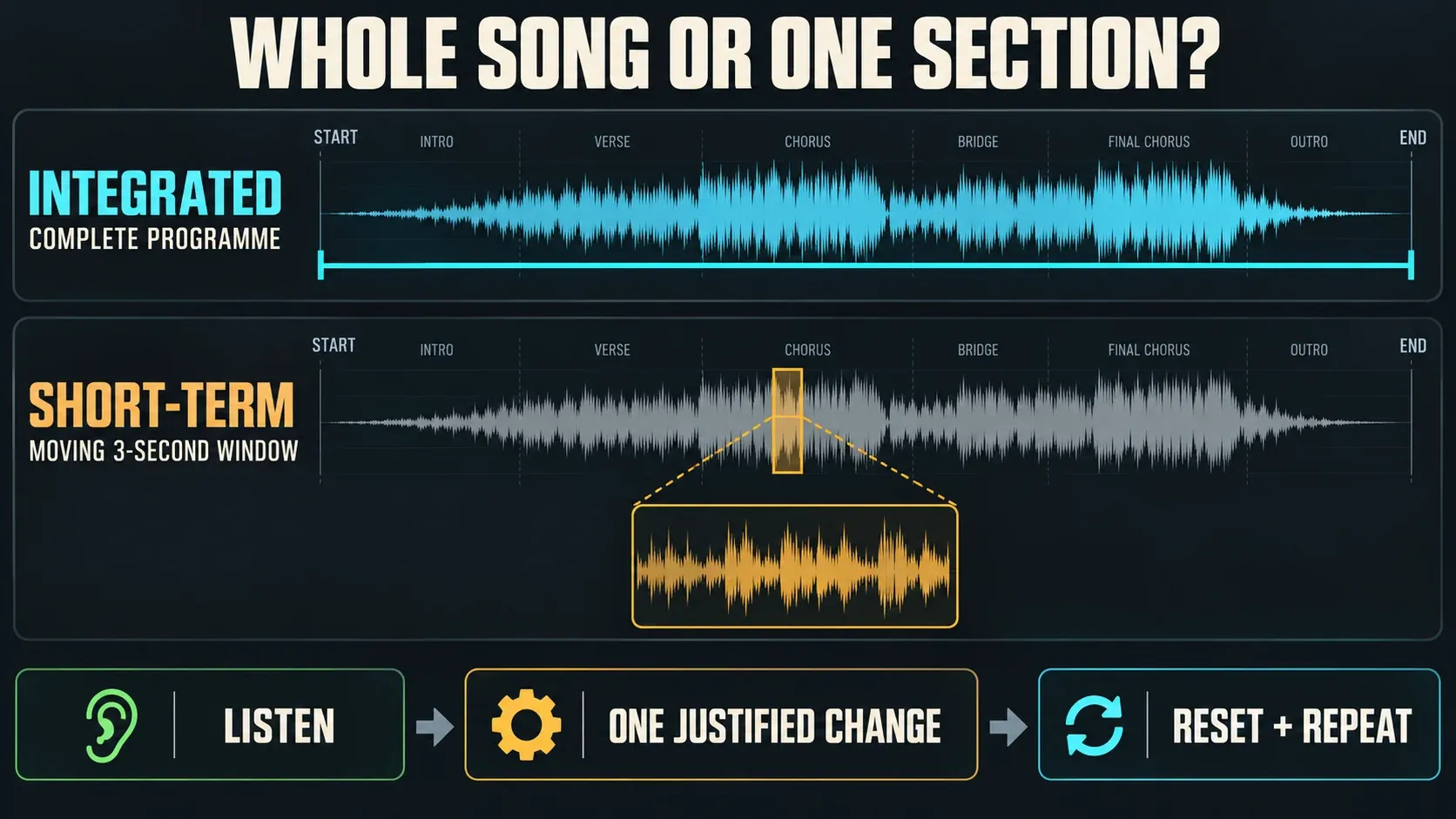
LUFS measures loudness over time with frequency weighting; it isn't the highest peak in a waveform. Integrated measurement uses gating so that quiet enough material doesn't dominate the result. Momentary and Short-term use shorter moving windows, and not every readout applies the same gating. The EBU metering overview separates the whole-programme reading from the 400-millisecond and three-second windows.
A sample-peak meter reads digital sample amplitudes. True peak estimates the reconstructed maximum, which can fall between those samples. RMS stands for root mean square: a statistical measure of signal amplitude that you can't swap in for the standardized loudness measurement. Youlean's measurement definitions also confirm that LUFS and LKFS are the same unit.
None of these numbers will tell you the vocal is buried or the snare hurts. Two songs with similar Integrated LUFS can feel very different because of their spectrum, transients and arrangement. If the audio already distorts, start by finding the clipping stage; lowering a loudness number can't undo damage already printed into a file.
Read Integrated, Short-term, Momentary and LRA correctly
| Reading | Time or scope | Useful question |
|---|---|---|
| Integrated / INT / LUFS-I | The programme measured since reset, with gating | How loud is this complete version? |
| Short-term / S | Moving three-second window | Does this chorus jump out from the verse? |
| Momentary / M | Moving 0.4-second window | Where are the fast loudness changes? |
| LRA, in LU | Statistical spread of gated Short-term loudness | How broad is the programme's loudness variation? |
| Maximum true peak, in dBTP | Highest reconstructed peak estimated during the pass | Does the file meet its peak-headroom requirement? |
A chorus-only Integrated result describes that chorus and nothing more, so label it that way. LRA isn't a quality score, and it isn't simply the loudest reading minus the quietest: EBU's Loudness Range specification uses a gated statistical distribution. A plugin's generic “Range” field may not match EBU LRA at all.
Choose the right FL Studio loudness meter
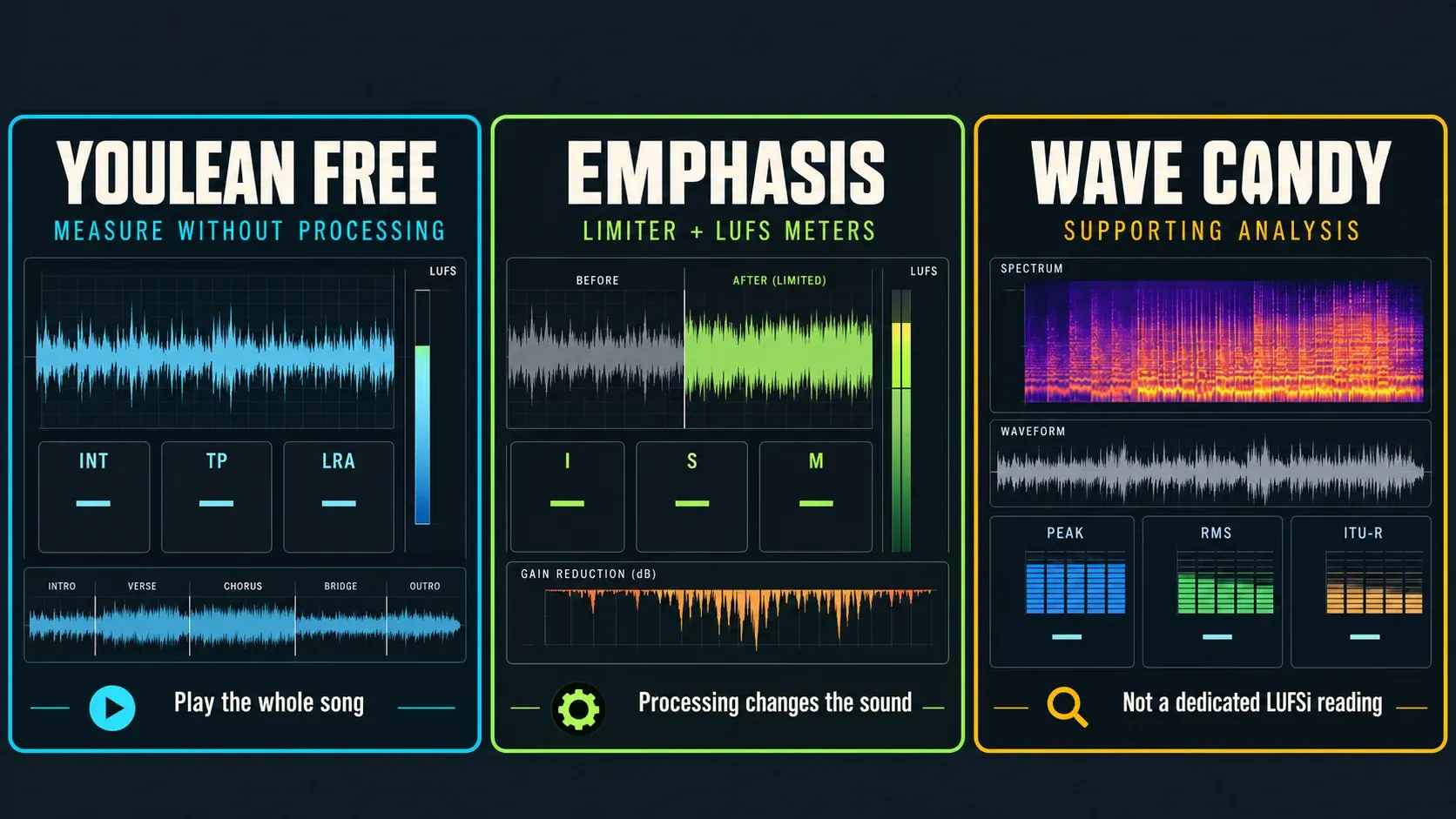
Youlean Free: the direct measurement route
The current Youlean Free feature list includes Integrated, TP and LRA readouts and says the free edition does not expire. You don't need the paid edition to measure a song during playback. Drag-and-drop file analysis is listed under Pro, though, and a free real-time pass takes longer than instant offline analysis.
If the plugin doesn't show up in FL Studio, follow the plugin installation and scan steps. For other handy tools to sit next to it, see the free-plugin starter selection. Youlean only measures the signal; inserting it won't normalize your song.
Emphasizer: Integrated LUFS in every edition
The current edition comparison includes Emphasizer in every edition, Fruity included. Its Integrated LUFS meter measures the full length analyzed since the last reset. Double-click that meter to clear it before a fresh playthrough, and check the cogwheel menu, because metering can be switched off there. Write down the finished result before clearing it for the next pass. Emphasis's Stop-reset behavior may not apply to Emphasizer, so don't assume it does.
Emphasizer is still a limiter and clipping processor. Leave its intended processing state alone while you measure. Setting its Emphasis control to zero bypasses the clipping stage but keeps the limiter as a safety stage. For a separate measurement that adds no processing, use Youlean. Emphasizer's documented peak/RMS displays can't stand in for a dedicated maximum-true-peak reading.
Emphasis: LUFS inside a mastering processor
The Emphasis manual documents I, S and M loudness readings, output peak/RMS meters and a true-peak limiting option. That limiting option doesn't mean there's a separate maximum-dBTP readout. When you need that delivery figure, put a dedicated true-peak meter downstream.
The current edition comparison includes Emphasis in All Plugins Edition, and the Image-Line shop also sells it on its own. Check your actual licence, because showing up in the plugin menu doesn't prove it's unlocked. Our edition guide explains the wider differences. You don't need an upgrade just to measure LUFS with Youlean Free.
Wave Candy: useful supporting analysis
Wave Candy offers Peak, PPM, RMS, VU, Leq(A) and ITU-R BS.1770 meter modes. Its manual describes the ITU-R option as frequency-weighted averaging over a long window, which falls short of a full-song Integrated/Short-term/Momentary suite. Don't label that number “LUFSi” or make up a fixed conversion to Youlean.
Keep it for its other analysis jobs, which the stock-plugin guide covers. A built-in meter only helps if it measures what you actually need.
Measure with Emphasis without accidentally remastering
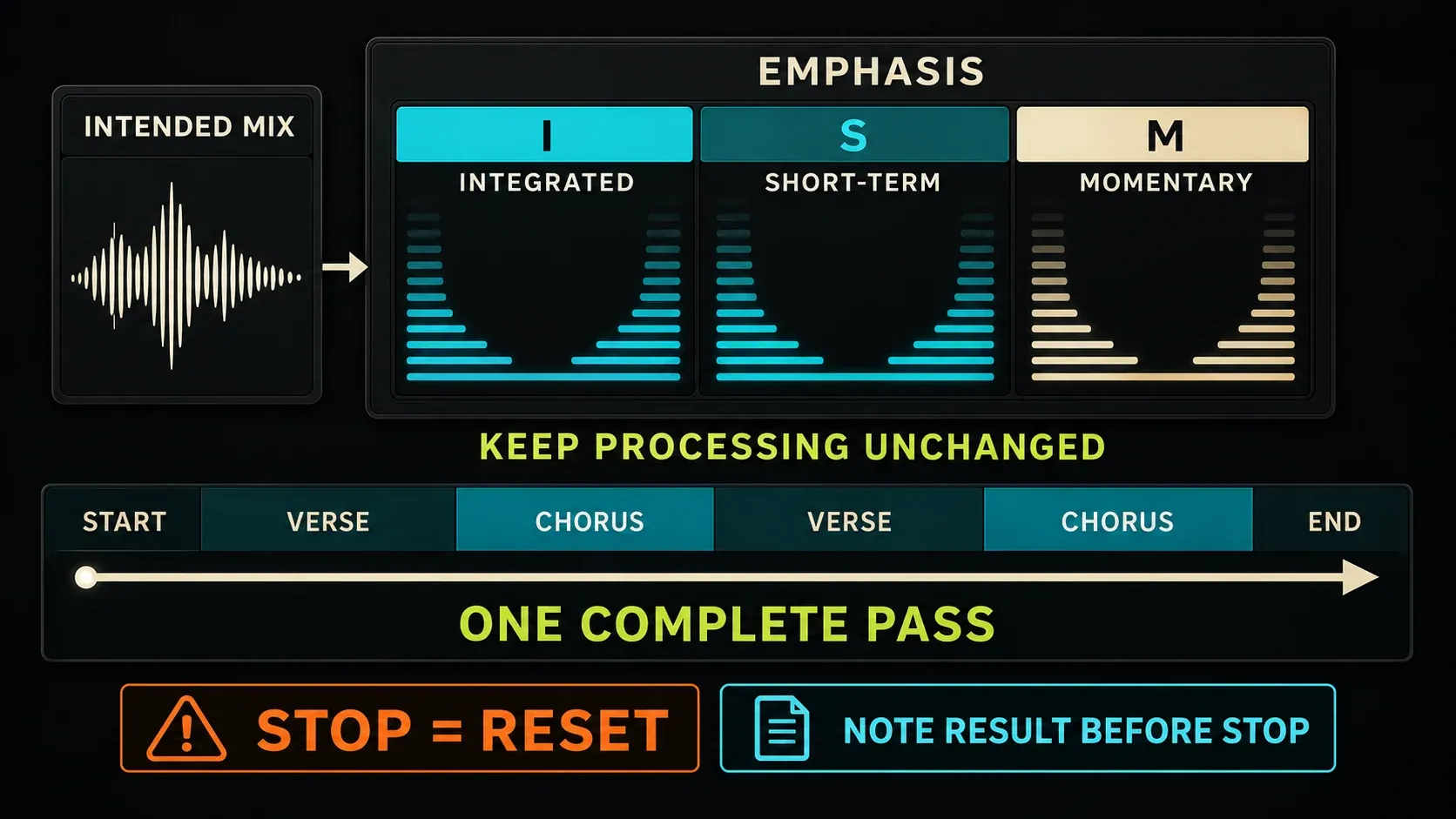
If Emphasis is already part of your intended chain, save that processing state before measuring. Input, Hardness and the limiter settings change the audio, so don't insert or tweak it just to chase a different number. Select I for the whole-song result and use S and M to look at movement.
The manual says pressing Stop resets the LUFS measurements. Reset before you start, play the full song without interruption and write down the result after the musical ending but before pressing Stop. If playback has already stopped and wiped it, run a fresh pass instead of guessing. Its Range field is described as the difference between the highest and lowest LUFS, so don't copy it down as EBU LRA.
To check everything after Emphasis, later processors included, put Youlean after the final slot processor or measure the exported file. The mastering walkthrough covers the processing decisions. This pass is only about measuring what you actually plan to deliver.
Place Youlean correctly and avoid stale measurements
Youlean's placement instructions specify the last Master slot and a 0 dB Master fader. Image-Line's Mixer signal flow explains why the last plugin isn't always the last change: built-in EQ, phase, stereo separation, volume and pan come after the slots. Also look at Current (C), which follows the selected track and so isn't a fixed Master measurement point.
Keep in mind that resetting a carefully balanced Master fader to 0 dB changes your mix. Work in a saved copy, or leave the mix alone and measure its export. For a simple in-session comparison, keep the downstream controls neutral and make any intentional level changes before the meter.
The Youlean interface guide separates clearing all measurements from pausing them. It also documents host-playback auto reset, which isn't available in Continuous histogram mode. A manual clear before each full pass is easy to confirm. Check that the numbers are building up and that the channel configuration matches the file, because a paused meter can look convincing while it shows yesterday's result.
Use the numbers to find a problem, then listen
If the full-song reading surprises you, compare the same passage with a suitable reference at similar playback loudness. Is the gap a simple level offset, a heavy sub, a sparse arrangement or sustained limiting? Use gain staging to trace level changes and Fruity Limiter's compression controls when dynamics processing really is the issue.
Make one change you can explain, then compare again at matched loudness. A bigger number doesn't prove the mix is clearer. Record Integrated and maximum true peak for the whole pass, and use Short-term to find a section, never as a replacement for the song result.
Spotify's -14 LUFS: recommendation, not a universal rule
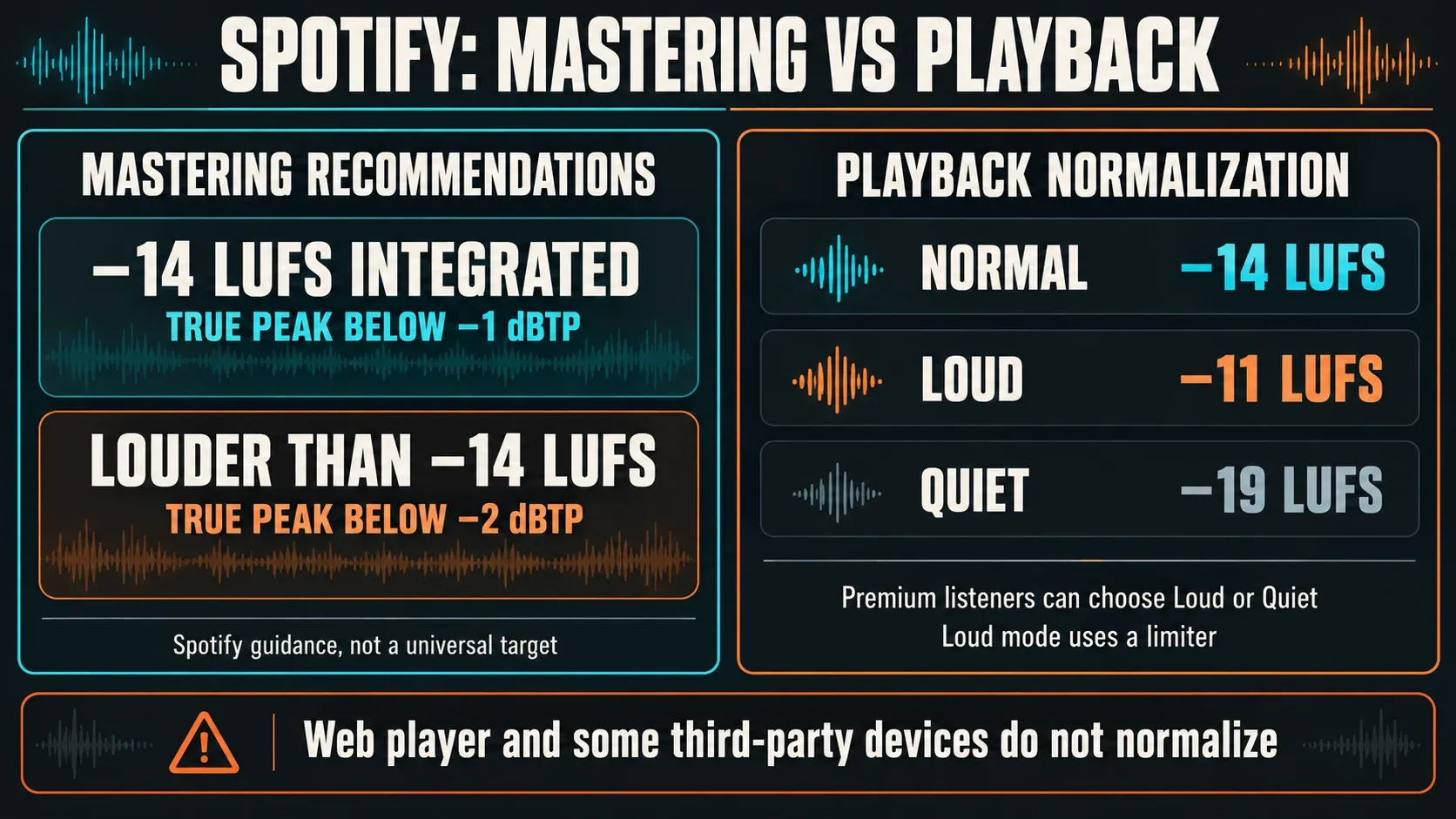
Spotify's current guidance recommends mastering at -14 LUFS Integrated, with true peak below -1 dBTP. If you master louder than -14 LUFS, it recommends keeping true peak below -2 dBTP. Those are Spotify's recommendations; they don't set one required artistic target for every song and destination.
With normalization enabled, Normal playback uses -14 LUFS. Premium listeners can also choose Loud (-11) or Quiet (-19); Loud uses a limiter. Quieter tracks may be raised only as far as available peak headroom allows. Album playback preserves relative track levels through album normalization, while shuffle and playlists can use individual-track adjustment.
Spotify also says its web player and some third-party devices don't normalize. So one playback comparison is no laboratory measurement of your master. Normalization can't repair distortion already in the file, and the -14 figure is no reason to flatten a song that needs musical contrast.
Measure the exported WAV without processing it twice
Render the exact range you intend to deliver, tail included, using the song-export steps. Confirm the intended Master processing is in the render. Image-Line's export manual separates normal Master exports from split Mixer-track files, which skip the Master. For format decisions, use the sample-rate, bit-depth and codec guide.
With Youlean Free, play the file in real time through a clean analysis path. A separate empty project works well, but check the template first: remove or bypass any default limiter, use unity playback gain, keep pitch and duration unchanged, neutralize built-in Mixer processing and leave only the meter in the chain. Don't route the finished master back through its original mastering chain. Pro's drag-and-drop analysis is optional, so you don't have to buy it for this check.
If the project and file readings disagree, first compare the same channel configuration, range, reset state and processing path. Then check export-specific plugin quality or oversampling settings. Extra silence won't necessarily lower Integrated LUFS, thanks to gating, but a missing musical section or tail is a different story. If you're sending a lossy file, analyze that too, because encoding can change peaks.
Before you approve the measurement
- The version and full playback range are recorded.
- The meter is running, correctly configured and cleared of older passes.
- Any processing after its slot is accounted for.
- Integrated LUFS and maximum dBTP come from the same complete pass.
- Short-term and Momentary help diagnose sections; LRA is not a quality score.
- The actual delivery file has been checked on a clean path.
If the measurement holds up but the balance still needs work, carry on through the mixing and mastering guides. If playback or export is misbehaving, use the troubleshooting routes to isolate that fault before you change the master.
FL Studio LUFS and loudness FAQ
Does FL Studio have a built-in LUFS meter?
Yes. Emphasizer has an Integrated LUFS meter and ships with every current edition, Fruity included. Emphasis adds Short-term and Momentary readings and comes with All Plugins Edition or as a separate purchase. Both process audio, so use Youlean Free when you want a dedicated measurement route without adding limiting or clipping.
Can Wave Candy measure Integrated LUFS?
Its manual documents an ITU-R BS.1770 weighted averaging mode, which is different from a dedicated whole-song Integrated LUFS workflow. Don't use that number in place of a LUFSi delivery measurement.
Where should a LUFS meter go in FL Studio?
Put Youlean in the last Master effect slot. Its documented setup assumes a 0 dB Master fader, and you also have to account for built-in Master processing after the slots. If those settings are intentional, measure the exported file on a clean path.
How long should I measure Integrated LUFS?
Measure the complete programme you intend to release once, musical ending and tail included. Reset first and avoid loops or seeking. A chorus-only pass describes the chorus and says nothing about the whole track.
What is the difference between LUFS and true peak?
LUFS describes loudness over time. True peak estimates the reconstructed maximum, which can sit between digital samples. Read Integrated LUFS and maximum dBTP together, because a good loudness result doesn't guarantee enough peak headroom.
Should every song be mastered to -14 LUFS?
No. Spotify recommends -14 LUFS Integrated and uses that level for Normal playback normalization, but it isn't a universal artistic target. Follow the guidance of the place you're actually releasing to, and keep the balance and dynamics the music needs.
Why does Emphasis lose the LUFS result when I stop?
Its manual says Stop resets LUFS measurements. Write down the complete-song result after the musical ending but before pressing Stop. If it has already reset, measure again. For maximum true peak, use a dedicated meter further down the chain.
Can Youlean Free analyze an exported WAV?
Yes, by measuring it during real-time playback on a clean, unity-gain path. Don't apply the mastering chain a second time. Drag-and-drop file analysis is a Pro feature.
Why does Integrated LUFS change when I loop the chorus?
The result covers everything the meter has collected since the last reset. Repeating one section changes its share, so that pass no longer stands for one normal playthrough of the song.
Why is exported loudness different from the project reading?
Check the Master fader and built-in processing after the meter, export range, included Master effects, meter reset and channel configuration. Also check export-specific plugin settings and whether the rendered file was normalized, stretched or processed again during analysis.