FL Studio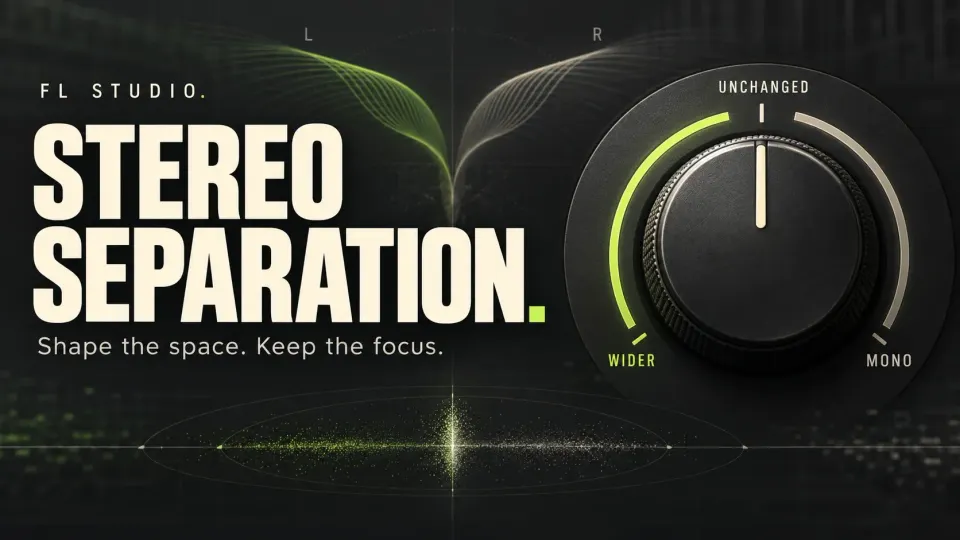
In FL Studio's Mixer, turn Stereo separation left to widen an existing stereo signal, or right to narrow it. Fully clockwise merges it to mono; the center position leaves this control inactive. If the left and right channels reaching the control are identical, there is no stereo difference for it to enhance.
That's the quick answer. The more useful follow-up is whether the sound needs a different position, a different width or brand-new stereo information. A lead that feels small might need quieter pads around it more than another widener. Make that musical call before you pick a plugin.
Set stereo separation in eight steps
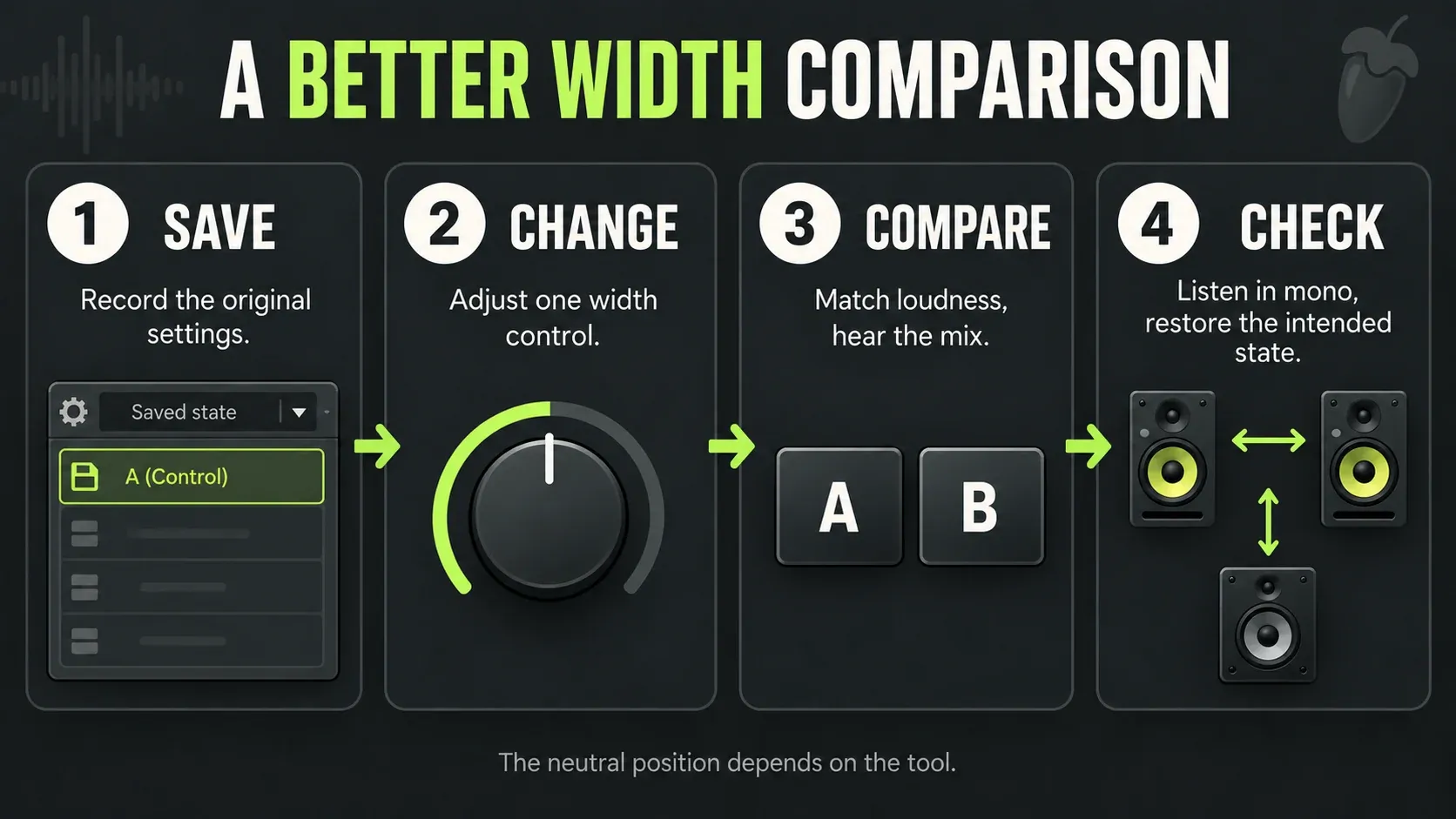
- Choose one sound and a repeatable passage. Loop a section where the part plays with the instruments around it. Decide what you want to hear differently: less spread, more space, or a clearer position.
- Save the original settings. Keep a project version and note the existing width and any automation. Mixer center is neutral for that control, but an existing mix may intentionally use another setting. Other plugins have their own defaults.
- Check the signal reaching the control. Listen to the source and its effects. A mono recording can become stereo through earlier processing; a two-channel file can still contain identical left and right audio.
- Choose the appropriate control. Use pan for position, Mixer Stereo separation for existing width, or a stereo-producing effect when you need new L/R differences. Change one control at a time.
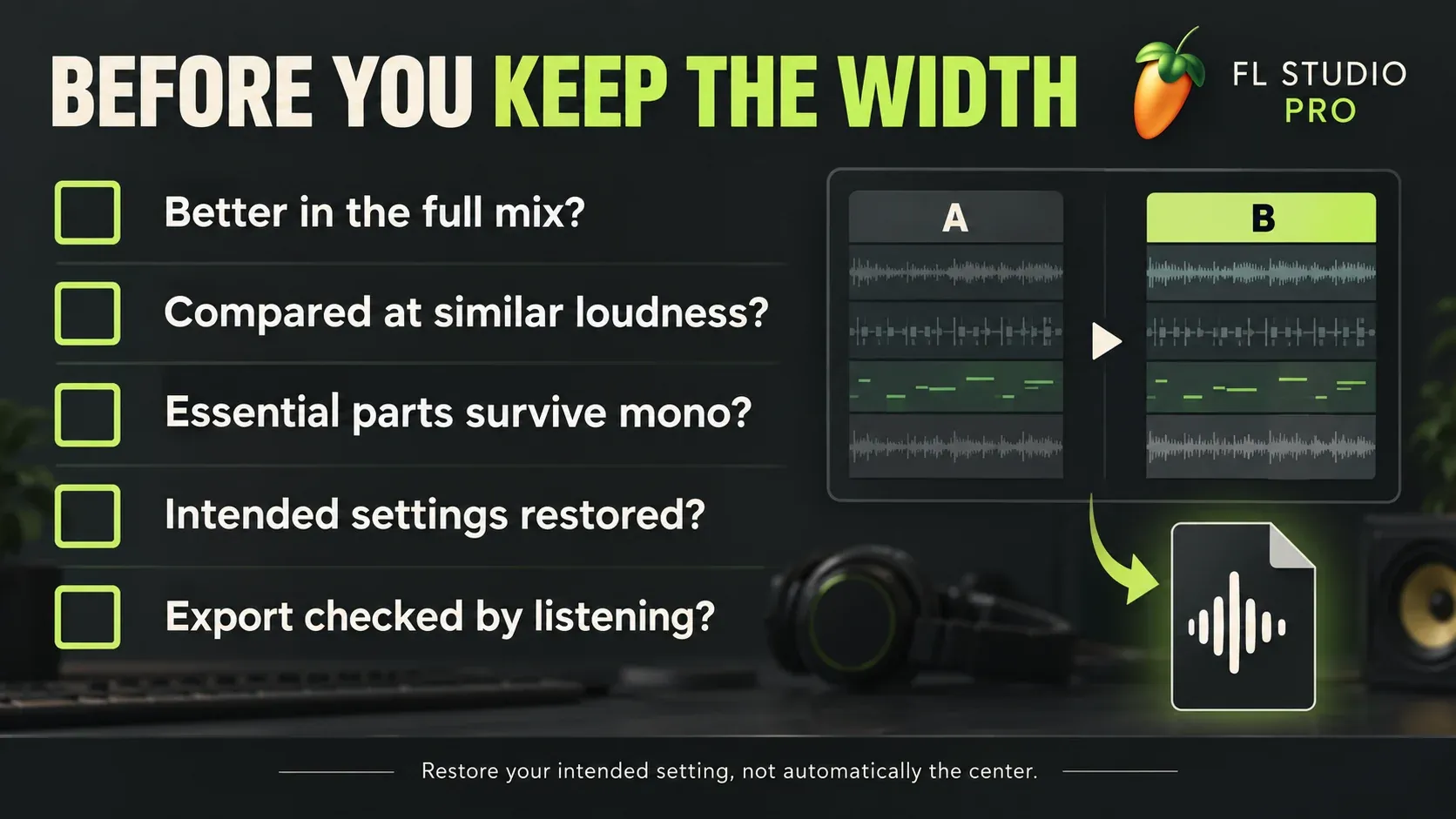
- Compare at similar perceived loudness. Compensate for a level change before choosing a winner. A louder result can seem more impressive even when the width itself is less useful.
- Judge the result in the full mix. Check the lead, low end and returns together. Keep the change only if it helps the part fit its surroundings; solo playback is useful for diagnosis, not the final decision.
- Check the mono fold-down. Note the Master's intended setting, then temporarily turn its Stereo separation fully clockwise. Listen for lost words, notes or body. This checks paths reaching the Master, not separate hardware-output paths that bypass it.
- Restore the intended state and verify the export. Return the temporary mono check to the setting you actually want, including any relevant automation. Render a comparison and listen to the file so a monitoring change does not become an accidental delivery choice.
What the Mixer knob changes—and what it cannot create
The Mixer manual's Stereo Separation section describes the directions explicitly. Left of center enhances existing stereo information. Right of center reduces it, reaching mono at the fully clockwise end. Do not confuse it with the pan knob. If the control is hidden, expand the Mixer and check its layout and additional track-property display options; the visible controls depend on those choices.
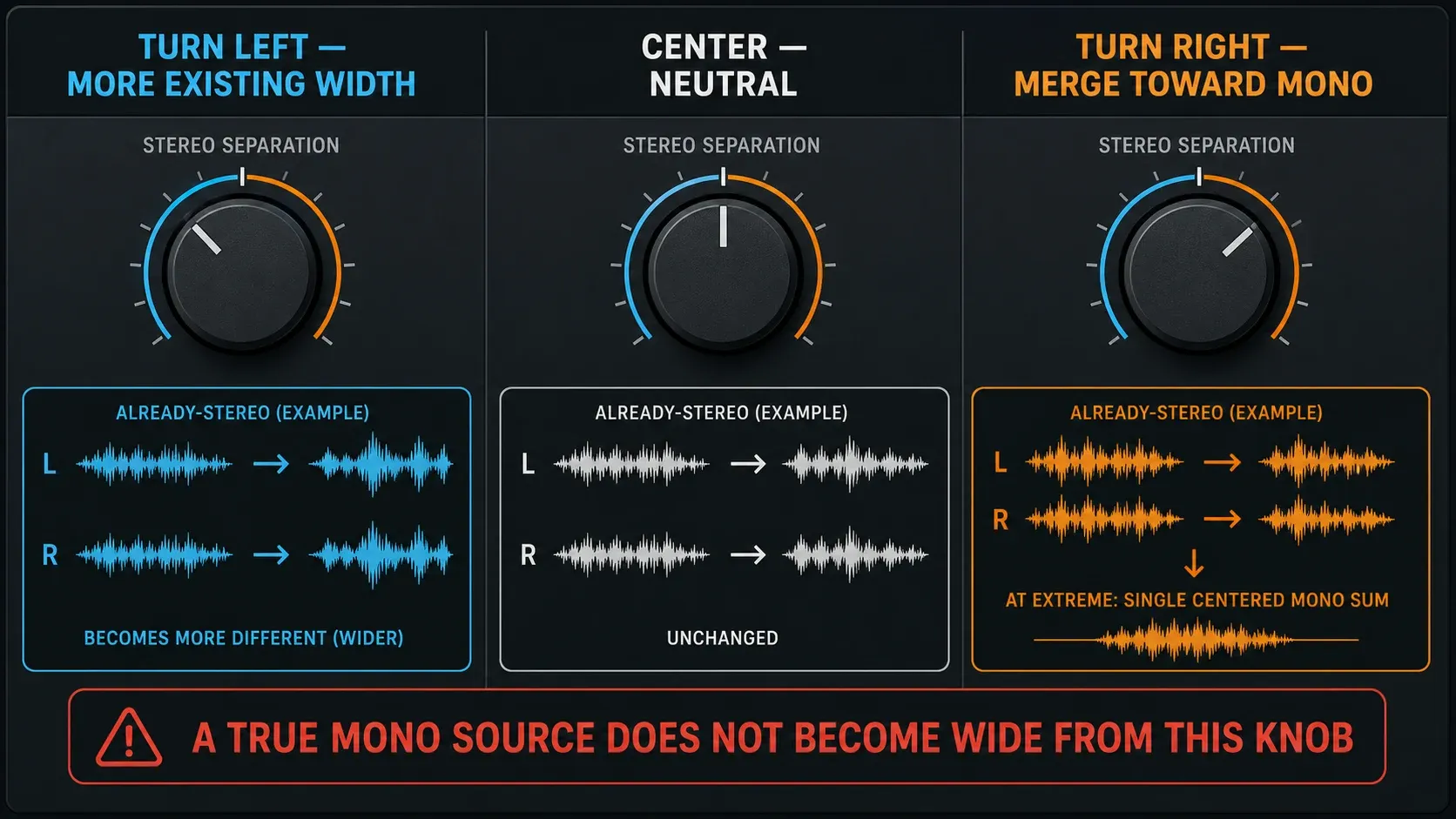
The word existing matters. This control works on the difference between left and right, so a centered mono signal with identical channels has no width to turn up. Loading the same mono take twice and panning the copies apart won't give you the performance differences of real double-tracking.
Check the signal as it actually arrives, not just the file label. FL Studio's effect-slot signal flow puts the FX stack before the built-in track properties. A stereo chorus or reverb ahead of the knob can give a mono recording L/R differences, and earlier mono processing can strip differences out of a stereo source. Our Mixer routing guide explains how to follow that path.
The short mid/side explanation
Using the convention in Image-Line's Stereo Shaper tutorial, Mid = (L + R) / 2 and Side = (L − R) / 2. Mid is the channel sum, not a separate collection containing only center-panned instruments. Side is their difference.
The Mixer's widening process uses phase-inverted cross-mixing to change that relationship. Shared center content can lose ground to the stereo content, which is why a wider pad may also feel less solid and why you should compensate for level when you compare. You can change width without touching the pan knob, but the perceived balance may still shift.
Pan, width or new stereo: choose the job first
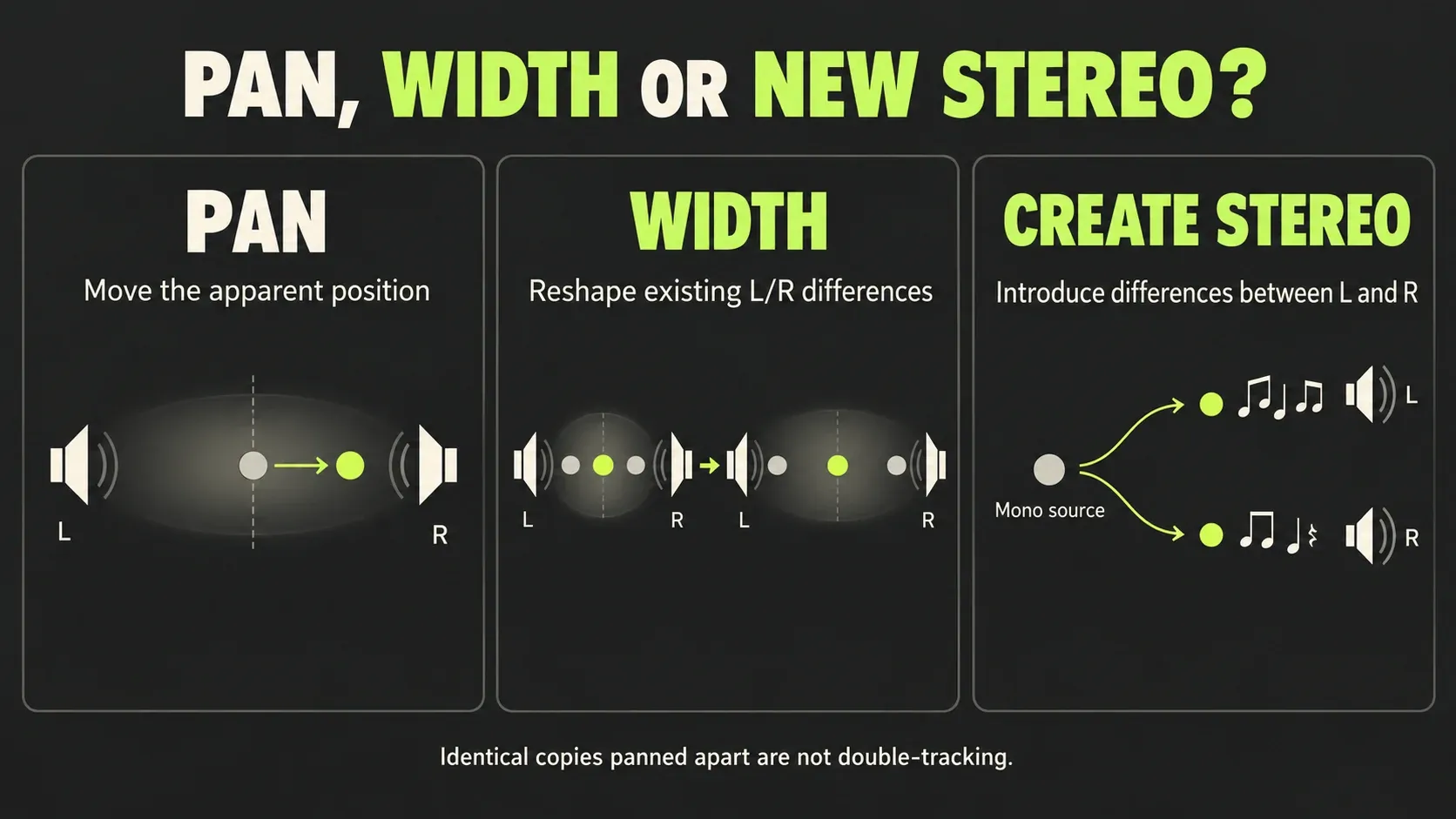
Pan changes position. Try it when two parts compete for the same apparent place. The FL Studio Mixer pan control cross-mixes the channels; it is not simply a balance control that turns down one side while leaving the other independent. Do not use it as a shortcut for extracting only the original left or right channel.
Width reshapes an existing stereo relationship. Try the Mixer control when a stereo pad is crowding the sides or a stereo recording needs a slightly broader presentation. Listen to what happens to its center as well as its edges.
Stereo creation introduces L/R differences. Stereo chorus, different performances panned apart, stereo reverb, or a suitable stereoizing processor can give a mono source a spread it did not have. Synth unison helps only when its settings produce actual differences between the channels; simply adding identical voices is not a stereo-width method.
For example, keep a lead vocal focused and try width on real doubles or on its wet return. If the actual problem is intelligibility, go to the vocal mixing workflow first. Width can't stand in for a sensible vocal level or an arrangement that leaves room for the words.
Choose the right stock width tool
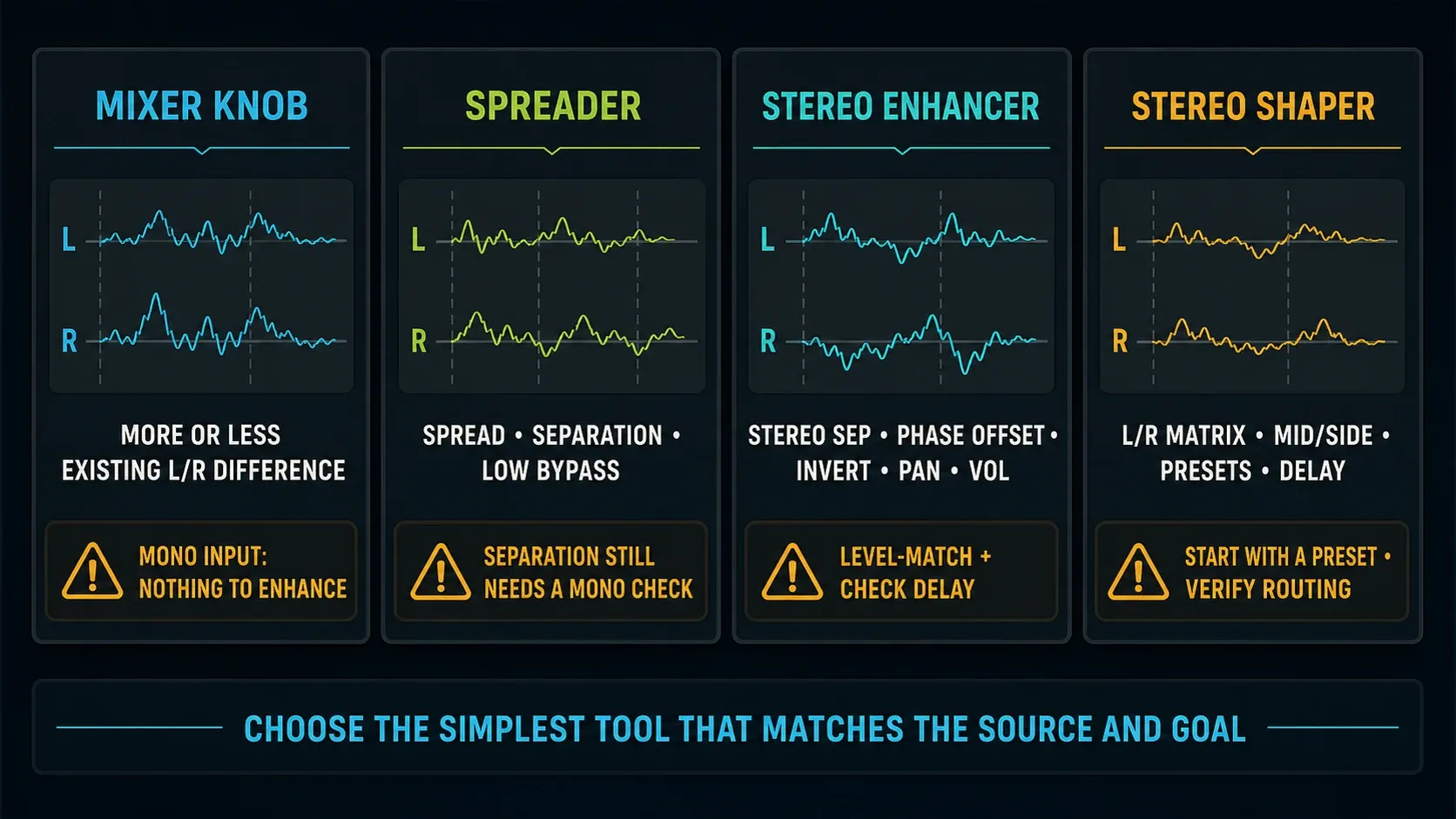
| Your aim | Start with | Watch for |
|---|---|---|
| Narrow or enhance an existing stereo track | Mixer Stereo separation | No new spread from identical L/R; changed level and center dominance |
| Add stereo spread with a dedicated processor | Spreader's Spread control | The separate Separation control has different behavior and directions |
| Adjust width plus a channel delay | Fruity Stereo Enhancer | Phase Offset can change balance and mono tone; merging is not complete |
| Choose, swap or cross-mix L/R; work with M/S | Fruity Stereo Shaper | A preset can change routing or polarity, not just width |
| Keep the dry part focused while adding space | A stereo reverb or delay return | Excess wet level, a wandering image or mono cancellation |
Spreader: two controls with different jobs
Start by separating Spread from Separation. Image-Line describes Spreader's Spread processing as mono-compatible. The same manual warns that increasing its separate Separation control can break mono compatibility. A plugin name is not a guarantee for every combination of its settings.
Spreader's Separation runs left toward merged mono and right toward separated. That's the opposite labeling direction from the Mixer's knob, so read the control you're actually adjusting instead of carrying a left/right habit from one plugin to another.
Low Bypass keeps low frequencies out of the spreading effect, and its separate Mono switch also folds that bypassed low end to mono. Pick the boundary by listening to the bass and the rest of the arrangement, since no single cutoff belongs on every song.
Stereo Enhancer: not an exact mono switch
Fruity Stereo Enhancer combines separation, Phase Offset, channel inversion, pan and output volume. Its separation knob follows the Mixer direction, but Image-Line specifies maximum separation and merging of around 98%. Use the Mixer's fully clockwise control when the check requires a complete mono fold, rather than treating Enhancer's end stop as identical.
Phase Offset delays one channel. It can sound wider, but it can also shift the apparent position or make the summed result hollow. The iZotope explanation of Haas-delay comb filtering helps here: a delayed copy can cancel different frequency regions once it's combined with the original. A shorter delay isn't automatically safer. Adjust the delay, the wet contribution or the technique based on what you hear.
Stereo Shaper: use a known preset
Stereo Shaper helps when you need explicit channel selection, polarity inversion or M/S routing. Start with the preset that matches the job and check what it outputs. Its Mid preset combines L and R, while LR to LL keeps the original left channel in both outputs. Those are two different operations, even though either one can leave you hearing a mono signal.
Don't experiment with a subtractive matrix on the Master and treat every fader as a width control. If you already have the individual tracks, a focused change on a source or return is usually easier to judge than rebuilding the whole mix through an M/S matrix.
Give width a musical role
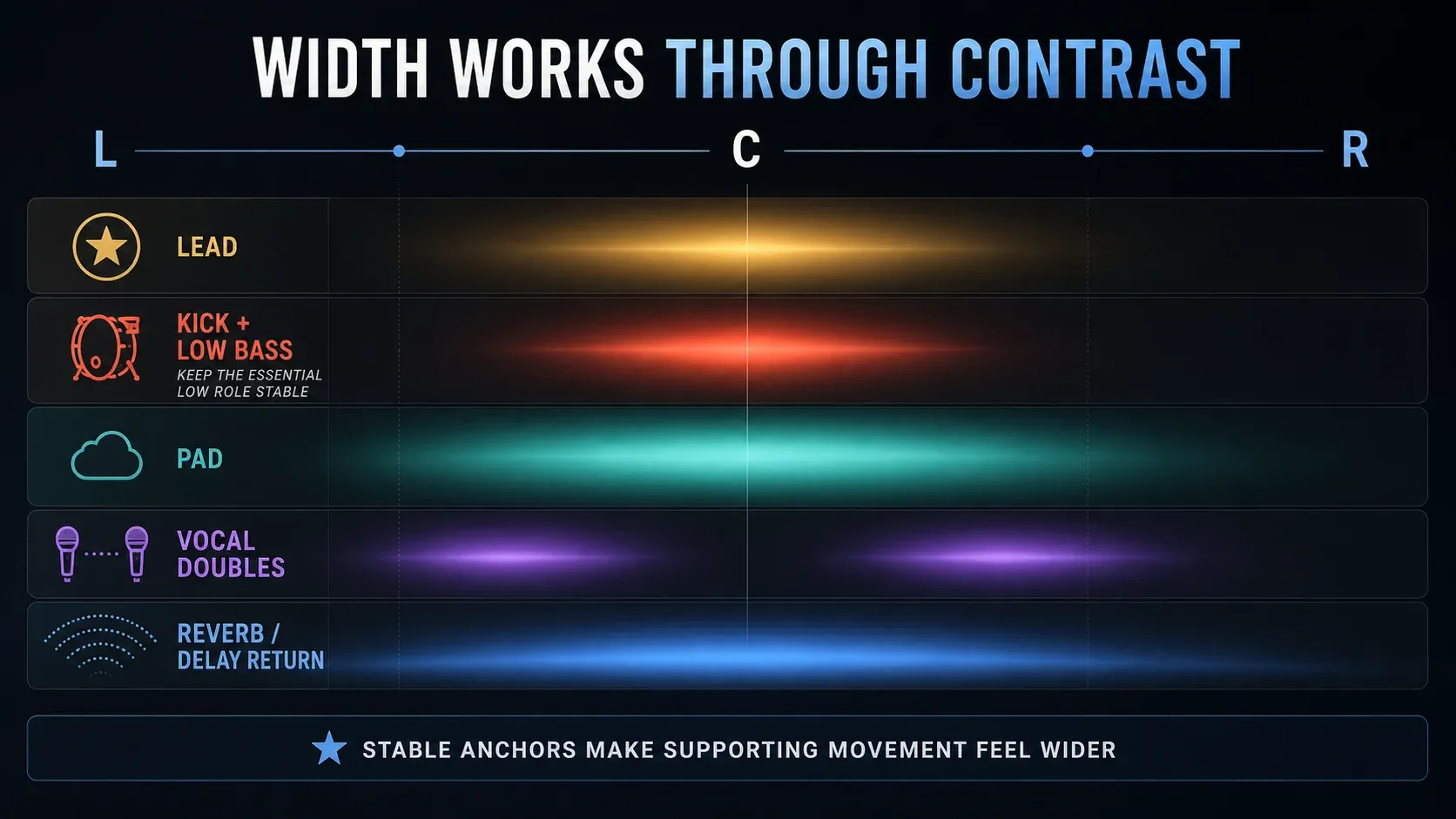
Pads and supporting synths: try narrowing one competing layer before you widen another. A contrast between focused and broad sounds often makes the arrangement easier to follow. For a moving bass texture, the Sytrus Reese bass tutorial covers the patch itself; come back here to judge its stereo footprint in the song.
Lead vocals and doubles: keep the words easy to follow, then decide whether the doubles or the ambience should carry the spread. These are starting points, not a rule that every lead has to sit dead center.
Reverb and delay: changing a wet return's width lets you shape its space without applying that same width control directly to the dry source. Follow the reverb and delay send setup if the dry/wet routing is not clear yet.
Kick and bass: listen for a stable foundation in both stereo and mono. Don't strip useful upper-frequency character just because a preset has “bass” in its name. The 808 mixing guide covers note length, kick overlap and audibility, because a width adjustment won't fix every low-end problem.
Put the meter after the change
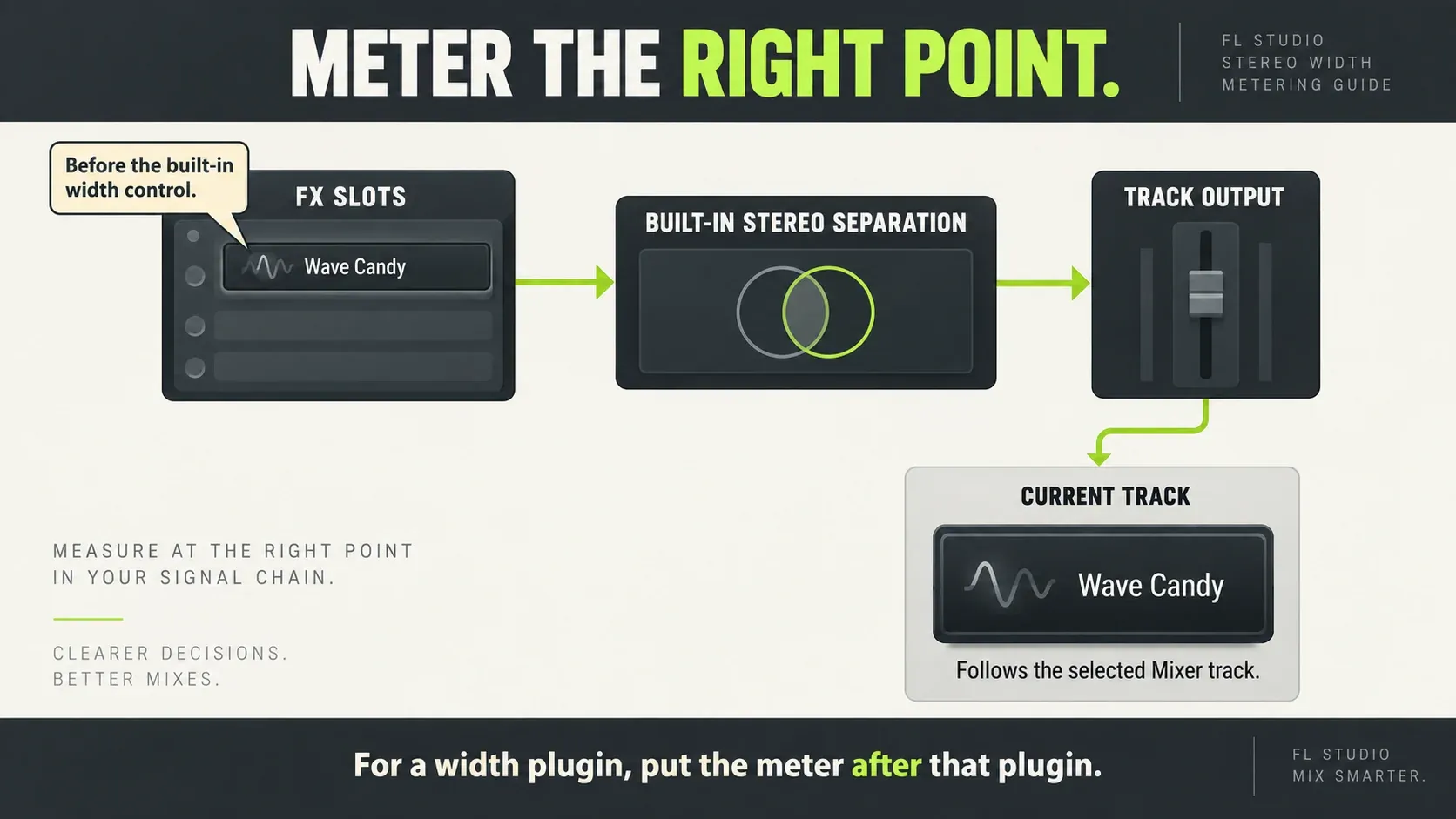
A vectorscope only helps if you know which signal it's receiving. Wave Candy in an FX slot sees the audio at that slot, before the same track's built-in Stereo separation control. Moving the knob afterward can change what you hear without changing the scope at all, and the same warning applies on the Master.
For a width plugin, put Wave Candy after that plugin to inspect its result at that point. For a built-in Mixer-width adjustment, the documented Current-track monitoring method is useful: load Wave Candy on Current (C), then select the Mixer track whose output you want to inspect. Current follows the selection, so reselect the Master when checking the mix. Keep unwanted processing off Current; its effects and EQ can affect the selected track.
With centered mono, Wave Candy's vectorscope draws a vertical line, and stereo differences make a wider or more complex shape. A strongly horizontal orientation is a reason to look into phase relationships, but it doesn't automatically mean the whole mix fails. A broad picture doesn't prove the vocal survives a fold-down either. Listen.
Spreader's pre/post display compares the input and output of Spreader itself, so it can't vouch for changes made later in the chain. If notes or words vanish when summed, use the mono compatibility troubleshooting guide to find the layer responsible instead of widening what's left to make up for it.
Be careful with Master-wide changes
A Master adjustment changes every part that reaches it at once. If only a pad is too wide, changing that pad is more targeted. Save whole-mix decisions for whole-mix needs, and compare against the saved baseline. The mastering guide puts that decision next to the rest of the final chain.
Keep an eye on output level after widening. Use gain staging to keep the comparison fair and the clipping checks if distortion shows up. For a longer loudness comparison, the LUFS measurement guide explains the meter readout; don't turn a loudness number into a target width setting.
For normal mix delivery, restore the intended Master state and choose the intended channel format before rendering. Image-Line's export documentation says ordinary mix export renders the Master path; Split mixer tracks uses different paths and bypasses the Master for individual stems. A Master-only width choice therefore is not a promise that every stem carries that processing.
Also keep Stereo apart from Mono (merged), Mono (left only) and Mono (right only). Saving two channels won't bring back stereo differences that were removed upstream. Use the export settings guide for delivery options, then listen to the actual file. Play it through a clean path, because running the rendered mix through the same widening chain again would apply that processing twice.
Your next useful move might be balance, EQ or a quieter return, not more width. The Mixing library gives you those routes. If the behavior still doesn't match the control you changed, use the FL Studio troubleshooting library to follow the symptom.
FL Studio stereo separation FAQ
Which direction makes the Mixer mono?
Turn the Mixer's Stereo separation fully clockwise. Center leaves that control inactive; turning left enhances existing stereo differences. This is not the direction convention of every width plugin.
Why does Stereo separation do nothing?
If identical left and right signals reach the Mixer control, there is no stereo difference to enhance. Check earlier effects, the actual routed track and any automation. A mono source with stereo effects may behave differently from its unprocessed file.
Is panning the same as stereo separation?
No. Panning changes apparent position; separation changes the relationship between the channels. FL Studio's Mixer pan also cross-mixes L and R, so it is not an independent channel-selection tool.
How can I make a mono sound wider?
Introduce useful L/R differences with stereo processing or different performances panned apart. Stereo chorus, reverb or a suitable stereoizing effect are options. Identical copies panned apart are not genuine double-tracking; compare the result in mono before keeping it.
Why does Spreader's Separation work the other way?
Its documented range runs from merged mono on the left to separated on the right, opposite to the Mixer knob. Spreader's Spread is a separate control; the manual warns that Separation can break mono compatibility.
Can Stereo Enhancer replace a complete mono check?
Not exactly. Image-Line specifies around 98% maximum merging for Stereo Enhancer. Use the Mixer's fully clockwise Stereo separation for a complete fold-down, and restore the intended setting afterward.
Why does Wave Candy stay unchanged when I turn the knob?
Wave Candy in the same track's FX stack is before its built-in Stereo separation. Use Current to monitor the selected track's output, or place the meter after a width plugin when checking that plugin. Confirm which track is selected.
Should every bass sound be mono?
No universal rule fits every bass patch. Check whether the low foundation stays useful in mono and whether the wider upper content helps the arrangement. Spreader's Low Bypass and separate Mono switch offer different ways to manage the low region.
Should I widen the Master?
Only if the whole mix benefits. A source or return adjustment is more selective when one part is the problem. Compare at similar loudness, check mono and remember that paths bypassing the Master do not receive its width adjustment.
Why is the exported stereo file narrow or mono?
Check the saved width settings, automation and export channel format. A Stereo file can still contain identical channels if the signal was merged before rendering. Ordinary Master export and Split mixer tracks also use different paths. Audition the delivered file through a clean playback path, without applying the widening chain a second time.