FL Studio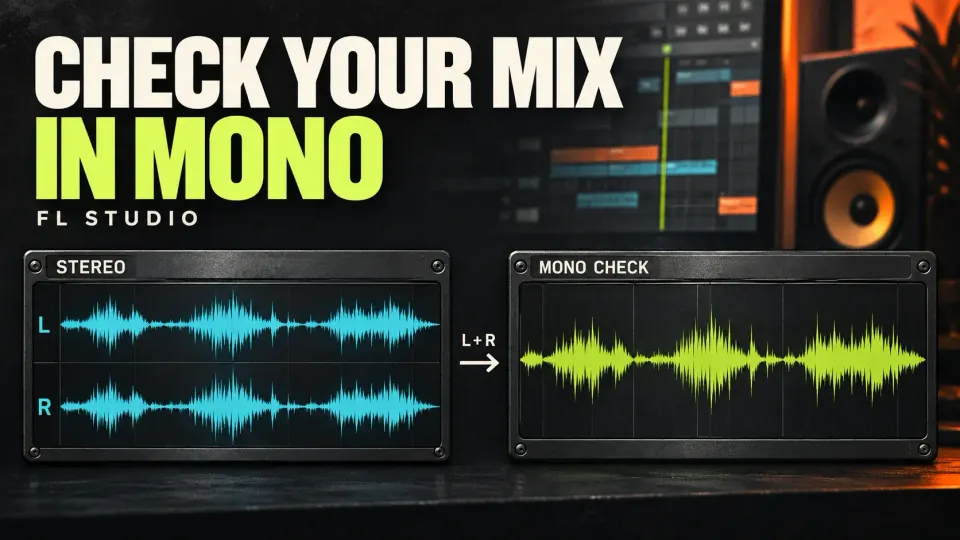
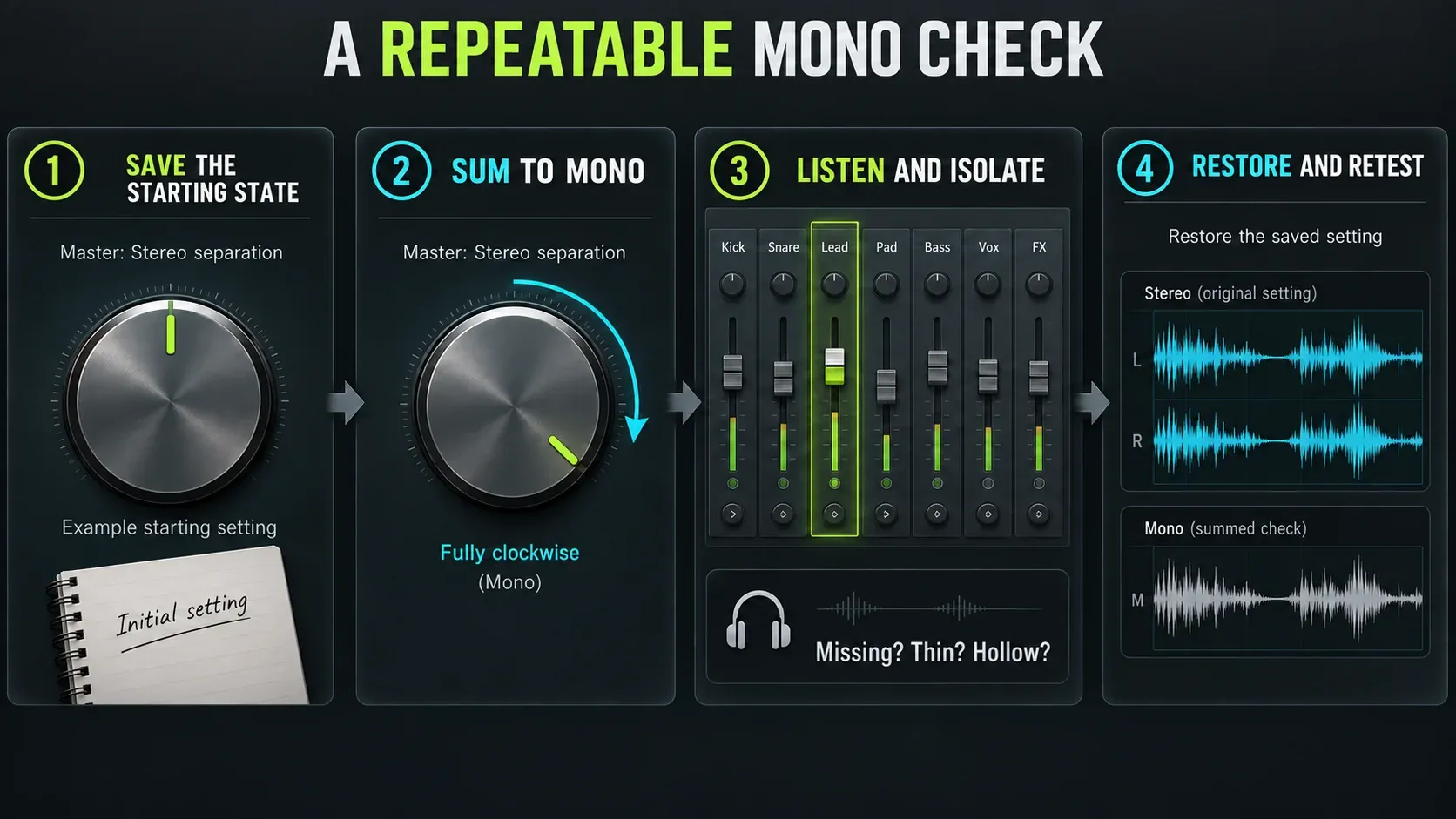
To check mono compatibility in FL Studio, select the Master Mixer track and turn Stereo separation fully clockwise. Then play the same busy passage in stereo and in mono and listen. Does the lead disappear? Does the bass lose weight, or the groove get hard to follow? Note where the control started so you can put it back after the test. You’re hunting for damaging changes. Mono will never sound as wide as stereo, and it doesn’t need to.
Save a copy of the project before you change timing, polarity or routing. The figures below show what each decision does to the waveforms, but whether a repair works comes down to your own listening comparison.
Check mono compatibility in eight steps
- Save the starting state. Note the Master Stereo separation setting and keep a project copy before making diagnostic changes.
- Loop a useful passage. Choose a section with the lead, kick, bass and main effects. Start at a comfortable listening level.
- Sum the Master to mono. Turn Stereo separation fully clockwise. Do not use the pan control or listen to only one headphone channel as a substitute.
- Name the audible failure. Write down a missing part, hollow tone, weak low end or changed balance. Reduced width alone is expected.
- Isolate the path. Compare groups, tracks and returns, then test suspect layers alone and together. Restore unrelated mute states.
- Compare effects carefully. Bypass one suspect effect at a time, working backward through its chain. Check level changes before blaming phase.
- Check the measurement point. Use Wave Candy’s Vectorscope to inspect stereo at its slot; a Master-slot instance is before the Master Stereo separation control.
- Repair, restore and retest. Keep the smallest useful change, compare at similar loudness, restore the saved Master setting and replay a short stereo export.
Use the Master control without changing the mix by accident
Image-Line’s Mixer documentation names fully clockwise as the mono setting. The middle position leaves stereo separation alone. Turning left exaggerates the stereo differences already there, so counter-clockwise is the wrong way for this test. If you can’t see the control, expand the Mixer or change its layout. The Mixer walkthrough explains the track controls.
Go back to center only if that was your starting point. If you’d deliberately narrowed or widened the Master, return to that saved position. When automation moves the control during playback, run the test in a project copy so you don’t record over the automation, and check that the mono setting holds for the whole passage.
The check only covers audio that reaches the Master. Send an Insert straight to a hardware output and it bypasses the Master, so the Master control never folds that path. Look at your routing before you judge all playback by one knob.
A stereo source doesn’t have to become a mono file to pass the test. If the stereo piano, room recording or return still works after summing, leave it as it is. Creative widening and narrowing belong in the separate Stereo separation guide. This page is about finding out what gets lost.
What should survive when the width disappears?
In mono, the stereo image folds inward. Reverb may feel smaller, panned instruments crowd into the center, and their apparent levels can shift. As iZotope’s mono-versus-stereo explanation makes clear, the comparison covers both what you can hear and how it balances. Before diagnosing a defect, compare a reference without extra processing at a similar loudness and with a broadly comparable arrangement in both stereo and mono. Can you still follow the vocal or melody, feel the kick and bass, and recognize the groove?
A quieter pad isn’t automatically a problem. A lead that almost vanishes, or a bass note that turns hollow, deserves a closer look. If every part sounds healthy soloed but they fight each other in the full mono mix, you may be dealing with masking or balance instead of cancellation inside one sound. Try a small level or arrangement change before you reach for a phase tool.
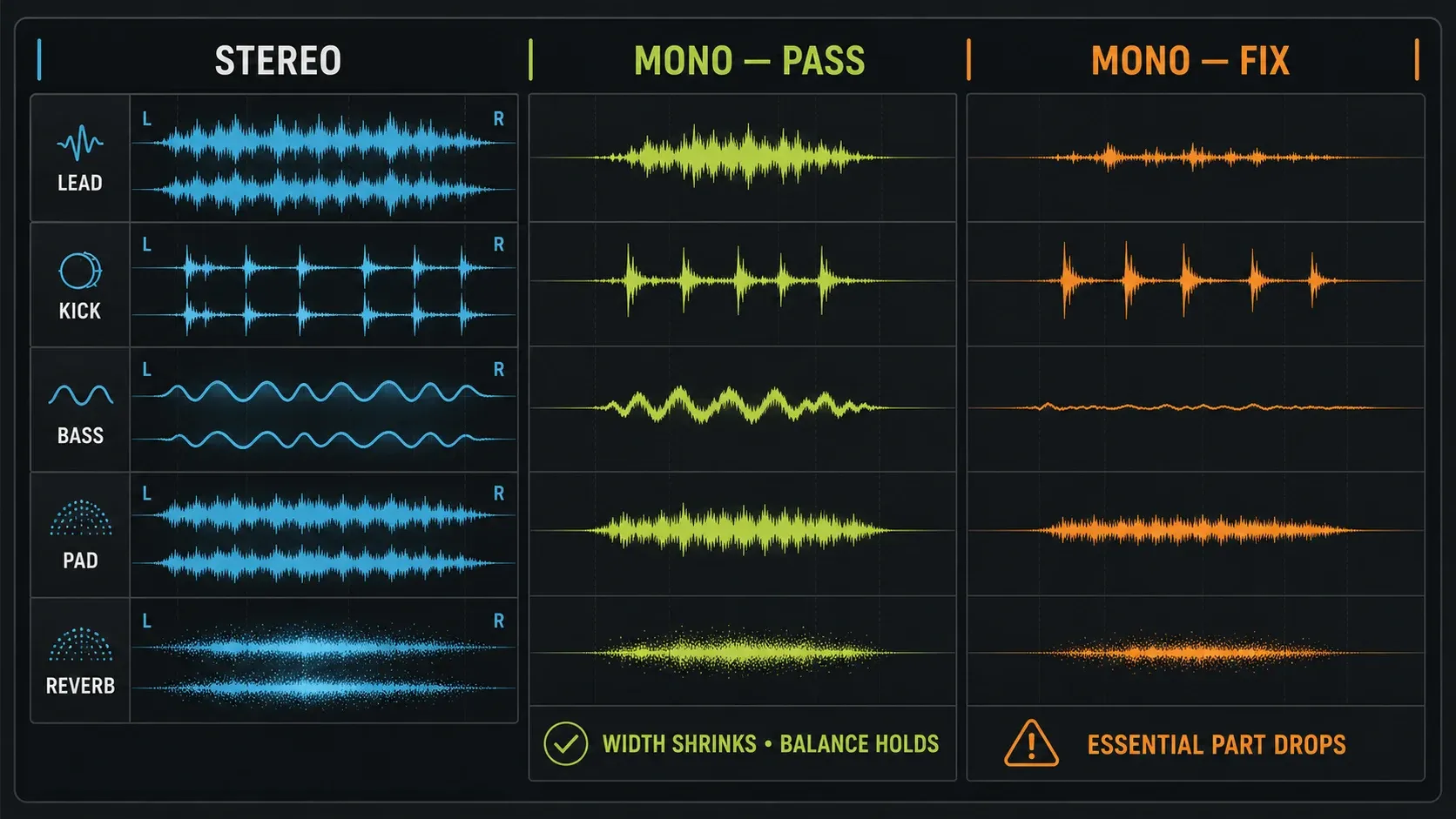
Why mono can sound quieter, hollow or almost silent
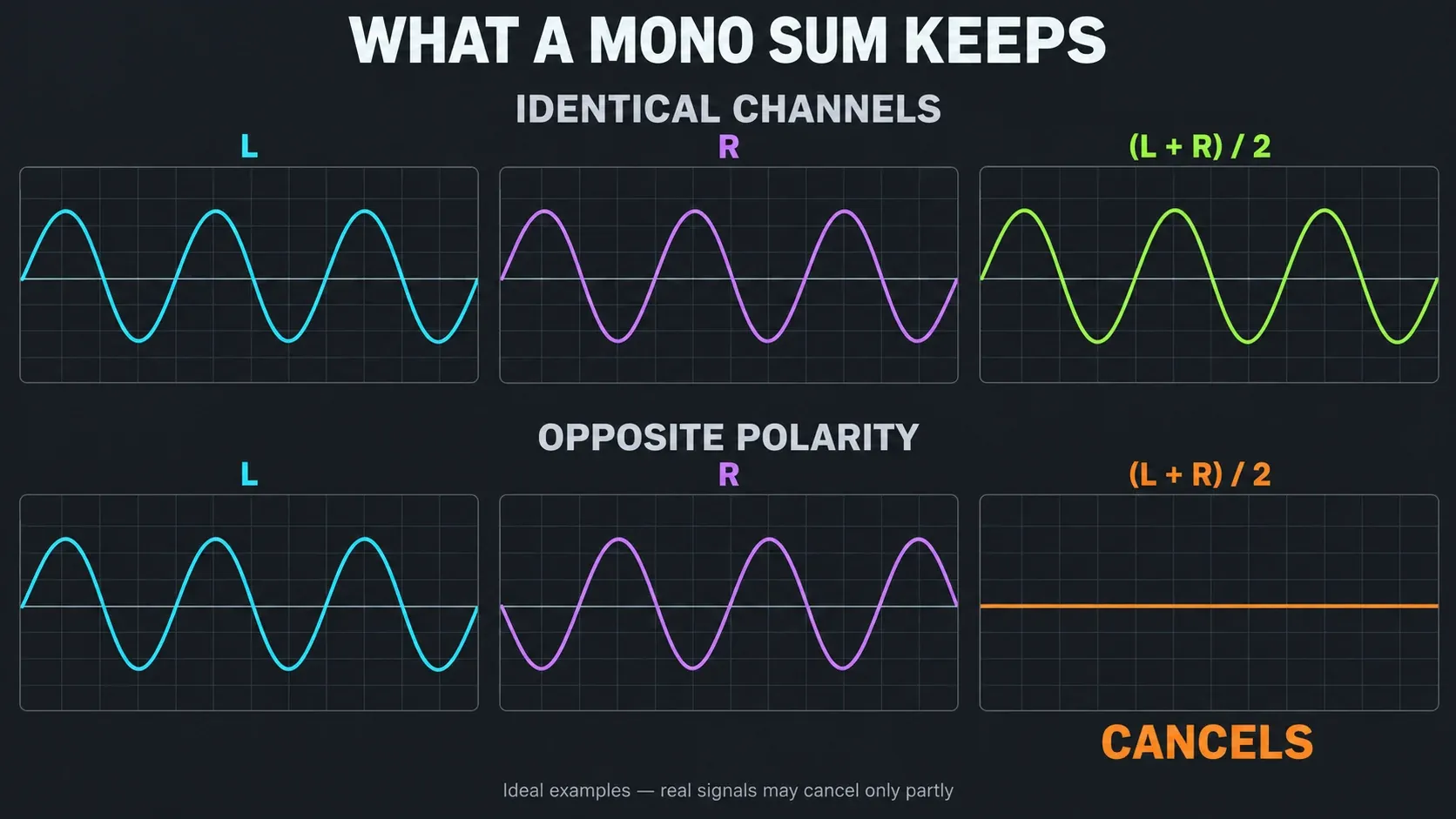
The Fruity Stereo Shaper manual defines the Mid signal as (L + R) / 2 and Side as (L − R) / 2. So Mid is the combined left and right signal. That’s more than the instruments panned to the center, and a hard-panned sound can still show up in that sum.
If the same waveform reaches both channels at equal level but with opposite polarity, the sum can cancel completely. A delayed copy behaves differently. Its relationship changes with frequency, so some frequencies reinforce and others cancel. You get the hollow, comb-filtered tone described in iZotope’s guide to comb filtering.
A drop in level doesn’t prove either kind of cancellation on its own. Summing shifts the balance between what the channels share and what differs between them, and losing pan separation can expose masking. Check the source and its processing before you make up the difference with more Master gain.
Listen to the Side channel to hear what mono removes
Fruity Stereo Shaper can play you the part of the mix that the fold throws away. Load it in the last free effect slot on the Master and choose the Side preset: both speakers now play (L − R) / 2, which is exactly what drops out when the channels sum. Switch to the Mid preset to hear what mono keeps.
Some Side content is normal, because reverb, room sound and wide pads live there. Listen for an important part that sits mostly in the Side preset, such as a lead hook, the body of the snare or the bass notes. Whatever you hear in the low end of the Side preset, the mono fold will take away. I’d run this check before bypassing effects one by one, since it shows which part depends on the sides in a single pass through the loop. Delete the plugin or switch it off afterwards. An ordinary mixdown renders the Master, so a forgotten Side preset ends up in the file.
Find the responsible track, return or layer
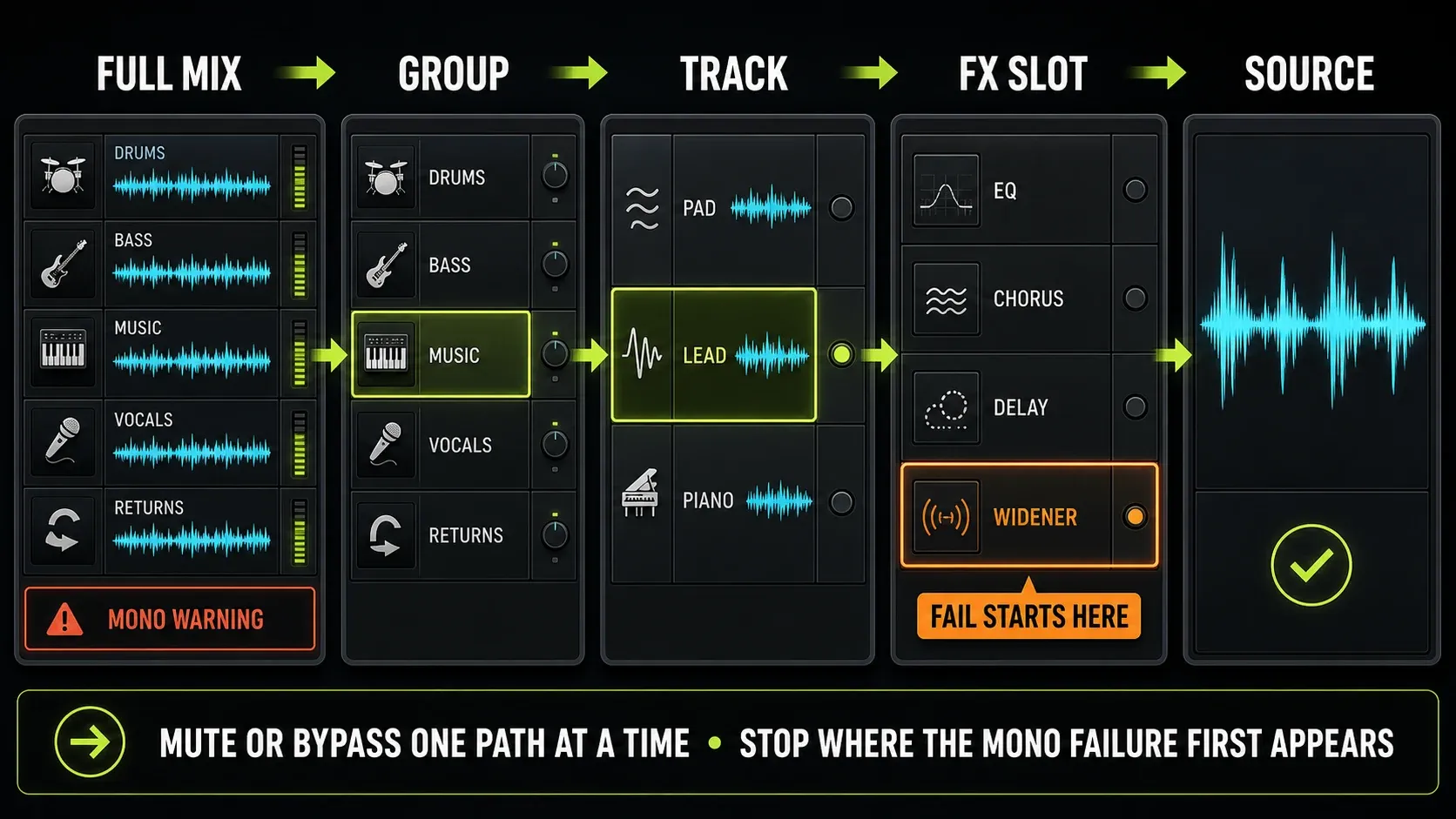
Start with the full mix folded to mono. Mute one broad group at a time, then bring it back: drums, bass, music, vocals, effects. If the problem changes when a group drops out, dig into that group and how it interacts with the rest. You can’t diagnose a missing lead by muting the lead itself. Solo it to hear whether its own tone survives.
On the suspect path, bypass effects one at a time and compare stereo with mono each time. The documented effect-slot order runs from 1 through 10, so work back from the last processor without deleting or reordering the chain. If bypassing a widener brings the sound back, compare its input and output, then check the wet amount, delay and level.
A bypass that helps is a clue, but it still isn’t proof: switching the processor off may also change loudness, compression or a parallel interaction. Turn it back on and repeat at comparable listening levels. Leave send paths and sidechain triggers alone unless one of them is what you’re testing.
With layers, listen to A, then B, then A+B. If each sounds solid alone but the pair goes thin, look at how their timing and polarity line up. Check several notes or hits. A shift that helps one transient can hurt the next one or change the groove.
Read Wave Candy at the right point in the chain
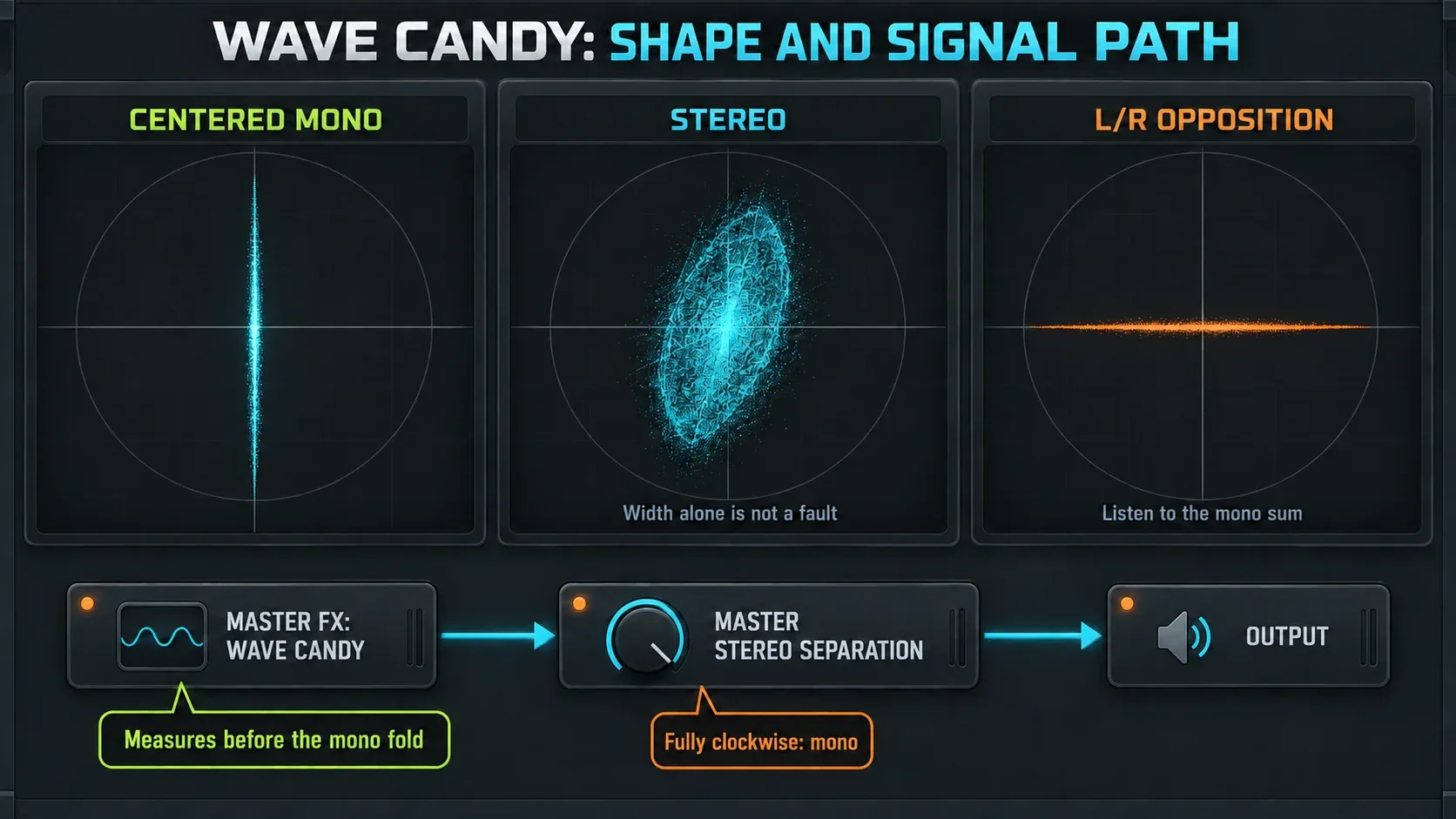
Load Wave Candy into a free effect slot on the track you want to inspect, then select Vectorscope. The Wave Candy manual says centered mono draws a vertical line, a single left or right channel draws a diagonal, and stereo produces a broader shape. A horizontal line points to left/right opposition. Complex music is much harder to read than a simple signal, though.
A Wave Candy instance in a Master effect slot measures before the Master Stereo separation control. The effect stack sits ahead of the built-in track properties, so the scope can keep showing a stereo shape while you hear the Master folded to mono. That does not mean the mono control failed. Use the scope there to inspect the stereo signal feeding the fold, and use your ears on the fold itself to judge translation.
The Current (C) track is another documented home for Wave Candy. It receives the output of whichever Mixer track is selected, and its target changes when you select another track. Be careful with corrective processing there: effects and EQ on Current can affect any track you select.
A broad display doesn’t mean the mix failed. If you use a separate correlation meter, treat a negative reading as a reason to listen more closely. It doesn’t predict that the entire song will vanish. And no scope can tell you whether a quieter backing part still does its musical job.
Make the smallest repair that actually helps
Haas delays, chorus and widening
Try turning down the delayed or wet layer, adjusting the delay between the channels, or keeping more dry signal. Check each option in both mono and stereo. Shorter isn’t automatically better, because changing the delay moves the cancellation pattern. Narrowing can’t bring back detail already cancelled in a printed mono file, so work from the stereo source or an earlier project whenever you have one.
Spreader’s documentation calls its Spread process mono-compatible, but warns that the separate Separation control can break compatibility. Low Bypass keeps low frequencies out of the spread effect, and its Mono option also folds that bypassed range to mono. Treat those as separate decisions. No preset is guaranteed to fix a damaged source.
Fold only the low band to mono
When a wide bass, 808 or kick layer is the problem, narrow the low band and leave the rest of the sound alone. Spreader does this on the track itself. Set Low Bypass to the crossover frequency and switch on Mono: everything below that point collapses to the center. Keep Spread at 0%, which the manual lists as no change, and leave Separation alone. Then bypass the plugin and compare. Above the crossover, the sound shouldn’t change.
Where should the crossover go? I compared the settings six mixing guides recommend. Armada Music’s kick-and-bass guide keeps both mono below 120 Hz. MusicRadar’s stereo bass feature and Mastering The Mix’s stereo width guide both settle on about 100 Hz, and Mastering The Mix allows a touch of width toward 150 Hz. Waves’ mono compatibility tips suggest 80 to 100 Hz on a multiband imager. iZotope’s Ozone Imager example folds 125 Hz and below, and EDMProd’s mono-versus-stereo guide goes furthest, centering everything below 200 Hz. Across those six, the range runs from 80 to 200 Hz, the median sits near 110 Hz, and four of the six land between 100 and 125 Hz.
I’d start Low Bypass around 110 Hz on the bass or 808 track, not on the Master. A Master fold also narrows the reverb tails, stereo keys and room sound below that point, and they’re rarely the cause. Then fold the whole mix to mono and listen. If the low end still loses weight, raise the crossover toward 150 Hz. If the stereo version loses movement you liked, lower it.
Folding has a cost of its own. In that iZotope example, narrowing 125 Hz and below lost some energy to low-frequency phase differences, and its Recover Sides option brought back about 2.5 dB under 125 Hz. Compare the folded and unfolded bass at matched level before you keep the change. Vinyl is a separate case: Green Lakes Pressing’s vinyl mastering notes ask for mono below 250 Hz, so follow the cutting engineer’s spec there rather than a mix figure.
If you want to set the slope yourself, Frequency Splitter splits a track into two or three bands with slopes from 6 to 96 dB per octave, in normal or linear-phase mode. Send the low band to one linked Mixer track and the high band to another, then turn the low track’s Stereo separation fully clockwise. Its manual warns that the main output and the sends carry the same signal, so turn the main output down or you’ll hear every band twice.
Polarity and timing are different repairs
The Mixer’s Invert phase control flips a track’s waveform polarity. Reach for it when correlated tracks cancel each other, such as two microphones on the same source, and keep the change only if the combined passage gets better. It won’t time-align a recording or undo an arbitrary frequency-dependent phase shift.
If the cancellation sits between the left and right channels inside one stereo file, flipping both at once won’t fix their opposition. In the ideal case, L = x and R = −x still sum to zero after both signs flip. Inspect the channels separately. Stereo Shaper has Invert Left and Invert Right presets for a confirmed polarity error on one channel, but don’t throw them at the whole mix. Image-Line also warns that inverting one channel can create cancellation of its own. A browser stereo test confirms your monitoring isn’t swapping channels on you.
One-sided recordings and effect returns
A mono microphone recorded on only one side of a stereo input is a different problem from phase cancellation. For the next take, pick the right mono input in the Mixer’s input list. Image-Line’s audio-recording instructions explain how that puts the active input into both Mixer channels. With an existing file, keep the original before you select its useful channel.
With reverb and delay, compare the dry sound, the return and both together. A smaller tail in mono is often fine, but a lead that leans on the sides to stay audible needs rebalancing. The separate dry-and-wet send workflow makes this easier. While you test the return, keep intentional ducking in place with the sidechain setup.
| What you hear | First comparison | Possible next move |
|---|---|---|
| Wide synth nearly vanishes | Dry versus widened signal | Reduce the responsible wet layer or revise its delay |
| Bass loses weight | Each layer, then the pair | Test timing or polarity; keep changes that help the whole phrase |
| Vocal drops behind the mix | Lead alone, then doubles and returns | Rebalance backing layers or competing instruments |
| Stacked snare turns hollow | Each sample, then both | Adjust the relationship or choose a different layer |
| Whole mix changes sharply in level | Master stereo processing on and off | Identify gain versus cancellation before changing width |
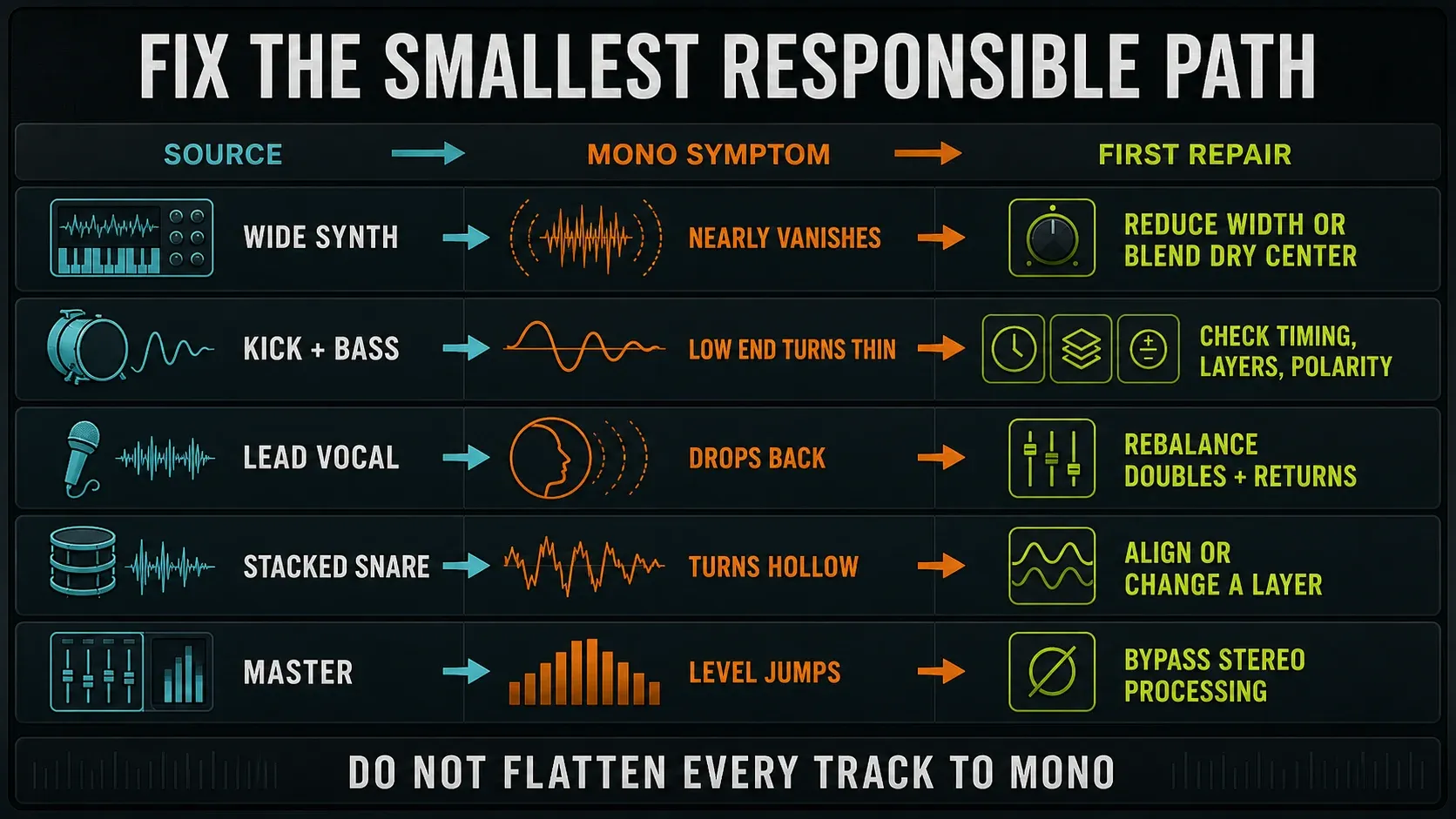
If the problem is in the low end, carry on with mixing the 808 against the kick. A lead that needs a stronger center is a job for the vocal-mixing workflow. There’s no rule that every bass must be mono below some fixed frequency. Protect the useful low-end weight and judge any stereo layer in context.
Level-match, restore the project and check the export
Compare the same passage at similar perceived loudness so a louder repair doesn’t win by default. Compensate for level after the processing you’re judging, since raising a plugin’s input can change how it behaves. Note the raw level change first, then compare tone and balance. The gain-staging guide covers those input-versus-output decisions.
Before the stereo render, put the Master Stereo separation setting back where it was and undo every temporary mute or bypass. The export manual says ordinary audio exports render the Master, so a mono fold you leave switched on ends up in that mixdown. A stereo file format can’t restore width already removed in the signal path. Split Mixer track exports take a different path, so the Master check may not cover each separate stem.
If you want a deliberate mono file, Mono (merged) sums the channels, while Mono (left only) and Mono (right only) each keep just one channel. They’re different tools, and neither of the last two works as a compatibility test. Play a short export outside the project, then check it in stereo and mono without sending it through the Master chain a second time.
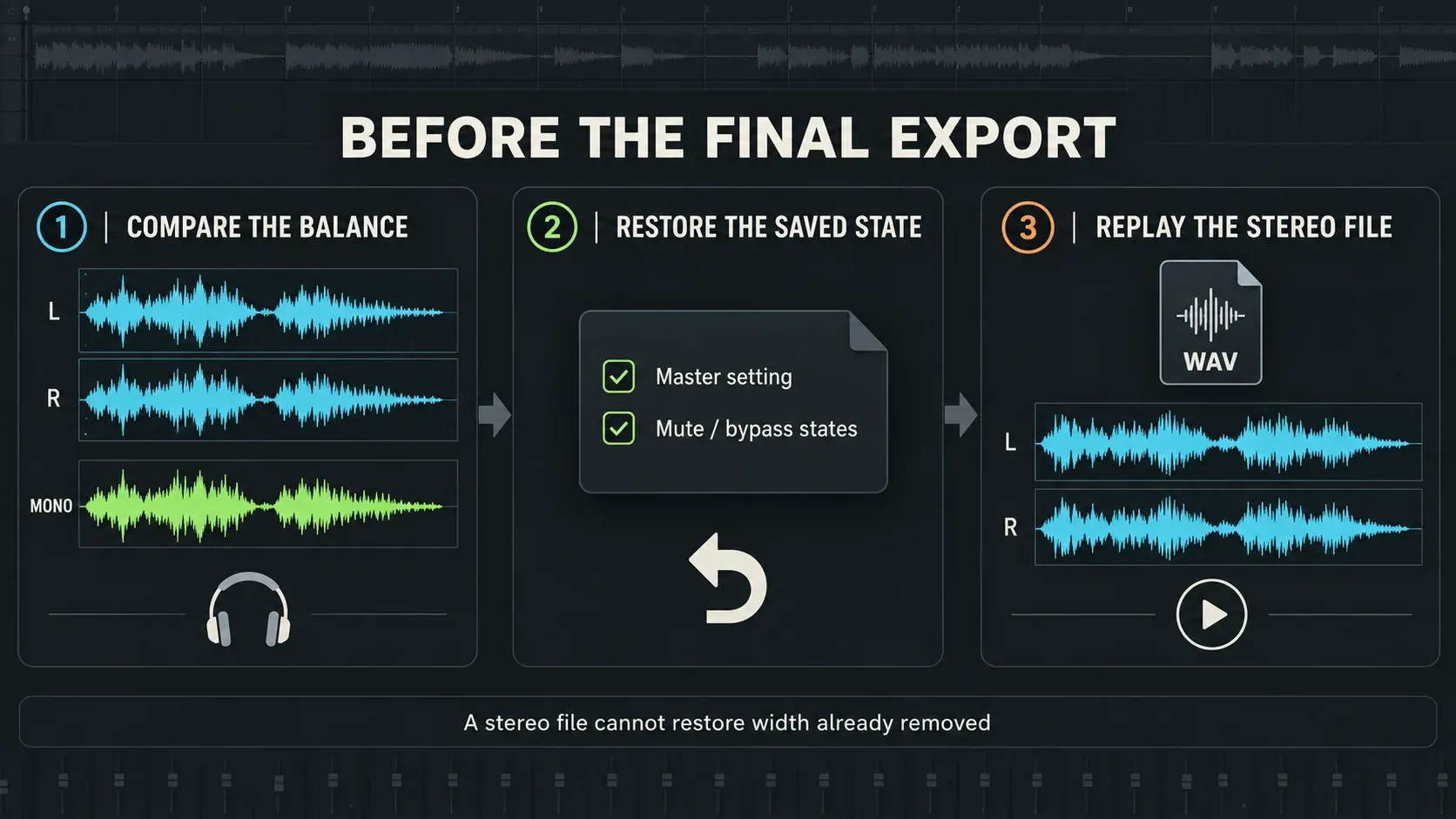
Settle the delivery choices with the mastering workflow and the export settings guide. If it sounds distorted in stereo and mono alike, look for clipping and earlier overload before you blame phase. The Mixing hub ties the wider workflow together, and the Troubleshooting hub covers faults this check doesn’t reach.
FL Studio mono compatibility FAQ
How do I check mono compatibility in FL Studio?
Note the Master Stereo separation setting, loop a busy passage and turn the control fully clockwise. Listen for missing parts, hollow tone or damaging balance changes. Restore the saved setting, isolate the suspect path and compare again after each repair.
Which direction turns the Master to mono?
Fully clockwise. Center leaves stereo separation unchanged, and counter-clockwise exaggerates existing stereo differences. After testing, return to your original setting, which is not necessarily center.
Why is my mix quieter in mono?
Summing changes the balance between shared and different left/right content, and timing or polarity differences may cancel. Reduced panning separation can also expose masking. A level drop alone does not prove a phase fault; isolate the sound and its processing.
Why does a synth disappear in mono?
Its stereo signal may lean heavily on opposing left/right content. Compare the dry sound with wideners, chorus and delays bypassed one at a time, then adjust the process responsible and compare levels before deciding what to keep.
Why does Wave Candy still look stereo after I turn the Master to mono?
A Wave Candy instance in a Master effect slot measures before the Master Stereo separation control. It can show stereo while the later control folds what you hear to mono. Check the measurement point before treating the display as a fault.
Does a wide Vectorscope display mean the mix fails?
No. Stereo normally produces a broader figure. A horizontal tendency warrants a mono listen, but the display alone does not tell you whether the important musical parts survive or whether the balance needs changing.
Should the bass always be mono?
There is no universal rule for the whole bass sound or a compulsory crossover frequency. Most published mixing guides put the mono point between 100 and 125 Hz, and the full spread runs from 80 to 200 Hz. Use that as a starting point, then check whether the useful low-end weight survives the fold. Keep stereo layers that work, and change only the layer or processing that causes a problem.
Can Invert phase fix cancellation?
It can help a confirmed polarity conflict between correlated tracks. It does not fix every timing or phase problem. Flipping both channels of one stereo file together will not repair opposition between its left and right channels.
Do I need to mix the entire song in mono?
No. Regular mono checks can expose balance and cancellation problems, but a stereo release also needs stereo decisions. Work in whichever view helps you decide, then check both before keeping the change.
Will leaving the Master in mono change my export?
It affects an ordinary mixdown rendered through the Master. Restore the saved Stereo separation setting before your stereo export; a two-channel file cannot recover width already removed. Separate Mixer-track exports do not all pass through the Master.