FL Studio
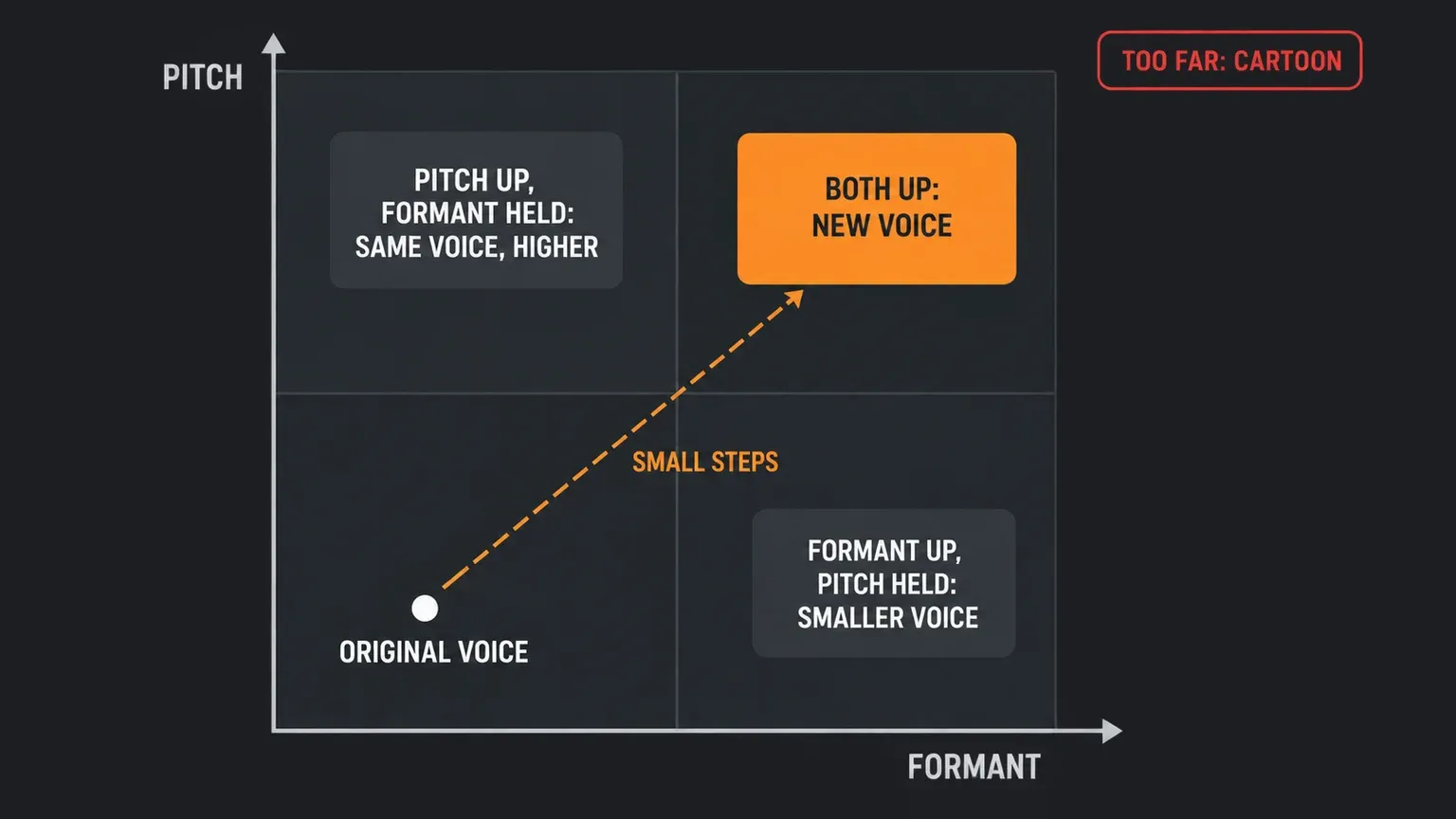
To make a voice sound female in FL Studio, the "girlify" effect from the short videos, move pitch and formant together; pitch alone won't do it. Formants are the throat and mouth resonances that tell the ear how big the speaker is, and a plain pitch shift either leaves them where they were or drags them into a helium sound. Load the voice dry and mono, put the shifter first in the chain, and use the stock route your edition has: Pitcher (Signature Bundle and up) for the Formant and Gender controls, the Voice tab of Pitch Shifter (All Plugins Edition only), Stretch pro in an audio clip or Sampler channel, whose F.Shift knob is a formant shift, or Edison's Time stretch / Pitch shift tool (Producer Edition and up). Raise the pitch in small steps, move the formant a little at a time until the voice stops sounding like a cartoon, then de-ess and EQ the result.
The short answers online, "use Pitcher" or "Stretch Pro and the formants go up", are both right and both leave out the part that decides whether the result sounds like a woman or like a man with a high voice. Below I explain pitch versus formant, compare the stock routes by edition, set up the source, walk through the three main routes with the controls Image-Line names in its manual, cover what to do for female to male and for a younger voice, and finish with a fixes table. Everything here uses FL Studio's own tools.
Why pitch alone doesn't sound female
Image-Line's Pitcher manual defines a formant as a resonance in the frequency spectrum, most often used for the throat, mouth and nasal cavity resonances of the human voice. Because those resonances depend on the size and shape of the cavities, it calls formants "a major aural cue to the age and sex of a speaker". The NewTone manual says the same thing from the editing side: changing the formant changes the apparent size, age or even sex of the vocalist.
That gives you two separate dials. Pitch decides how high the voice sings. Formant decides how big the voice sounds. A tape-style pitch change moves both together, and Image-Line's Pitch Shifter manual describes what happens when formants move with a big pitch change: the familiar helium sound. A formant-preserving shift does the opposite and holds the resonances where they were, so a male voice moved up still has a male-sized throat. That's exactly what you want when you're correcting a note, and the wrong thing when you're changing who the voice seems to belong to.
Forum users reached the same conclusion long before the videos did. In a June 2022 Elektronauts thread a reply to someone asking for a male-to-female plugin said "pitching up is not gonna do it" and that you also need a formant shifter.
Pick a stock route for your edition
The FL Studio edition comparison lists Pitcher and NewTone as Signature Bundle and up, Edison and Vocodex as Producer Edition and up, Audio Clips as Producer Edition and up, and Pitch Shifter as All Plugins Edition only. The Sampler channel's time stretching panel has no edition note in the manual, so on Fruity Edition that's the first place I'd look.
| Route | Formant control | Best for |
|---|---|---|
| Pitch Shifter, Voice tab (All Plugins Edition) | Formant and Formant Correction | Moving pitch and formant together on one X/Y pad |
| Stretch pro in a clip (Producer Edition and up) or a Sampler channel | F.Shift | Repitching a recorded phrase without a plugin |
| Pitcher (Signature Bundle and up) | Formant switch and Gender | Tuning the shifted voice and overriding its formants |
| Edison Time stretch / Pitch shift (Producer Edition and up) | Factor coarse, Fine, Mul | Rendering a processed copy of one take |
| NewTone (Signature Bundle and up) | Formant per note | Fixing single words that sound off |
| Vocodex (Producer Edition and up) | Modulator pitch shift | A vocoded, robotic voice, not a natural one |
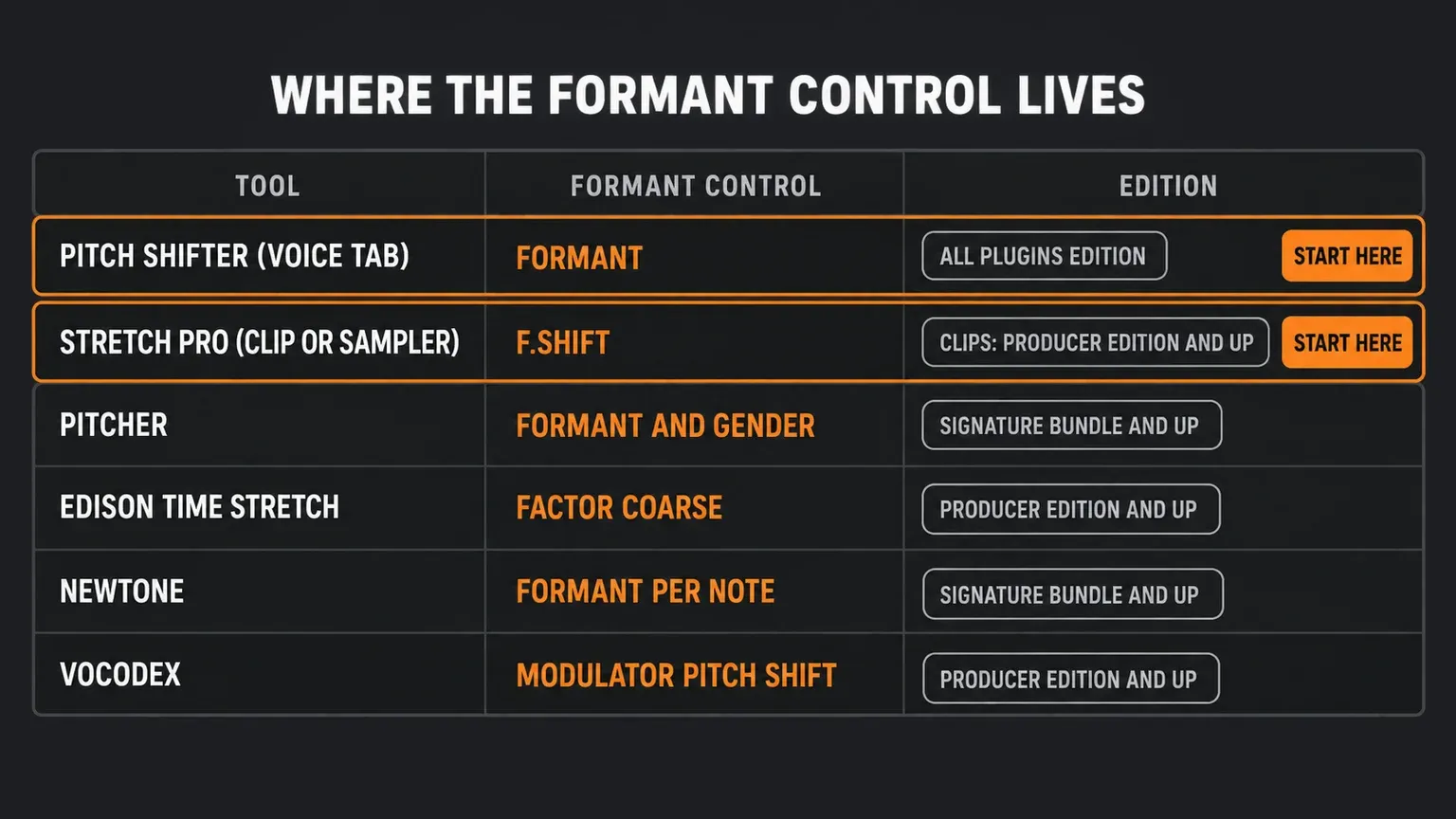
If I had to pick one for a first try, it'd be Pitch Shifter when you own it and Stretch pro when you don't. Both put pitch and formant in front of you at once. Pitcher is the route the Image-Line forum has pointed to for years: in a September 2012 thread, the visible part of the answers has the site admin replying "Yes... Pitcher" and other users naming NewTone, Edison's formant controls and Harmor. The thread is 14 years old and truncated for guests, so treat it as a pointer rather than a method.
Prepare the voice before you shift it
Pitch tools work on one clear voice, so a few choices up front matter more than any knob.
- Use a dry, single voice. The Pitcher manual says it works with monophonic sounds and won't follow choirs, chords or complete mixes. Layered or doubled takes go through separate instances. Our guide to recording vocals in FL Studio covers getting a clean take; the Elektronauts thread adds that recording at high quality helps re-pitching, with fewer unwanted artifacts.
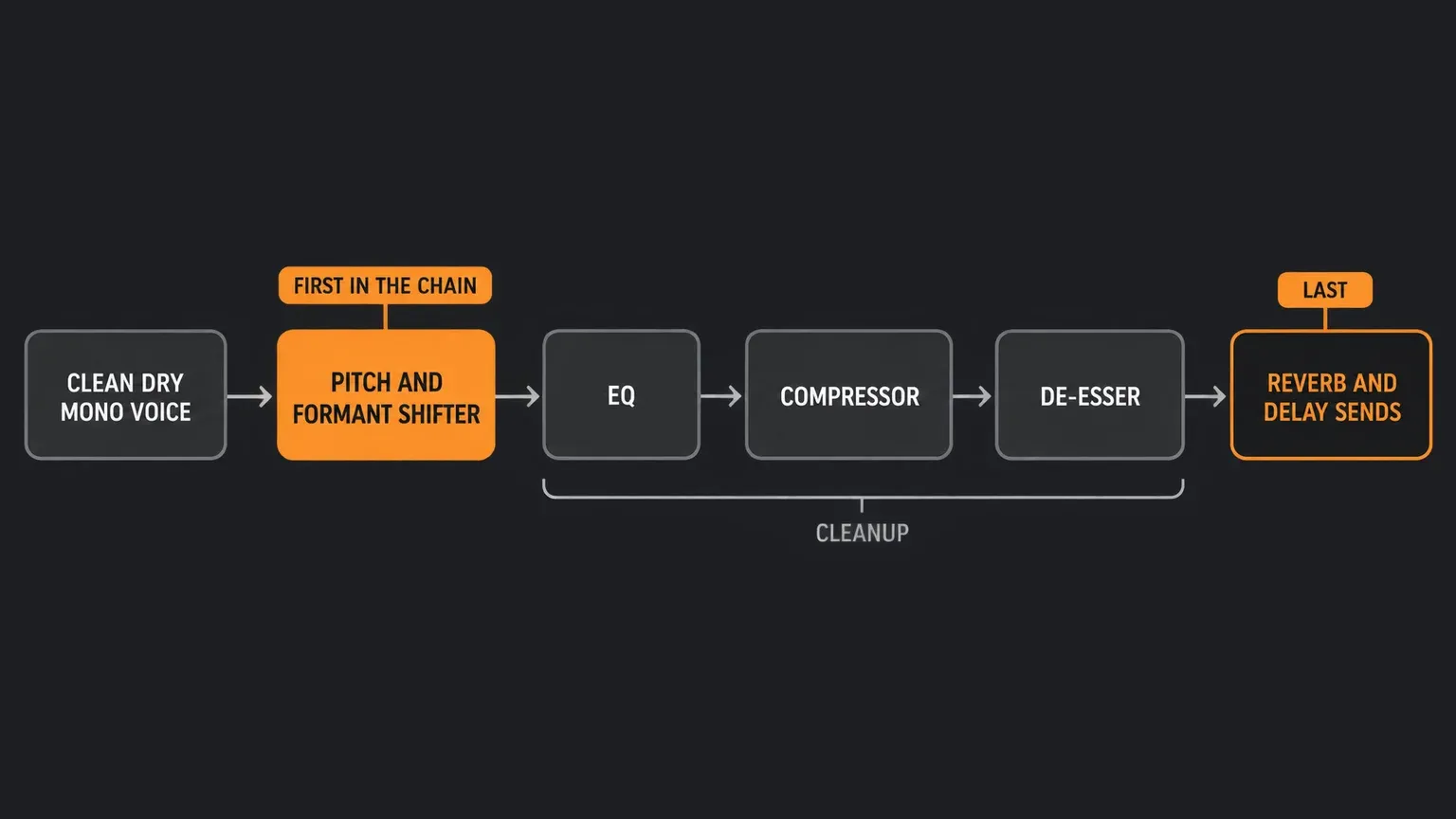
- Put the shifter first. Both the Pitcher and Pitch Shifter manuals say phasing, chorus, reverb and delay upstream hurt pitch detection. The shifter goes in the first slot of the vocal's Mixer track, and everything else comes after it.
- Set Pitcher's Min frequency for the voice you recorded. The manual suggests 80 to 170 Hz for male voices and 170 to 220 Hz for female voices, which also cuts rumble and breath pops from the detector.
- Check the key if you'll use Pitcher. Its Scale and Key controls decide which notes the voice can land on. If you don't know the key, the manual says to watch the pitch indicator and deselect notes that are detected but unwanted.
Route 1: Pitch Shifter's Voice tab
If your edition has it, Pitch Shifter is the most direct stock tool, and its manual page describes the Voice tab as built for monophonic input with a clearly defined pitch. The X/Y panel on the Voice tab pairs Pitch on the vertical axis with Formant on the horizontal axis, which is the pair you need.
- Insert it first and open the Voice tab. The Music tab is for polyphonic material; switching tabs changes the algorithm, so the two don't run together.
- Raise Pitch. The slider covers minus 12 to plus 12 semitones and pauses at each semitone; the X/Y pad gives smooth continuous changes. Move up in small steps.
- Move Formant. This is the control that makes the voice sound smaller or larger. I'd expect to move it up for a smaller-sounding voice, and the Edison manual tells you where the limit is: it calls the chipmunk effect a classic case of formants shifted too high. Nudge it a little at a time and compare with the original.
- Read Formant Correction before you trust it. At 0% the manual says it maintains the formant position for the most natural result; at 100% the formant varies most with pitch. For a gender change I'd read that as a reason not to leave it at 0% when the voice still sounds like the same person, and to raise it or move Formant directly.
- Leave Mix at 100%. The manual says 100% is the pitch-shifted signal and 0% is the input. Its tip of 50% is for two-part harmonies, which is a different job.
- Fix a wobbling pitch. If you hear glitching, switch the Pitch Detector between Fast (28 ms) and Accurate (56 ms, better for fundamentals below about 100 Hz), or change the Analysis Channel to Left or Right when one side of a stereo recording misbehaves.
Route 2: Stretch pro in a clip or Sampler channel
This route needs no plugin. The Sampler channel manual describes a Time stretching / Pitch shifting panel whose PITCH knob changes pitch while preserving length, and a Mode menu with Realtime options. The Stretch pro mode is an enhanced Stretch with formant control: its F.Shift knob is the formant shift. Our guide to time stretching in FL Studio covers the other modes.
- Open the clip's Channel settings. For an audio clip, click its button in the Channel Rack; the clip's Pitch and Fine controls are semitones and cents. All instances of one audio clip share a single stretch mode.
- Choose Mode, then Realtime, then Stretch pro. This is the mode that adds F.Shift.
- Raise PITCH in small steps. With a stretch mode active the phrase keeps its length instead of speeding up.
- Move F.Shift. This is the formant; I'd raise it in small steps for a smaller-sounding voice. The manual notes that automating it adds movement to sampled sounds, which is useful for effects but not what you want for a steady voice.
Avoid the offline Elastique e3 Mono mode here. The manual describes it as specialized for monophonic input such as vocals, with automatic formant preservation, which keeps the resonances where they were. It's the right choice for tuning a take and works against a gender change. The manual also lists Resample, which changes length with pitch, so a phrase pitched that way drifts out of time.
Route 3: Pitcher for tuning and the Gender control
Pitcher doesn't transpose by a set interval in Automatic mode: it moves each pitch to the nearest enabled note. That's why it works best behind a shift from Route 1 or Route 2, tuning the raised voice to the key and overriding its formants. Our Pitcher guide explains Formant, Gender and Fine tune in detail, so here is the short version for this task:
- Formant keeps the resonances steady as pitch moves. With it off, the manual says to expect the helium sound for shifts of more than a few notes.
- Gender is a formant override control. The manual doesn't say which direction is more feminine, so move it in small steps and compare by ear.
- Correction Speed: the manual says fast settings sound more artificial and slower ones more natural, so keep it slower on a voice you want to believe.
If you want Pitcher itself to set the target pitch, switch to MIDI mode with Octaves and drive it from a MIDI Out channel set to the same port; the manual says the MIDI notes then scale the audio to the note and octave played. That needs the melody written out, which is more work than moving a knob.
Other stock tools worth knowing
- Edison. The Time stretch / Pitch shift tool (Alt+T) changes duration, pitch and formant independently. Its formant section has Factor coarse in semitones, Fine in cents, Mul and Order. The "Copy from pitch" button copies the pitch value so formants are preserved, which is the opposite of what a gender change needs. Preview before you accept, and see our Edison guide for the editor itself.
- NewTone. In Advanced Edit mode, double-click a note and drag vertically on its Formant control. It's the tool for the one word that still sounds male after a global shift. Our NewTone guide covers the editor.
- Vocodex. Its Modulator pitch shift knob, marked with gender symbols, slews the vocoder down for a more masculine sound and up for a more feminine one. A vocoder uses your voice to shape a synth, so you get a robotic result rather than a natural female voice. Our Vocodex guide sets up the carrier and modulator.
Make it believable
The tools only move the sound; the performance still has to give them something to work with. These habits help:
- Small moves, then compare. Big pitch and formant moves read as an effect. Our Pitcher guide makes the same point: subtle moves blend more easily with the original performance. I'd stop at the point where the voice still sounds like a person.
- Deliver the line lighter and higher. The processing can't add a different way of speaking. A softer, brighter delivery gives it better source material, and the closer the recording is to the voice you want, the less you need to push.
- Compare with a real voice. Put a recording of the kind of voice you're aiming for next to yours and switch between them. It's the quickest way to hear whether the size cue is right, and it keeps you from judging the effect against the original take, which will always sound different.
- De-ess after the shift. Sibilance moves with the voice, and a brighter voice can sound spitty. Our de-essing guide shows the stock options.
- Finish with EQ. A high-pass can clear rumble the shift exposed, and small moves in the presence range help the voice sit. Our Fruity Parametric EQ 2 guide shows how to set the bands.
- Add reverb and delay last. Keep time-based effects after the shifter, as in our reverb and delay sends guide, and fit the processed voice into the rest of the chain with our guide to mixing vocals in FL Studio.
Female to male and younger voices
The same tools work in the other direction. For a female voice that should sound male, lower the pitch and lower the formants together. Vocodex's manual documents the direction for its own knob, left for a more masculine sound. For Pitch Shifter's Formant, F.Shift and Edison's Factor coarse I'd lower the formant for a bigger voice and raise it for a smaller one, since Edison's manual ties "formants shifted too high" to the chipmunk sound. For Pitcher's Gender the manual gives no direction, so find it by ear. Pitcher's Min frequency range then belongs to the female source voice, 170 to 220 Hz in the manual's suggestion.
For a younger-sounding voice, my reasoning is that a smaller vocal tract means higher formants and a lighter delivery, so I'd move formants up a bit further than I would for an adult female voice and keep the pitch change modest. That's an inference from how the manuals describe formants, not a documented recipe, and pushing it far turns into a cartoon quickly.
Fix common problems
| Symptom | Likely cause | What to try |
|---|---|---|
| Chipmunk or cartoon | Pitch and formant pushed too far together | Smaller steps, pull the formant back, turn Pitcher's Formant on |
| A man's voice, just higher | Formants preserved | Move Formant or F.Shift; avoid e3 Mono and Edison's Copy from pitch |
| Glitching or wobbling pitch | Pitch detection struggling | Shifter first, nothing upstream, Fast or Accurate detector, Analysis Channel, Pitcher Min frequency |
| Metallic or robotic | Large shift or fast correction | Slower Correction Speed, smaller shift, try Formant Correction |
| Spitty esses | Sibilance moves with the voice | De-ess after the shifter, then EQ |
| Phrase drifts out of time | Resample mode changes length with pitch | Use Stretch or Stretch pro so length is kept |
Quick answers
Does FL Studio have a one-click male to female plugin?
No. You combine a pitch move with a formant move using Pitch Shifter, Stretch pro, Pitcher, Edison or NewTone, depending on your edition.
What can I use on Fruity or Producer Edition?
Producer Edition has Stretch pro in audio clips, Edison and Vocodex. The manual lists no edition limit for the Sampler channel's time stretching panel, so check what your build shows. Pitcher and NewTone start at Signature Bundle and Pitch Shifter needs All Plugins Edition. Our overview of the stock plugins worth learning first places these in context.
Should I change pitch or formant first?
Pitch first in small steps, then formant, then back and forth. Judge each change against the original so you notice when the voice crosses from natural into cartoon.
Can Pitcher do it on its own?
Its Gender control overrides formants, but in Automatic mode Pitcher snaps to scale notes rather than lifting the voice by an interval. Raise the pitch first, or drive it with MIDI, and use Pitcher for tuning and Gender.
Do the same steps make a female voice sound male?
Yes, in the other direction: lower pitch and lower formants, in small steps. Vocodex documents which way its knob turns for a more masculine sound.
Whichever route you pick, the method is the same: clean mono voice, shifter first, pitch and formant in small steps, then de-ess and EQ. Stop when the voice still sounds like a person, not when the effect is loudest.