FL Studio
Vocodex makes a synth speak: the voice, called the modulator, opens and closes the frequency bands of a synth, called the carrier. Load Vocodex on a Mixer track other than Master and route the synth to that same track, so CAR 0 reads it. Send the voice from its own track with Sidechain to this track only. Start at 16 bands, then raise NOISE when s and t sounds vanish.
Image-Line's editions comparison lists Vocodex in Producer Edition and up, while Fruity Vocoder comes with all editions, so a Fruity Edition owner works with the plugin covered further down. The FL Studio editions guide sorts the other edition differences. Once Vocodex loads, failures come down to three decisions: the wrong signal reaches MOD or CAR, the carrier lacks frequency content, or the settings wipe out the consonants that make words recognizable.
Carrier and modulator in plain language
Picture the modulator as a moving stencil and the carrier as the material pushed through it. A spoken phrase keeps reshaping the stencil, while a synth chord supplies a steady, pitched texture. You hear the carrier, but its frequency balance moves with the voice.
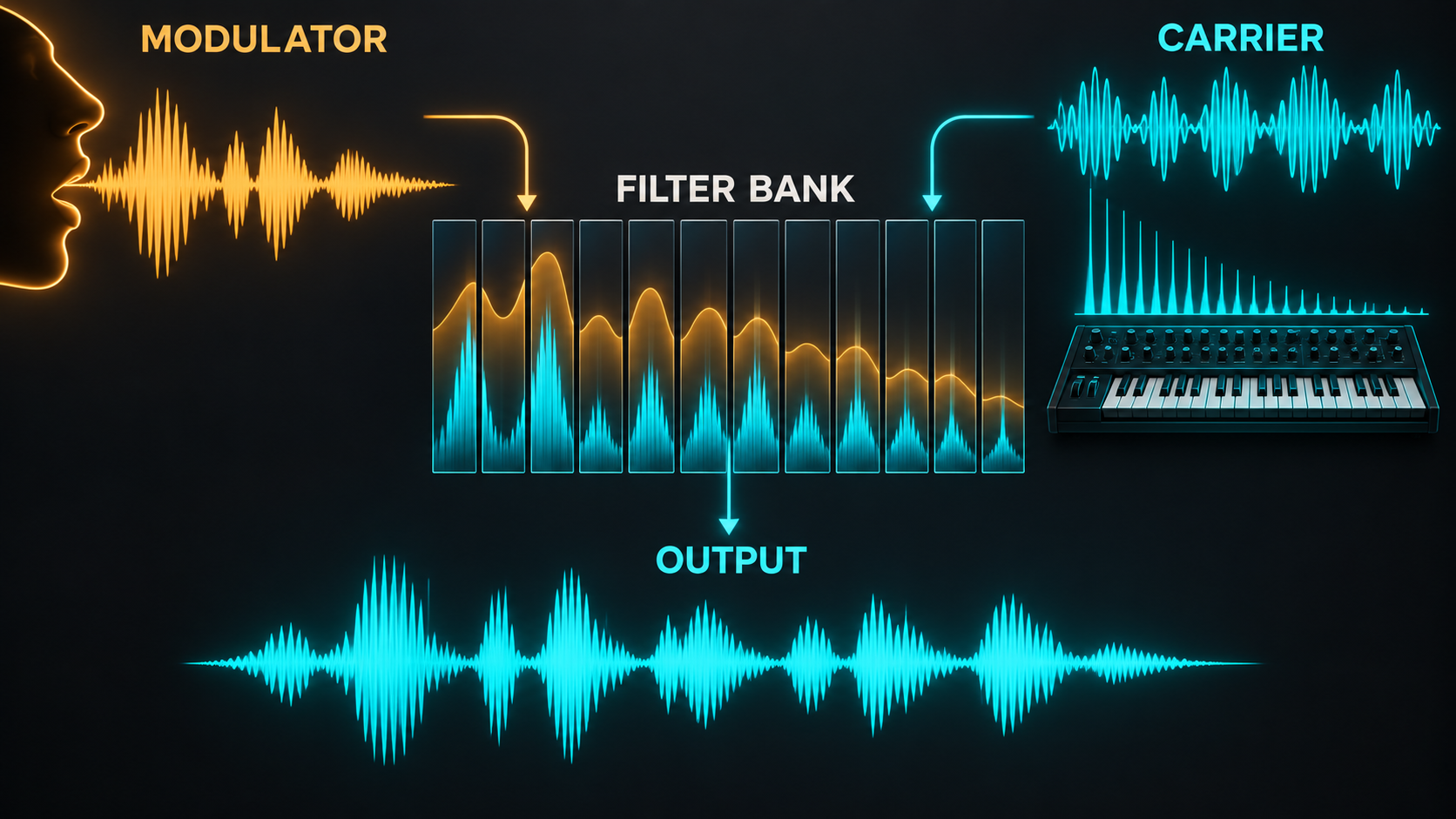
Image-Line's Vocodex manual describes the engine as a bank of band-pass filters, where each band responds to energy detected in the same region of the modulator. If the voice has energy in a band but the carrier has nothing there, the opened band has little to pass. That is why a thin, sine-like carrier can make speech harder to follow than a bright, harmonically dense sound.
Read Vocodex as a signal path
The interface looks crowded because several systems share one window. Read it from the input and mix controls, through the envelope follower and band distribution, into the mapping display and the output character controls.
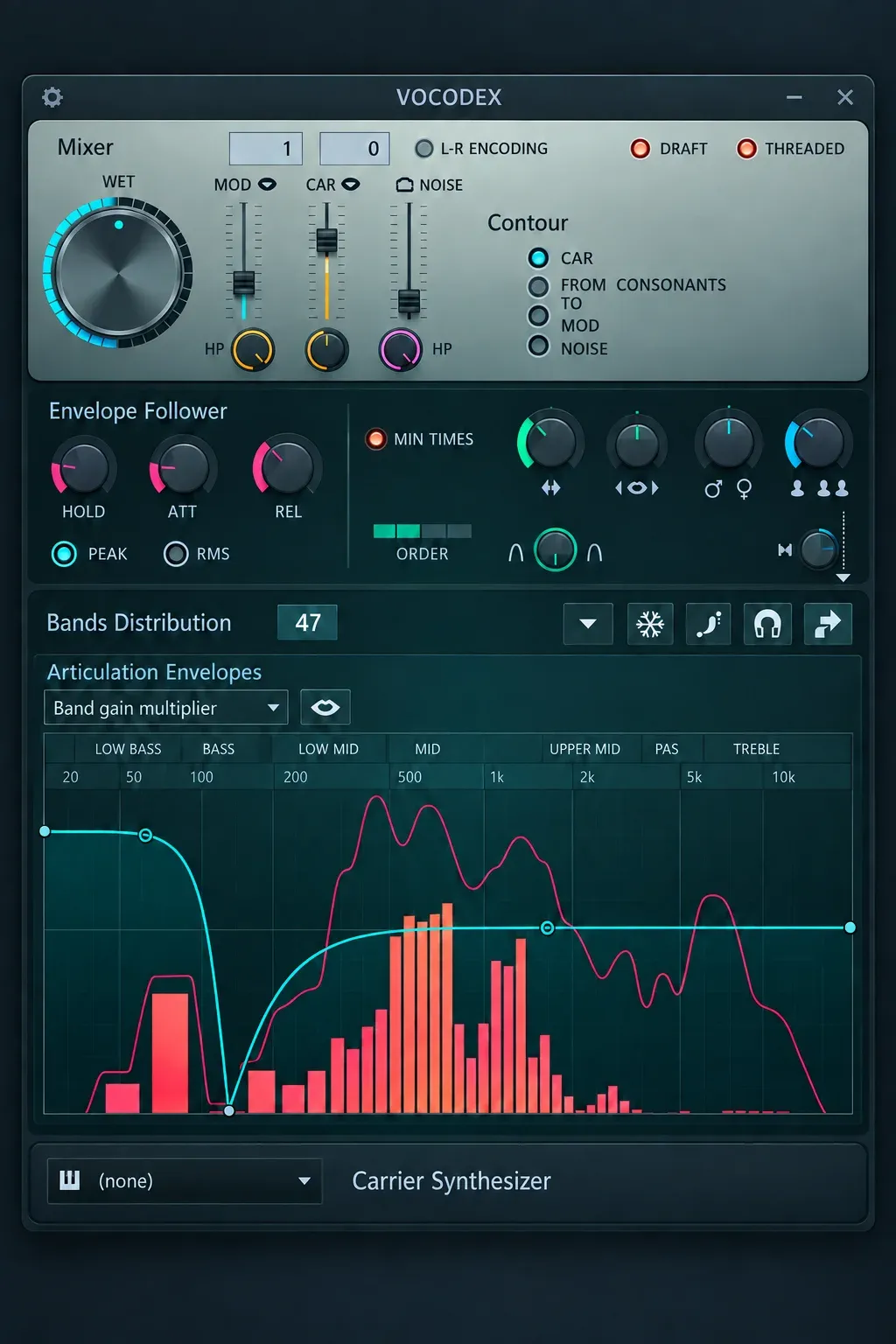
- WET sets the vocoded effect level.
- MOD and CAR select incoming Mixer sources and also provide pass-through controls.
- NOISE adds broadband material to the carrier path.
- Contour can make MOD pass-through or noise respond to the carrier envelope or detected consonants.
- Envelope Follower sets how quickly band levels react and recover.
- Band Distribution controls band count, filter behavior and analysis width.
- Modulation Mappings shape behavior across the spectrum instead of applying one setting equally to every band.
I prove the route before I touch a mapping envelope, because no mapping can shape a signal that never reaches the plugin. Play the phrase and the chord together and confirm that both reach Vocodex before drawing anything.
Use the internal carrier for a fast orientation
Vocodex includes an internal carrier synthesizer. Image-Line positions it mainly as a live demonstration method. Load Vocodex on a Mixer insert other than Master, send a voice or microphone to that insert, choose an Immediate preset, select an internal carrier sound and play the on-screen keyboard or a MIDI controller while the voice runs.
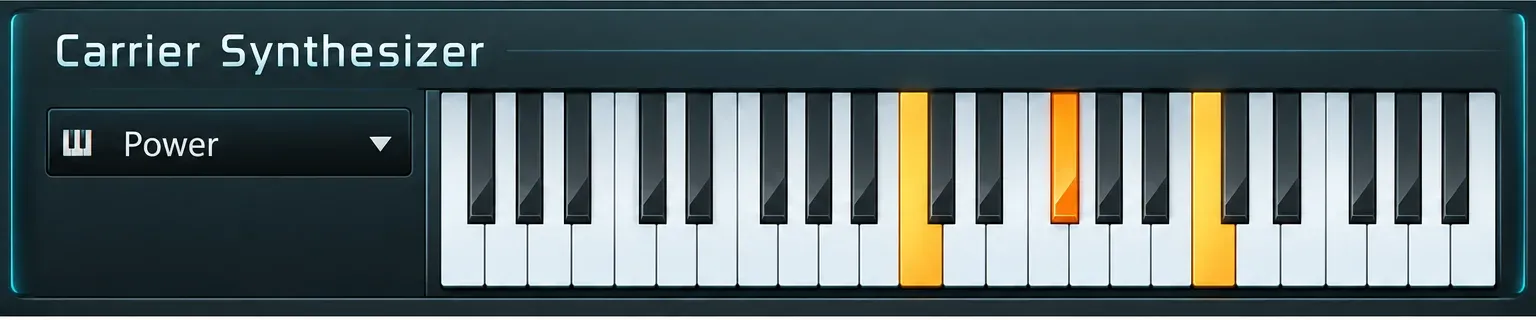
The Vocodex carrier manual describes the internal carrier as a synth based on the Sytrus engine, with its sound menu to the left of the keyboard. A chord played on a controller keyboard holds until the next chord, and the first held note of that chord clears the others. That makes it handy for hearing one spoken phrase under different chords.
I use the internal carrier only to learn the sound, because it does not respond to the Piano roll or the Step Sequencer. The same carrier sounds sit in Browser > Plugin presets > Sytrus > Vocoder carriers, so a Sytrus channel gives project work an editable carrier. The Vocodex input guide draws the same line: the internal carrier is the live demo method and the production method is the route for project work.
Build the external production route
The production method gives the carrier its own Channel and Piano roll pattern, and it keeps the dry voice off Master unless MOD pass-through brings some of it back through Vocodex. The FL Studio Mixer guide explains how inserts, sends and destinations connect before you trace the same path inside Vocodex.
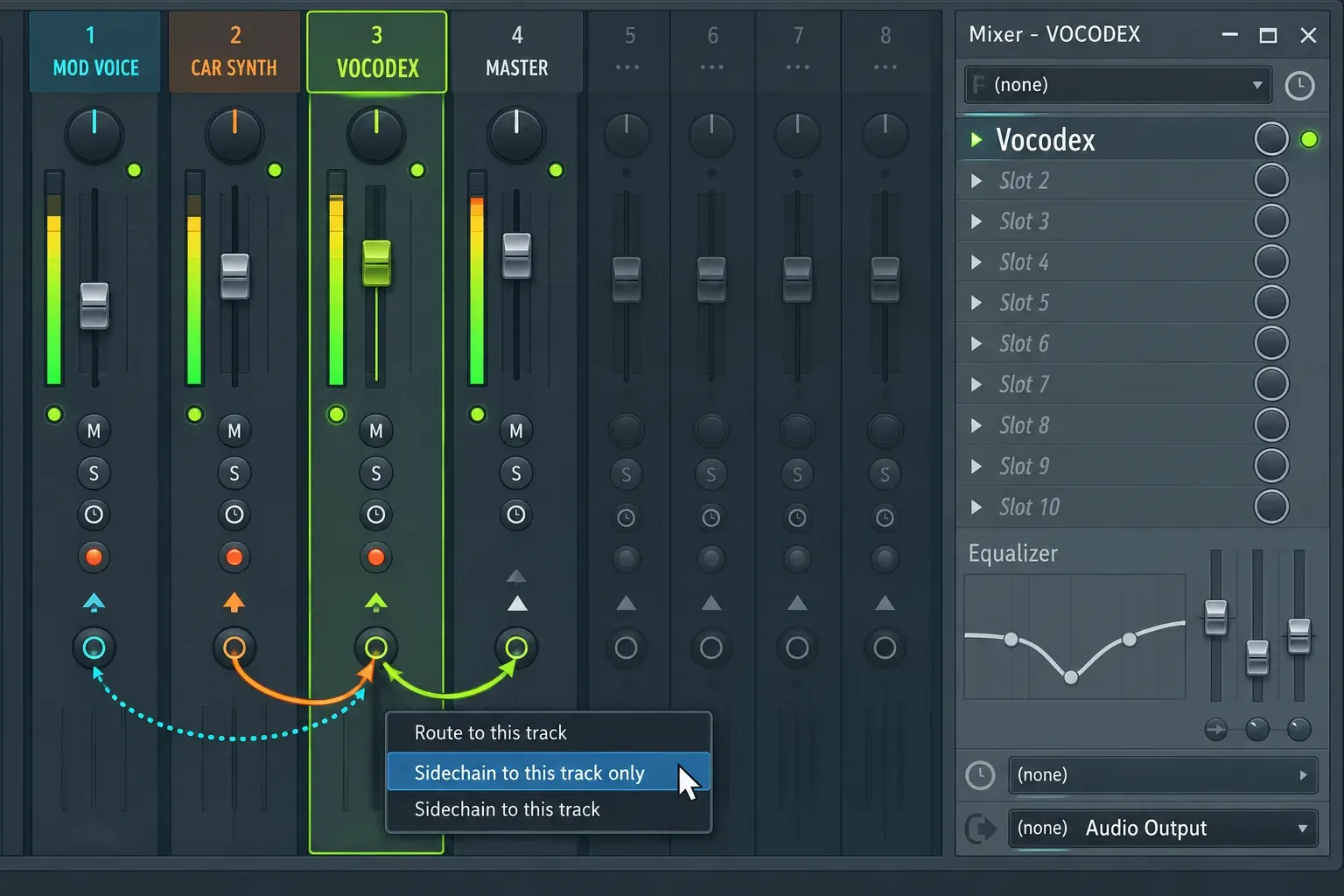
- Create two named Mixer tracks: MOD for the voice and VOCODEX for the carrier and the effect. This is the two-track route in Image-Line's production setup.
- Load Vocodex in an effect slot on VOCODEX. Keep it off Master, so other instruments stay outside the processing route.
- Send the voice to MOD. With MOD selected, right-click the send switch below VOCODEX and choose Sidechain to this track only. The voice reaches Vocodex as a sidechain and its send to Master switches off.
- Route the synth to VOCODEX. Set the FX track selector in the carrier's Channel settings to the VOCODEX track number. A separate CAR track is unnecessary on this route.
- Set the plugin inputs. Leave CAR on 0, which reads the audio on the VOCODEX track itself, and point MOD at the voice track by name. A selector showing --- blocks that external input.
The FL Studio sidechain guide covers source and destination routing in detail. Here the sidechain carries the voice itself for Vocodex to analyze, not a trigger for a compressor's detector.
Understand 0, numbered inputs and ---
Vocodex numbers its inputs among the Mixer tracks routed or sidechained to its own track. Right-click a selector to list every sidechained source track, and name the MOD and CAR tracks so that list reads at a glance.
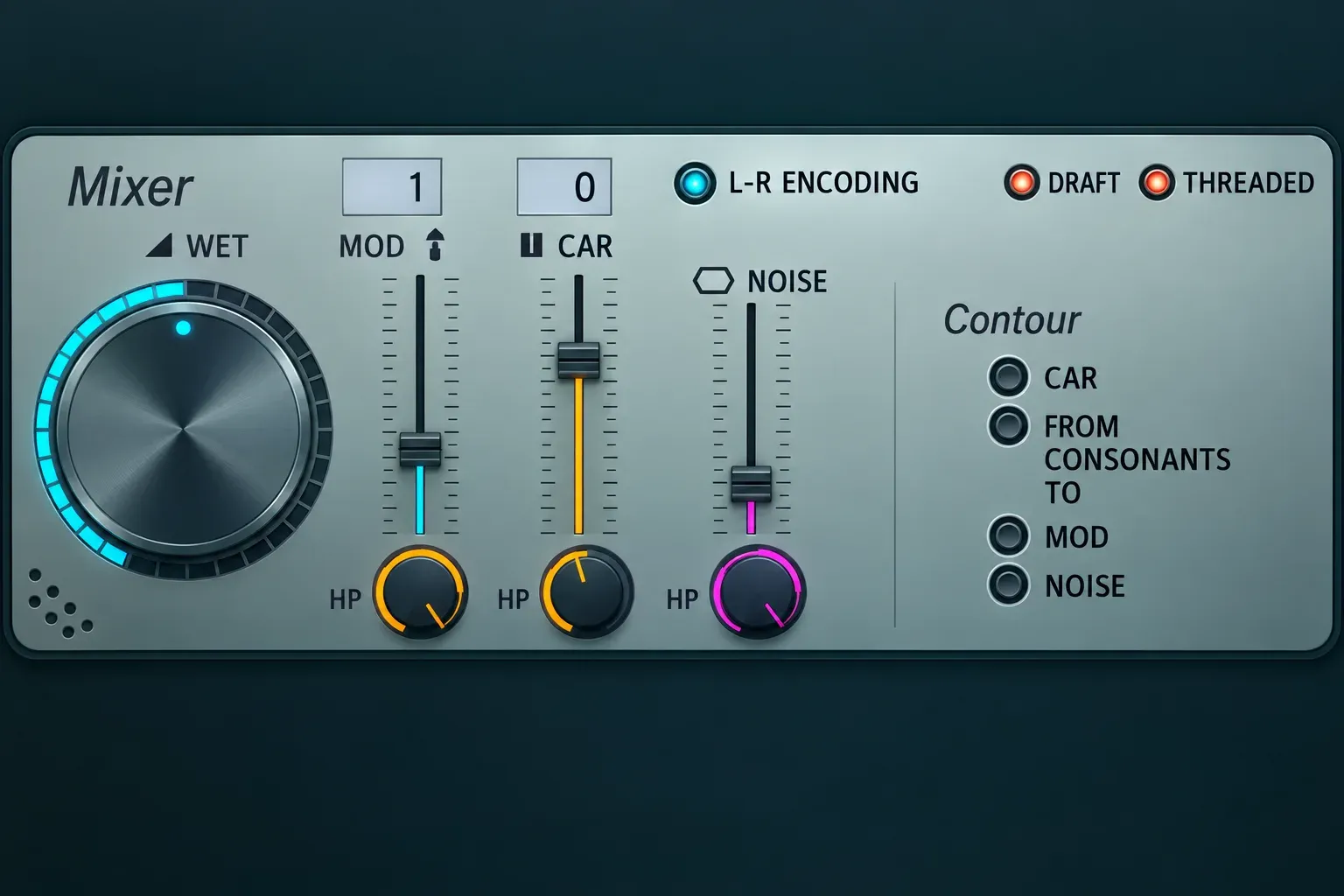
- 0: use audio passing through the same Mixer insert that hosts Vocodex.
- A numbered or named sidechain: use that routed Mixer source.
- ---: disable the external input. Immediate presets use this for CAR when the internal carrier is active.
I route the carrier straight to the Vocodex track, because the default selectors then read it as CAR 0 and only the voice needs a sidechain. The other route sidechains both sources to the Vocodex track and picks each one with the MOD and CAR selectors. It costs a third track and a manual CAR setting, and it suits a project where the synth already feeds its own Mixer track with its own effects.
Choose a carrier that can speak
A carrier needs energy across the regions that hold intelligibility cues. Bright pads, saw-based chords and harmonically rich stacks make reliable starting points because they give the filter bank plenty to reveal. A dark or narrow patch can lose whole chunks of the phrase even when the routing is right.
Stereo carriers stay stereo through Vocodex, and a mono carrier stays mono. The modulator is analyzed as the mono sum of its left and right channels, while MOD pass-through keeps its stereo image. Width makes the result feel bigger, but it does not fix missing consonants or a poorly suited spectrum. Start with a stable, broad sound, make sure the words come through, then add movement and width.
If you want to build the source rather than browse presets, the 3xOSC guide gives a simple harmonic starting point, while the Sytrus guide explains richer detuned carrier design. Keep that synthesis work separate from Vocodex troubleshooting: first prove the route with a predictable carrier.
Set bands and bandwidth for the words you need
The Vocodex parameters manual gives Vocodex 5 to 100 bands, and Image-Line places classic vocoder effects at 8 to 16. More bands sound closer to the modulator and add CPU load, so a low count is a character choice, not a broken setup. For a harsher robotic sound, Image-Line's tutorial points to 16 to 32 bands, or to the Band width knob turned right to widen the bands.
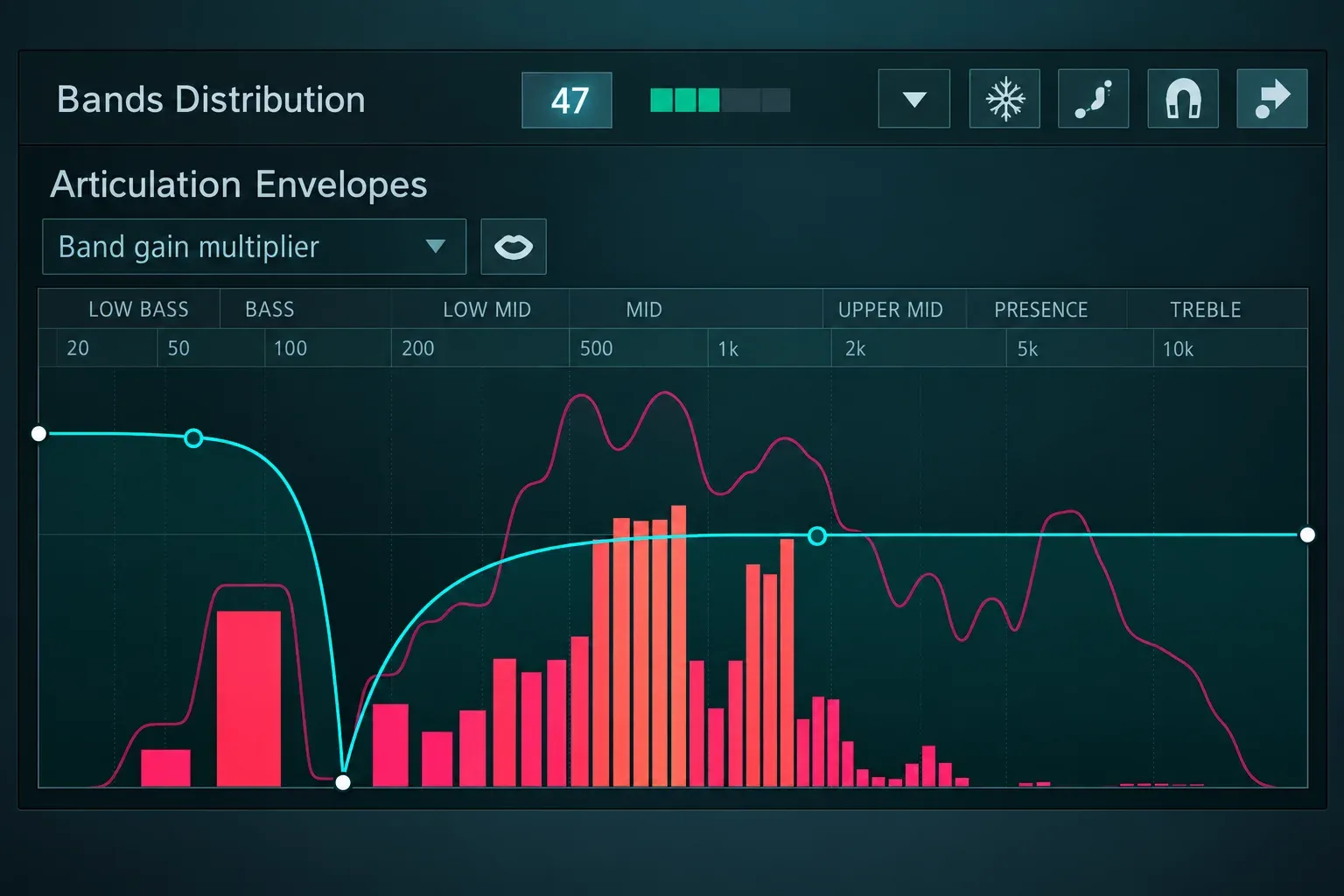
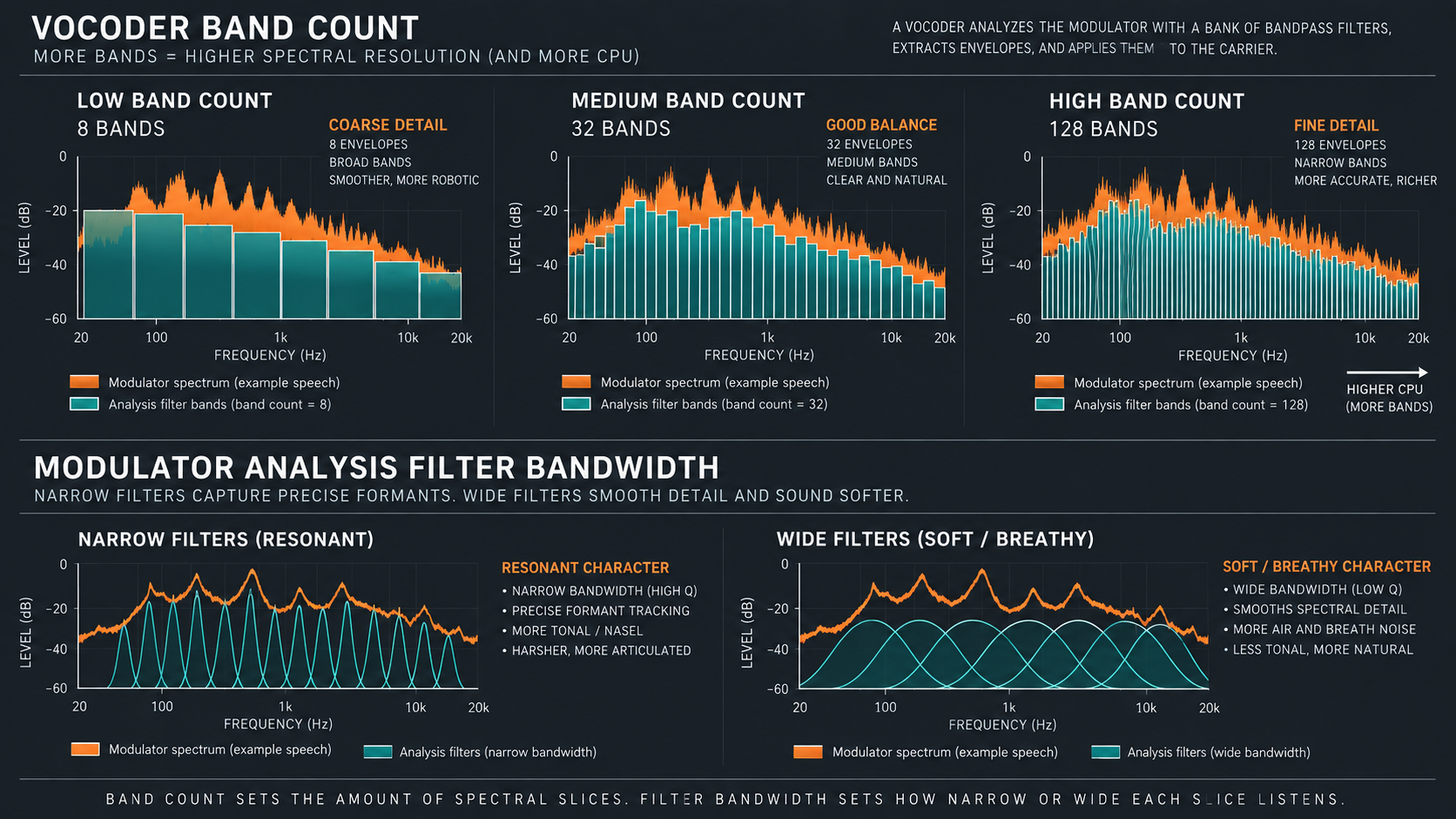
I start at 16 bands and raise the count only when syllables smear, because classic vocoder sounds sit at 8 to 16 bands and every extra band adds CPU load. Lower the count when the sound turns too literal or thin. Then set Modulator bandwidth: a lower setting gives a resonant character and a higher one a softer, breathy or raspy result.
Order changes the steepness around each detection band. Band Width changes the vocoder bands themselves, while Filter Flatness changes whether their peaks are pointed or flatter. Do not read the display as a score to maximize. Change one control, speak the same phrase, and listen for one named difference.
Tune articulation with the envelope follower
The envelope follower decides how quickly each band responds to the modulator. Fast movement keeps consonants and short syllables defined. Slower movement can make the result smoother, but too much hold or release turns one phoneme into the next.
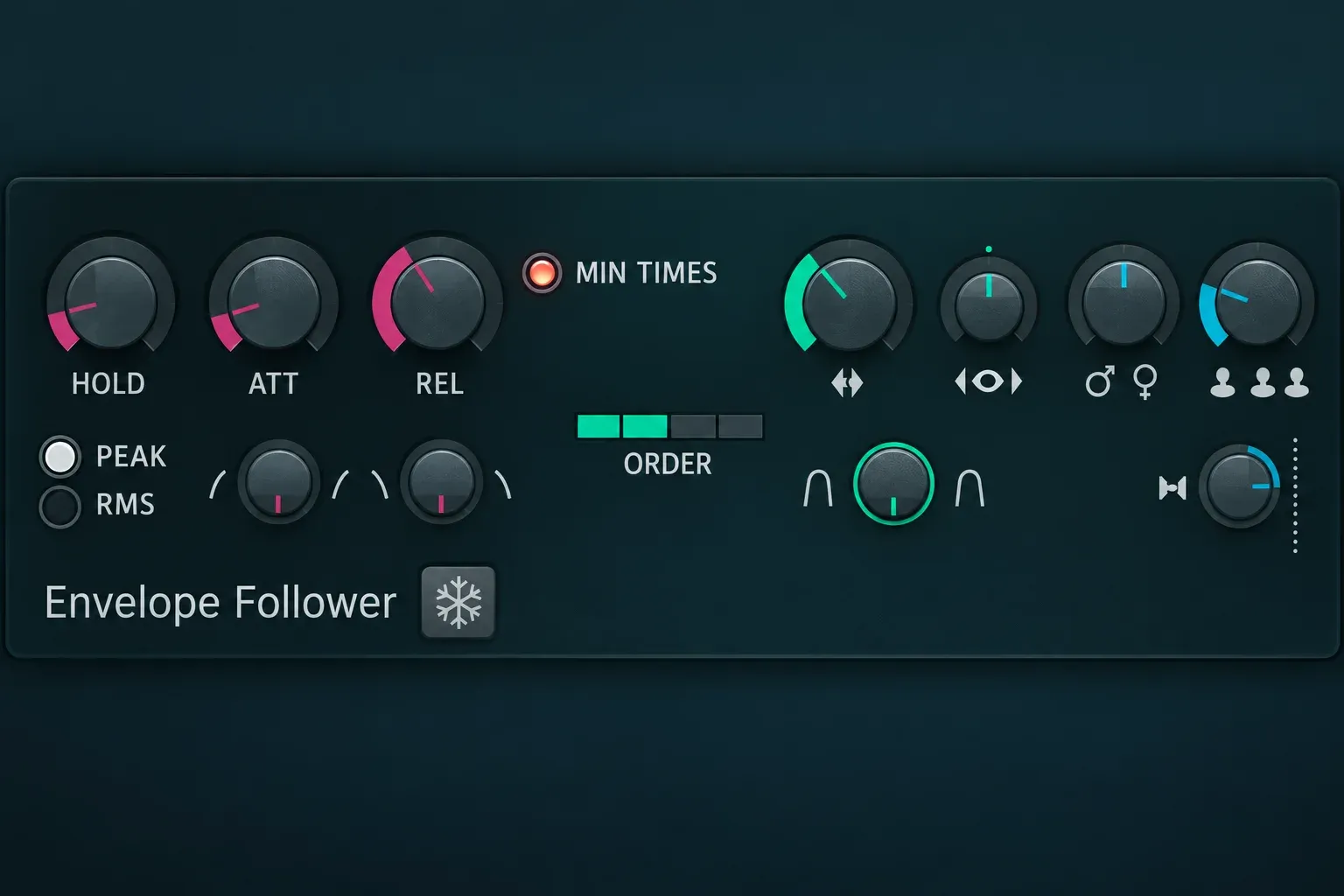
- Attack: a faster setting tracks the modulator volume envelope more closely, and a slower one softens the opening.
- Release: a longer setting keeps bands open and gives a laggy, reverberant character.
- Hold: holds detected levels in Peak mode and sets the averaging window in RMS mode. In Peak mode a longer hold raises CPU load.
- Peak and RMS: Peak gives a stepped volume envelope and RMS a smooth one, and RMS carries a lower CPU load.
- Min Times: keeps bands open for a minimum time to reduce audible glitching.
Begin with the default behavior and fix obvious problems in order. If the first consonant arrives late, shorten attack. If words blur together, shorten release or hold. If the result chatters, increase Min Times before redesigning the entire band map.
Restore s, t and other unvoiced consonants
I add NOISE before I raise the band count for s and t sounds, because those consonants are mostly high-frequency noise that a tonal carrier lacks. A synth chord holds plenty of harmonic body for vowels and little broadband energy for the hiss of an s. NOISE adds that missing material to the carrier.
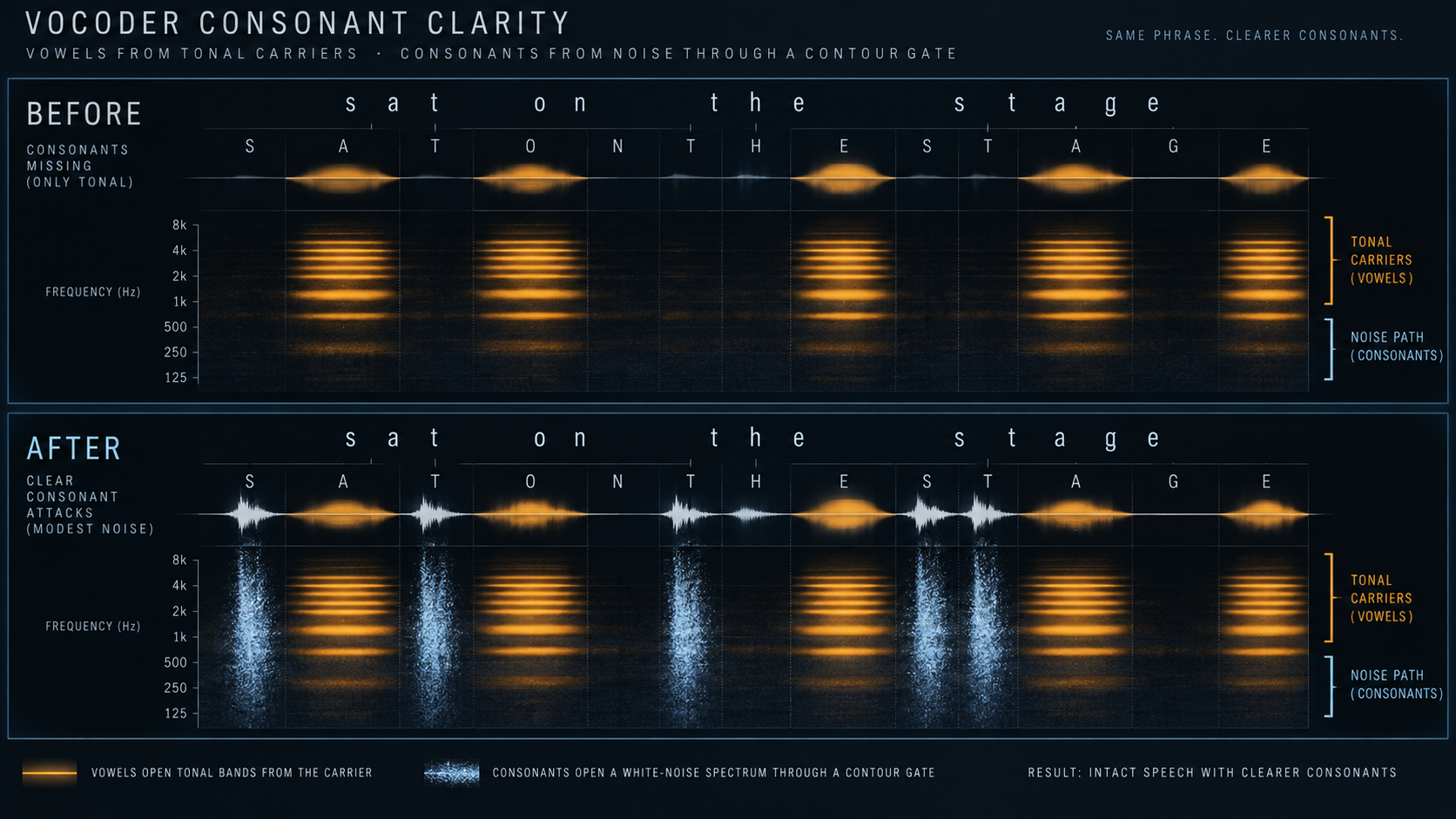
Raise NOISE until the ends and attacks of words return, then back it down. Constant hiss is not the goal. The Contour section can make noise respond to detected consonants: select FROM CONSONANTS and TO NOISE. Vocodex requires at least one FROM and one TO switch for Contour to do anything.
You can also pass some original modulator through the MOD control and use its high-pass filter so mostly high-frequency articulation reaches the output. CAR has its own low-pass-filtered pass-through path for retaining some carrier tone without letting its upper range mask the consonants. These are blend tools, not repairs for a wrong input source.
Prepare the voice without turning this into a vocal chain
I compress the voice before it reaches Vocodex, because the quieter syllables then come up far enough for the band detector. Image-Line's input guide recommends compression on speech for that reason. The Fruity Limiter compression guide covers the settings, and a moderate amount that evens out large level gaps is enough here.
Room noise and headphone bleed can open bands while the intended phrase is silent. Vocodex can analyze a representative quiet section for about two seconds and build a modulator noise-level map. Its subtractive denoising option then either subtracts that map or uses it as a threshold, depending on the setting.
For recording, cleanup, EQ, compression and ambience after the vocoder, use the FL Studio vocal-mixing workflow. Keeping that work separate helps you tell whether a word is unclear because of the source, the carrier or Vocodex itself.
Use unison after intelligibility works
Vocodex can create one to five modulation unison voices, with pitch shift and panning controls. The effect is a lot like chorus: the copies get detuned and spread out, and CPU use rises with the voice count.
I add unison only after the single voice is intelligible, because every extra voice adds CPU load and copies the blur. Start with two or three voices, set a small pitch shift and widen the panning while the phrase stays understandable. The unison shift control works only once the unison order shows a number.
The carrier can supply width too, so decide where the movement belongs. A wide carrier plus heavy Vocodex unison can make an impressive solo sound that falls apart inside a busy mix.
Balance WET, pass-through and output level
WET controls the vocoder output. MOD and CAR in the Mixer section are direct pass-through levels shaped by HP and LP filters, which is a different job from choosing input sources with the selectors.
Start with WET carrying the result and both pass-through levels low. Add high-passed MOD only when the vocoded path needs more articulation, and add low-passed CAR only when the tonal body needs support. Working in that order keeps each blend decision audible.
On percussion, Image-Line's tutorial lets some of the original drum sound through with the MOD pass-through slider, so raise MOD until the hits return.
SG applies Soundgoodizer-style maximization to the vocoder output and limits its unpredictable output levels. At 0% it is off, so keep it there while you build the sound and raise it only for that character. Match the level when you compare changes, because louder is not clearer.
A practical speech-to-synth workflow
- Choose a dry phrase. Use a spoken or sung line without doubles, long reverb or background noise. The FL Studio text-to-speech guide covers building a spoken phrase when no recording is at hand.
- Create MOD and VOCODEX tracks. Route the voice to MOD, load Vocodex on VOCODEX and send MOD to it with Sidechain to this track only.
- Route the carrier. Point the synth channel at the VOCODEX track and leave CAR on 0.
- Select the modulator. Pick the voice track for MOD from the selector's right-click list and confirm that Vocodex responds to both sources.
- Hold a bright carrier chord. One sustained saw-based voicing keeps pitch movement from hiding routing mistakes.
- Set 16 bands. Change the count only after the whole phrase produces output.
- Tune attack and release. Keep the openings sharp and stop one syllable from smearing into the next.
- Add NOISE for consonants. Use Contour with FROM CONSONANTS and TO NOISE when the noise should follow detected consonants.
- Steady the voice. Apply modest compression or the modulator noise detection rather than forcing every problem through band controls.
- Add unison and pass-through last. Compare the result at a matched level in the full mix and keep the simplest route that carries the phrase.
Make the carrier sing the vocal melody
The Vocodex tutorial describes a pitch-tracked method: the carrier plays the notes of the vocal itself, which gives a purer voice close to a Talk-Box. It needs a monophonic singing vocal as the modulator.
- Convert the vocal to a score. Open the vocal in Edison, right-click it and choose Tools > Convert to score and dump to piano roll. The notes land in the selected channel as a Piano roll score, and the Edison guide covers the editor itself.
- Load the carrier. Drag the Saw preset from Browser > Plugin presets > Sytrus > Vocoder carriers onto that score channel.
- Route both sources. Route the Sytrus channel to the Vocodex track. Route the vocal clip to its own Mixer track named Modulator and send that track to the Vocodex track with Sidechain to this track only.
- Nudge the score. I place the talk-box score a quarter step early, because the carrier is then already playing when the first syllable starts.
- Set the bands. Use 16 to 40 bands. For a variation, drop the carrier score one octave in the Piano roll, and the Piano roll guide covers moving notes.
Vocodex vs Pitcher, NewTone and normal vocal effects
Vocodex is not a pitch-correction tool. It stamps the modulator's spectral movement onto another sound. Pitcher corrects or redirects pitch during playback and builds harmonies from the original vocal, while NewTone edits detected notes and timing offline.
- Choose Vocodex when a synth or other carrier should speak with the voice's articulation.
- Choose Pitcher when the vocal should remain the sound while pitch is corrected, targeted or harmonized during playback.
- Choose NewTone when a recorded performance needs visible note-by-note pitch or timing edits.
- Choose normal EQ, compression, delay and reverb when the goal is a clear natural vocal rather than spectral resynthesis.
The FL Studio stock-plugin guide helps place these tools within the larger native set, but the choice here comes down to what you want to do with the signal: keep the voice, edit the voice, or make another sound follow it.
Vocodex or Fruity Vocoder
Fruity Vocoder comes with every FL Studio edition, and the Fruity Vocoder manual describes it as a vocoder with zero latency and 4 to 128 bands. Load it in a Mixer track effect slot, not Master. By default it reads the modulator from the left channel and the carrier from the right, so it processes a mono input with a stereo output, and the MIX section can swap the two. Route both Channels to its Mixer track, then pan the modulator hard left and the carrier hard right. I pick Vocodex over Fruity Vocoder when the edition has it, because a stereo carrier stays stereo in Vocodex while Fruity Vocoder reads its carrier from one channel.
Troubleshoot Vocodex by signal flow
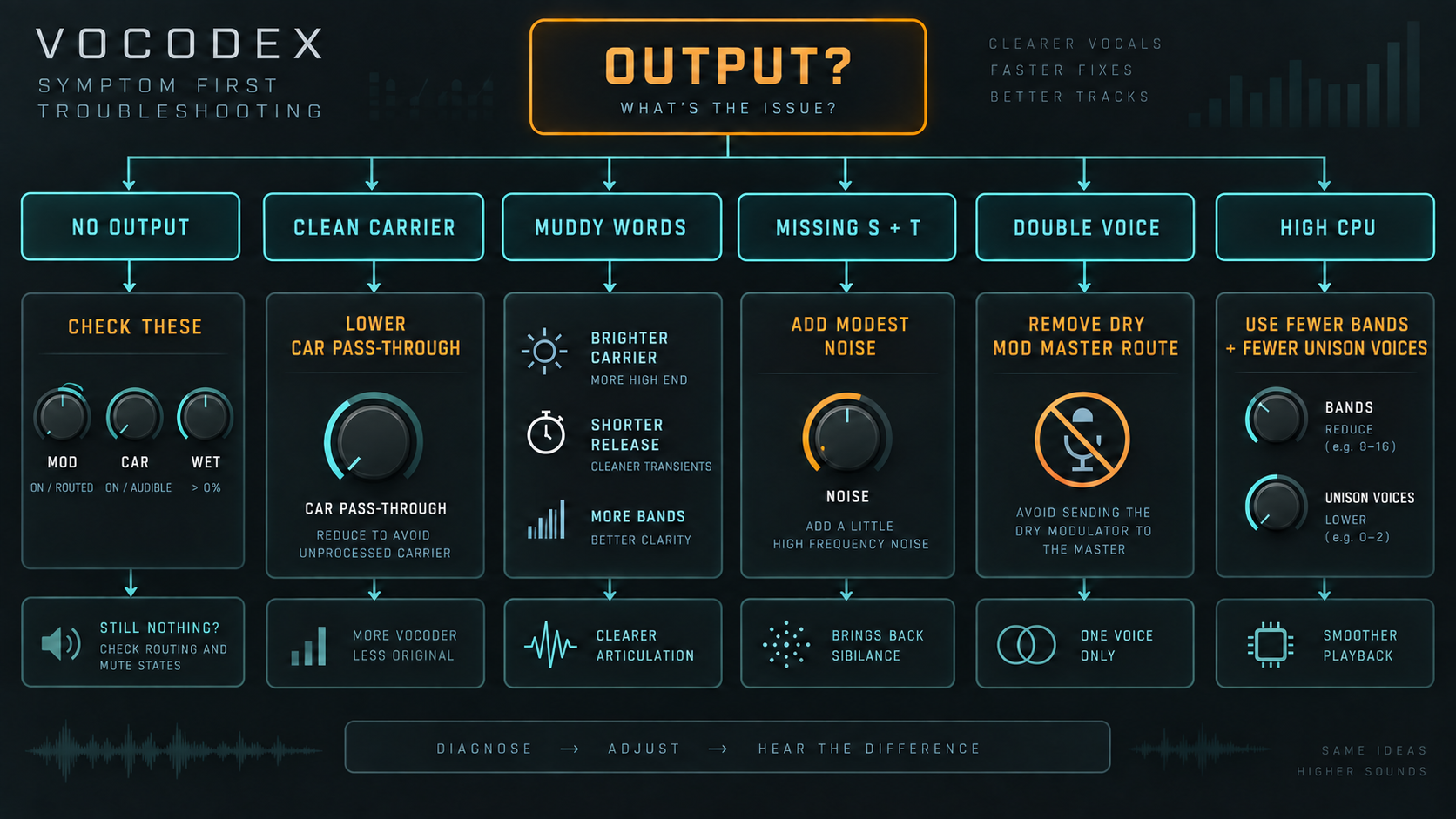
No output
Confirm that both sources are playing, the VOCODEX insert reaches Master, WET is raised and neither required selector is set to ---. Check whether CAR points to the synth and MOD points to the voice. A carrier alone or modulator alone is not enough.
You hear only the clean carrier
Lower CAR pass-through and confirm WET is up. Then check that the voice reaches Vocodex as the modulator. A clean carrier means it reaches the output past the vocoder through CAR pass-through or another Mixer path.
The words are muddy
Use a brighter carrier, even out the modulator level, shorten any long release or hold, and raise the band count. Change one cause at a time. A hundred bands cannot rescue a carrier with nothing in its upper range.
S and T disappear
Add NOISE, set Contour to FROM CONSONANTS and TO NOISE, or blend a small high-passed MOD path. Listen for constant hiss between words while you raise them.
The dry voice is doubled
The MOD track still reaches Master while a second path comes through Vocodex. Use Sidechain to this track only for the modulator, or switch off its direct send to Master by hand.
The result is thin or painfully bright
Adjust the carrier first, then Band Width, Filter Flatness and modulator bandwidth. Use CAR low-pass pass-through only when a controlled amount of low tonal body helps.
CPU use rises sharply
Reduce the band count and the unison voices, and switch the envelope follower from Peak to RMS, which keeps CPU load flat at long Hold settings. Draft lowers CPU load at some cost in audio quality, and it turns off during rendering when HQ for all plugins is on. THREADED spreads the work across several CPU cores.
Feedback or unstable monitoring appears
Trace every audible send. A live microphone should not reach the speakers through both the dry route and the vocoder chain. For live use, select the microphone as an INPUT on the Vocodex track itself, wear headphones and remove duplicate Master paths before raising the gain. The FL Studio vocal recording guide covers the microphone setup itself.
A compact Vocodex checklist
- Name the MOD and VOCODEX Mixer tracks for the two-track route.
- Keep the dry voice off Master, and bring it back only through MOD pass-through.
- Use an external Sytrus carrier when the Piano roll should play it.
- Leave CAR on 0 and pick the MOD sidechain by name inside Vocodex.
- Start with a bright carrier and 16 bands.
- Tune attack, hold and release for articulation before adding size.
- Use NOISE or high-passed MOD to recover s and t sounds.
- Add unison, pass-through and SG only after the phrase is readable.
- Reduce bands and voices when CPU cost outweighs the benefit.
- Compare the final result at a matched level in the arrangement.
Vocodex FAQ
What does Vocodex do in FL Studio?
Vocodex is a vocoder effect. It analyzes a voice, the modulator, in frequency bands and uses that movement to open the same bands of a synth, the carrier, so the synth seems to speak with the voice's articulation.
Which FL Studio editions include Vocodex?
Image-Line lists Vocodex in Producer Edition and up. Fruity Vocoder comes with all editions, so Fruity Edition owners use that plugin, which reads the modulator from the left channel and the carrier from the right.
What do 0 and --- mean on the MOD and CAR selectors?
0 reads the audio on the Mixer track that hosts Vocodex. A number picks one of the sidechained tracks, and --- blocks the external input from other Mixer tracks.
Why is the dry voice doubled?
The voice track still sends straight to Master while its sound also comes through Vocodex. Choose Sidechain to this track only on the send switch, which feeds the voice to Vocodex and switches off its send to Master.
How many bands should Vocodex use?
Image-Line puts classic vocoder effects at 8 to 16 bands, a harsher robotic sound at 16 to 32 and the pitch-tracked talk-box method at 16 to 40. The range runs from 5 to 100, and every extra band adds CPU load.
Can the Piano roll play the internal carrier?
No. The internal carrier responds to the on-screen keyboard and a controller keyboard, not to the Piano roll or the Step Sequencer. For project work, load a Sytrus channel with a Vocoder carriers preset and route it to the Vocodex track.