 FL Studio

Choose your DAW, then your FL Studio edition
Decide whether FL Studio fits the way you make music, then choose the edition that supports your projects. Compare the work you actually do, check the license and look at the final price before paying.
There are two different buying decisions
The first decision is the DAW: does FL Studio’s Channel Rack, Piano Roll and Playlist workflow fit how you turn an idea into a track, or do you prefer another program for writing, recording and arranging? The second question is which FL Studio edition includes the recording, audio-clip and native-plugin capabilities your projects need.
A larger bundle cannot make an awkward workflow feel natural, and a cheaper tier is not a bargain if a missing capability blocks your next project. Try the same short musical idea in each DAW on your shortlist. Read the trial restrictions first: saving a project and being allowed to reopen it are not always the same thing.
Compare the DAWs on your shortlist
Start with the pair you are actually considering. Look for the steps you repeat—editing notes, recording takes, arranging audio or preparing a live set—rather than choosing a winner from the longest feature list.
 FL Studio or Ableton Live
Ableton vs FL Studio: Which DAW Fits You in 2026?
Compare beat making, recording, arrangement, audio editing and live use, then try the same short idea in each DAW.
Compare FL Studio and Ableton
 FL Studio or Logic Pro
FL Studio vs Logic Pro: Beats, Recording and Real Cost
Compare MIDI editing, recording, included tools and project compatibility against the way you work.
Compare FL Studio and Logic Pro
 FL Studio or REAPER
FL Studio vs REAPER: Beats, Recording, Price and Linux
Weigh recording and editing workflows, plugin needs and license terms before switching or buying.
Compare FL Studio and REAPER
Choose the edition and check the purchase terms
Match the edition to the work first; a discount is useful only on a license you need. If you already own FL Studio, separate a free software update from a paid move to another edition.
 Choose the FL Studio tier
How Much Is FL Studio? 2026 Prices and Best Edition
Compare Fruity, Producer, Signature and All Plugins by the work they unlock, not by the length of the plugin list.
Compare FL Studio editions
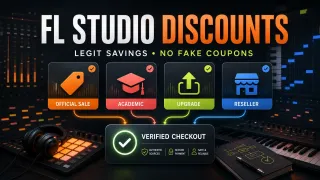 Check a deal before paying
FL Studio Discounts: Sales, Promo Codes & Student Prices
Check offer eligibility and license terms, and distinguish a real saving from an unsupported coupon claim.
Check FL Studio discounts
 Understand the current release
FL Studio 2026 vs 2025: What's New and How to Update
See what changed and which features depend on your edition before updating a working installation.
Read the FL Studio release guide
Build the same short sketch in each DAW
Use the same drum sounds, a short MIDI part, one recorded or imported audio clip, a basic arrangement and an export where the trial permits it. Note where you stop to search and which edits feel direct. This is a personal workflow comparison, not proof that one DAW is universally faster.
FL Studio’s standard trial can save and export, but cannot reopen saved projects until purchase. Export your sketch before closing it and keep notes about the steps you tried. After buying, full project recall also depends on having valid licenses for the plugins used. If FL Studio suits you, continue with the edition comparison instead of assuming the largest bundle is necessary.
Open the guide for the task in front of you
This list includes every live guide assigned to this route. Scheduled and draft pages stay out until readers can open them.
How Much Is FL Studio? 2026 Prices and Best Edition
FL Studio costs $99 to $449 at US list price, paid once, with lifetime free updates: Fruity $99, Producer $179, Signature $269, All Plugins $449. I’d buy Producer first, because Fruity leaves out audio recording. One license covers Windows and macOS.
Open the guide
Ableton vs FL Studio: Which DAW Fits You in 2026?
FL Studio for patterns and buy-once updates, Ableton Live for audio and performance: list prices and current offers, edition limits, stem-separation test results and a one-hour trial test.
Open the guide
 FL Studio System Requirements: PC, Mac and Laptop Specs
FL Studio needs 64-bit Windows 10/11 or macOS 10.15.7+, 4 GB of RAM and 4 GB of disk space. I recommend 16 GB for general production; buying advice varies by platform and workload. Compare CPU tiers, laptop specs and drive layouts before buying.
Open the guide
 FL Studio on Chromebook: Mobile, Desktop and Your Options
Choose the right Chromebook route before buying: local FL Studio Mobile, remote access to a separate host, or an experimental Wine setup. Includes project transfer and backup checks.
Open the guide
 FL Studio on Linux: Wine, Bottles, Yabridge and Fixes
FL Studio has no Linux build, but the Windows version runs in a Bottles environment with workarounds. Here are the WineHQ test results, the 26.1.4 verification error and its fix, audio and plugin setup, when yabridge helps, and how to back up a bottle.
Open the guide
 FL Studio Mobile vs Desktop: Price, APK, iPad and Plugins
FL Studio Mobile is a separate $14.99 app for iPhone, iPad, Mac, Android and Chromebook; Desktop is the Windows/macOS DAW and runs Mobile as a free plugin. Which to pick, why APK copies are a bad idea, iPad and PC options, plugins and moving projects.
Open the guide
FL Studio Discounts: Sales, Promo Codes & Student Prices
Image-Line's Black Friday Sale ends December 3: Producer Edition $139, Signature Bundle $199, All Plugins Edition $224. Sale prices back to 2020, where genuine promo codes come from, academic prices from $199, and the upgrade, reseller and Focusrite routes.
Open the guide
FL Studio vs Logic Pro: Beats, Recording and Real Cost
Pick FL Studio for pattern-first beats, Windows or an Intel Mac; pick Logic Pro for recorded takes and comping on an Apple silicon Mac. Producer lists at $179, Logic at $199.99 or $12.99 a month, Logic leads two listening comparisons; MVSEP results vary by version and submission.
Open the guide
FL Studio vs REAPER: Beats, Recording, Price and Linux
Pick FL Studio for pattern-first beats and a bigger sound library, REAPER for recorded takes, routing and Linux. Here are the license prices, evaluation rules, plugin formats and the clean way to use both.
Open the guide
FL Studio 2026 vs 2025: What's New and How to Update
Back up projects and move personal files out of the Mac app bundle, then run the latest installer without uninstalling. Stable 2026.1.7b, changes since 2025, parallel installs and the separate 2026.2 beta explained.
Open the guide
 FL Studio vs Pro Tools: Beats, Vocals, Tiers and Price
Pick FL Studio for pattern-first beats and MIDI, Pro Tools for vocal takes, comping, editing, video and studio session exchange. Here are FL list prices, Pro Tools tier limits and licenses, plugin formats and the clean way to move a beat into Pro Tools.
Open the guide
 Best DAW for Mac: Top Picks and Free DAWs for Mac
Logic Pro is the best all-round DAW for a current Apple silicon Mac; FL Studio, Ableton Live, REAPER, Pro Tools and Cubase each win a different workflow. For a free start, GarageBand fits macOS 15.6 or later, and Waveform Free covers older Macs from macOS 13 with VST3 plugins.
Open the guide
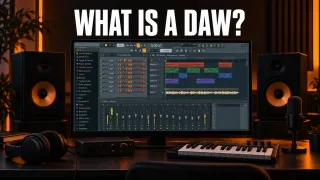 What Is a DAW? Digital Audio Workstations Explained
DAW stands for digital audio workstation: the software you record, arrange and mix music in. Here are its parts shown in FL Studio, what you need to run one and what it costs.
Open the guide
 Free FL Studio Alternatives: Which Free DAW Should You Use?
FL Studio's trial never expires but won't reopen saved projects. Here is what free FL Studio can do, and which free DAW fits pattern beats, vocals, a Mac or a browser, with each app's documented limits.
Open the guide
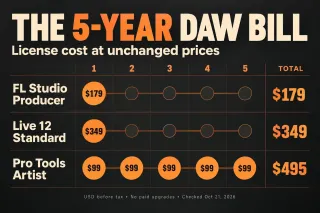 DAW Cost Comparison: 3–5-Year Prices and Calculator
Compare FL Studio, Ableton Live, Cubase, Fender Studio Pro, Logic Pro, REAPER and Pro Tools over 1–5 years. Adjust purchase prices, subscriptions and optional upgrades in the calculator.
Open the guide
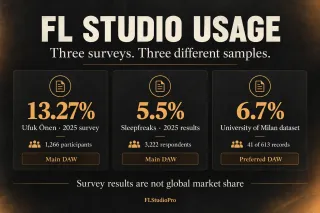 FL Studio Statistics: Usage Surveys and Market Share
FL Studio took 13.27% in Önen’s 2025 main-DAW poll and 5.5% in Sleepfreaks’ 2025 results. These audience surveys do not establish global market share.
Open the guide
 FL Studio on Mac: How Well It Runs and What’s Different
FL Studio runs natively on Intel and Apple Silicon Macs, and one license covers Windows and macOS. Here’s how it performs, what changes from Windows and how to set it up.
Open the guide
 Is FL Studio Free? What the Trial Really Lets You Do
The free FL Studio trial never expires and exports at full quality. It cannot reopen its own saved projects, and Make unique is disabled; Web and Mobile work differently.
Open the guide
 FL Studio License: Computers, Refunds and Unlocking
One FL Studio license covers every computer you own, for you alone. How to move it, unlock it online or offline, when a refund is still possible, and what the ID and email checks ask for.
Open the guide
 FL Studio vs Audacity: Choose the Right Tool for Your Task
Audacity for audio edits; FL Studio for instruments and song production. Make the choice by task, check the recording edition, and move audio through WAV.
Open the guide
Before paying for FL Studio
- Confirm that the operating system and hardware you will actually use can run the current installer.
- Name whether you need audio recording and unrestricted audio-clip work, not just MIDI and patterns.
- Separate Lifetime Free Updates for the owned edition from paid edition upgrades, optional plugins and FL Cloud.
- Compare the included native tools with the work you do instead of valuing a bundle by plugin count alone.
- Export a trial sketch before closing it; check project-reopening restrictions and the licenses needed for its plugins.
Use Image-Line’s current official edition comparison for the final feature matrix and purchase terms. After choosing, move to Start Here for installation, audio setup and the first complete project.
FL Studio buying questions
Should I choose FL Studio or Ableton from a feature table?
No. A feature table can reveal missing capabilities, but the deciding evidence is how each workflow handles the same small project. Test beat making, MIDI, audio, arrangement and export in the work you expect to repeat.
Which FL Studio edition is the safest starting point?
The safest edition is the lowest tier that supports the work you know you need. Check audio recording, audio clips and required native plugins against the current official matrix rather than assuming every beginner needs the same bundle.
Do Lifetime Free Updates include every FL Studio product?
No. They cover future FL Studio updates for the edition you own. Moving to a higher edition, buying optional plugins and using paid FL Cloud services are separate decisions that can cost money.
Can I reopen a project saved in the FL Studio trial?
Not in the standard trial. You can save and export, but reopening saved projects requires buying FL Studio. Full recall also depends on licenses for the native and third-party plugins used in the project.